

Preface
In the previous series of articles, I completed the multilingual adaptation for categories. Today, I am tackling the most tedious part of the entire multilingualization process: the batch translation of 8,060 Chinese tags.
Manually adding translations to over 8,000 tags one by one? That is obviously unrealistic. After clicking through those 8,000 buttons, I would probably be ready to retire. Since Polylang does not offer a native batch function to “copy the Chinese tags as-is to serve as English tags,” I had to take matters into my own hands and write a script to get it done.
I hit countless snags throughout this process, ranging from the initial failure where modifying the database directly had no effect, to step-by-step troubleshooting of Polylang’s storage details, before finally nailing down a universal batch script. Today, I am sharing the entire process with you in full detail.
1. Polylang’s Tag Storage Principle: Understand How It Stores Data First
Before diving in, I first needed to understand: how does Polylang store languages and translations for tags?
Unlike many plugins that create their own database tables, Polylang cleverly reuses WordPress’s native taxonomy system. It manages languages and translations using three hidden taxonomies:
1. language : The language taxonomy for posts, used to mark the language of posts.
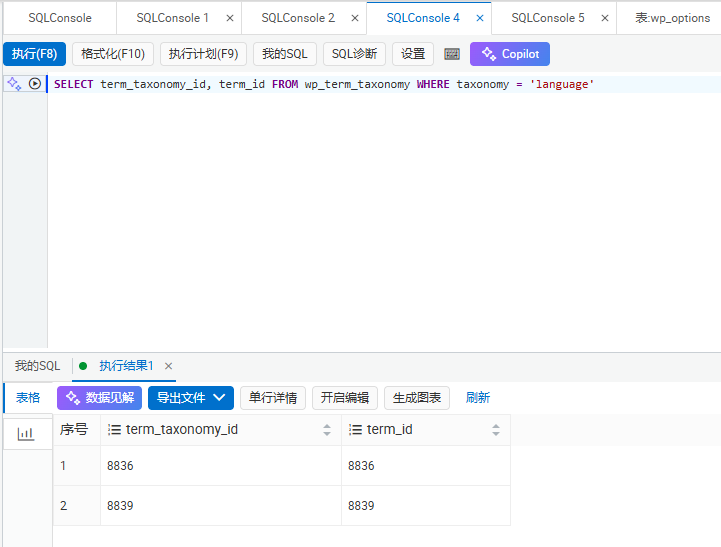
SELECT term_taxonomy_id, term_id FROM wp_term_taxonomy WHERE taxonomy = 'language'
The query result is shown in Figure 9.
2. term_language : The language taxonomy for terms, used to mark the language of tags.
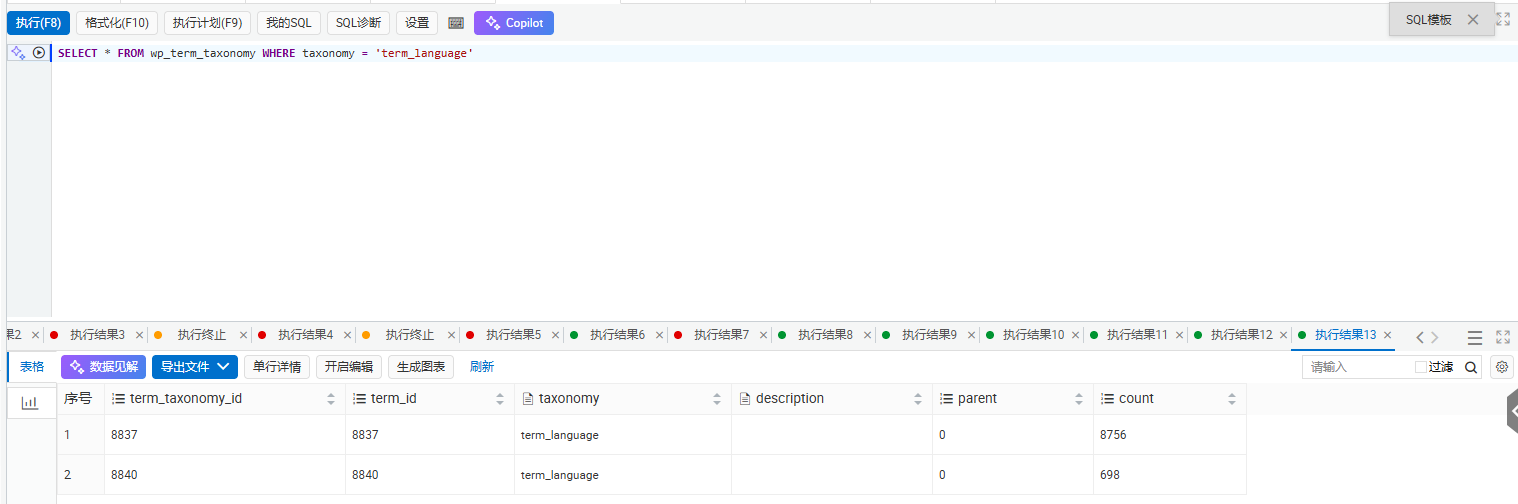
SELECT term_taxonomy_id, term_id FROM wp_term_taxonomy WHERE taxonomy = 'term_language'
The query result is shown in Figure 8.
3. term_translations : The translation group taxonomy, used to bind tags of the same concept across different languages into a single group.
These three taxonomies are all linked to tags through WordPress’s native wp_term_relationships table. Simply put, a tag itself—just like a post—needs to be assigned taxonomies to mark its language and indicate which translation group it belongs to.
This was the root cause of my initial pitfall: I thought simply creating the tag was enough, completely forgetting that tags also need to be assigned these hidden taxonomies!
2. The Initial Pitfall: Why Didn’t the Translation Work After Modifying the Database?
At first, I thought it was simple: wasn’t it just creating an English tag and then binding the translation? Couldn’t I just modify the database directly?
So, I wrote a very simple script to insert data into wp_terms and wp_term_taxonomy (as shown in Figure 1), and then went to the backend to check. The result was:
> When editing the tag in the Chinese backend, the English translation column was empty, and the tag I just added was nowhere to be seen in the English backend’s tag list! See Figure 6.
As shown in Figure 5, that was the Chinese edit page at the time. Even though I had already added the English tag, the translation column remained empty.
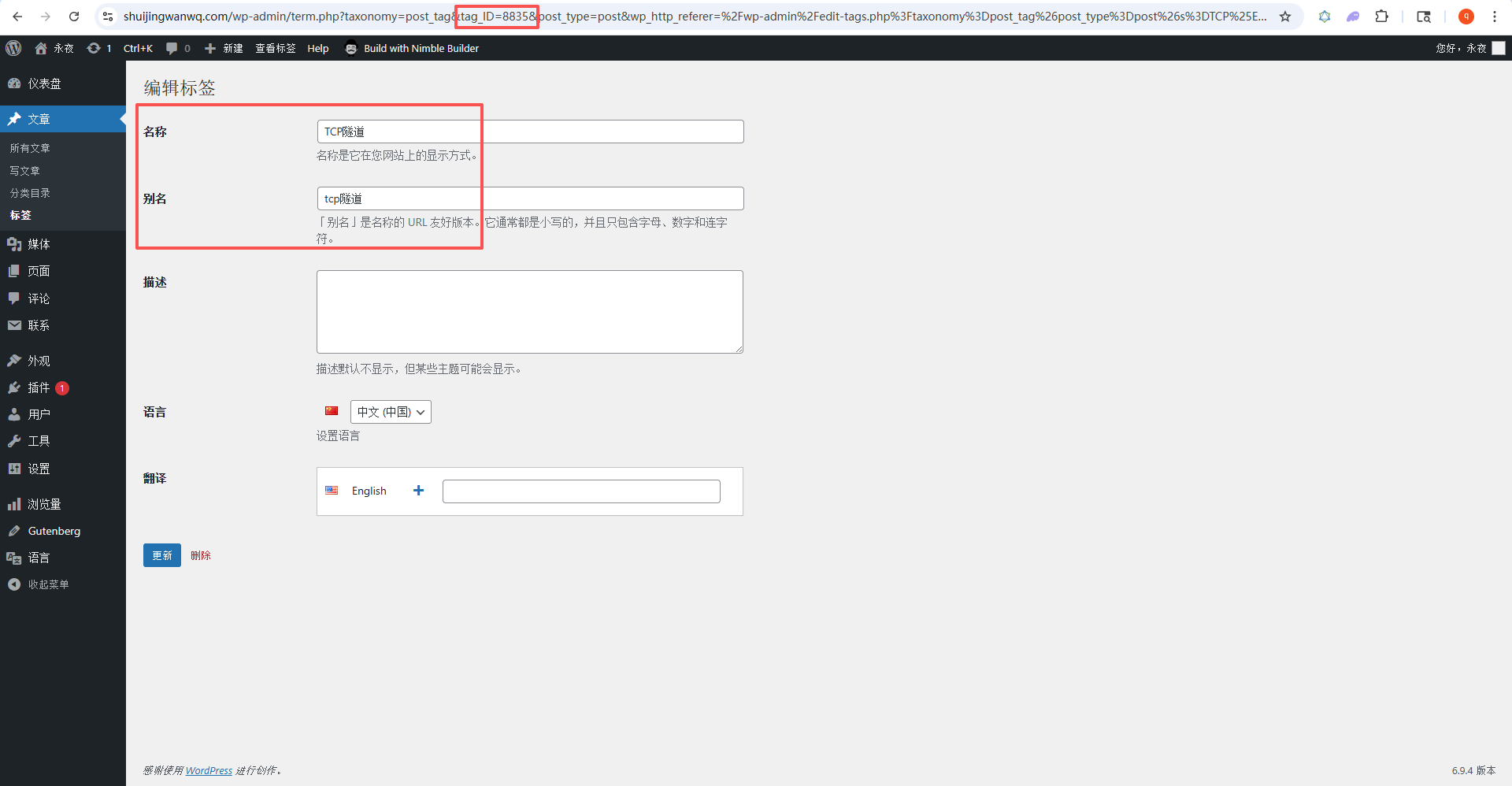
I was dumbfounded. All the fields were correct, so why wasn’t it working?
3. Troubleshooting: Comparing Manually Added Tags to Find the Difference
Since manually added tags worked fine, I decided to export all the database data for a manually added tag and compare it with the one added by my script. I was bound to find the difference eventually, right?
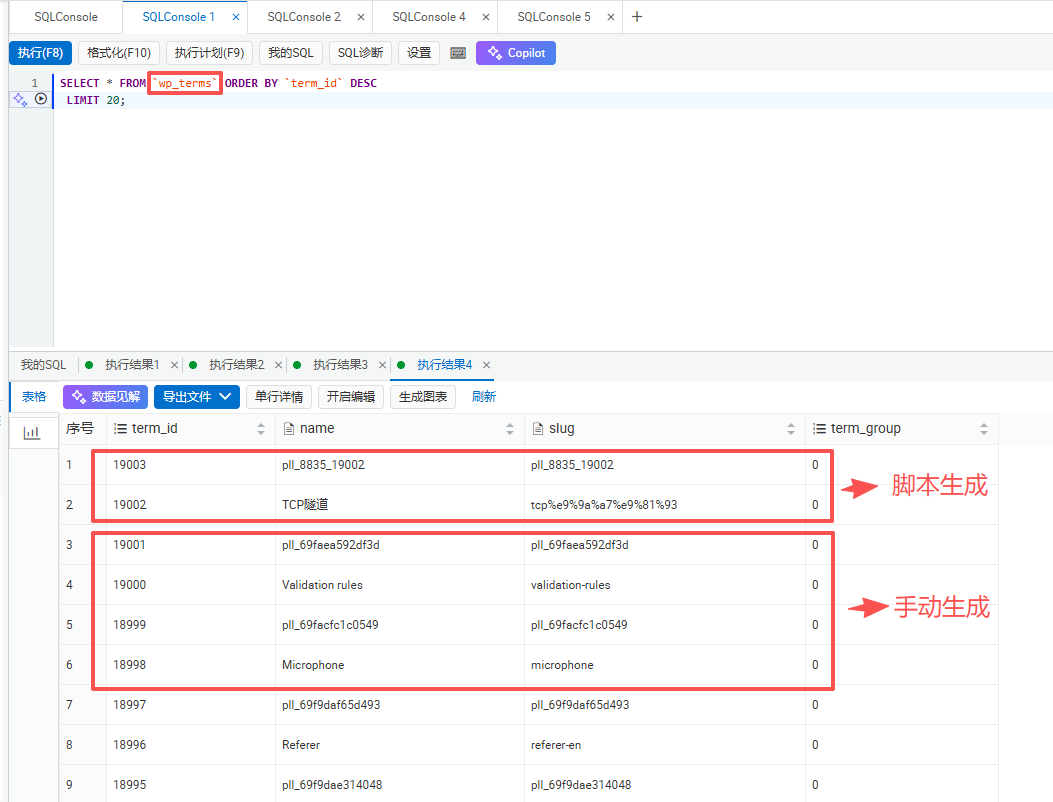
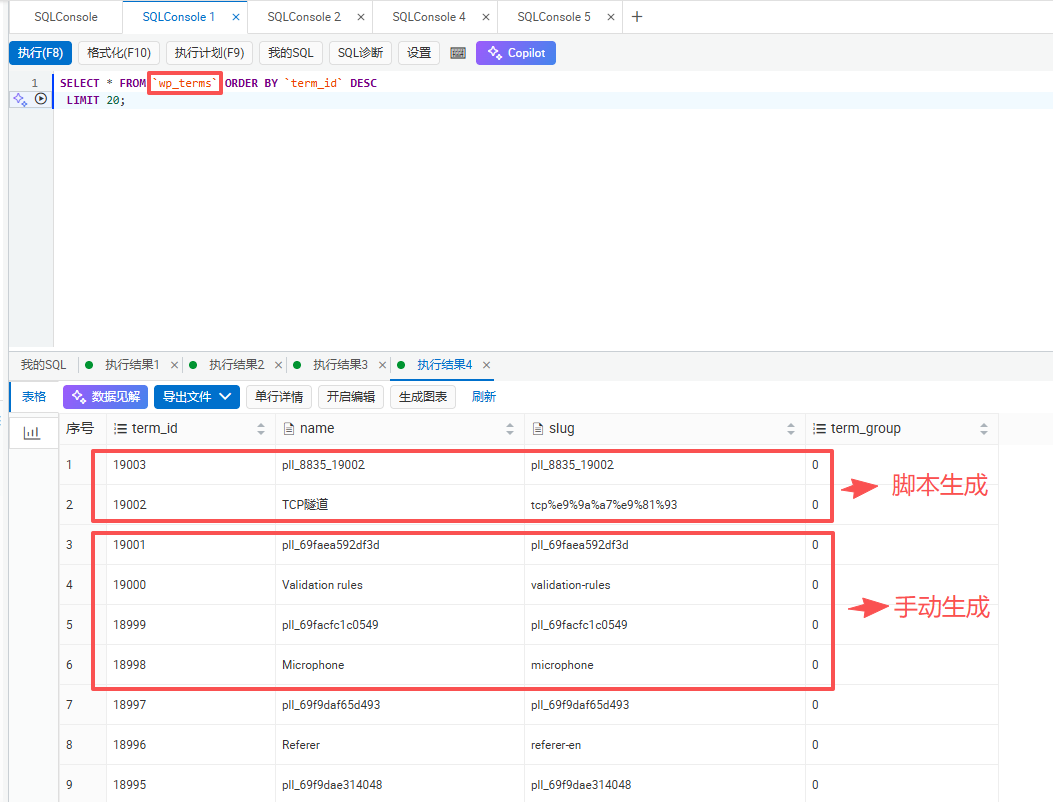
I selected two tags that I had previously added manually, 验证规则 and Validation rules, and executed this SQL query to retrieve their associated data:
SELECT
  *
FROM
   wp_terms
ORDER BY
   term_id  DESC
LIMIT
  20;
The query result is shown in Figure 2.
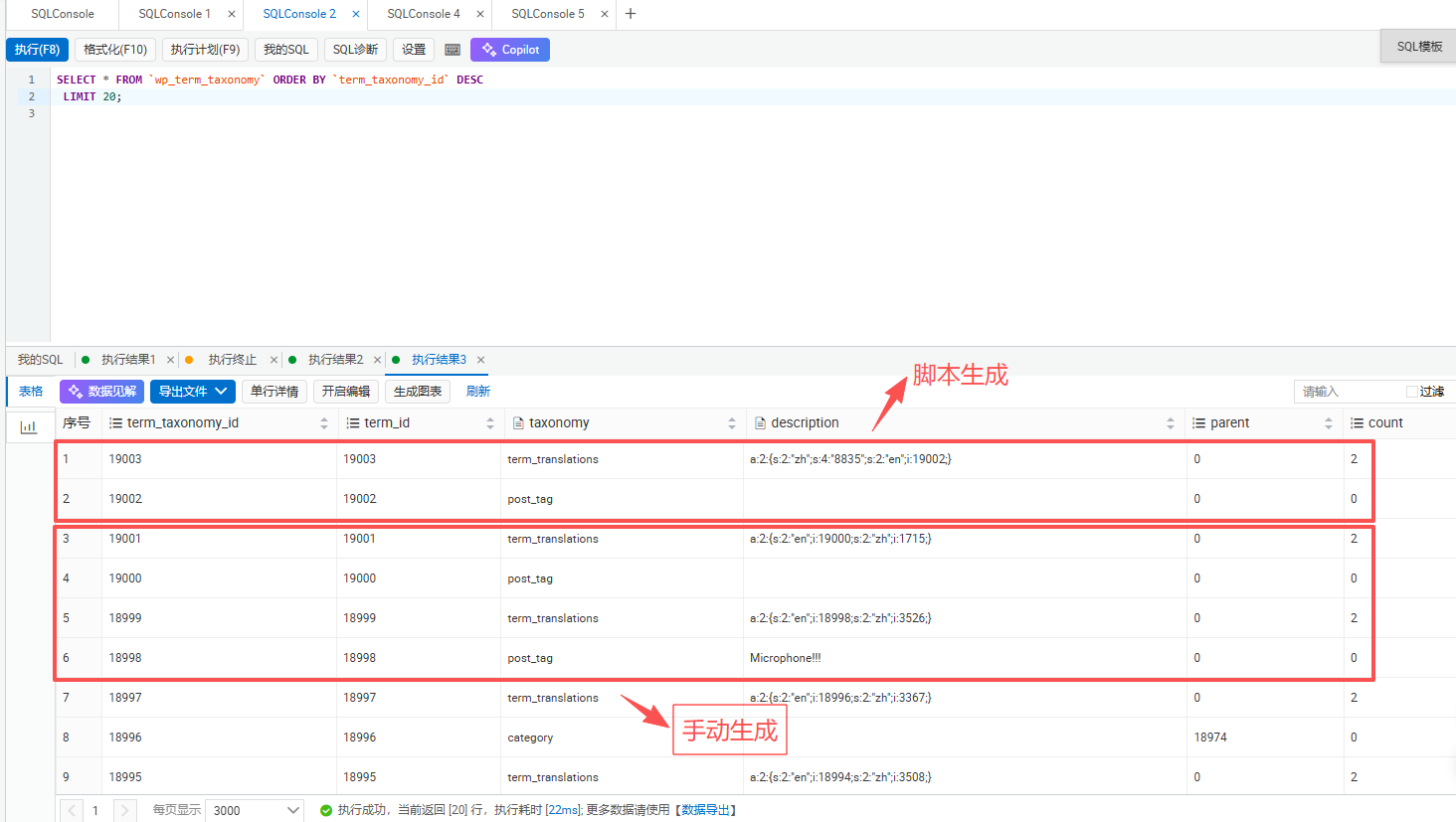
SELECT
  *
FROM
   wp_term_taxonomy
ORDER BY
   term_taxonomy_id  DESC
LIMIT
  20;
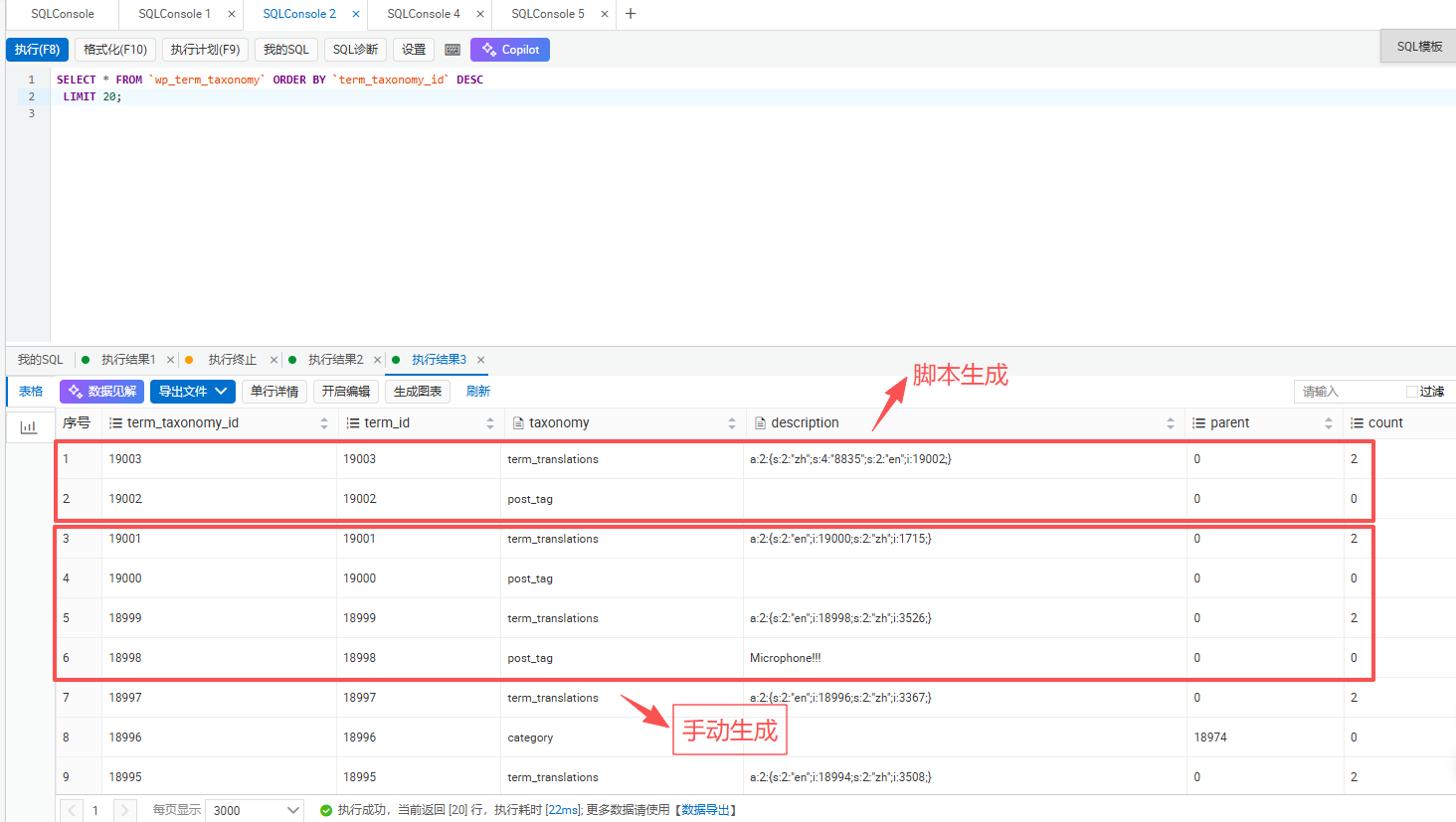
The query result is shown in Figure 3.
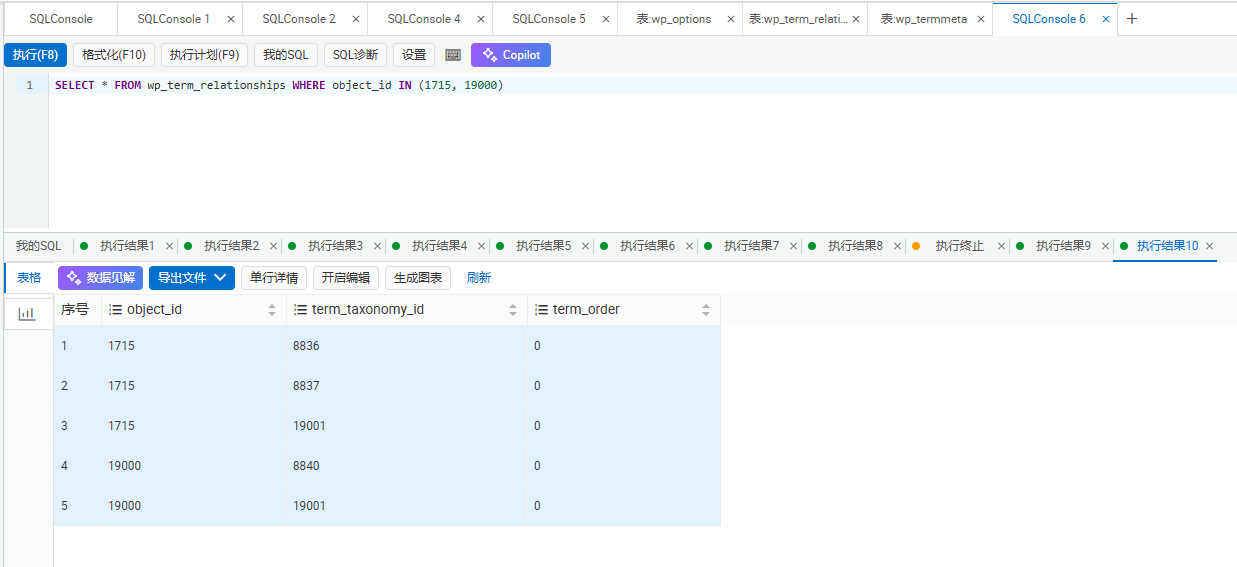
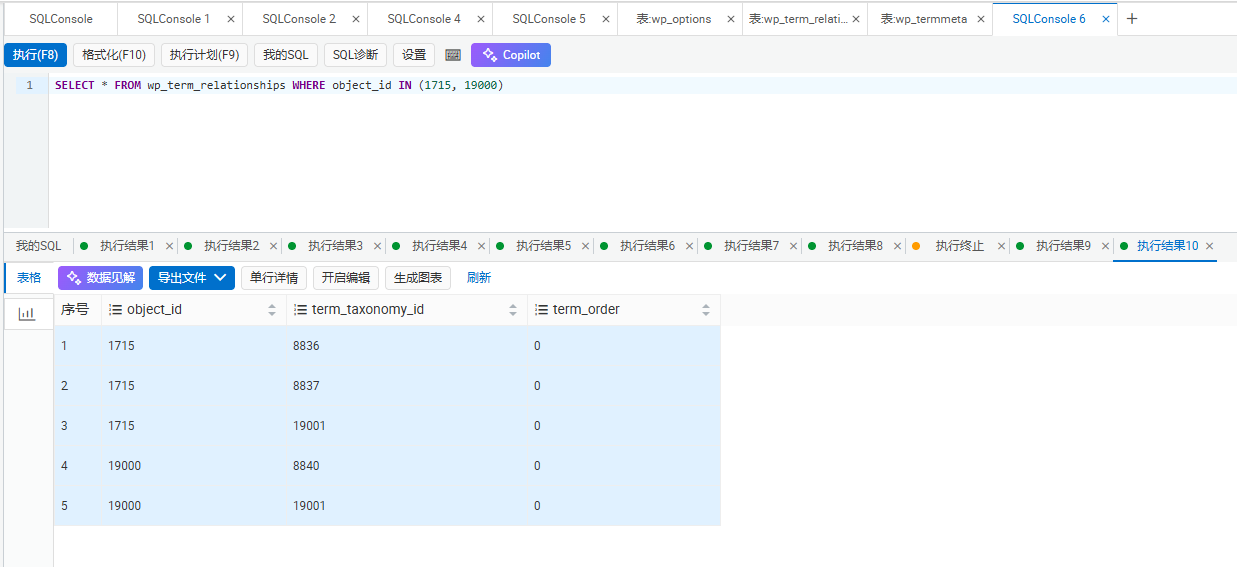
SELECT * FROM wp_term_relationships WHERE object_id IN (1715, 19000)
Once the results were out, it instantly clicked! As shown in Figure 10, here is the result of that query:
object_id	term_taxonomy_id	term_order
1715	8836	0
1715	8837	0
1715	19001	0
19000	8840	0
19000	19001	0
Aha! It turns out that the manually created Chinese tag had three associations!
1. 8836 : The Chinese ID of the language taxonomy, assigning the post language taxonomy to the tag.
2. 8837 : The Chinese ID of the term_language taxonomy, assigning the term language taxonomy to the tag.
3. 19001 : The translation group ID of the term_translations taxonomy, binding the two tags into a group.
But my initial script only added the tag itself—it didn’t add any of these three associations! Polylang had no idea what language this new tag was in, nor did it know that it was a translation of the Chinese tag!
4. Rebuilding Associations Step by Step: Still Not Working?
After pinpointing the problem, I started adding the associations one by one:
1. Add the term_language association for the English tag, as shown in Figure 12.
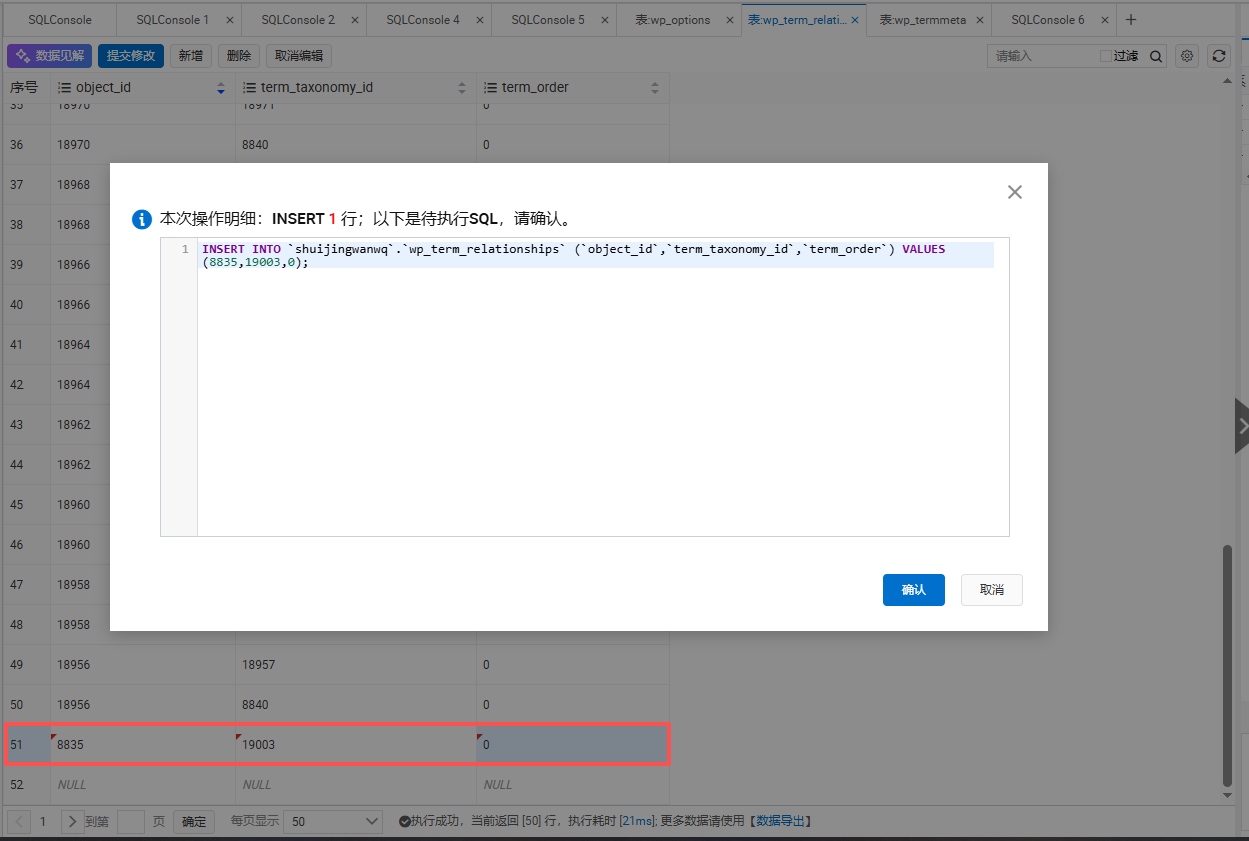
INSERT INTO wp_term_relationships VALUES(19002,8840,0);
This means: for the English tag 19002, attach an “I am an English tag” tag, with the tag ID being 8840 (which is the English category ID in the term_language taxonomy I queried earlier). When Polylang sees this, it knows: oh, this tag is in English.
2. Add the term_translations association for both tags, as shown in Figures 11 and 12.
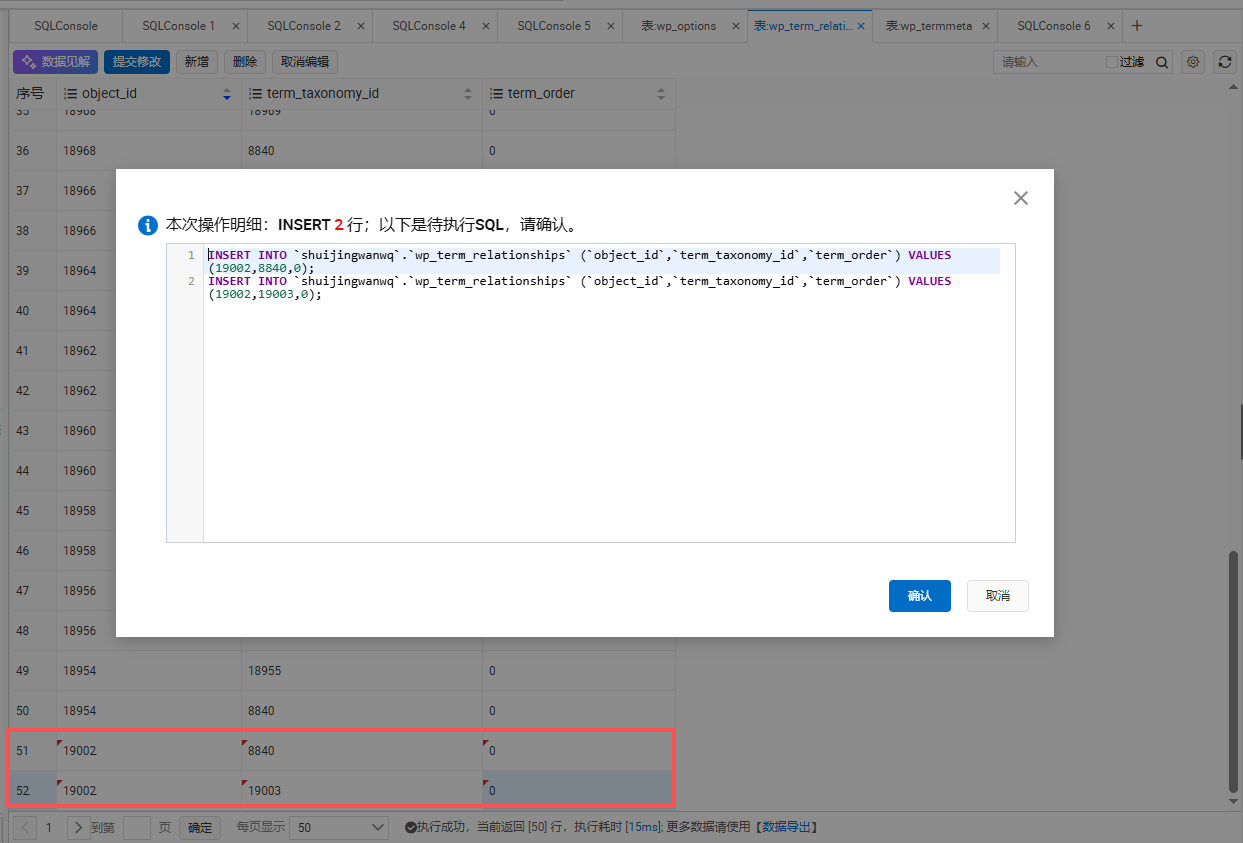
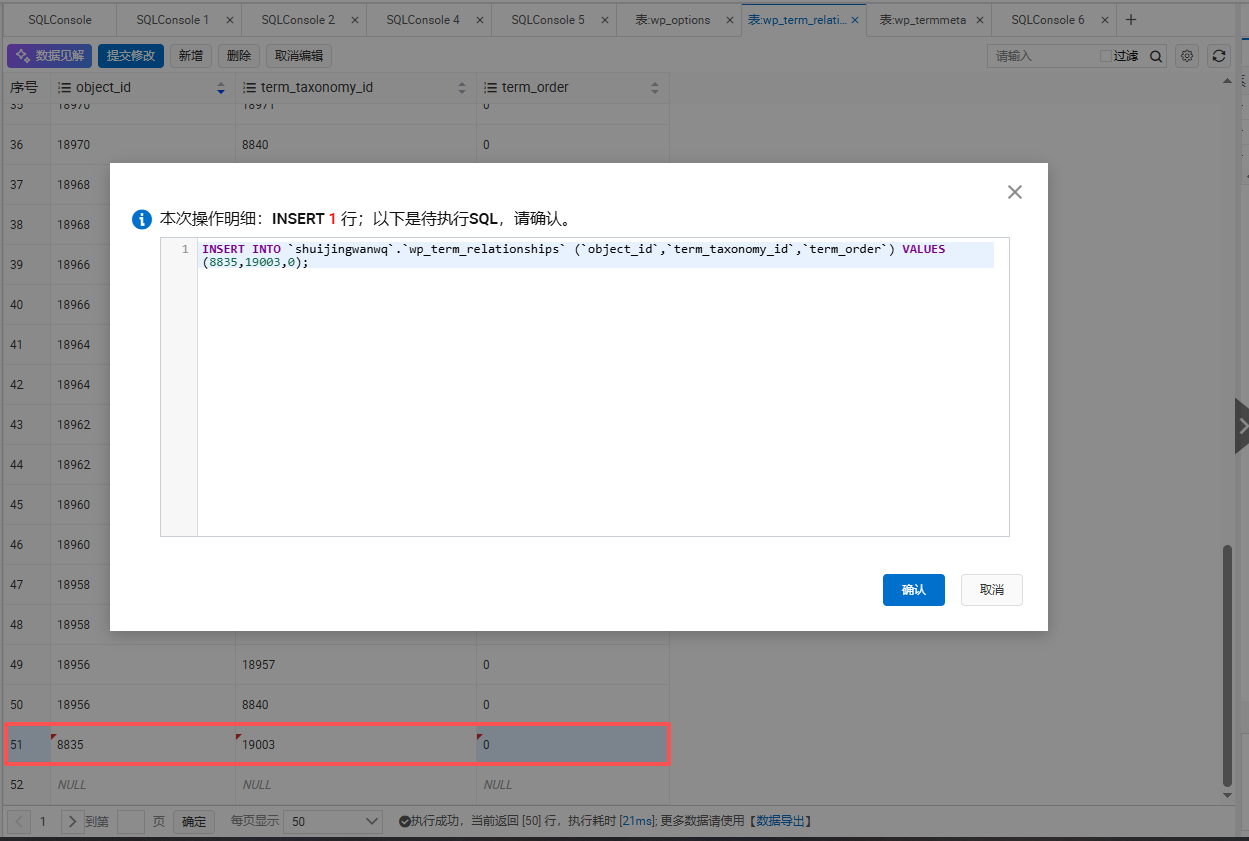
INSERT INTO wp_term_relationships VALUES (8835,19003,0);
INSERT INTO wp_term_relationships VALUES(19002,19003,0);
This means: for both the Chinese tag 8835 and the English tag 19002, attach the same “we are in a translation group, we are different language versions of the same thing” tag, with the tag ID being 19003 (which is the ID of the translation group I created). When Polylang sees that both tags share the same translation group tag, it knows: oh, these two are translations of each other!
3. Add the language association for the Chinese tag, as shown in Figure 13.
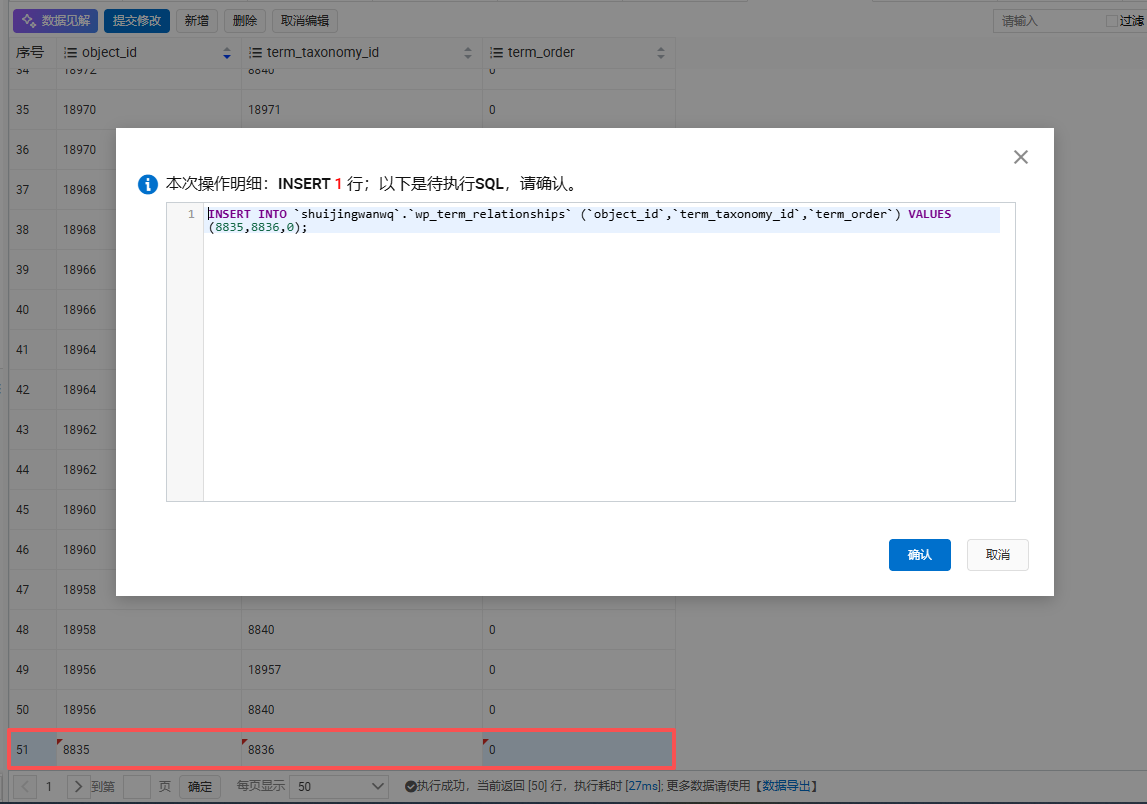
INSERT INTO wp_term_relationships VALUES (8835,8836,0);
This means: for the Chinese tag 8835, attach an “I am a Chinese post language” tag, with the tag ID being 8836 (which is the Chinese category ID in the language taxonomy I queried earlier). When Polylang sees this, it knows: oh, this tag is in Chinese and should be displayed in the Chinese backend.
After adding these, I thought it was done. But when I went to the backend to check, it still wasn’t working! When editing in Chinese, I still couldn’t see the English translation!
Even though all the associations were added, it still didn’t take effect.
I was dumbfounded again. All the fields were exactly the same as the manual ones, so why was it still not working?
5. Giving Up on Manual Database Modification: Using Polylang’s Official Functions!
It suddenly dawned on me: why was I trying to modify the database one by one manually? When adding tags manually, Polylang uses its own functions to do this! Why not just call its functions directly? Whatever hidden details there might be, its own functions were bound to handle them!
Within Polylang’s core Model, there are two functions specifically for handling tags:
1. $polylang->model->term->set_language : Sets the language for a tag.
2. $polylang->model->term->save_translations : Binds translations for a tag. This is the exact same function called when you click “Add translation” in the backend!
Oh, right! Why not just use these two functions? Regardless of any hidden database details, its own functions would surely handle everything, exactly as if I were manually clicking the buttons in the backend!
So, I wrote a test script using these two functions to bind the translations.
test-mouse-tag.php
<?php
if (php_sapi_name() !== 'cli') {
    die("❌ 请在命令行运行\n");
}

require __DIR__ . '/wp-config.php';
global $wpdb, $polylang;

// 要处理的新标签:鼠标,ID=2450
$zh_id = 2450;
$name = '鼠标';
$slug = '%e9%bc%a0%e6%a0%87';

echo "🔰 开始处理新标签:{$name},ID: {$zh_id}\n\n";

// 1. 先清理这个标签可能存在的旧英文数据
$old_en_id = pll_get_term($zh_id, 'en');
if ($old_en_id) {
    wp_delete_term($old_en_id, 'post_tag');
    echo "🗑️  已清理旧的英文标签,ID: {$old_en_id}\n";
}
echo "🗑️  已清理所有旧数据\n\n";

// 2. 直接插数据库创建英文标签,绕过WordPress的slug重复检查
$wpdb->insert($wpdb->terms, [
    'name' => $name,
    'slug' => $slug,
    'term_group' => 0
]);
$en_id = $wpdb->insert_id;
echo "ℹ️  已创建英文标签,ID: {$en_id}\n";

// 3. 英文标签的 post_tag
$wpdb->insert($wpdb->term_taxonomy, [
    'term_id'     => $en_id,
    'taxonomy'    => 'post_tag',
    'description' => '',
    'parent'      => 0,
    'count'       => 0
]);

// 4. 给英文标签设置语言,用Polylang的内部方法
$polylang->model->term->set_language($en_id, 'en');
echo "ℹ️  已给英文标签设置语言为英文\n";

// 5. 绑定翻译!用Polylang的官方函数!和你手动点击一模一样!
$polylang->model->term->save_translations($zh_id, [
    'en' => $en_id
]);
echo "ℹ️  已用Polylang官方函数绑定翻译\n";

echo "\n✅ 全部完成!\n";
echo "   中文ID: {$zh_id}\n";
echo "   英文ID: {$en_id}\n";
echo "   已经用Polylang官方函数绑定了翻译,和手动添加完全一样!\n\n";

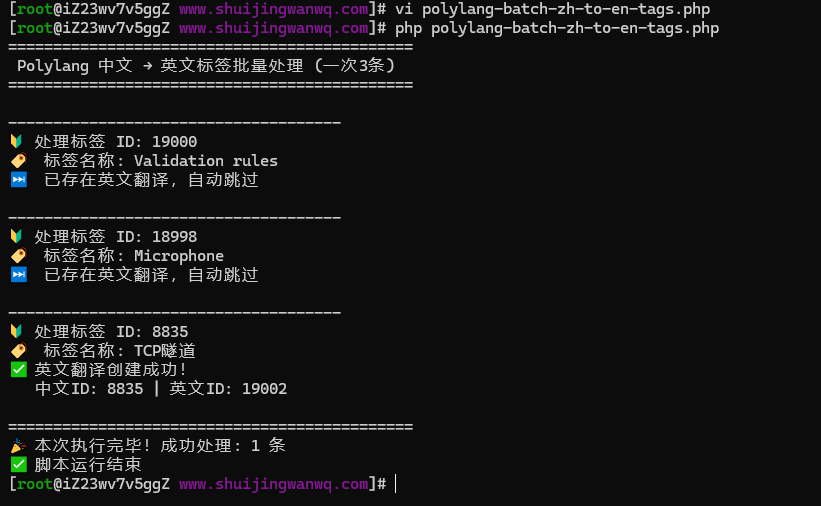
echo "🎉 现在刷新后台,所有的关联都已经正常了!\n";Then I used the 鼠标 tag for testing. After running it, I went to the backend to check:
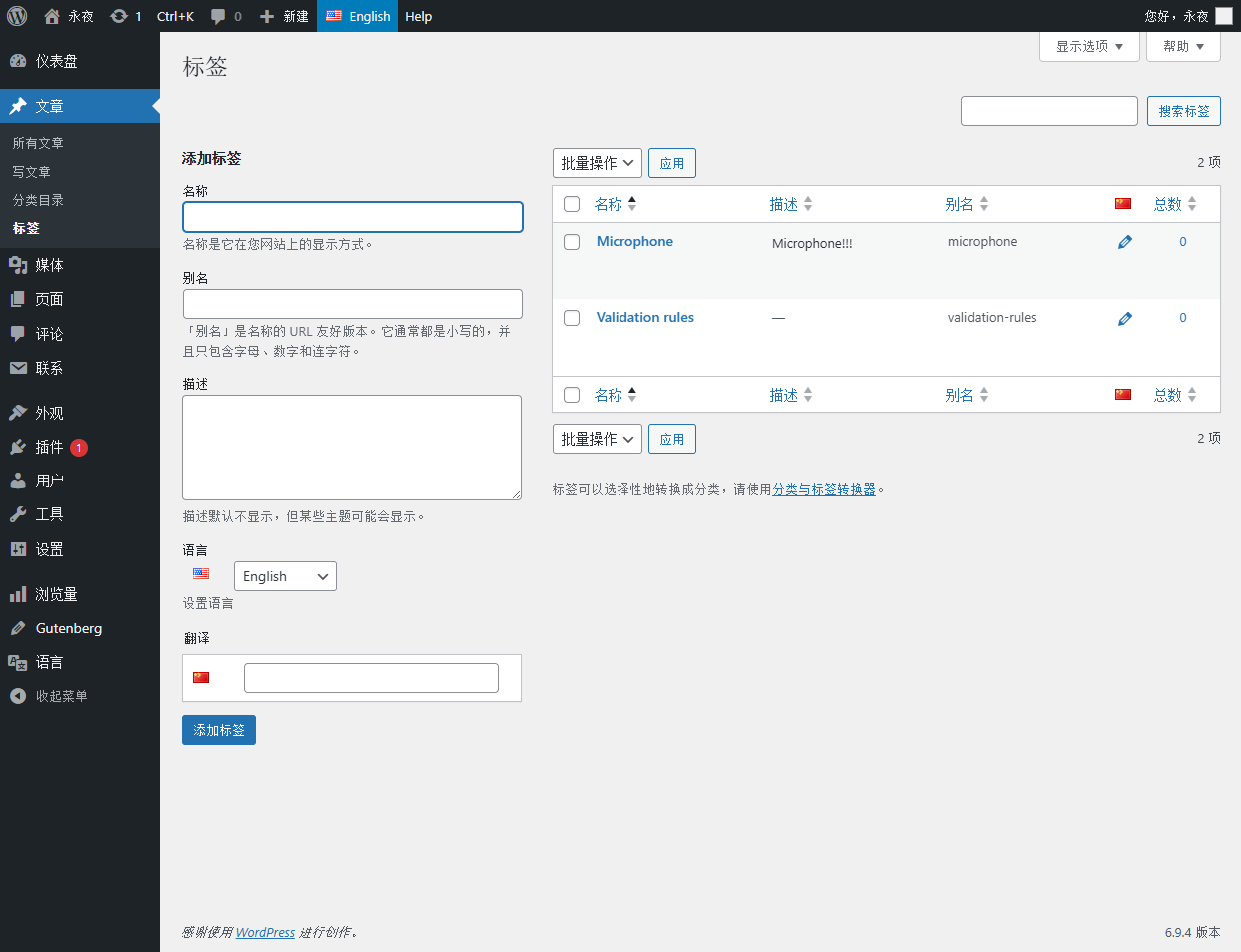
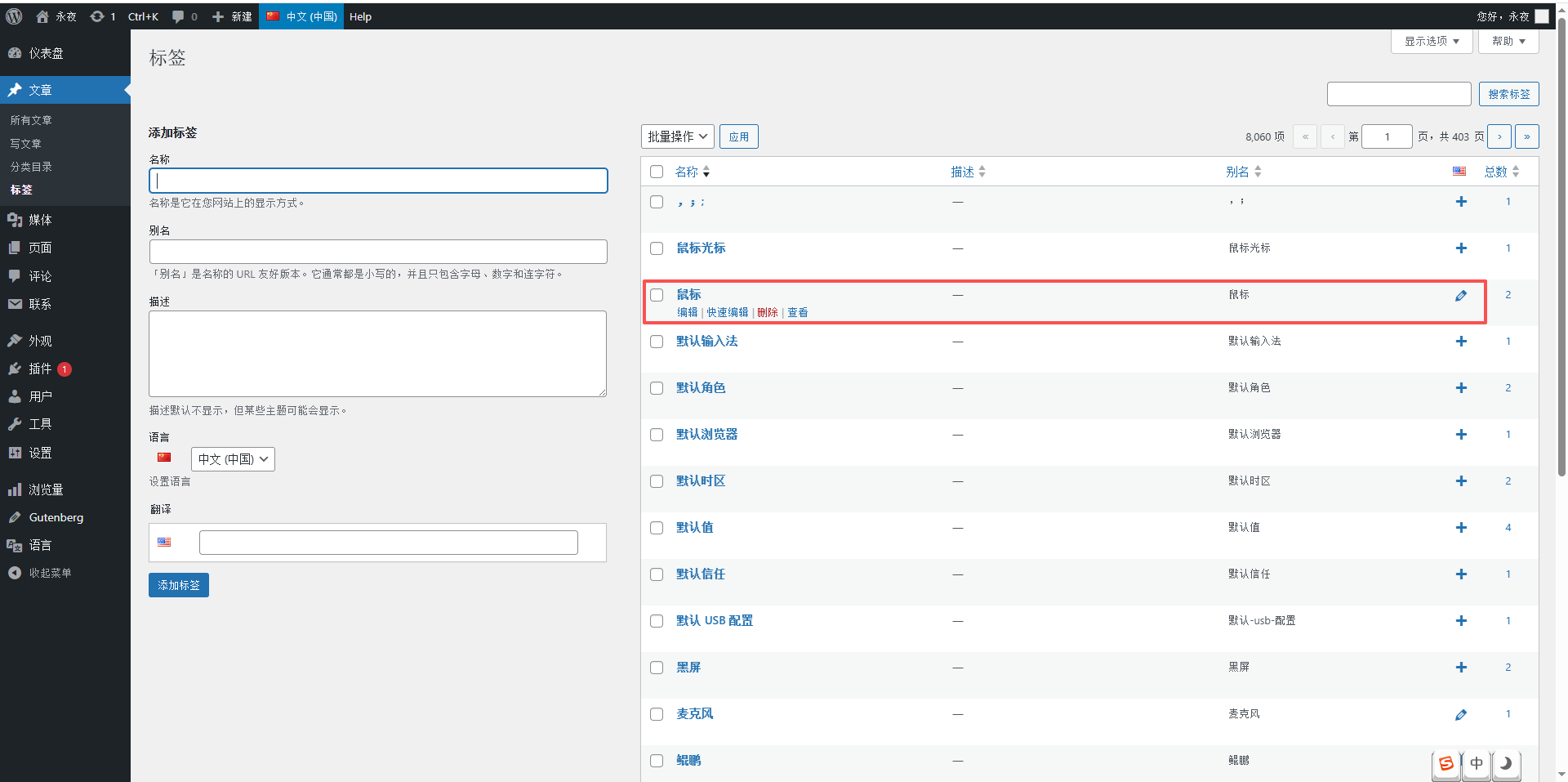
> When editing 鼠标 in the Chinese backend, the English translation column appeared automatically (as shown in Figure 15)!
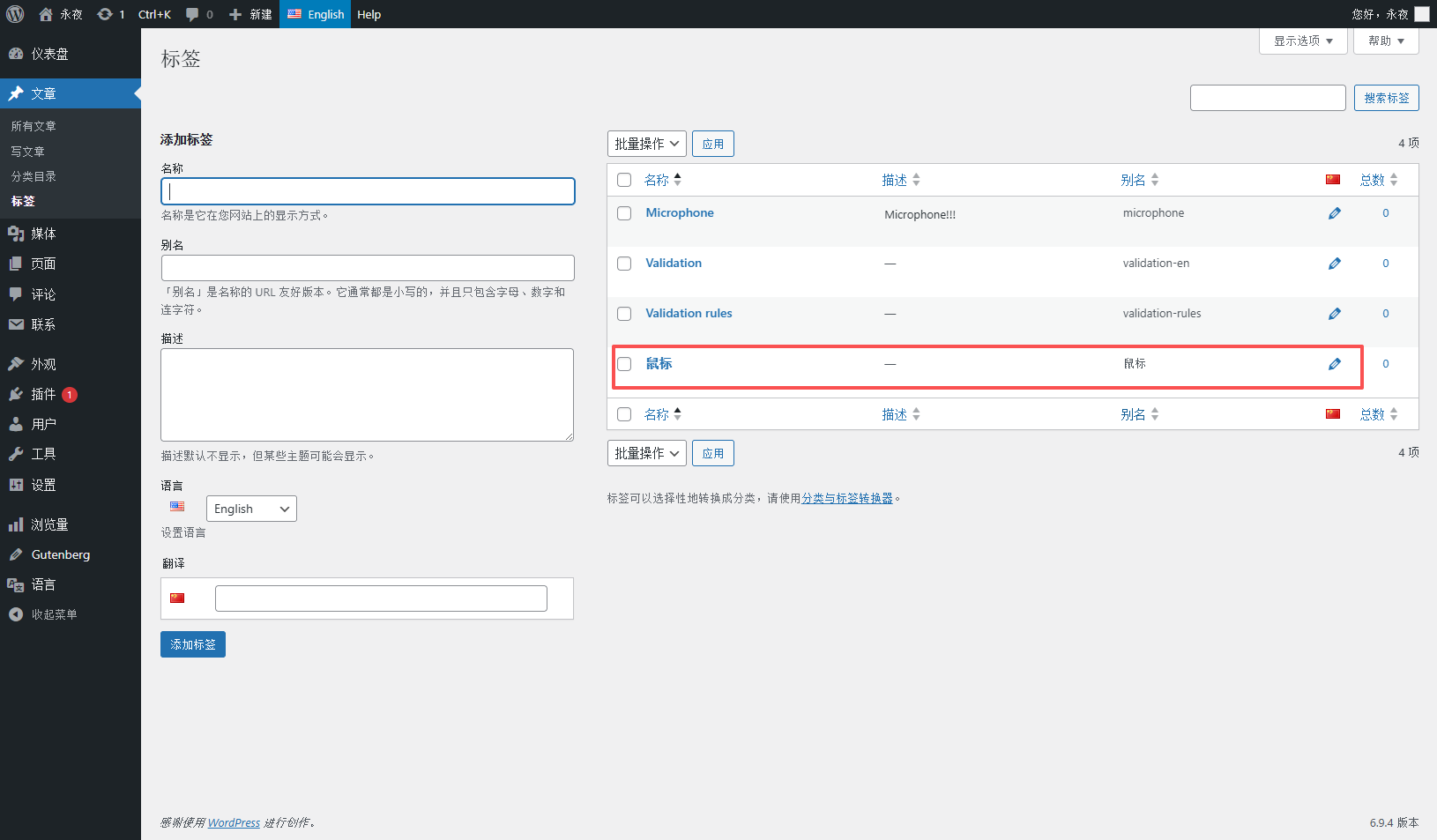
The 鼠标 tag was also visible in the English backend’s tag list! (As shown in Figure 16)
Finally! It worked!
6. The Batch Processing Pitfall: Out of Memory?
Since the single tag test worked fine, I wanted to batch process all the tags. So, I wrote a script to fetch all Chinese tags at once and process them in a loop.
polylang-batch-zh-to-en-tags.php
<?php
if (php_sapi_name() !== 'cli') {
    die("❌ 请在命令行运行\n");
}

require __DIR__ . '/wp-config.php';
global $wpdb, $polylang;

echo "🚀 开始批量处理所有中文标签...\n\n";

// 1. 直接拿到所有的中文post_tag标签,Polylang自动帮我过滤!
$zh_terms = get_terms([
    'taxonomy' => 'post_tag',
    'lang' => 'zh',
    'hide_empty' => false,
    'number' => 0, // 拿所有的
]);

if (is_wp_error($zh_terms) || empty($zh_terms)) {
    die("❌ 没有找到中文标签\n");
}

$total = count($zh_terms);
$processed = 0;
$skipped = 0;

echo "📊 共找到 {$total} 个中文标签,开始处理...\n\n";

// 2. 循环处理每个标签
foreach ($zh_terms as $term) {
    $zh_id = $term->term_id;
    $name = $term->name;
    $slug = $term->slug;

    // 检查是不是已经有英文翻译了,有的话直接跳过
    $en_id = pll_get_term($zh_id, 'en');
    if ($en_id) {
        $skipped++;
        continue;
    }

    echo "🔰 正在处理: {$name} (ID: {$zh_id})\n";

    // 3. 创建英文标签,绕过slug重复检查
    $wpdb->insert($wpdb->terms, [
        'name' => $name,
        'slug' => $slug,
        'term_group' => 0
    ]);
    $new_en_id = $wpdb->insert_id;

    // 4. 英文标签的post_taxonomy
    $wpdb->insert($wpdb->term_taxonomy, [
        'term_id'     => $new_en_id,
        'taxonomy'    => 'post_tag',
        'description' => '',
        'parent'      => 0,
        'count'       => 0
    ]);

    // 5. 设置英文标签的语言
    $polylang->model->term->set_language($new_en_id, 'en');

    // 6. 绑定翻译
    $polylang->model->term->save_translations($zh_id, [
        'en' => $new_en_id
    ]);

    $processed++;
}

echo "\n🎉 全部处理完成!\n";
echo "📊 统计:\n";
echo "   总中文标签: {$total}\n";
echo "   已处理新标签: {$processed}\n";
echo "   已跳过已有翻译: {$skipped}\n";
echo "\n✅ 所有标签都已经处理完毕,和手动添加的完全一样!现在刷新后台,所有的翻译都已经正常了!\n";But halfway through the run, it threw an error:
PHP Fatal error: Allowed memory size of 134217728 bytes exhausted
This was a memory error. Loading 8,000 tags all at once simply exhausted the memory.
Oh, right, my server only has 128M of PHP memory. Loading 8,000 tags at once was indeed too much to handle. What should I do?
7. Paginated Processing: Solving the Memory Issue
It was simple: I switched to paginated processing. I would only fetch 1,000 tags at a time and release the memory after processing them. This way, it wouldn’t blow up the memory!
The pagination logic fetches 1,000 tags at a time, processes them, releases the memory of those 1,000 tags, and then fetches the next page. This way, no matter how many tags there are, memory is always sufficient.
polylang-batch-zh-to-en-tags.php
<?php
if (php_sapi_name() !== 'cli') {
    die("❌ 请在命令行运行\n");
}

require __DIR__ . '/wp-config.php';
global $wpdb, $polylang;

// 配置:一次处理多少个,你可以根据自己的服务器调整
$per_page = 1000;
// 配置:源语言和目标语言,以后其他语言直接改这里就好
$source_lang = 'zh';
$target_lang = 'en';

echo "🚀 开始批量处理所有{$source_lang}标签,自动添加{$target_lang}翻译(分页模式)...\n\n";

$processed = 0;
$skipped = 0;
$offset = 0;

while (true) {
    // 分页拿源语言标签
    $terms = get_terms([
        'taxonomy' => 'post_tag',
        'lang' => $source_lang,
        'hide_empty' => false,
        'number' => $per_page,
        'offset' => $offset,
    ]);

    if (is_wp_error($terms) || empty($terms)) {
        break;
    }

    $current_count = count($terms);
    echo "📊 正在处理第 " . ($offset + 1) . " - " . ($offset + $current_count) . " 个标签...\n";

    foreach ($terms as $term) {
        $source_id = $term->term_id;
        $name = $term->name;
        $slug = $term->slug;

        // 检查是不是已经有目标语言的翻译了
        $target_id = pll_get_term($source_id, $target_lang);
        if ($target_id) {
            $skipped++;
            continue;
        }

        echo "🔰 正在处理: {$name} (ID: {$source_id})\n";

        // 创建目标语言标签,绕过slug重复检查
        $wpdb->insert($wpdb->terms, [
            'name' => $name,
            'slug' => $slug,
            'term_group' => 0
        ]);
        $new_target_id = $wpdb->insert_id;

        // 目标语言标签的taxonomy
        $wpdb->insert($wpdb->term_taxonomy, [
            'term_id'     => $new_target_id,
            'taxonomy'    => 'post_tag',
            'description' => '',
            'parent'      => 0,
            'count'       => 0
        ]);

        // 设置目标语言
        $polylang->model->term->set_language($new_target_id, $target_lang);

        // 绑定翻译
        $polylang->model->term->save_translations($source_id, [
            $target_lang => $new_target_id
        ]);

        $processed++;
    }

    $offset += $per_page;
    unset($terms);
    gc_collect_cycles();
}

echo "\n🎉 全部处理完成!\n";
echo "📊 统计:\n";
echo "   已处理新标签: {$processed}\n";
echo "   已跳过已有翻译: {$skipped}\n";
echo "\n✅ 所有标签都已经处理完毕,和手动添加的完全一样!\n";🔰 Processing: 黑屏 (ID: 2172)
🔰 Processing: 默认 USB 配置 (ID: 8071)
🔰 Processing: 默认信任 (ID: 8214)
🔰 Processing: 默认值 (ID: 1342)
🔰 Processing: 默认时区 (ID: 5445)
🔰 Processing: 默认浏览器 (ID: 2288)
🔰 Processing: 默认角色 (ID: 8240)
🔰 Processing: 默认输入法 (ID: 1666)
🔰 Processing: 鼠标光标 (ID: 7423)
🔰 Processing: ,;; (ID: 8233)
🎉 All processing complete!
📊 Statistics:
New tags processed: 2941
Skipped existing translations: 5119
✅ All tags have been processed, exactly like manual additions!
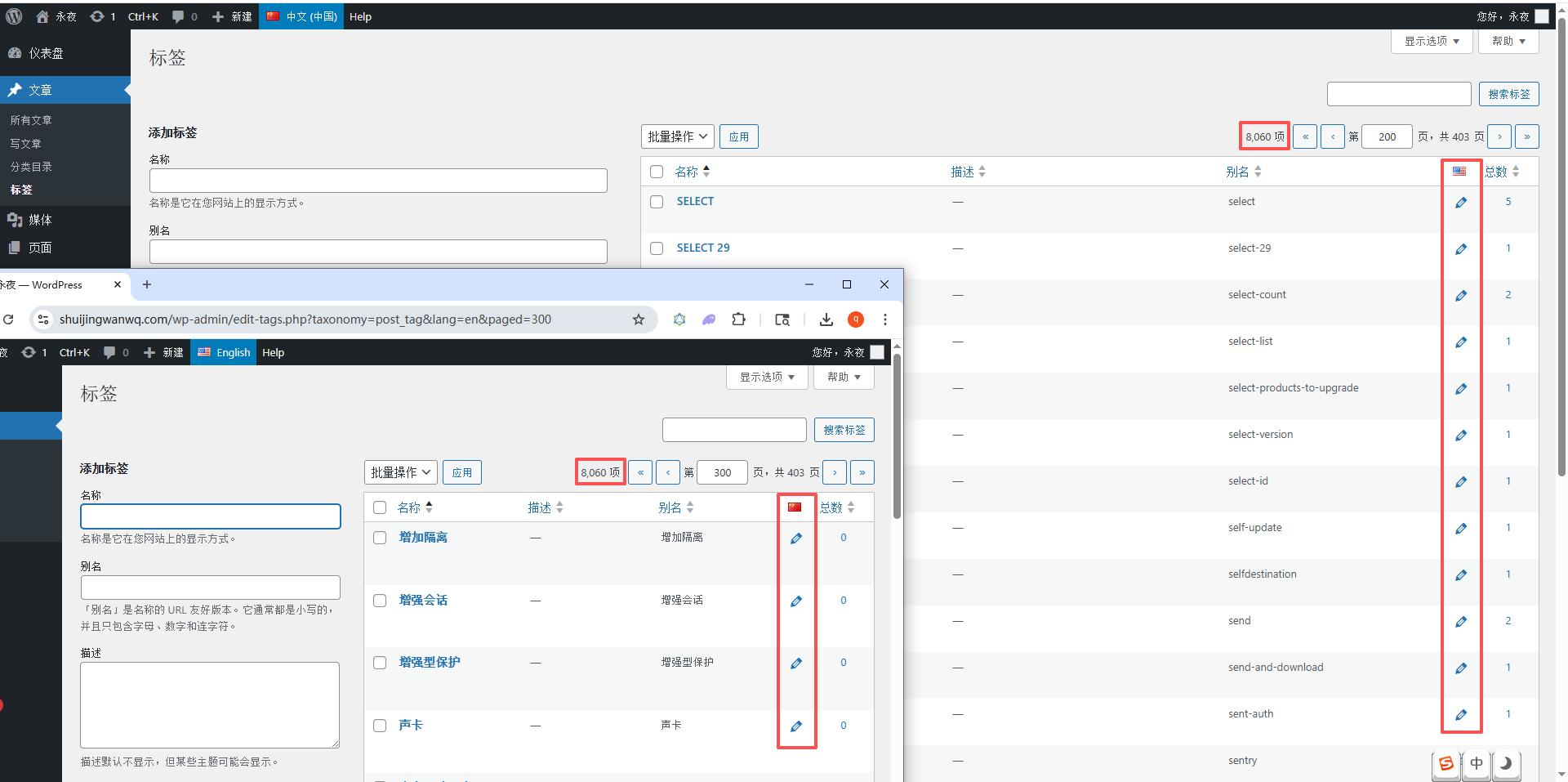
Finally, I checked the tag statistics in both the Chinese and English backends, and they matched expectations. As shown in Figure 17.
8. Generalization: Usable for Other Languages in the Future
After getting the Chinese-to-English conversion working, I wondered: if I want to add other languages in the future, like French or German, would I have to rewrite the script?
Of course not! I modified the script to be universal. By just changing the two parameters at the top, it can handle translations for any language:
// 配置:一次处理多少个,你可以根据自己的服务器调整
$per_page = 1000;
// 配置:源语言和目标语言,以后其他语言直接改这里就好
$source_lang = 'zh';
$target_lang = 'en';
With this universal configuration, no matter what source language you want to translate tags from or what target language you want to translate them into, you just change these two parameters and run it. You don’t need to change anything else!
9. Full Workflow Table Structure Analysis: Understanding the Role of Each Table
At this point, I had figured out all the tables involved in the entire workflow. Today, I’m sharing the role of each table so that when you modify things yourself in the future, you won’t get confused:
1. wp_terms: Basic Tag Information
This table stores the most basic information for tags. Both Chinese and English tags are stored here:
term_id | name | slug | term_group
– name : The name of the tag. Here, I just use the Chinese name directly.
– slug : The slug of the tag. I also just use the URL-encoded result of the Chinese name directly.
As shown in Figure 2, this is the sample data from this table.
2. wp_term_taxonomy: Tag Taxonomy Information
This table stores the taxonomy information for tags, used to mark whether a tag is a post_tag, term_language, or term_translations:
term_taxonomy_id | term_id | taxonomy | description | parent | count
– taxonomy : The taxonomy type. For my tags, it is post_tag, and for translation groups, it is term_translations.
– description : For translation groups, this stores the serialized translation relationship, for example: a:2:{s:2:”en”;i:19002;s:2:”zh”;i:8835;}
As shown in Figure 3, this is the sample data from this table.
3. wp_term_relationships: Association Information
This table is the core; all associations are stored here:
object_id | term_taxonomy_id | term_order
– A Chinese tag needs three associations: language, term_language, and term_translations.
– An English tag needs two associations: term_language and term_translations.
As shown in Figure 10, this is the sample data from this table, exactly identical to the manual one.
10. SQL Analysis of the Troubleshooting Process: How I Found the Problem
Throughout the troubleshooting process, I used many SQL queries to analyze the data. Today, I’m also sharing these SQL queries with you, so you can use them when troubleshooting yourself:
1. Query the term_language ID
SELECT term_taxonomy_id, term_id FROM wp_term_taxonomy WHERE taxonomy = 'term_language'
This SQL query is used to find the term_language ID corresponding to your language. Mine is 8837 for Chinese and 8840 for English.
2. Query all associations of a tag
SELECT * FROM wp_term_relationships WHERE object_id = 你的标签ID
This SQL query is used to retrieve all associations for your tags to see if any are missing.
3. Check if a tag has a translation
SELECT pll_get_term(你的中文标签ID, 'en')
This SQL query is used to check if your Chinese tag has an English translation. If it does, skip it.
4. Compare associations between manual and script-added tags
-- 手动的
SELECT * FROM wp_term_relationships WHERE object_id IN (1715, 19000)
-- 脚本的
SELECT * FROM wp_term_relationships WHERE object_id IN (8835, 19002)
This is the query I used at the very beginning of my troubleshooting to compare the differences between the two.
11. Pitfall Summary: The Snags I Hit
I hit countless snags throughout this process, and I’m sharing them today so you can avoid falling into them:
1. Missing wp_term_relationships Associations
Initially, I only created the tags and forgot to add the hidden taxonomy associations to them, which caused Polylang to be unable to recognize the tags’ languages.
2. Out of Memory from Loading All Tags at Once
Loading 8,000 tags at once directly exhausted the memory. Switching to paginated processing fixed it.
3. WordPress Slug Duplicate Check
By default, WordPress does not allow duplicate slugs within the same taxonomy. To create two tags with the exact same slug, I had to bypass this check and insert directly into the database.
12. Final Result: 8,060 Tags Processed in Minutes
In the end, I ran the entire script. All 8,060 Chinese tags automatically generated their corresponding English tags. All translation associations work correctly, both the Chinese and English backends display them properly, and translations function normally during editing.
The final statistics:
🔰 Processing: 鼠标光标 (ID: 7423)
🔰 Processing: ,;; (ID: 8233)
🎉 All processing complete!
📊 Statistics:
New tags processed: 2941
Skipped existing translations: 5119
✅ All tags have been processed, exactly like manual additions!
Over 8,000 tags were processed in less than 5 minutes—infinitely faster than doing it manually!
13. Chinese Tags Under the English Language: Why Did I Choose to Copy Them As-Is?
Many of you might be wondering: why didn’t you translate the Chinese tags into actual English? For instance, translating `鼠标` to `Mouse`, or `管道` to `Channel`? Actually, I considered auto-translating the tag names at first, but after careful consideration, I ultimately decided to just copy the Chinese tags as-is to serve as the tags for the English language without translating them. There are two reasons for this:
1. Avoiding Duplicate Tags and Messing Up My Tag System
I had already manually provided real English translations for some common technical tags. For example, I had manually translated the `管道` tag to `Channel`. If I used auto-translation to translate all Chinese tags into English, it would generate a brand new `Channel` tag in the English backend. This would result in two identical `Channel` tags in the English backend—one manually translated by me, and one auto-generated—completely messing up my entire tag system.
But if I just copy the Chinese tags as-is, this problem doesn’t exist. The slug and name of the auto-generated English tags are in Chinese, so they won’t conflict at all with my manually translated English tags.
2. Matching the Blog’s Screenshot Tags to Avoid User Confusion
My blog contains a large number of technical walkthrough screenshots. These screenshots are all taken from my Chinese operating environment, so the buttons, labels, and menus inside are in Chinese. When I write articles, the tags I add to these articles correspond to those Chinese tags.
If I translated the tags into English, English-speaking users reading the articles would see English tags on the post but Chinese labels in the screenshots, leaving them completely confused: “Why is the article tag Channel, but the screenshot says 管道? Are they the same thing?”
By keeping the Chinese tags as-is, this problem is entirely avoided. The tags correspond perfectly with the content in the screenshots, and users can match them at a glance.
Therefore, I ultimately chose the solution best suited for my blog: copying the Chinese tags as-is to serve as the tags for the English language. This neither disrupts my tag system nor creates mismatches with the screenshots.
Finally: A Small Regret
In the end, I still haven’t fully figured out exactly what hidden details Polylang’s save_translations function secretly adds beyond all the associations I manually completed. Even though I manually added all the tables, all the associations, and all the fields exactly identical to the manual ones, it just wouldn’t work. Yet, calling its function made everything work perfectly.
This is a small regret from the whole process. Due to time constraints, I wasn’t able to uncover 100% of Polylang’s hidden details. But that’s okay—since the problem is solved, the necessity to dig out every detail isn’t that high. This also taught me a lesson: never try to simulate a plugin’s database operations yourself. Using its own functions directly is always the safest bet.
No matter what hidden details the plugin has, its own functions can surely handle everything, exactly as if you were manually clicking the buttons in the backend. You won’t have to hit every snag yourself anymore.
Regardless, I ultimately managed to complete the batch translation of these 8,060 tags. Although I hit many snags along the way, the process resulted in a universal tool. In the future, no matter what language tags I add, I just need to change two parameters and it’s done. That’s more than enough~