

⚠️ Experimental Notice (Important)
This article is the second in a series of practical guides, continuing the experimental technical exploration from Part 1: Minimalist Principles and Initial Build.
The current configuration is still in the verification phase:
- Not guaranteed to work in all network environments
- Not recommended to copy directly for production or critical business use
- The main purpose is to verify the feasibility of the “minimal rule model + minimal DNS override”
Network environments, DNS behaviors, and VPS line quality in different regions will all affect the final result.
If it runs stably in the future, this notice will be removed in the final part and published as a reliable reference solution.
1. Symptom: Google Times Out, but WireGuard Works Fine
In the previous article (Part 1), I built a minimalist WireGuard routing configuration based on the MetaCubeX dataset. The core principle was: do not override DNS; leave it entirely to the Clash Verge Rev core defaults.
After going live for testing, domestic websites loaded normally and behavior was consistent across multiple devices, but google.com consistently failed to open. Checking the Clash Verge Rev logs revealed the following warning:
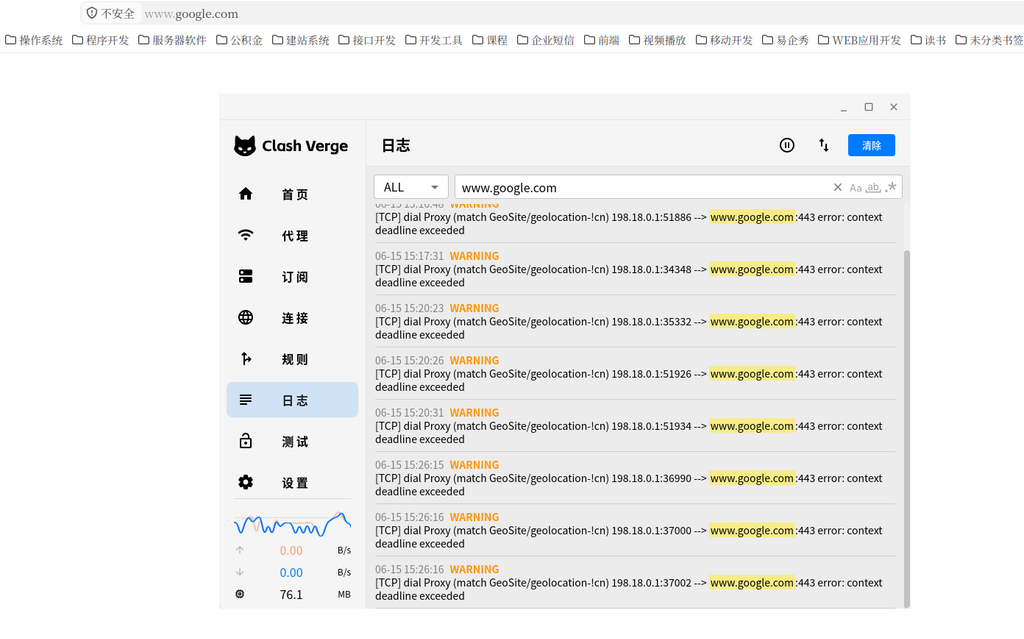
Key information:
[TCP] dial Proxy (match GeoSite/geolocation-!cn) 198.18.0.1:56278
--> www.google.com:443 error: context deadline exceeded- The routing rule is correct:
google.commatchedGEOSITE,geolocation-!cnand correctly entered theProxygroup. - Fake-IP works normally: the source address
198.18.0.1is a fake IP returned by Clash, indicating that the client thinks it is communicating locally and the connection has been taken over by Clash. - The error type is
context deadline exceeded, meaning the TCP handshake could never be completed.
However, checking the status of the WireGuard node ZgoCloud-WG itself at this time showed normal latency test results:
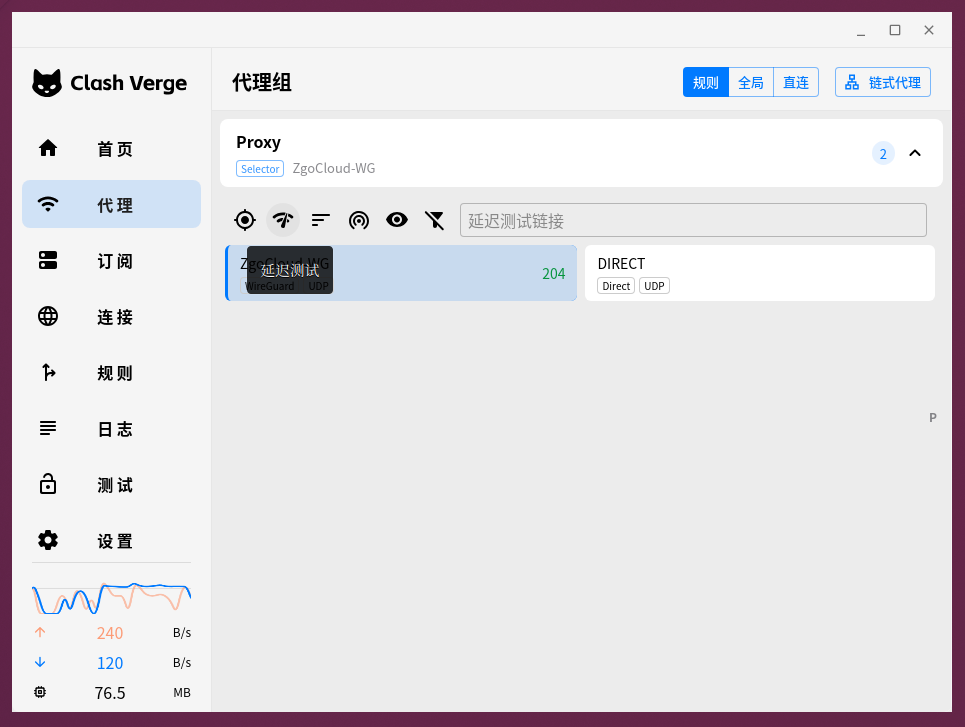
A latency of 204ms indicates that the WireGuard handshake and basic connectivity are completely normal. If the tunnel were down, the latency would directly show Timeout or a red cross.
2. Root Cause: DNS Pollution, Fallback Not Routing Through Proxy
This seemingly contradictory symptom points to one conclusion: there is no problem with the proxy tunnel itself; the issue is that “the target IP the proxy is trying to connect to is wrong”.
In the minimalist v1 configuration, the dns section does not explicitly specify anything, relying entirely on the defaults of the Clash Verge Rev core. In the final merged configuration, the DNS settings are roughly equivalent to:
dns:
  enable: true
  ipv6: false
  enhanced-mode: fake-ip
fake-ip-range: 198.18.0.1/16nameserver is not specified, nor are the fallback and proxy fields.
In this case, Clash uses the system default DNS (usually assigned by the ISP or 114.114.114.114) to resolve all domains. In mainland China’s network environment, DNS resolution for google.com is polluted and returns an incorrect IP. Although Fake-IP mode returns 198.18.0.x to the client, Clash uses that polluted real IP behind the scenes to establish the connection.
Even if this connection subsequently matches a rule and goes out through the WireGuard tunnel exit, the WireGuard remote end is still accessing that incorrect IP, naturally failing to complete the TCP handshake and ultimately timing out.
Root cause: the DNS query for fallback (overseas domain resolution) is sent directly from the local machine without going through the proxy, resulting in pollution.
3. Fix Philosophy: Add Only Necessary Overrides, No Redundancy
Past experience tells me that to prevent pollution, DNS queries for overseas domains must be sent through the proxy tunnel to obtain the correct IP. However, this fix strictly adheres to the core goal from Part 1: do not introduce extra rules; do not turn it into a complex DNS system.
I ultimately decided to append a very short dns block to the subscription file zgocloud-metacubex-v1.yaml, overriding only the fields that need to be changed while still trusting the core defaults for the rest.
Final Appended DNS Override (Only 6 Lines)
dns:
  nameserver:
    - https://dns.alidns.com/dns-query   # 国内域名使用阿里 DoH,直连
  proxy: Proxy                            # 让 fallback 查询走代理
  fallback:
    - tls://1.1.1.1:853                  # 境外域名使用 Cloudflare DoT
  fallback-filter:
    geoip: true
geoip-code: CN # 只有非 CN 域名才触发 fallbackWhy are these six lines enough?
enable: true,ipv6: false,enhanced-mode: fake-ip, andfake-ip-rangeare all left to the core defaults and do not need to be rewritten.nameserverconnects directly to Alibaba DoH, handling resolution for all CN domains, maintaining unchanged domestic access speeds without being polluted.fallbackpoints to Cloudflare’s DoT, dedicated to resolving non-CN domains (such asgoogle.com).proxy: Proxyis the only key: it forcesfallbackqueries to be sent through theProxygroup (i.e., ZgoCloud-WG) instead of a local direct connection. This completely bypasses local DNS pollution and obtains the correct Google IP.fallback-filterusesgeoip: true+geoip-code: CNto let Clash automatically determine domain geography based on the IP database. Only non-CN domains use the fallback, while domestic domains obediently use the nameserver, without interfering with each other.
This entire modification adds no domain lists and introduces no new rules, maintaining a minimalist structure.
4. Enabling the New Configuration
After modifying the local subscription file, go to the Profiles page in Clash Verge Rev and click “Reactivate Subscription” in the top right corner to reload the configuration and restart the core (since my subscription is a local file, the effect is equivalent to reloading the core).
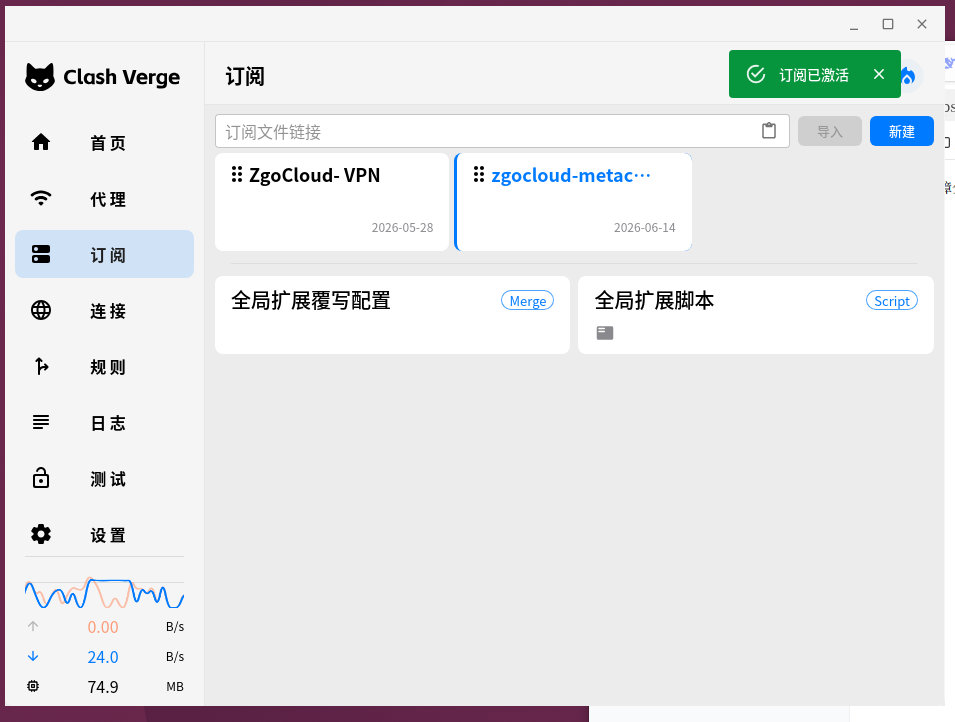
After restarting, clear the browser cache and visit google.com again; the page loads smoothly. The timeout warning for deadline exceeded no longer appears in the logs.
5. Full Test Results
Using the built-in connection test in Clash Verge Rev, I tested 13 common targets:
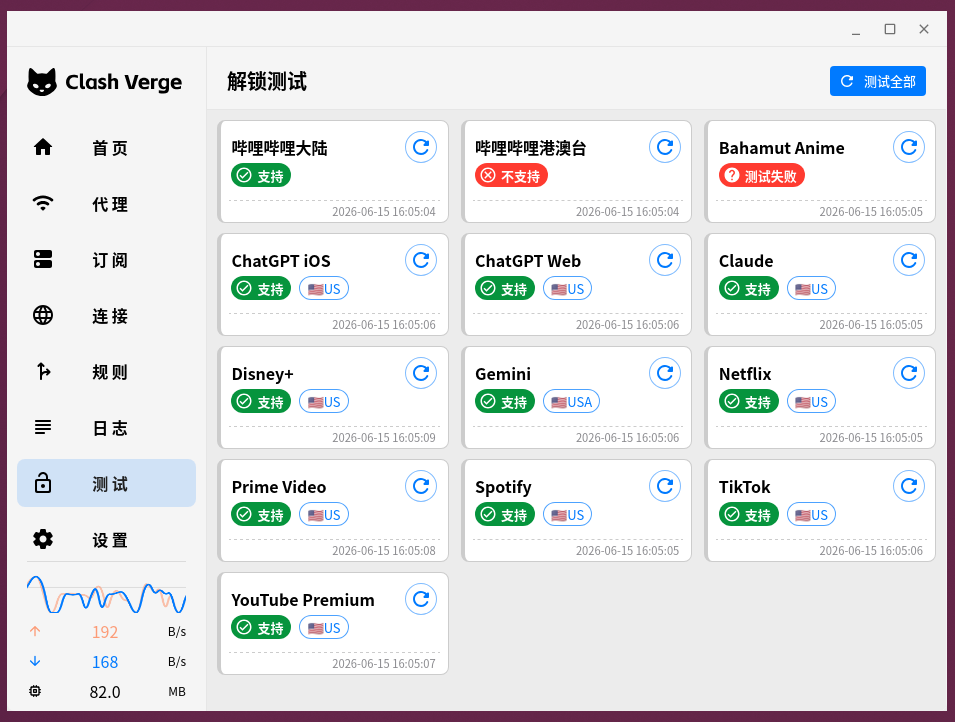
Passed (11 items): Google, YouTube, GitHub, Netflix, etc., all work normally. Scenarios that previously had occasional issues in the older version, such as Google Play and sending emails, are also stable.
Failed (2 items): Bilibili Hong Kong/Macau/Taiwan and Bahamut Anime Crazy.
These two services require a strict Taiwan IP (Bahamut is even locked to the Taiwan region), and my WireGuard exit is located in Los Angeles, USA, so they are blocked by regional restrictions. This is unrelated to the configuration file and is determined by the geographical location of the exit IP. If there is a need to watch them in the future, this can be resolved by adding a Taiwan node and incorporating routing rules. However, under the current minimalist model, this is an optional extension and does not affect regular use.
6. Final Configuration Overview (with Detailed Comments and Modification Guide)
# ==============================================
# ZgoCloud + Wstunnel + WireGuard
# MetaCubeX 极简稳定版 v2 (minimal DNS fix)
#
# 特点:
# - 最小化 DNS 覆写(仅防污染)
# - 不使用 SMTP / Google / YouTube 特殊规则
# - 基于 GEOSITE + GEOIP
# - 结构最小化,便于排错
# ==============================================

# ----- 通用设置 -----
profile:
  store-selected: true   # 记住用户在 Proxy 组中手动选择的节点(重启后不丢失)

# ----- DNS 最小覆写(防污染) -----
dns:
  # 国内域名解析:使用阿里公共 DNS over HTTPS,直连不经过代理
  nameserver:
    - https://dns.alidns.com/dns-query

  # 【关键】让所有 DNS 查询(特别是 fallback)都通过代理组 Proxy 发出,避免本地 DNS 污染
  proxy: Proxy

  # 境外域名解析:使用 Cloudflare DNS over TLS,解析结果由代理隧道保护
  fallback:
    - tls://1.1.1.1:853

  # 只让非中国 IP 的域名使用 fallback,国内域名强制走 nameserver
  fallback-filter:
    geoip: true
    geoip-code: CN

# ----- 代理节点定义 -----
proxies:
  - name: ZgoCloud-WG          # 节点名称,可自定义
    type: wireguard            # 类型:WireGuard
    server: 127.0.0.1          # 【必须修改】WireGuard 服务器的地址(此处为本地 wstunnel 映射端口)
    port: 51820                # 【必须修改】WireGuard 端口

    ip: xxx               # 【必须修改】分配给本机的 WireGuard 内网 IP

    public-key: xxx     # 【必须修改】服务器公钥
    private-key: xxx    # 【必须修改】本机私钥
    pre-shared-key: xxx # 【必须修改】预共享密钥

    udp: true                  # 启用 UDP 转发
    mtu: 1280                  # MTU,若遇部分网站卡顿可尝试调整为 1200 或 1000

# ----- 代理组 -----
proxy-groups:
  - name: Proxy               # 代理组名称,被分流规则引用
    type: select              # 类型:手动选择
    proxies:
      - ZgoCloud-WG           # 主代理节点
      - DIRECT                # 直连(不走代理)

# ----- 分流规则(基于地理数据集) -----
rules:
  # Wstunnel 服务器 IP 强制直连,避免隧道自身流量回环(no-resolve 表示仅匹配 IP 规则,不触发 DNS 解析)
  - IP-CIDR,154.21.196.249/32,DIRECT,no-resolve   # 【必须修改】替换为你的 Wstunnel 服务器公网 IP

  # 本地/私有网络直连
  - GEOSITE,private,DIRECT
  - GEOIP,private,DIRECT,no-resolve

  # 中国大陆域名和 IP 直连,保证国内访问速度
  - GEOSITE,cn,DIRECT
  - GEOIP,CN,DIRECT,no-resolve

  # 所有非中国大陆域名走代理
  - GEOSITE,geolocation-!cn,Proxy

  # 未匹配到任何规则的流量,默认走代理(防止泄漏)
- MATCH,Proxy📋 Usage Instructions
- Save the configuration
Save the complete content above as a local configuration file (e.g.,zgocloud-metacubex-v2.yaml). - Modify required fields
Based on your actual environment, modify the values at all [Must Modify] markers:
server/port: the address and port corresponding to your local wstunnel listenerip: your WireGuard private network IP- Three sets of keys:
public-key,private-key,pre-shared-key - The IP in
IP-CIDR: your Wstunnel server’s public IP
- Enable in Clash Verge Rev
- Go to the Profiles page, click add local file in the top right corner, and activate it (or right-click to reactivate the subscription).
- It is recommended to enable TUN Mode (one-click enable in the GUI) and turn off the system proxy to achieve global takeover.
- Daily Use and Troubleshooting
- If you need to temporarily route everything directly, you can manually select
DIRECTin theProxygroup. - If some websites experience lag or timeouts, try lowering
mtuto1200or1000. - When encountering issues, prioritize checking WireGuard latency, Wstunnel process status, and DNS resolution records in the Clash logs.
7. Summary
From “minimalist no DNS override” to “adding only 6 lines of anti-pollution override”, this fix still maintains the cleanliness and maintainability of the entire configuration system. It introduces no new routing logic and adds no special domain rules; it is just a single proxy: Proxy that routes overseas DNS queries through the proxy, solving the pollution problem in the mainland environment.
Final results:
- Direct connection for domestic websites, with no impact on speed
- Stable access to overseas services like Google
- Consistent behavior across multiple devices
- Troubleshooting logic remains clear: if there is a problem, only check WireGuard, TUN, and VPS
If there is a need to unlock Taiwanese streaming media in the future, proxy groups and rules may be expanded in Part 3, but that will be an on-demand optional enhancement that does not break the current stable foundation.
Series Articles:
- (Part 1) From Complex to Minimalist: Minimalist Principles and Initial Build
- (Part 2) This article: Minimal DNS Fix for Google Pollution