

I. Incident Background
While debugging a WordPress multilingual tag synchronization script, I added logic to batch query and delete dirty tags. Processing massive amounts of data in loops caused the script to hang and freeze. After forcibly terminating the process, the database suffered irreversible severe damage:
Reference: Complete troubleshooting and resolution record of WP 6.9 tag synchronization script failing in WP 7.0
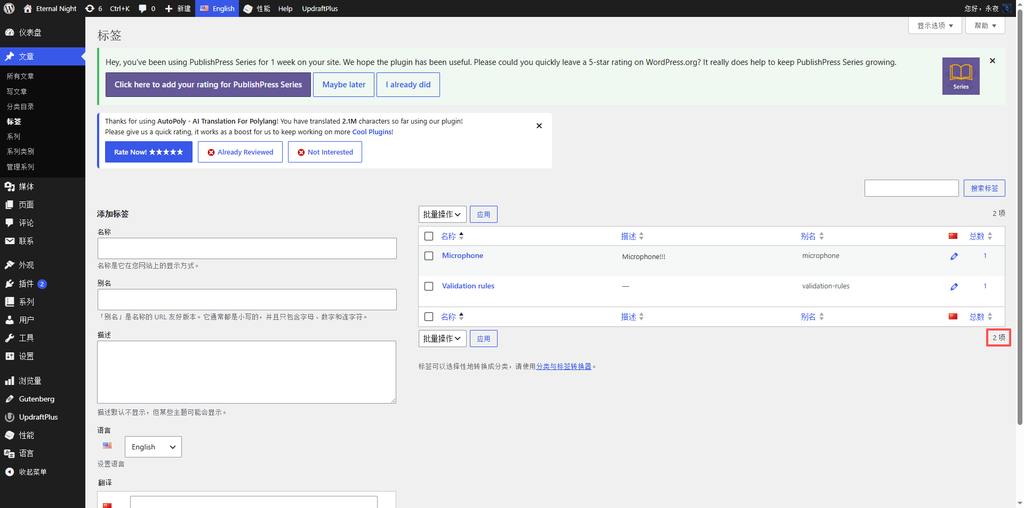
- A large number of normal English tags were mistakenly identified as dirty data and deleted. The total number of English tags plummeted from over 8,000 to just 2 (see Figure 1);
- Over a hundred duplicate and redundant Chinese tags were generated, causing an abnormal surge in the statistical count;
- Dirty data with no language attribution remained in the database, multilingual translation associations were broken and scrambled, and the website’s backend statistics and tag management functions became completely abnormal.
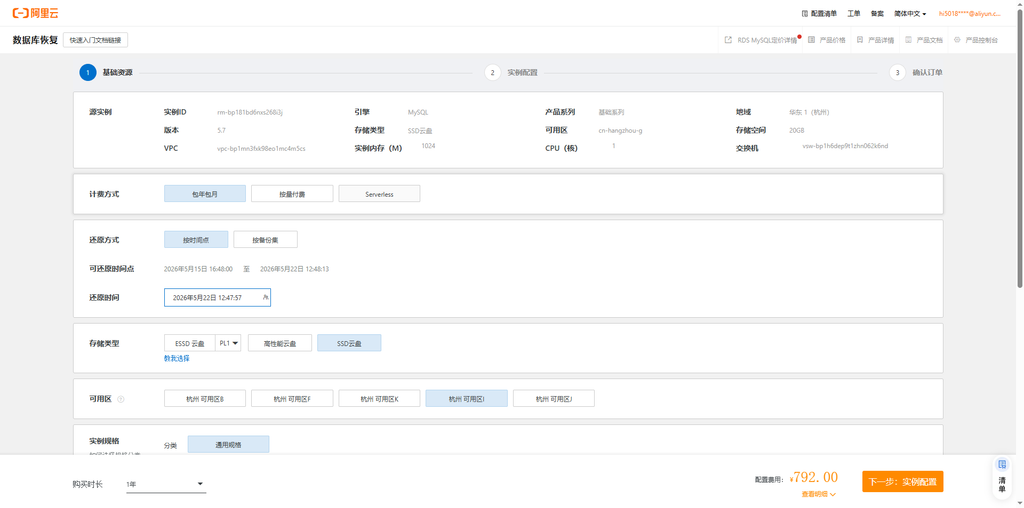
I usually manually export SQL files via DMS for offline backups. This offline backup consisted of historical data from several days ago and could not restore the latest business data generated within the last half-day. Meanwhile, the RDS instance-level backup also had a time gap, and a full instance recovery would require purchasing additional instance resources, which did not meet the current need to repair only a single database’s data without altering the instance architecture. Ultimately, I chose the database and table point-in-time recovery feature to precisely roll back to a time point half a day before the failure occurred, successfully recovering the complete and valid data.
II. Prerequisite Preparations
- Confirm the target recovery time, locking in a point about half an hour before the script executed abnormally;
- Ensure the Alibaba Cloud RDS MySQL instance is running normally and the local network has been added to the instance whitelist;
- Pause website frontend access and shut down all running database scripts on the server to eliminate new data write conflicts during the recovery process;
- Record the website’s original database name and account permission information in wp-config.php in advance to facilitate the subsequent database configuration switch.
III. Recovery Process Tailored to the Actual Scenario: Database and Table Point-in-Time Recovery
The data corruption was severe, and both historical offline SQL backups and full instance backups lacked sufficient timeliness. I abandoned the approaches of dropping and rebuilding the database or performing a full instance recovery, opting instead for RDS’s native point-in-time database and table recovery to precisely trace back the data from the specified time period.
- Enter the database and table recovery feature entrance
1.1. Log in to the Alibaba Cloud official website, enter the ApsaraDB RDS console, and open the details page of the currently running database instance;
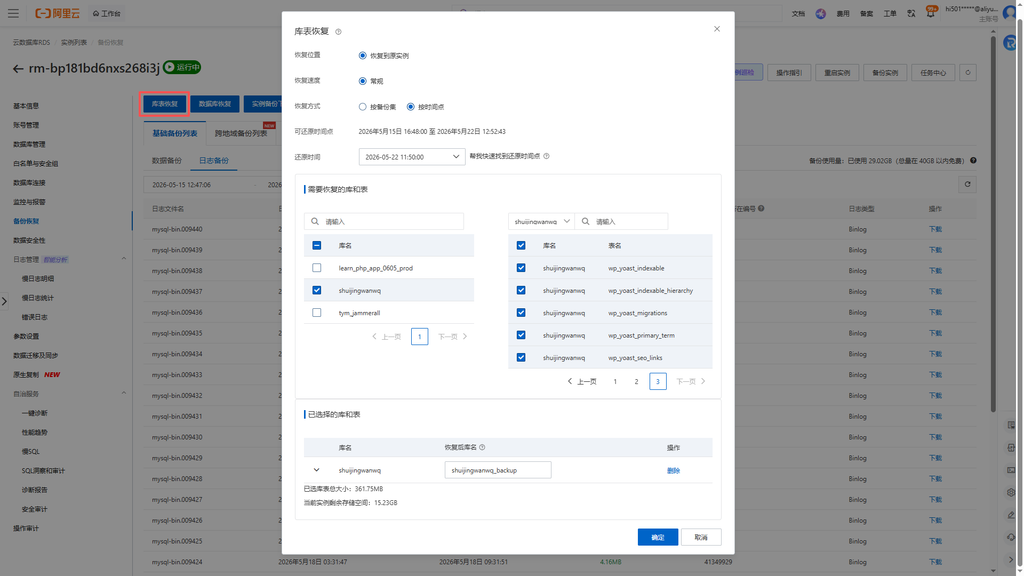
1.2. Locate the Backup and Recovery section in the left navigation pane, click to enter, and select the database and table recovery feature;
1.3. Select point-in-time recovery as the recovery method, and manually choose the exact timestamp from half a day before the failure was triggered (see Figure 2). - Select the database and data tables to recover
2.1. In the database list, check the damaged website databaseshuijingwanwq;
2.2. Key pitfall to avoid: merely checking the database cannot complete the data recovery. After selecting the database, click Select All in the data table list on the right to include all data tables in the database (see Figure 3);
2.3. Confirm the recovery target. The system generates a new backup database with the suffix_backupby default, which does not directly overwrite the original online database, ensuring safety and no risk. - Submit the recovery task and check the execution progress
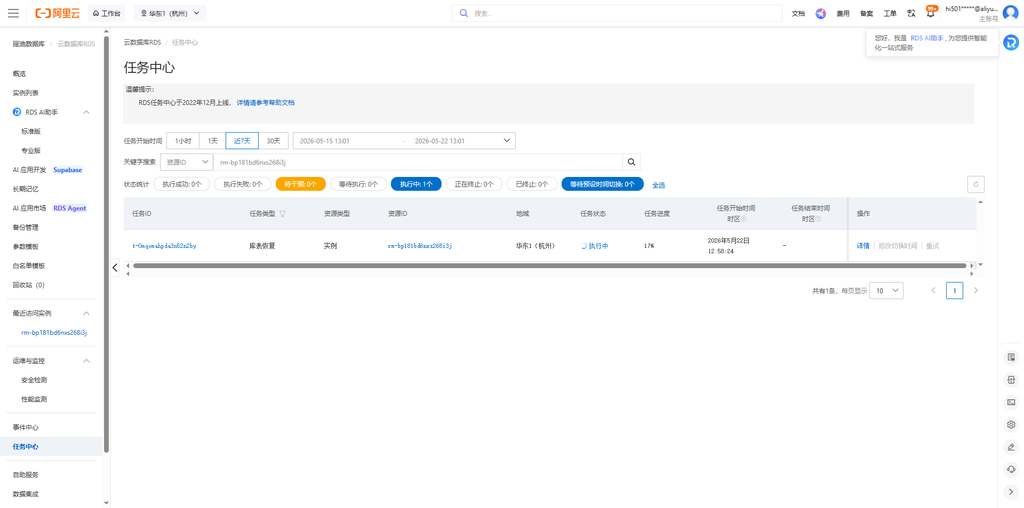
3.1. After verifying that the recovery time and the scope of databases and tables are correct, submit the database and table recovery task;
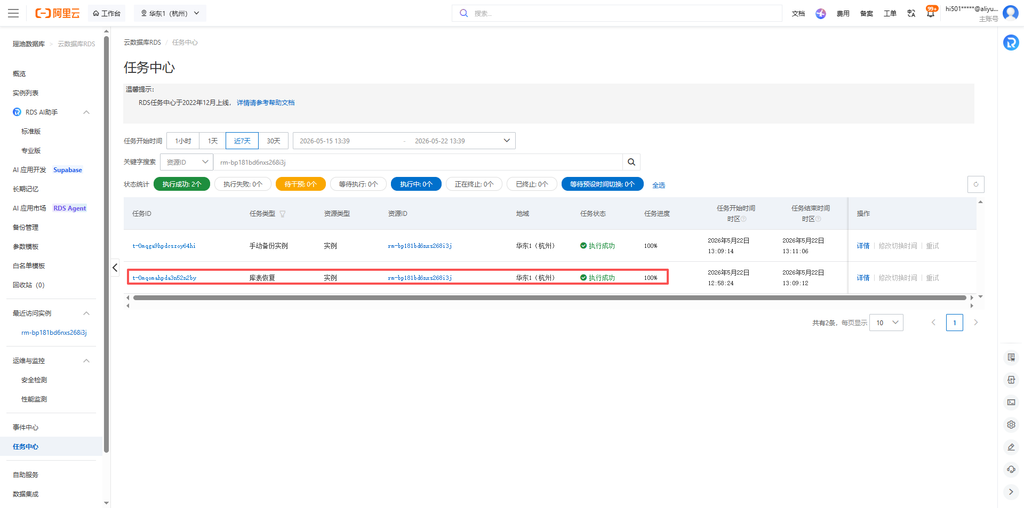
3.2. The page redirects to the Task Center, where you can view the task status in real time and wait for the system backend to automatically complete the data rollback and recovery (see Figure 4);
3.3. When the task shows successful execution, it means the complete data for the corresponding time point has been generated in the backup database (see Figure 5). - Assign database access permissions
4.1. Return to the database management page and find the newly recovered databaseshuijingwanwq_backup(see Figure 6);
4.2. Add and grant full read and write permissions for this backup database to the website program’s original database access account (see Figure 7);
4.3. Verify account connectivity to ensure the program can properly read and manipulate the new database’s data (see Figure 8). - Modify site configuration to switch databases
5.1. Log in to the website server and open thewp-config.phpconfiguration file in the website’s root directory;
5.2. Change the original database name parameter to the recovered database nameshuijingwanwq_backup(see Figure 9);
5.3. Save the configuration file. There is no need to modify other parameters such as the database account, password, or address.
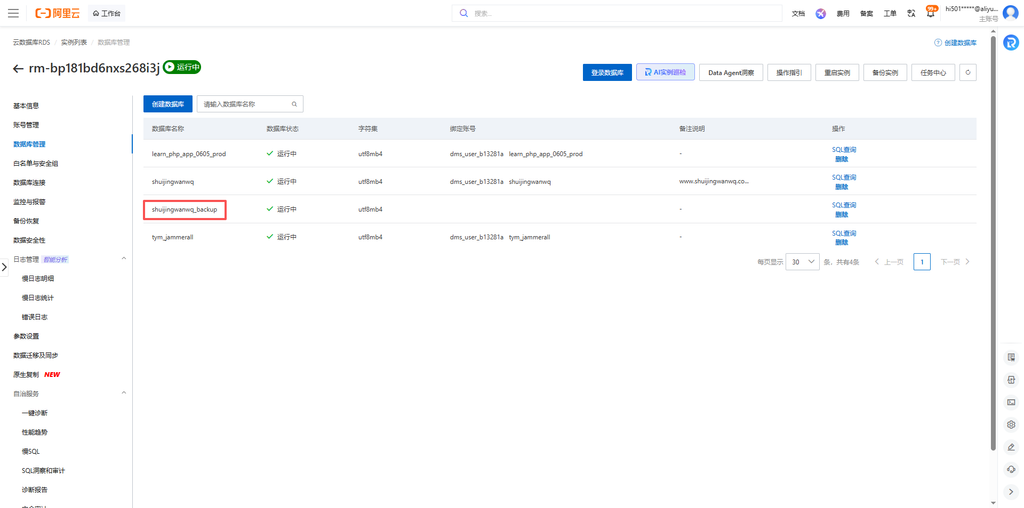
shuijingwanwq_backup (see Figure 6)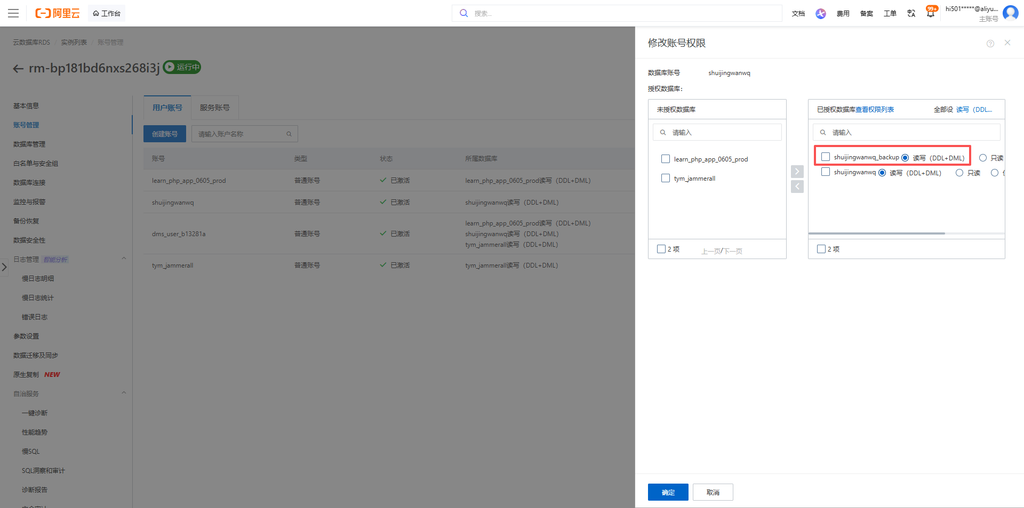
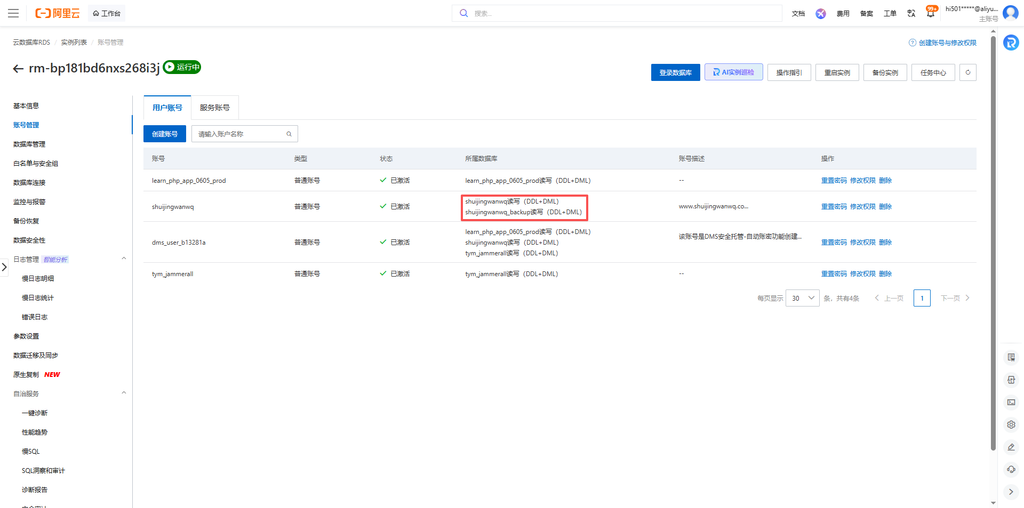
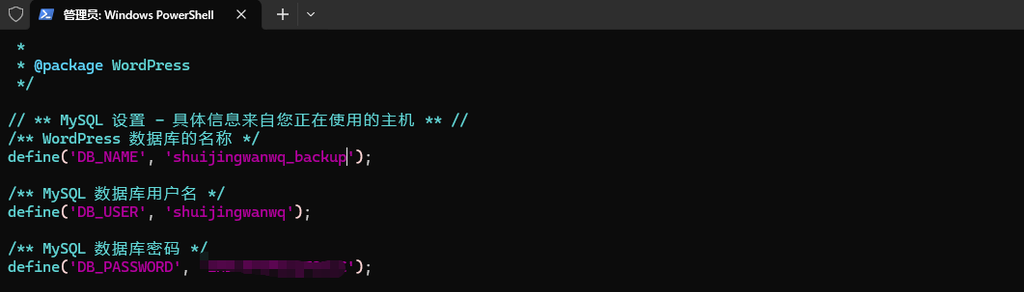
shuijingwanwq_backup (see Figure 9)IV. Post-Recovery Data Verification and Wrap-up
- Refresh the database table structure, verifying that the number of data tables and the field structure match the normal state;
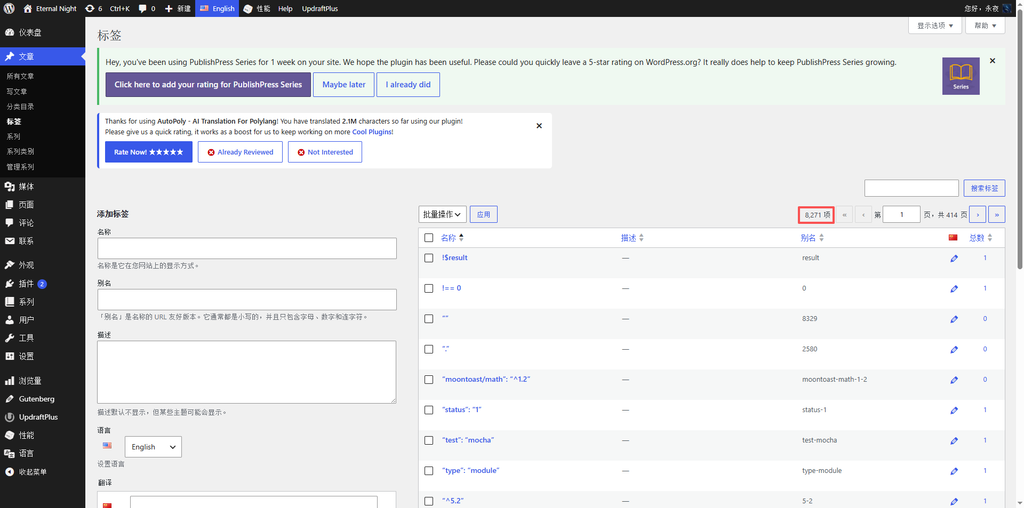
- Log in to the WordPress backend and check the statistical counts of Chinese and English tags respectively, which recovered to the pre-failure standard count of 8,271 (see Figure 10);
- Spot-check tag translation associations, article content, and basic site configuration to confirm there is no missing, scrambled, or duplicate data;
- Go to the W3 Total Cache plugin dashboard, clear all site caches with one click, refresh the website frontend pages, and verify that browsing and functional operations have all returned to normal.
V. Summary and Pitfall Avoidance Key Points for This RDS Recovery Practice
- Offline SQL backups and full instance backups have a time lag. For recent data corruption, prioritize point-in-time database and table recovery, which precisely restores data at a low cost without requiring a new instance;
- For database and table recovery, you must check the entire database plus all data tables. Checking only the database without checking the tables will not result in any data recovery;
- The system automatically generates a new backup database and does not overwrite the original online data, resulting in a high fault tolerance rate and eliminating the risk of secondary damage to the original data;
- After recovery, you must synchronize the database account permissions before modifying the website’s database parameters to avoid the website failing to connect to the database due to insufficient permissions;
- For high-risk database scripts involving batch deletions or loop queries, lock in a time point before execution and retain a traceable recovery point to minimize losses from data corruption;
- After recovery finishes, clear the entire site cache to eliminate data display anomalies caused by cache residue, ensuring data consistency between the backend and the frontend.