

⚠️ Experimental Notes (Important)
This article is the third in a series of practical guides, continuing the experimental technical explorations from (1): Minimalist Principles and Initial Build and (2): Minimal DNS Correction.
The current configuration is still in the validation phase:
- It is not guaranteed to work in all network environments.
- It is not recommended to copy it directly for production or critical business use.
- The main purpose is to verify the feasibility of the “minimal rule model + minimal DNS override”.
Network environments, DNS behavior, and VPS route quality vary by region, all of which affect the final outcome. If it runs stably in the future, I will remove this disclaimer in the final article and publish it as a reliable reference solution.
1. Problem Description
While using FlClash (an Android client based on the Clash Meta core) with a self-hosted ZgoCloud + Wstunnel + WireGuard setup on an Android phone, I encountered a typical issue:
- Play Store page: Opens and browses normally.
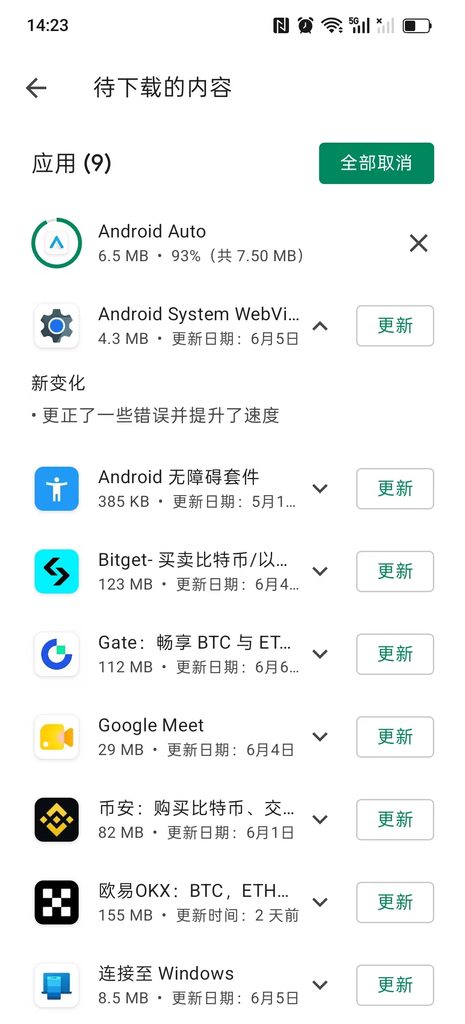
- App updates/downloads: After tapping “Update”, the app remains stuck in the “Pending” state with no download progress and eventually fails.
Meanwhile, the exact same configuration works perfectly on a Windows PC (Clash Verge Rev)—Google access is normal, and the Play Store web version opens fine. Only the Play Store app on the Android phone fails to complete downloads.
2. Problem Isolation
I have already provided a detailed analysis of this issue in another blog post, “Can’t Update Play Store Apps After Self-Hosting a VPN? Stop Tinkering with Wstunnel; the Problem Lies in Clash Routing Rules”. The core conclusion is:
The root cause is not Wstunnel or the network link, but rather insufficiently refined Clash routing rules.
The specific fix is to adjust the rule order—placing GEOSITE,google,Proxy before GEOSITE,private.
3. Solution
3.1 Core Change
Building on the v2 configuration, I added just one rule and adjusted its position:
rules:
  # Wstunnel 服务器 IP 强制直连
  - IP-CIDR,154.21.196.249/32,DIRECT,no-resolve

  # ===== 关键:Google 服务走代理(必须放在 GEOSITE,private 之前) =====
  - GEOSITE,google,Proxy

  # 本地/私有网络直连
  - GEOSITE,private,DIRECT
  - GEOIP,private,DIRECT,no-resolve
...3.2 Why Place It Before GEOSITE,private?
Testing revealed that placing GEOSITE,google,Proxy before GEOSITE,private restores Play Store downloads to normal; placing it after GEOSITE,cn has no effect.
3.3 Final Configuration File (v3)
The complete configuration has been uploaded to GitHub: shuijingwan/clash-config
# ==============================================
# ZgoCloud + Wstunnel + WireGuard
# MetaCubeX 极简稳定版 v3 (Google Play 优化)
# 兼容:Clash Verge Rev / FlClash
#
# 特点:
# - 最小化 DNS 覆写(仅防污染)
# - 不使用 SMTP / YouTube 特殊规则
# - 基于 GEOSITE + GEOIP
# - 结构最小化,便于排错
#
# 调整:将 GEOSITE,google 前置到 private 之前,
#       确保 Google 服务优先走代理(实测可解决 Play 下载问题)。
# ==============================================

# ----- 通用设置 -----
profile:
  store-selected: true # 记住用户在 Proxy 组中手动选择的节点(重启后不丢失)

# ----- DNS 最小覆写(防污染) -----
dns:
  # 国内域名解析:使用阿里公共 DNS over HTTPS,直连不经过代理
  nameserver:
    - https://dns.alidns.com/dns-query

  # 【关键】让所有 DNS 查询(特别是 fallback)都通过代理组 Proxy 发出,避免本地 DNS 污染
  proxy: Proxy

  # 境外域名解析:使用 Cloudflare DNS over TLS,解析结果由代理隧道保护
  fallback:
    - tls://1.1.1.1:853

  # 只让非中国 IP 的域名使用 fallback,国内域名强制走 nameserver
  fallback-filter:
    geoip: true
    geoip-code: CN

# ----- 代理节点定义 -----
proxies:
  - name: ZgoCloud-WG # 节点名称,可自定义
    type: wireguard # 类型:WireGuard
    server: 127.0.0.1 # 【必须修改】WireGuard 服务器的地址(此处为本地 wstunnel 映射端口)
    port: 51820 # 【必须修改】WireGuard 端口

    ip: x.x.x.x # 【必须修改】分配给本机的 WireGuard 内网 IP

    public-key: xxx # 【必须修改】服务器公钥
    private-key: xxx # 【必须修改】本机私钥
    pre-shared-key: xxx # 【必须修改】预共享密钥

    udp: true # 启用 UDP 转发
    mtu: 1280 # MTU,若遇部分网站卡顿可尝试调整为 1200 或 1000

# ----- 代理组 -----
proxy-groups:
  - name: Proxy # 代理组名称,被分流规则引用
    type: select # 类型:手动选择
    proxies:
      - ZgoCloud-WG # 主代理节点
      - DIRECT # 直连(不走代理)

# ----- 分流规则(基于地理数据集) -----
rules:
  # Wstunnel 服务器 IP 强制直连,避免隧道自身流量回环(no-resolve 表示仅匹配 IP 规则,不触发 DNS 解析)
  - IP-CIDR,154.21.196.249/32,DIRECT,no-resolve # 【必须修改】替换为你的 Wstunnel 服务器公网 IP

  # ===== 关键:Google 服务走代理(必须放在 GEOSITE,private 之前) =====
  - GEOSITE,google,Proxy

  # 本地/私有网络直连
  - GEOSITE,private,DIRECT
  - GEOIP,private,DIRECT,no-resolve

  # 中国大陆域名和 IP 直连,保证国内访问速度
  - GEOSITE,cn,DIRECT
  - GEOIP,CN,DIRECT,no-resolve

  # 所有非中国大陆域名走代理
  - GEOSITE,geolocation-!cn,Proxy

  # 未匹配到任何规则的流量,默认走代理(防止泄漏)
- MATCH,Proxy4. Verification Results
After modifying the configuration and reloading Clash:
| Verification Item | Result |
|---|---|
| Play Store page | ✅ Loads normally; browsing is unaffected |
| App downloads | ✅ Progress bar appears normally with stable speed |
| Google web access | ✅ Normal |
Checking the real-time request logs in FlClash, all Play Store-related requests go through the proxy, and downloads proceed normally:
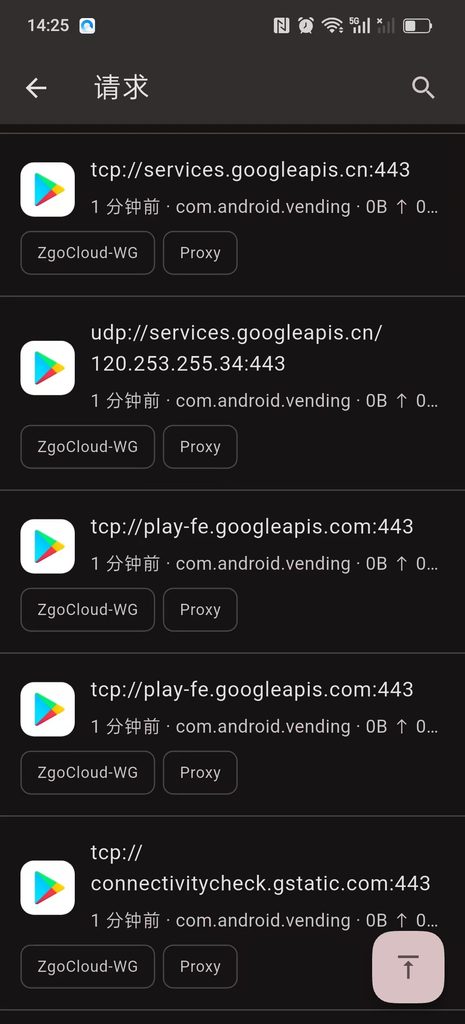
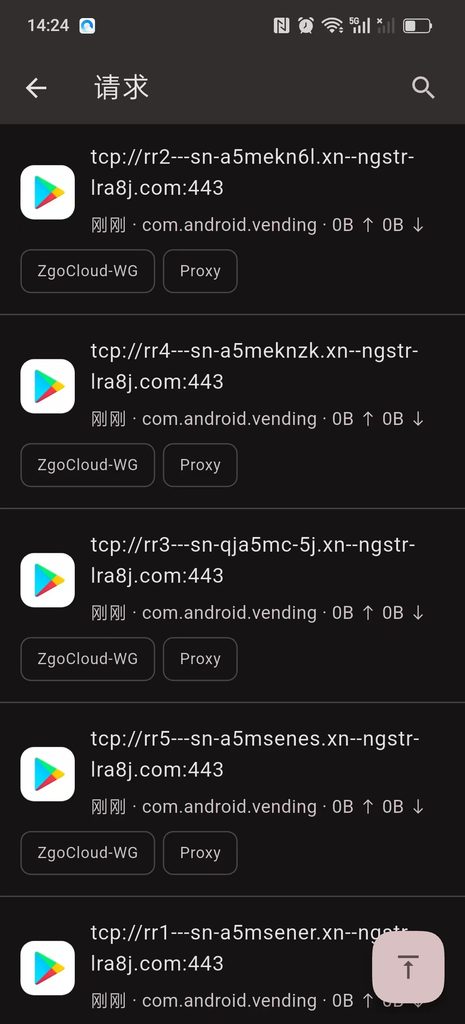
tcp://play-fe.googleapis.com:443  → ZgoCloud-WG / Proxy
tcp://rr2---sn-a5mekn6l.xn--ngstr-Ira8j.com:443 → ZgoCloud-WG / Proxy
tcp://services.googleapis.cn:443  → ZgoCloud-WG / Proxy
tcp://connectivitycheck.gstatic.com:443 → ZgoCloud-WG / ProxyThis is exactly the expected behavior: the GEOSITE,google rule identifies Google-related domains as proxy traffic, establishing the complete communication link for the Play Store and thereby restoring downloads.
5. Summary
Looking back at the entire troubleshooting process, the biggest lesson learned is:
Do not prematurely attribute the problem to the underlying network.
Although Wstunnel involves a longer link, it is not the fundamental cause of Play Store updates getting stuck. The real issue lies in the order of the Clash routing rules.
Ultimately, only the position of a single configuration line was changed—placing GEOSITE,google,Proxy before GEOSITE,private. This is the power of “minimalist configuration”: the problem was a rule ordering issue, not a need to pile on complex DNS overrides or external rule sets.
The complete code for the three configurations in this series has been uploaded to GitHub:
👉 shuijingwan/clash-config
Feel free to Star, Fork, or submit an Issue for discussion.
Related Reading: