

While adjusting my blog recently, I noticed a minor detail that affects the reading experience.
My blog uses the WordPress Twenty Twenty-Five theme. By default, links within the post body are not clearly distinguishable from regular text.
For example, in one post, I linked to the previous article:
Minimalist Remote Job Board: 10 Websites + 5 TG Channels + 2 Discovery Sources for PHP / Go Dual-Stack Backends
Although this text actually contains a link, it is almost impossible to spot at a glance on the page.

For readers, links without distinct styling are easy to miss, along with the related context. Since blog posts frequently reference one another, invisible links disrupt the reading flow and overall on-site browsing experience.
Initial Attempt
Initially, I considered directly modifying the styles for all links within the post content area:
.entry-content a {
    color: #503aa8;
    text-decoration: none;
    border-bottom: 1px solid rgba(80,58,168,.35);
}

.entry-content a:hover {
    color: #3e2d84;
    border-bottom-color: #503aa8;
}
This approach did make the links obvious.
However, I quickly noticed an issue: the scope of .entry-content a was too broad.
It affected not only standard links in body paragraphs but also links in other components within the content area, such as:
- Series article lists;
- Category components;
- Table of contents;
- Other blocks embedded in the post;
- CTA or recommendation modules.
For instance, titles in the series article list also displayed a purple underline on hover, which looked visually inconsistent.
Therefore, this approach was not precise enough.
Final Solution
Later, I narrowed down the selector scope so it only applied to standard text links within body paragraphs:
/* 仅正文段落中的普通链接 */
.entry-content p a {
    color: #503aa8;
    text-decoration: none;
    transition: color .2s ease;
}

.entry-content p a:hover {
    color: #3e2d84;
    text-decoration: underline;
}
The key point of this solution is:
.entry-content p a
It only matches links within the post’s body paragraphs.
In other words, it primarily affects content like this:
<p>
相比 V1 <a href="...">极简远程求职看板:PHP / Go 双栈后端的 10 个网站 + 5 个 TG 频道 + 2 个发现源</a>,每天频繁刷新招聘网站并没有带来更多合适的机会。
</p>
While leaving components like series article lists, category modules, and navigation menus unaffected.
Final Effect
After the modification, body links appear purple in their normal reading state:
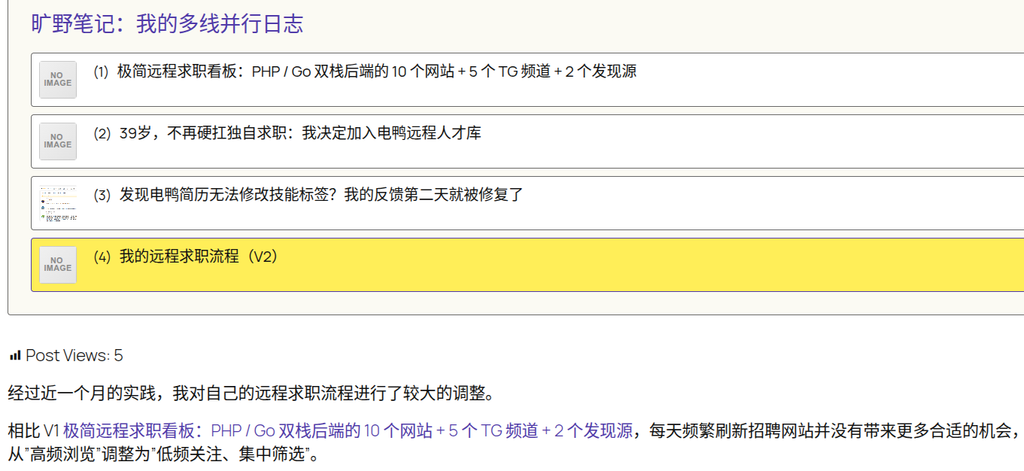
This allows readers to immediately recognize the text as clickable.
When hovering over the link, the color darkens slightly and an underline appears:

This effect is fairly restrained; it does not disrupt the body text layout and aligns with most users’ expectations for link interactions.
Why Use #503aa8?
The #503aa8 used here is not a randomly chosen color.
My blog uses the Twenty Twenty-Five theme, and #503aa8 is exactly Accent 3 from the theme editor’s color palette.
I have already reused this color in multiple places, such as:
- Dates with published posts in the calendar;
- Citation links within the body text;
- Other elements that need to stand out without being too prominent.
The benefit of this approach is that the site avoids accumulating too many scattered colors, keeping the overall visual style more unified.
Regarding CSS Variables
From a long-term maintenance perspective, the ideal approach is to use the CSS variables provided by the theme rather than hardcoding color values.
For example:
.entry-content p a {
color: var(--wp--preset--color--accent-3);
}
This way, if “Accent 3” is modified in the theme editor later, all locations referencing this variable will update automatically.
However, my blog already contains a large amount of custom CSS, and I currently have no plans to systematically convert them all to variables. Therefore, I opted to use the specific color value for now:
#503aa8
When I eventually conduct a unified cleanup of the site’s custom CSS, I will consider gradually replacing these color values with theme variables.
Retained CSS
The final code retained this time is as follows:
/* 仅正文段落中的普通链接 */
.entry-content p a {
    color: #503aa8;
    text-decoration: none;
    transition: color .2s ease;
}

.entry-content p a:hover {
    color: #3e2d84;
    text-decoration: underline;
}
Summary
Although this adjustment was just a few lines of CSS, it solved a very practical problem:
Body links need to be recognizable to readers without affecting other components like series lists, category modules, and navigation menus.
The final solution applies style enhancements exclusively to standard links within body paragraphs.
This improves the reading experience while avoiding the issue of global CSS having too broad an impact.
For WordPress theme style adjustments, this is an important principle:
It is better to write CSS selectors precisely rather than broadly targeting the entire content area just for convenience.
This is especially true for block themes like Twenty Twenty-Five, where the post content area can contain many different types of blocks and components. If a selector is too broad, it easily fixes a problem in one place while creating new style issues in another.