

Recently, I have started seriously considering the monetization of my tech blog.
For over a decade, I have used my blog as a tool for technical notes and knowledge consolidation, primarily recording practical experiences with PHP, Go, Linux, MySQL, and WordPress. With changes in search traffic, the impact of AI on search behavior, and adjustments to my personal income structure, I have started looking for new revenue streams for the blog.
My main current areas of exploration include:
- Google AdSense
- Technical consulting services
- VPN-related services
- Affiliate Marketing
This time, I decided to take my first step into affiliate marketing, starting with BeWild.
Initial Idea: Adding an Invitation Link at the End of Articles
Initially, I referenced the approach used by many affiliate marketing websites.
At the end of an article about purchasing ChatGPT Plus, I added a section like this:
If this article was helpful, you can register for BeWild using my invitation link.
Purchasing through the invitation link does not increase your cost, and I will receive a referral bonus from the platform.
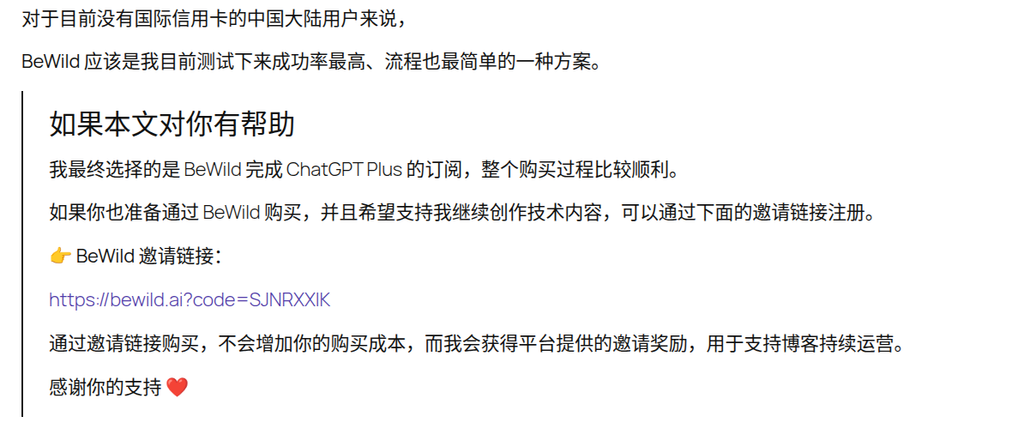
Formally, there was nothing wrong with this.
But after writing it, I felt something was off.
Because my blog has never been a coupon site or a shopping guide.
Readers come here mostly to:
- Read about real troubleshooting processes
- Review technical practice records
- Find the final solution
Not specifically to look for discount links.
If a large block of promotional content appeared at the end of every article, it would actually disrupt the overall reading experience.
A Key Issue: Users Do Not Receive Extra Discounts
I then revisited BeWild’s referral mechanism.
I found a practical issue:
When users purchase through my invitation link:
- They do not receive an additional discount
- They do not receive any bonus items
- They do not receive an exclusive offer
In other words:
Users do not directly benefit.
For many technical readers, what they care more about is:
Which solution works best?
Rather than:
Whose invitation code should I use?
This is different from scenarios like cryptocurrency exchange referral links or cloud service promotional campaigns.
Therefore, I started rethinking how to present referral links.
Final Decision: Only Add Referral Links at Key Decision Points
After several adjustments, I ultimately adopted an approach that better fits the style of a technical blog.
No more separate promotional sections.
No more large blocks of invitation text.
Instead, I add referral links right where the article actually involves a decision.
For example:
Final choice: BeWild
And:
I ultimately completed the ChatGPT Plus subscription on BeWild, and the entire purchase process went smoothly.
These two positions are exactly the information readers care about most.
Because when users search for this article, they are essentially looking for:
What solution did you actually end up using?
Given this, integrating the referral link naturally into the decision conclusion makes more sense.
Designing a Dedicated Style for Referral Links
To distinguish referral links from regular links, I specifically designed a new link style.
The goals were clear:
- More prominent than regular links
- No buttons
- No banner ads
- Maintain the technical blog style
The final result is as follows:
- Uses the blog’s unified accent color
- Text has a dashed underline
- Automatically displays an external link arrow
- Arrow size is reduced so it doesn’t steal visual focus
- Color changes on hover
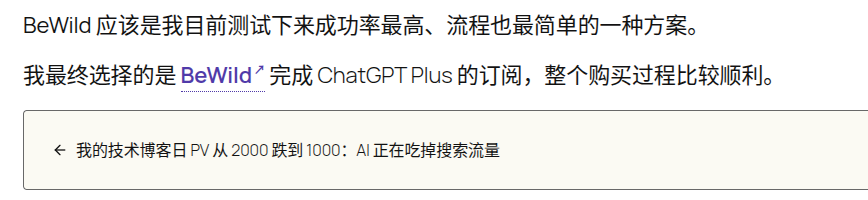
Final CSS:
/* ==========================================================================
   ★ 联盟营销 / 推荐链接
   ========================================================================== */

.recommend-link {
    color: #503aa8 !important;
    font-weight: 600;
    text-decoration: none !important;

    border-bottom: 1px dotted currentColor;
    padding-bottom: 1px;
}

.recommend-link::after {
    content: " ↗";
    font-size: 0.5em;
    vertical-align: super;
}

.recommend-link:hover {
    color: #3e2d84 !important;
}
Usage in WordPress Gutenberg:
<a href="https://example.com"
   target="_blank"
   rel="noopener"
   class="recommend-link">
    ProductName
</a>
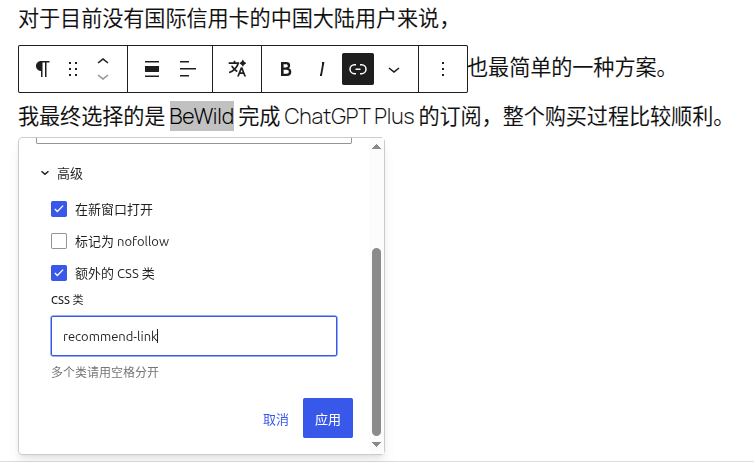
This way, there is no need to switch to source code mode to add extra span tags, and maintenance costs are lower.
Referral Link Usage Guidelines (v1.0)
After this practice, I established the first version of guidelines for my blog.
Referral links are applicable to
- Products I have actually used
- Services I am willing to recommend to readers
- Tools highly relevant to the article’s topic
For example:
- BeWild
- ZoogVPN
- Vultr
- DigitalOcean
Preferred Locations for Referral Links
First priority:
Final choice
Second priority:
Actual purchase or usage result
For example:
I ultimately chose BeWild.
I ultimately completed the ChatGPT Plus subscription on BeWild.
Not Recommended Locations
- Product screenshot captions
- Repeatedly occurring product names
- Feature introduction sections
- Parameter description sections
Quantity Control per Article
General rule:
No more than 2 referral links.
This prevents the entire article from turning into an advertising page.
Future Plans
To systematically manage affiliate marketing programs, I have started using NocoDB to build an affiliate marketing database.
Currently, the following have been entered:
- BeWild
- ZoogVPN
- Vultr
- DigitalOcean
Future plans include:
- Creating a resource recommendation page
- Tracking affiliate link clicks
- Recording affiliate revenue data
- Continuously optimizing the referral method
Final Thoughts
For a technical blog, affiliate marketing does not necessarily mean stuffing ads and promotional links everywhere.
I prefer a simpler approach:
When I have actually used a product and am willing to recommend it to others, I leave a link at the most critical decision point.
As for whether users click or purchase, I leave that to the content itself to determine.
This is my first step on the path of affiliate marketing for my technical blog.