

🧭 1. Background: Why a Second Optimization Article is Needed
In the previous article, Cloudflare SSL/TLS and Cache Rules Configuration in Practice, I completed the basic rule setup, including:
✔ 5 Core Rules Completed:
- Bypass cache for WordPress admin dashboard
- Bypass cache for WordPress login page
- Bypass cache for WordPress REST API
- Long-term caching for static assets (CSS / JS)
- Static asset cache optimization
🚀 New Goals in This Article:
Building on the existing foundation, I am adding one key rule:
🧠 HTML Page Caching (SEO-Safe Optimization)
🧩 2. Overall Architecture Upgrade Overview
WordPress (Content Origin)
        ↓
Cloudflare Plugin (Auto Purge)
        ↓
Cache Rules (Fine-grained Control Layer)
        ↓
Cloudflare Edge Cache (HIT/MISS)⚙️ 3. Cloudflare Recommended Configuration (Apply Recommended)
📌 Figure 1: WordPress Cloudflare Plugin Settings Entry

📌 Figure 2: Clicking Apply Recommended Cloudflare Settings for WordPress

🧠 Key Notes (Important Correction)
This action:
❗ Does not enable all available settings
❗ Does not override Cache Rules
📌 Figure 3: Prompt indicating “All available settings are enabled”

🧠 Key Conclusions:
- Recommended configuration ≠ enabling everything; I manually enabled all settings in the Cloudflare dashboard myself
- Recommended configuration = Zone Settings API write
🚨 4. Cloudflare Plugin Exception (Key Pitfall)
📌 Figure 4: WordPress Cloudflare Settings Page Loading Exception (Forbidden)

❌ Symptom:
- Page stuck on Loading
- Console error:
Forbiddenr.body.result is null🧠 Analysis Process:
Via API call:
/wp-admin/admin-ajax.php?action=cloudflare_proxyReturns:
{
  "result": null,
  "success": false,
  "message": "Forbidden"}
}🔍 Root Cause Analysis:
Missing Cloudflare API permissions
✔ Resolution Process:
Gradually added permissions:
- Zone Read
- Zone Settings Read/Write
- Cache Purge
- DNS Read (auxiliary API)
📌 Figure 5: Plugin returns to normal after permission fix, final permission configuration

⚙️ 5. Cloudflare Dashboard Recommended Configuration Verification
📌 Figure 6: Speed page configuration takes effect

📌 Figure 7: Caching page update time record

📌 Figure 8: Security page update record

🧠 Key Conclusions:
- Apply Recommended actually modifies Zone Settings
- Speed / Caching / Security are all written to
🚀 6. Auto Purge Content On Update (Key Configuration)
📌 Figure 9: Auto Purge Content On Update enabled

🧠 Purpose:
- Publish article → auto purge
- Update article → auto refresh cache
- Comment → trigger cache update
🧩 7. New Core Rule: HTML Page Caching (SEO-Safe)
📌 Figure 10: New rule added in Cache Rules

🧠 Rule Details:
(not starts_with(http.request.uri.path, "/wp-admin/")
and not starts_with(http.request.uri.path, "/wp-login.php")
and not starts_with(http.request.uri.path, "/wp-json/")
and not starts_with(http.request.uri.path, "/feed/")
and not starts_with(http.request.uri.path, "/xmlrpc.php")
and not http.cookie contains "wordpress_logged_in")🧠 Rule Explanation:
✔ Cache HTML pages (SEO optimization)
❌ Excluded:
- Admin dashboard
- Login page
- REST API
- Feed
- XML-RPC
❗ Key Point:
wordpress_logged_inUsed for:
🧠 Bypassing cache for logged-in users
🧠 8. Final Cache Strategy Closed Loop
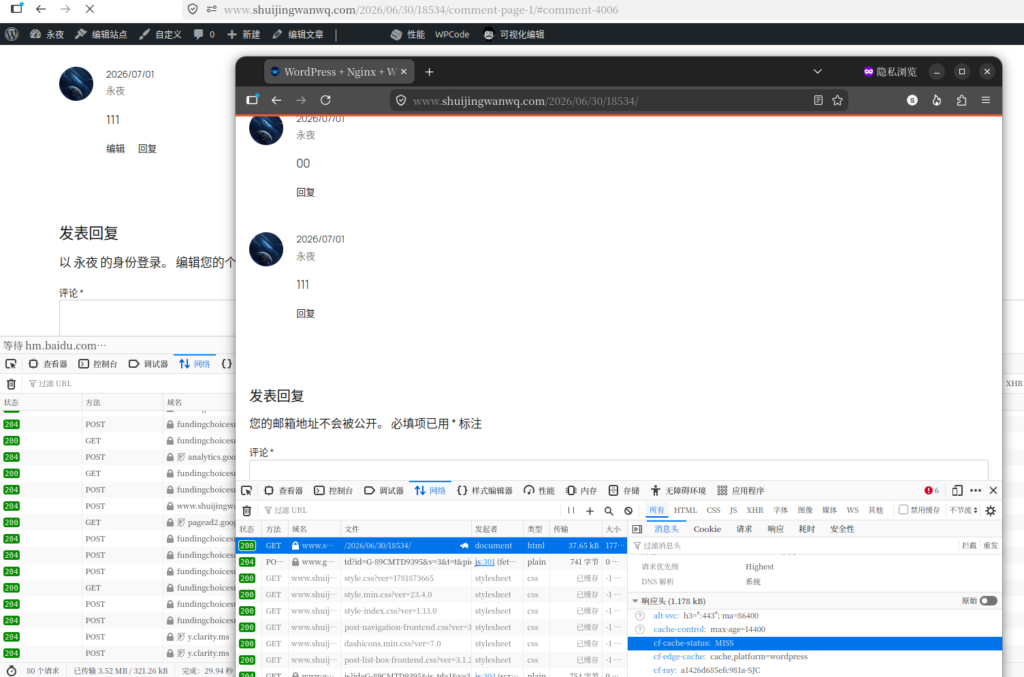
📌 Figure 11: cf-cache-status = HIT

📌 Figure 12: Comments take effect in real time
🔄 9. Complete Cache Flow
User visits page
        ↓
Cloudflare Cache Rules evaluation
        ↓
Logged-in user → bypass
Logged-out user → cache HTML
        ↓
Edge returns HIT
        ↓
WordPress triggers update via purge🚨 10. Key Pitfalls Summary
❌ 1. Misunderstanding Apply Recommended
Reality:
Does not enable all configurations
Does not modify Cache Rules
❌ 2. Plugin Forbidden Issue
Cause:
- Incomplete API Token permissions
❌ 3. Mistakenly Believing Cache Rules Can Be Omitted
Reality:
🧠 Cache Rules are the core control layer for the WordPress CDN
🧠 11. Final Architecture Summary
Cloudflare Recommended Configuration (Base Layer)
        ↓
Cache Rules (Business Control Layer)
        ↓
WordPress Auto Purge (Trigger Layer)
        ↓
Edge Cache (Performance Layer)🎯 12. Final Conclusion
🟢 Cloudflare Recommended Configuration:
✔ Provides baseline optimization
✔ Does not replace Cache Rules
🟢 Cache Rules:
✔ Controls login state / API / HTML caching
🟢 Auto Purge:
✔ Ensures real-time content updates
💡 Final One-Sentence Summary
🧠 The Cloudflare recommended configuration handles the “performance baseline,” Cache Rules handle “business correctness,” and Auto Purge handles “data consistency”