

Preface: Following Part 6 of this series, “Part 5: Complete Practical Record of Translating a WordPress Multilingual Blog to English (Polylang Plugin, with Pitfall Guide)”, Part 6 focused on the complete process of “translating existing Chinese blog posts into English”. In actual operations, however, we continuously add new Chinese articles—and these new articles come with new categories and tags. If you translate the article body directly, you will encounter issues like category/tag language mismatches, association failures, and frontend display anomalies. This post focuses on solving the “multilingual translation preparation for new Chinese articles”, highlighting: the pre-translation logic for new categories/tags, script-based tag copying techniques, manual category translation methods, and a minimalist “total count verification” trick to quickly spot missing translations. The entire process is demonstrated using the Polylang plugin, complete with screenshots (accurately annotating placeholder scenarios) to help you avoid all pre-translation pitfalls.
1. Prerequisite Understanding: When adding new articles, why must you translate categories and tags before the body?
Core logic: In a WordPress multilingual site (Polylang plugin), categories and tags are “global attributes”, and articles have an “associative binding” relationship with them. If you translate the article body first and then add the English translations for categories/tags later, it will cause:
– The article to fail associating with English categories/tags properly, making the frontend English site display “No categories” or “No tags”;
2. Preparation: Polylang Plugin Basic Configuration Check (Ensure categories and tags can be translated normally)
Before starting the translation of new categories/tags, you must first confirm that the Polylang plugin is configured correctly to avoid translation failures caused by basic setup issues. Focus on checking 3 core settings (continuing from the configuration in Part 6, supplementing what is needed for new scenarios).
2.1 Confirm Chinese and English languages have been added normally
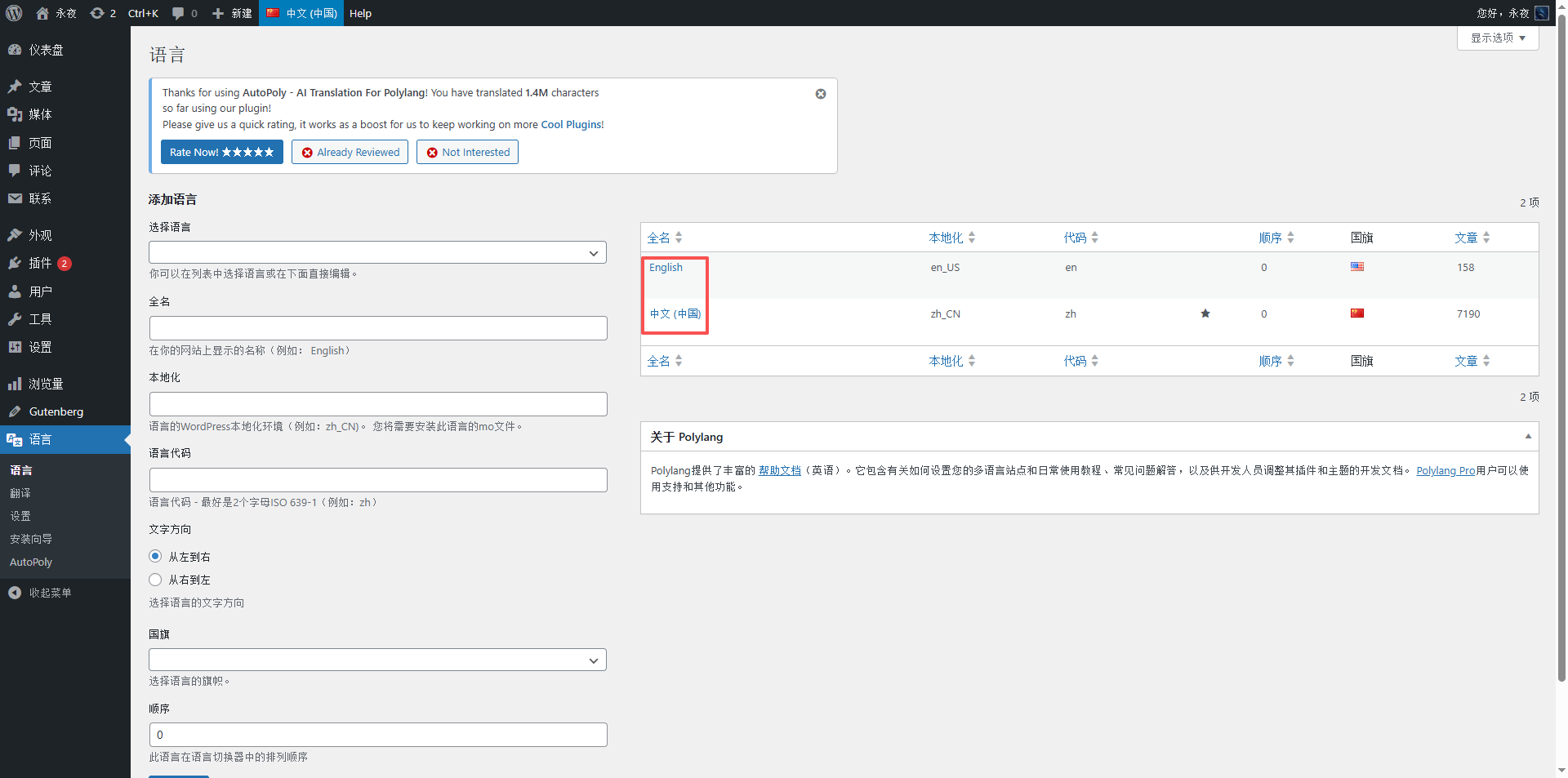
Operation path: WordPress Dashboard → Polylang → Languages → Confirm that “中文 (简体)” (Chinese, Simplified) and “English (United States)” have been added, and the default language is Chinese (matching the language of the new article).
Figure description (as in Figure 2): Screenshot of the Polylang language management page, annotating the Chinese and English language entries and the default language setting location.
2.2 Synchronization settings optimization (Practical application, addressing post format checkbox questions)
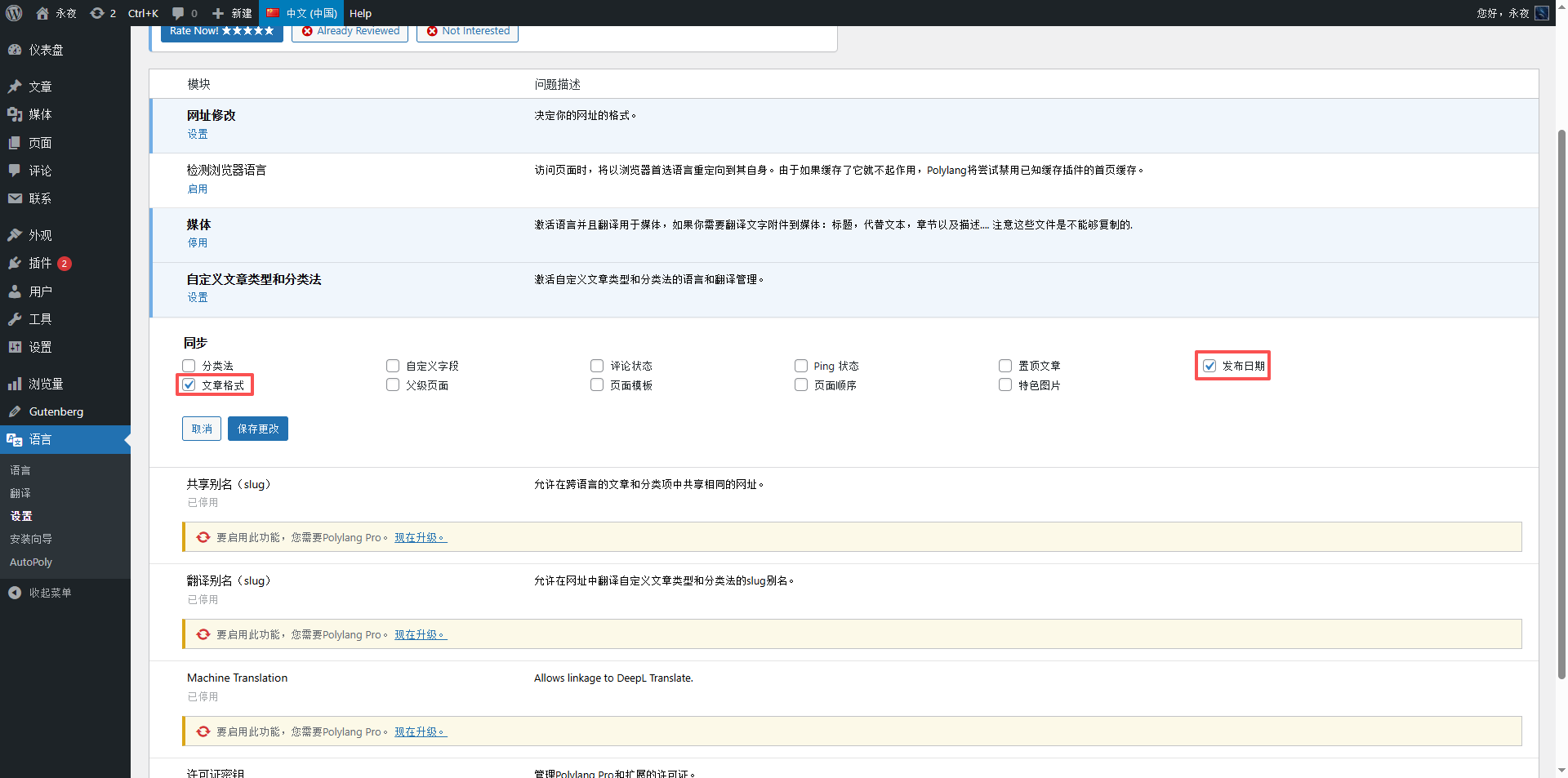
Operation path: WordPress Dashboard → Polylang → Settings → Synchronization. The synchronization options include: Taxonomies, Custom fields, Comment status, Ping status, Sticky posts, Published date, Post format, Parent page, Page template, Page order, Featured image (Note: There is no “Tags” option in the synchronization options). In practice, you do not need to check other synchronization options. When translating an article, categories and tags will automatically sync and associate; the English article will automatically match the categories and tags of the corresponding Chinese article without manual operation. This is a default feature of the Polylang plugin—when creating a new translation, it automatically copies metadata like categories and tags from the source article. Therefore, prioritize checking “Published date” in the sync settings to ensure the publish dates of Chinese and English articles match. Regarding the issue of inconsistent formats in the Classic Editor, practical verification shows that after checking the “Post format” sync option, newly translated English articles (whether using the Classic Editor or Gutenberg Editor) can maintain the same format as the Chinese source article. This completely resolves the Classic Editor format issue—just check it directly without additional testing; it will not affect other site configurations.
Figure description (as in Figure 3): Screenshot of the Polylang synchronization settings page, annotating the complete list of sync options (no Tags option), clearly marking the two required checkboxes “Published date” and “Post format”, and explaining the effects achieved after checking them (consistent dates, unified formats). You can operate directly without testing.
3. Core Practice: New Tag Translation (No need to manually complete one by one, PHP script assists with verification and copying)
Core rule: For new Chinese tags, the English version requires no manual translation; directly copy the Chinese tag name as-is (to avoid semantic deviation after translation and user search mismatches). In practice, you can use a PHP script to assist with this operation. The script can be run on the server, and its core functions are: query all tags under the Chinese language, automatically verify if corresponding English translations exist, and if not, automatically copy the Chinese tag as the English tag to complete it. This requires no manual searching or batch operations, making it highly efficient and precise. Example: A new Chinese article tag list includes “ColorOS, Google account security verification, security code, GMS, security and login, login to Google, Google Mobile Services, Google Services Framework, OnePlus 12, OnePlus 12”. You can quickly complete the English tag population via this script.
3.1 Step 1: Add Chinese tags and record them (Basic preparation)
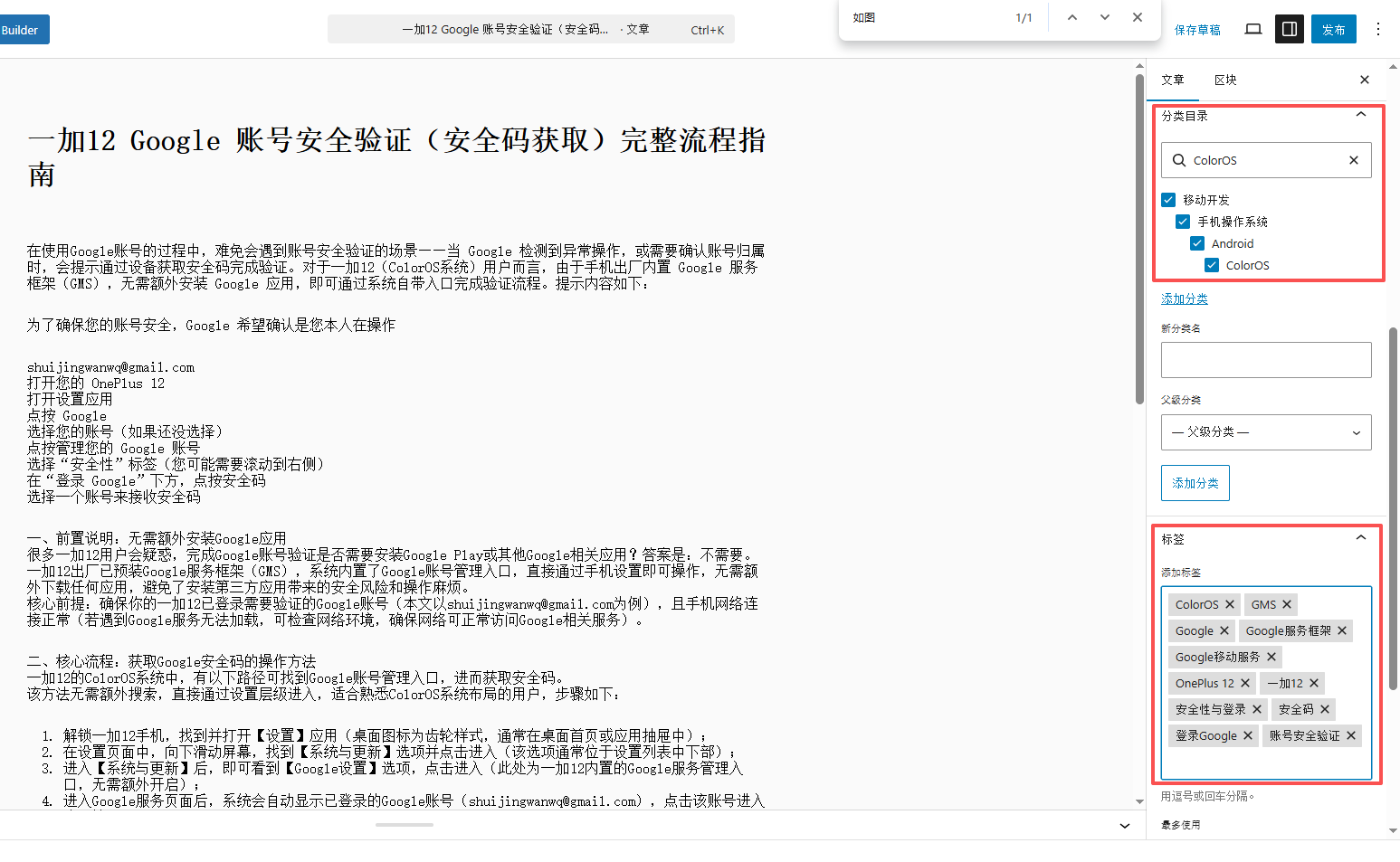
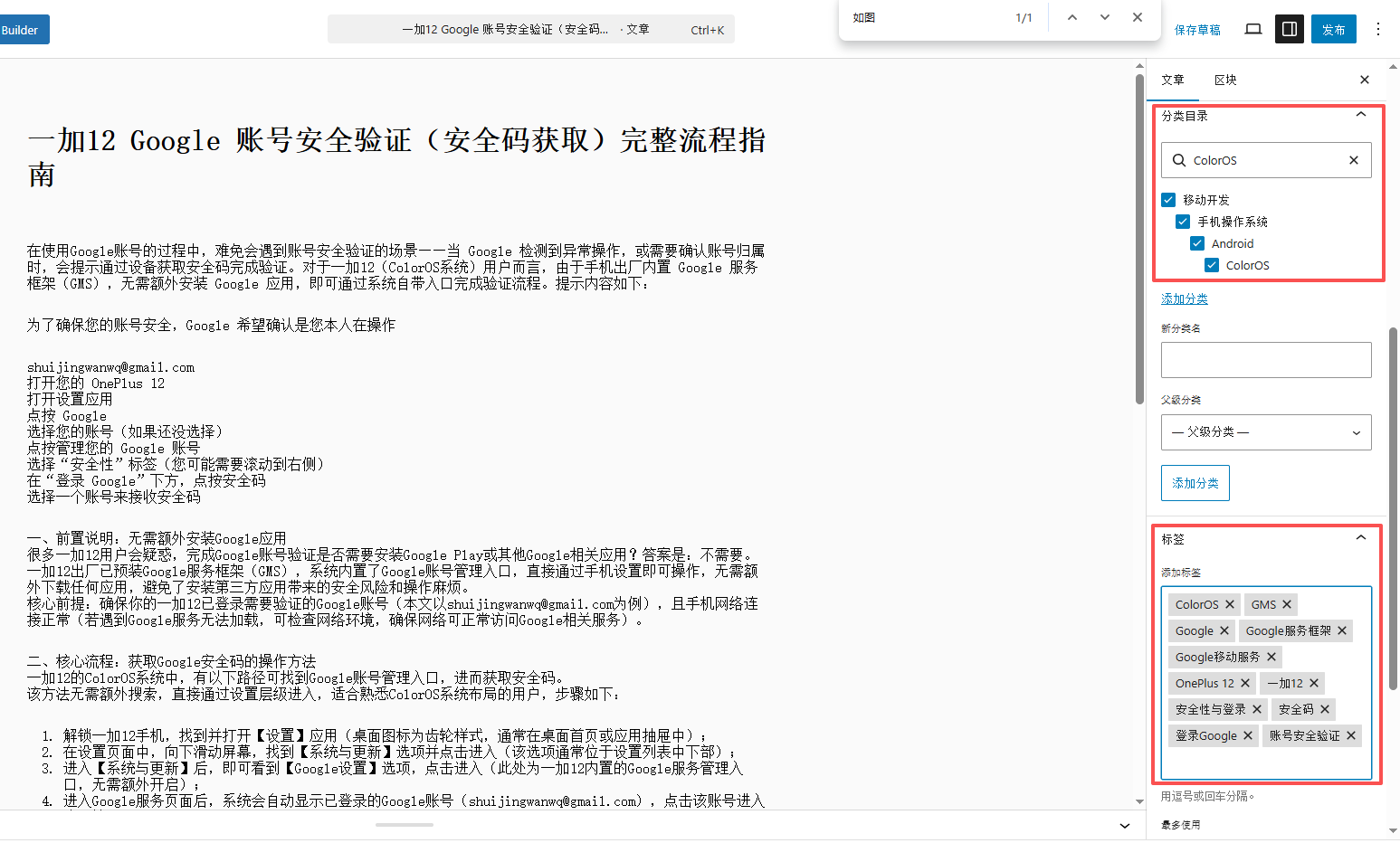
Operation path: When adding a new Chinese article, add the corresponding tags in the “Tags” input box on the article edit page (such as “ColorOS, Google account security verification” in the example), and save the article after adding. There is no need to manually record the tags; the script will automatically query all Chinese tags later, requiring no extra action.
Figure description (as in Figure 1): Screenshot of the “Tags” input box on the WordPress article edit page.
3.2 Step 2: Run the PHP script to automatically verify and populate English tags
Operation steps (script execution related):
3.2.1. Step 1: Prepare the PHP script (write or obtain it yourself), confirm the script runs properly, with core functions being “query Chinese tags, verify English tags, automatically copy and populate”;
polylang-batch-zh-to-en-tags.php
<?php
if (php_sapi_name() !== 'cli') {
    die("❌ 请在命令行运行\n");
}

require __DIR__ . '/wp-config.php';
global $wpdb, $polylang;

// 配置:一次处理多少个,你可以根据自己的服务器调整
$per_page = 1000;
// 配置:源语言和目标语言,以后其他语言直接改这里就好
$source_lang = 'zh';
$target_lang = 'en';

echo "🚀 开始批量处理所有{$source_lang}标签,自动添加{$target_lang}翻译(分页模式)...\n\n";

$processed = 0;
$skipped = 0;
$offset = 0;

while (true) {
    // 分页拿源语言标签
    $terms = get_terms([
        'taxonomy' => 'post_tag',
        'lang' => $source_lang,
        'hide_empty' => false,
        'number' => $per_page,
        'offset' => $offset,
    ]);

    if (is_wp_error($terms) || empty($terms)) {
        break;
    }

    $current_count = count($terms);
    echo "📊 正在处理第 " . ($offset + 1) . " - " . ($offset + $current_count) . " 个标签...\n";

    foreach ($terms as $term) {
        $source_id = $term->term_id;
        $name = $term->name;
        $slug = $term->slug;

        // 检查是不是已经有目标语言的翻译了
        $target_id = pll_get_term($source_id, $target_lang);
        if ($target_id) {
            $skipped++;
            continue;
        }

        echo "🔰 正在处理: {$name} (ID: {$source_id})\n";

        // 创建目标语言标签,绕过slug重复检查
        $wpdb->insert($wpdb->terms, [
            'name' => $name,
            'slug' => $slug,
            'term_group' => 0
        ]);
        $new_target_id = $wpdb->insert_id;

        // 目标语言标签的taxonomy
        $wpdb->insert($wpdb->term_taxonomy, [
            'term_id'     => $new_target_id,
            'taxonomy'    => 'post_tag',
            'description' => '',
            'parent'      => 0,
            'count'       => 0
        ]);

        // 设置目标语言
        $polylang->model->term->set_language($new_target_id, $target_lang);

        // 绑定翻译
        $polylang->model->term->save_translations($source_id, [
            $target_lang => $new_target_id
        ]);

        $processed++;
    }

    $offset += $per_page;
    unset($terms);
    gc_collect_cycles();
}

echo "\n🎉 全部处理完成!\n";
echo "📊 统计:\n";
echo "   已处理新标签: {$processed}\n";
echo "   已跳过已有翻译: {$skipped}\n";
echo "\n✅ 所有标签都已经处理完毕,和手动添加的完全一样!\n";3.2.2. Step 2: Upload the PHP script to the corresponding server directory of your WordPress site (ensure the script has the appropriate execution permissions to avoid failures);
3.2.3. Step 3: Run the PHP script on the server and wait for it to finish executing (execution time depends on the number of tags; if the number is small, it completes in seconds);
3.2.4. Step 4: After the script finishes executing, go to the WordPress dashboard. No manual operation is needed; the script has automatically populated all unsynchronized English tags.
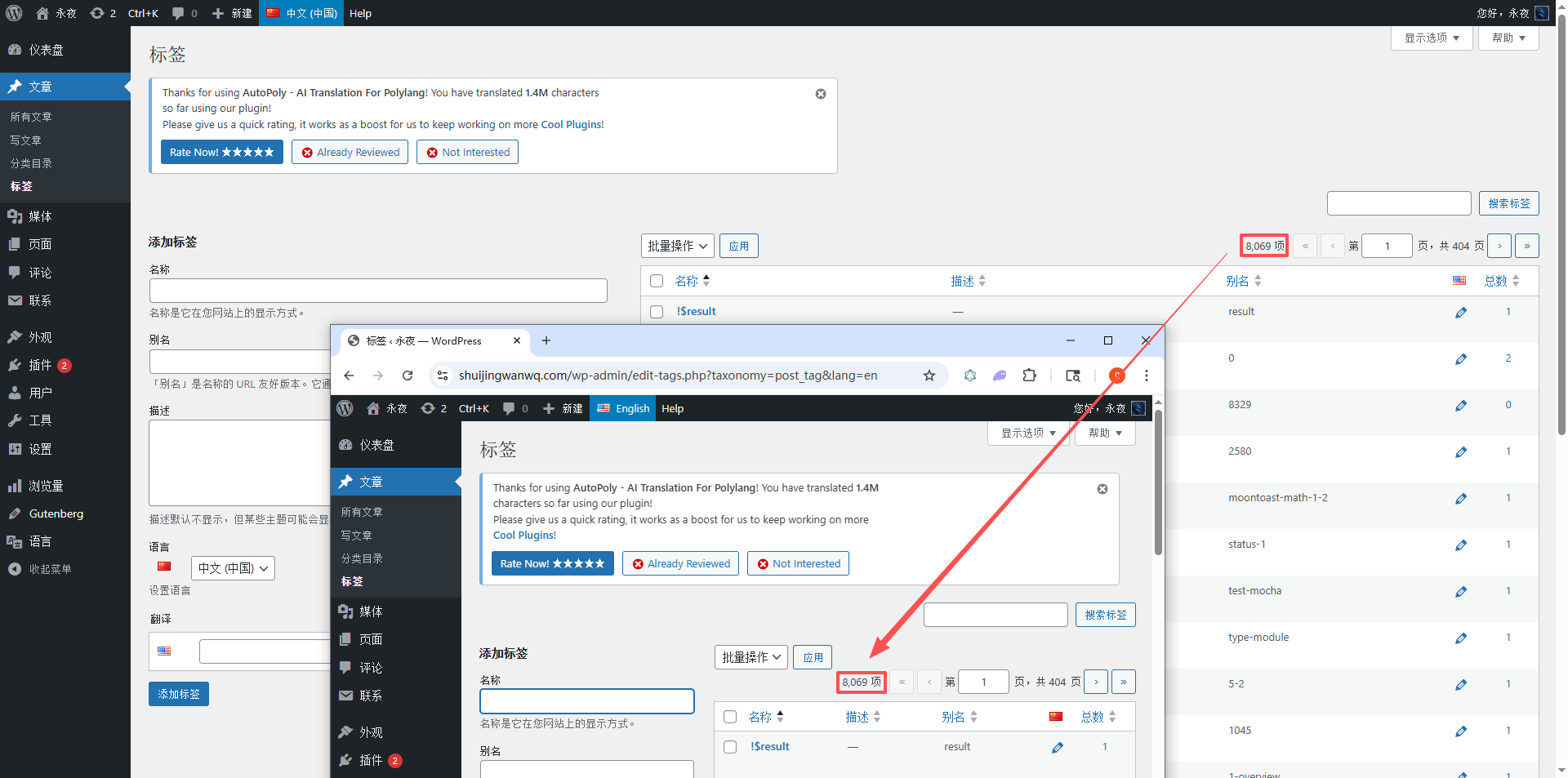
As shown in Figure 4: Split-screen comparison screenshot of the Chinese/English tag management pages, annotating the difference in total counts between the two, demonstrating the scenario where “English total < Chinese total", making it clear that new tags need to be populated;
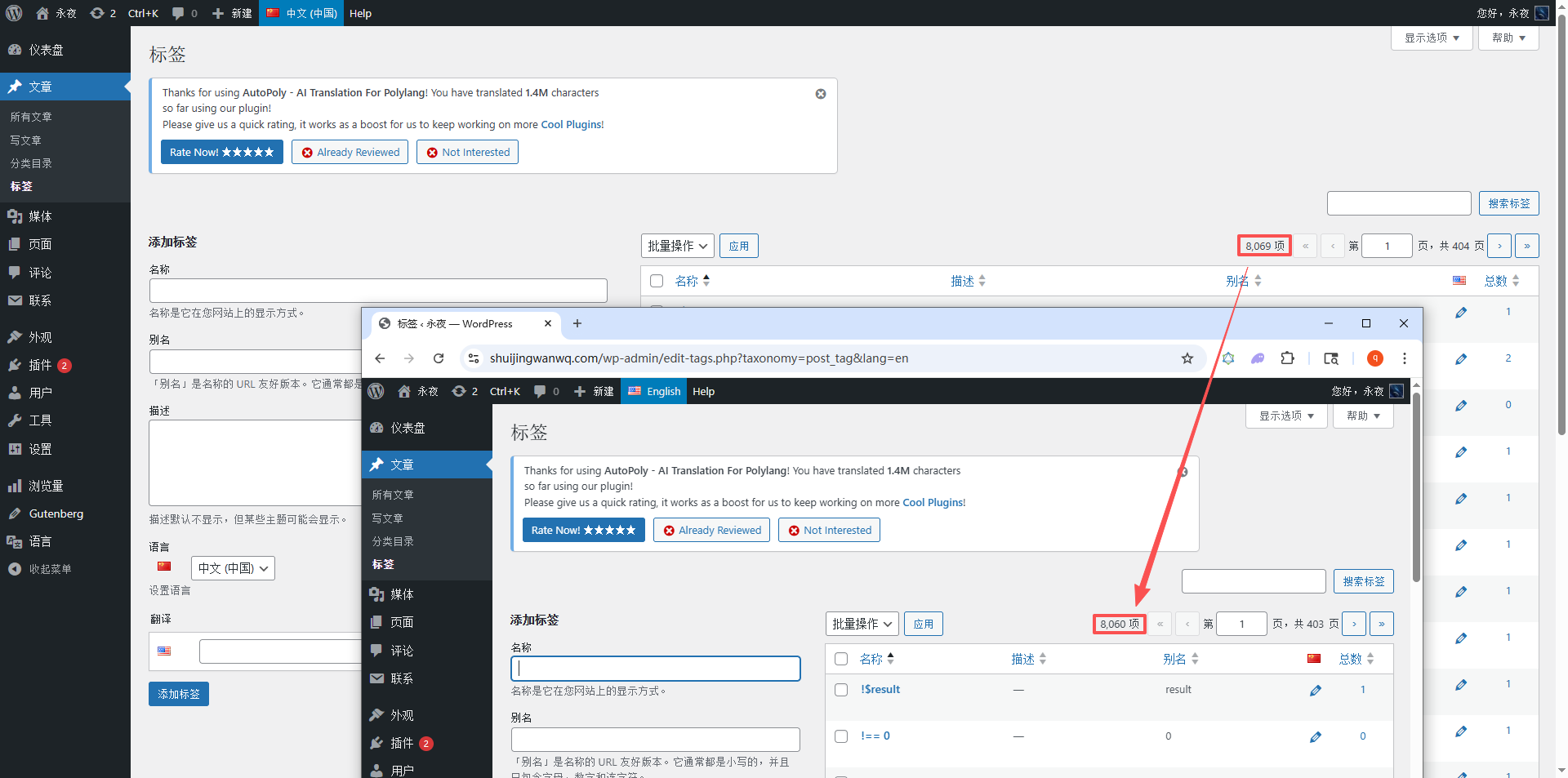
Core operation: Upload the prepared PHP script to the server and run it. The script will automatically perform the following operations without manual intervention: 1. Query all tags under the Chinese language (including the newly added article tags); 2. Verify each Chinese tag one by one to confirm whether a tag with the same name exists under the English language (no translation needed, match by name directly); 3. If it detects that there is no corresponding tag in English, the script will automatically copy the Chinese tag, add it to the English tag list as an English tag, and complete the population.
3.3 Step 3: Verify after tag synchronization (Ensure nothing is missed)
Operation path: WordPress Dashboard → Posts → Tags → Switch to the English language (language switch button at the top), check the synchronized tag count and names, and confirm they are exactly consistent with the new Chinese tags.
Figure descriptions (2 in total):
3.3.1. As shown in Figure 5: Screenshot of the interface running the PHP script on the server, annotating the script execution command, execution status (such as “Processing” or “Processing complete”), and the success prompt message;
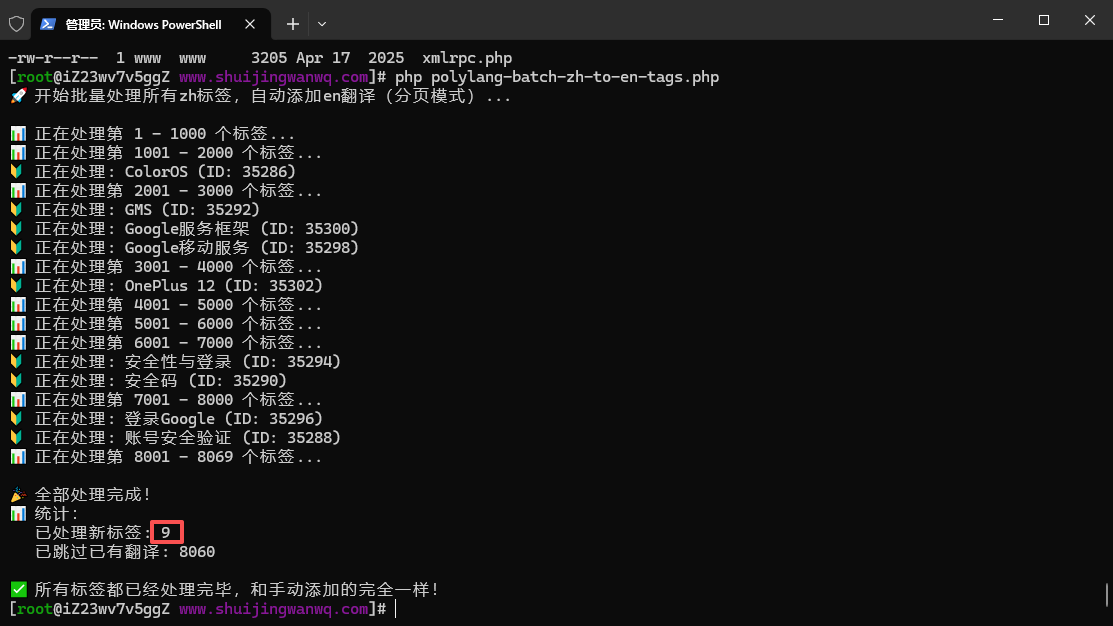
[root@iZ23wv7v5ggZ www.shuijingwanwq.com]# php polylang-batch-zh-to-en-tags.php
🚀 开始批量处理所有zh标签,自动添加en翻译(分页模式)...

📊 正在处理第 1 - 1000 个标签...
📊 正在处理第 1001 - 2000 个标签...
🔰 正在处理: ColorOS (ID: 35286)
📊 正在处理第 2001 - 3000 个标签...
🔰 正在处理: GMS (ID: 35292)
🔰 正在处理: Google服务框架 (ID: 35300)
🔰 正在处理: Google移动服务 (ID: 35298)
📊 正在处理第 3001 - 4000 个标签...
🔰 正在处理: OnePlus 12 (ID: 35302)
📊 正在处理第 4001 - 5000 个标签...
📊 正在处理第 5001 - 6000 个标签...
📊 正在处理第 6001 - 7000 个标签...
🔰 正在处理: 安全性与登录 (ID: 35294)
🔰 正在处理: 安全码 (ID: 35290)
📊 正在处理第 7001 - 8000 个标签...
🔰 正在处理: 登录Google (ID: 35296)
🔰 正在处理: 账号安全验证 (ID: 35288)
📊 正在处理第 8001 - 8069 个标签...

🎉 全部处理完成!
📊 统计:
   已处理新标签: 9
   已跳过已有翻译: 8060

✅ 所有标签都已经处理完毕,和手动添加的完全一样!3.3.2. As shown in Figure 6: Screenshot of the English tag management page after script execution, annotating the automatically populated tag list, confirming it is exactly consistent with the new Chinese tags, requiring no manual completion.
4. Core Practice: New Category Translation (Requires manual translation, search in advance + entry)
Core rule: Unlike tags, categories need to reflect the site’s section hierarchy and the accuracy of English semantics. They cannot be directly copied from Chinese and require manual translation (refer to industry English conventions to avoid semantic deviations caused by literal translation). You must also search in the Polylang dashboard in advance to confirm that the category has not been translated before entering it.
4.1 Step 1: Record new Chinese categories (Precise positioning to avoid missing translations)
Figure description (as in Figure 1): Screenshot of the “Categories” input box on the WordPress article edit page.
4.2 Step 2: Search whether the category has already been translated (Key step to avoid duplicate translation)
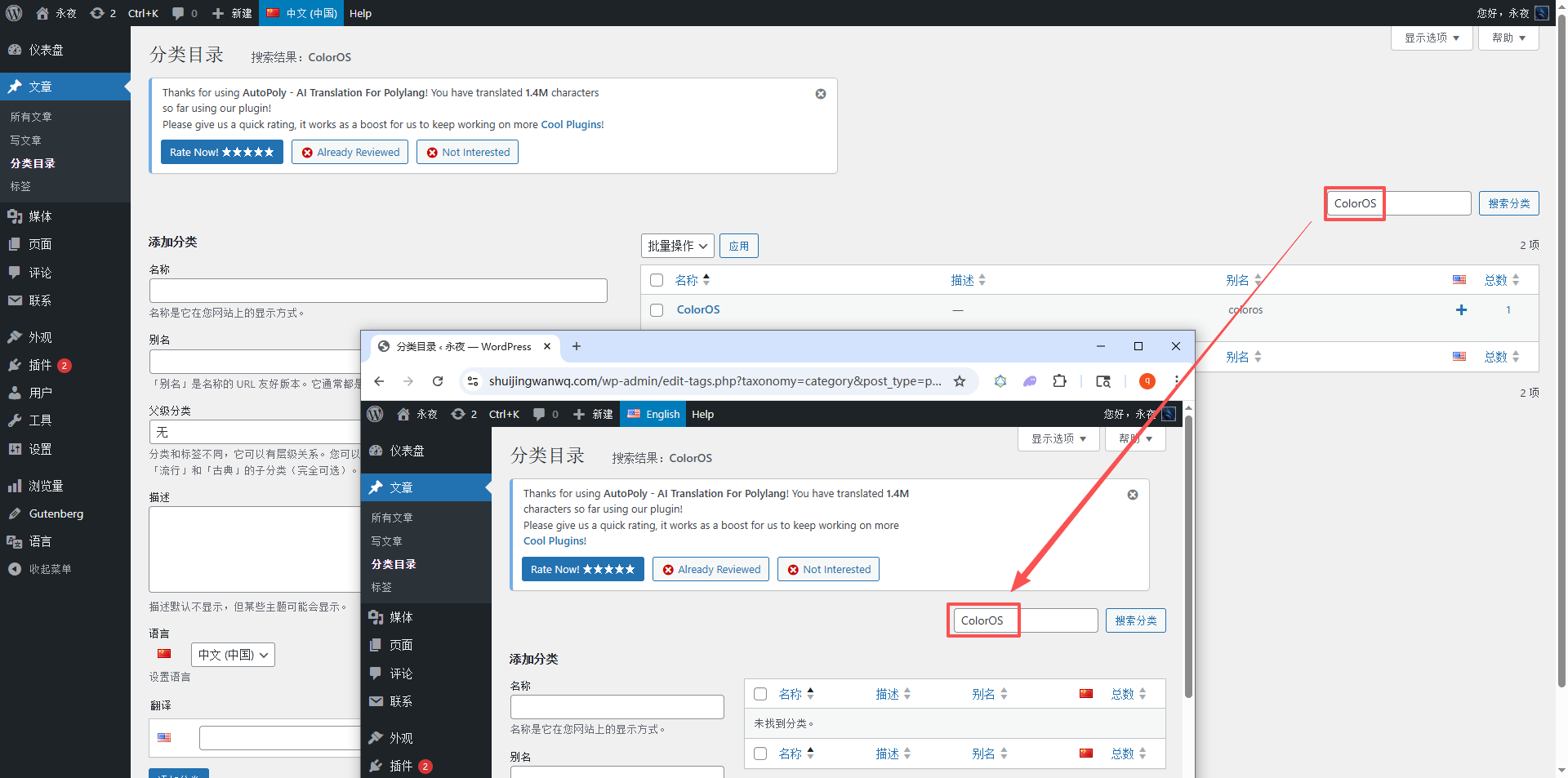
Operation path: WordPress Dashboard → Polylang → Categories → Switch to the English language → Enter the Chinese category name (or the translated English name) in the “Search box” to check if the corresponding category exists:
– If found, it means the category has been translated and no duplicate operation is needed;
– If not found, it means the category is untranslated and you need to proceed to the next step for manual translation and entry.
Figure description (as in Figure 7): Screenshot of the Polylang category management page, annotating the language switch button, search box, and the “No results found” prompt (corresponding to the untranslated category scenario).
4.3 Step 3: Manually translate and enter the English category (Standard operation to avoid confusion)
Operation steps:
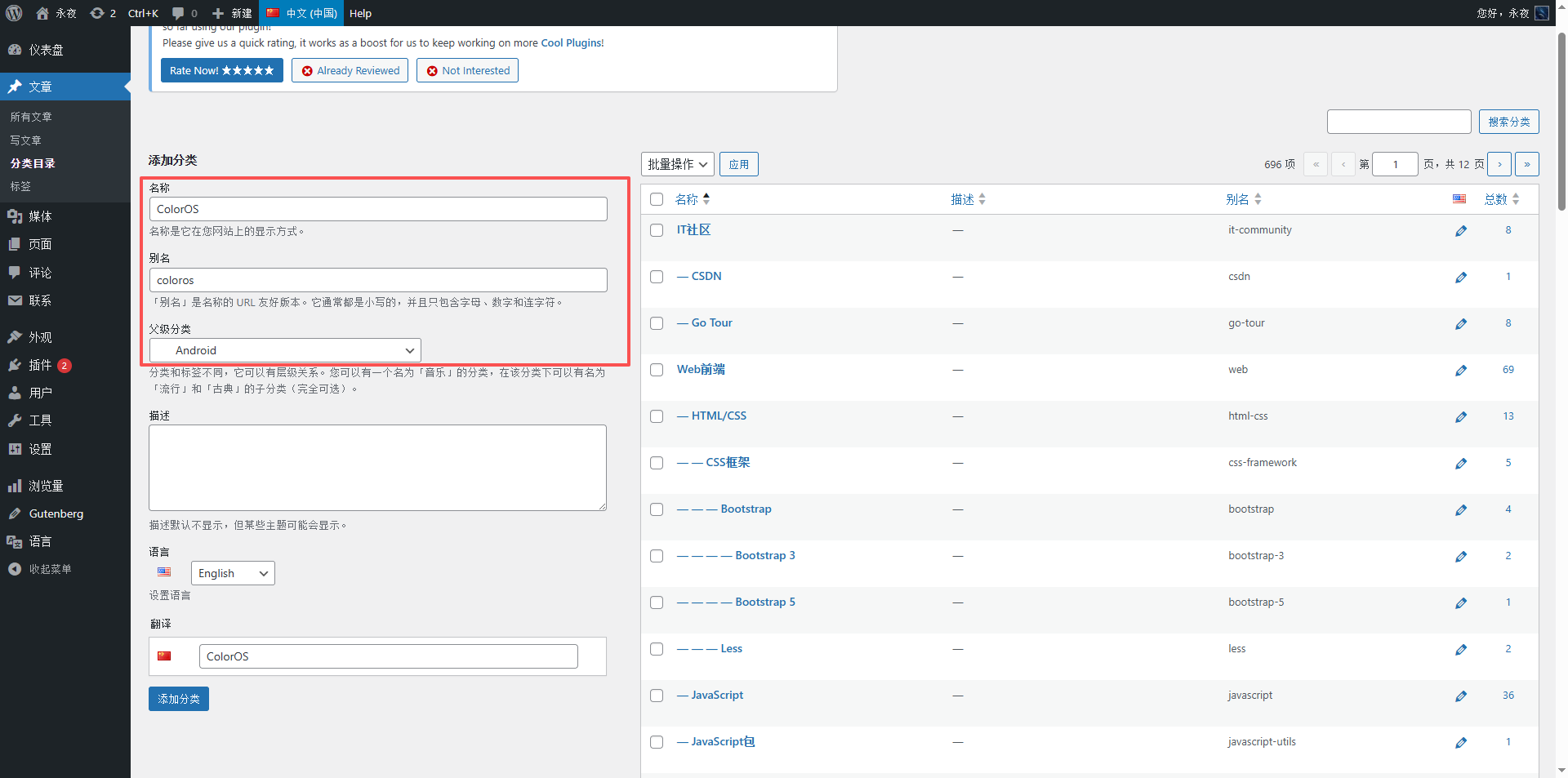
1. On the Polylang category management page (Chinese language), click “+”;
2. Enter the translated English category name (must fit the Chinese semantics, refer to industry conventions, e.g., translate “技术教程” as “Tech Tutorials” rather than literally as “Technology Course”);
3. Copy the Chinese category description (if any), translate it, and enter it into the English category description (maintain semantic consistency, keep it concise and clear);
4. In the “Language” dropdown box, select the corresponding Chinese category (to achieve Chinese-English category association and avoid association failure);
5. Click “Add Category” to complete the English category entry.
Figure descriptions (2 in total):
1. As shown in Figure 8: Screenshot of the “Add Category” page for English categories, annotating the English name and description entry locations, and the selection method for the “Language” dropdown box;
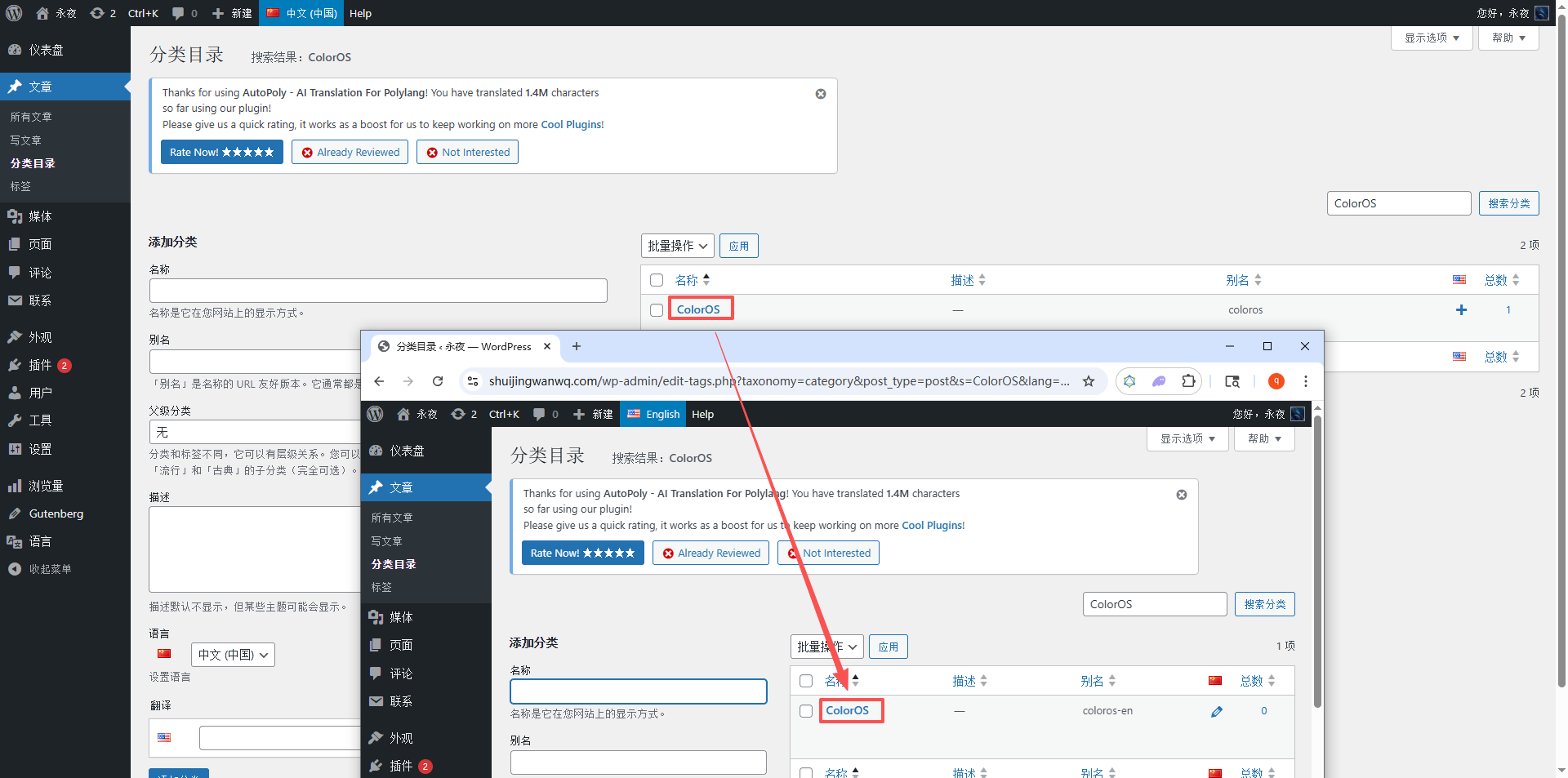
2. As shown in Figure 9: Screenshot of the English category list after adding is complete, annotating the associated Chinese category to confirm successful entry.
4.4 Step 4: Verify after category translation (Ensure correct association)
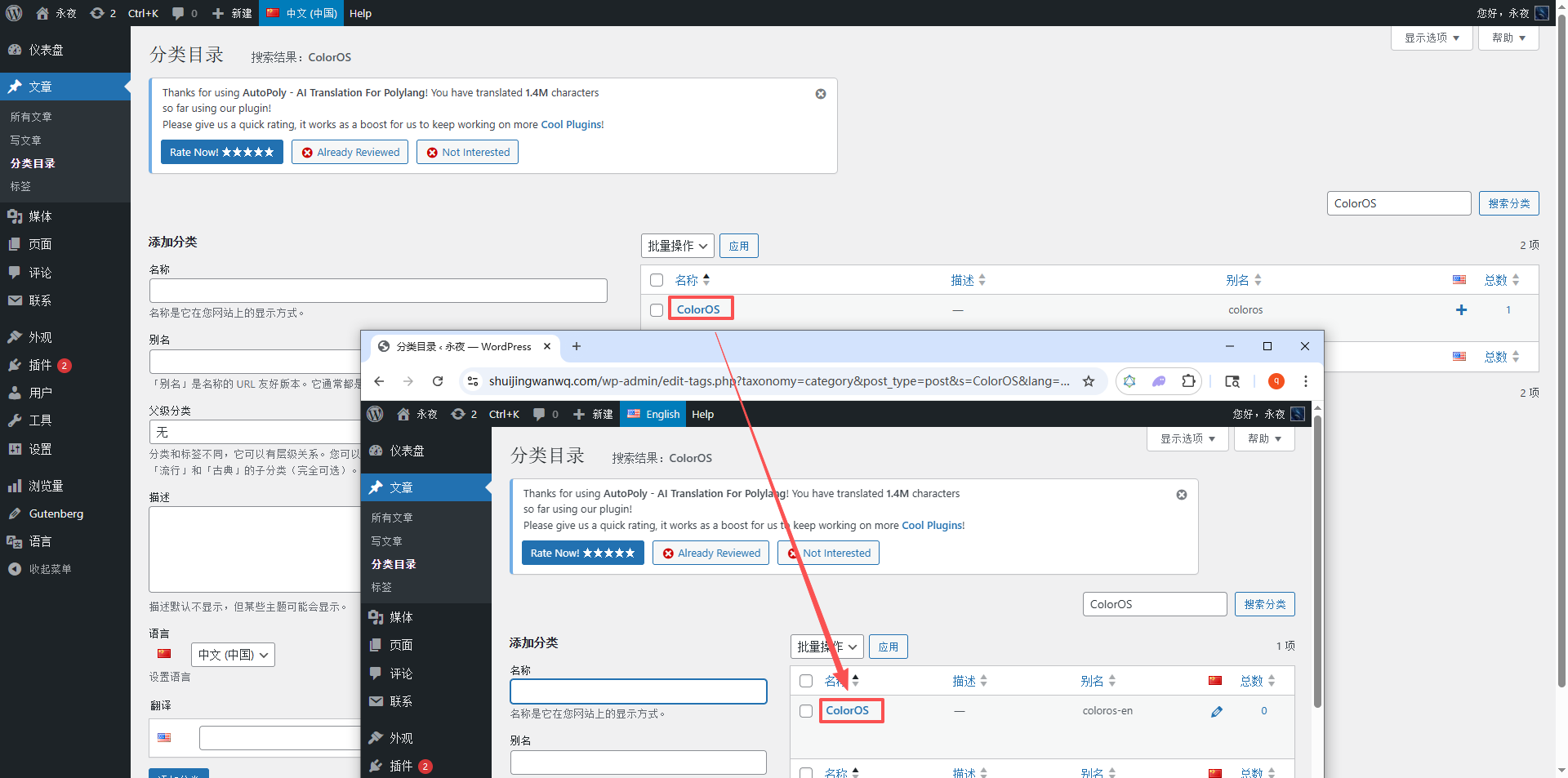
Operation path: Switch back to the Chinese category management page, find the new category, and check the “Language” column to confirm the corresponding English category is displayed (indicating successful association); at the same time, switch to the English category page to confirm the category name and description are correct.
Figure description (as in Figure 9): Screenshot of the Chinese category management page, annotating the “Language association” display location, confirming the English category has been successfully associated.
5. Minimalist Pitfall Avoidance Trick: Use “Total Count Verification” to quickly spot missing translations (Core and efficient)
There is no need to check each category and tag one by one. Simply by comparing the “total Chinese/English category count and tag count”, you can quickly determine if any new entries were missed in translation/synchronization. This is suitable for batch addition scenarios and saves a lot of verification time.
5.1 Category total count verification method
Operation path:
1. WordPress Dashboard → Posts → Categories → Switch to the Chinese language, check the total category count (labeled as “Chinese category count”);
2. Switch to the English language, check the total English category count (labeled as “English category count”);
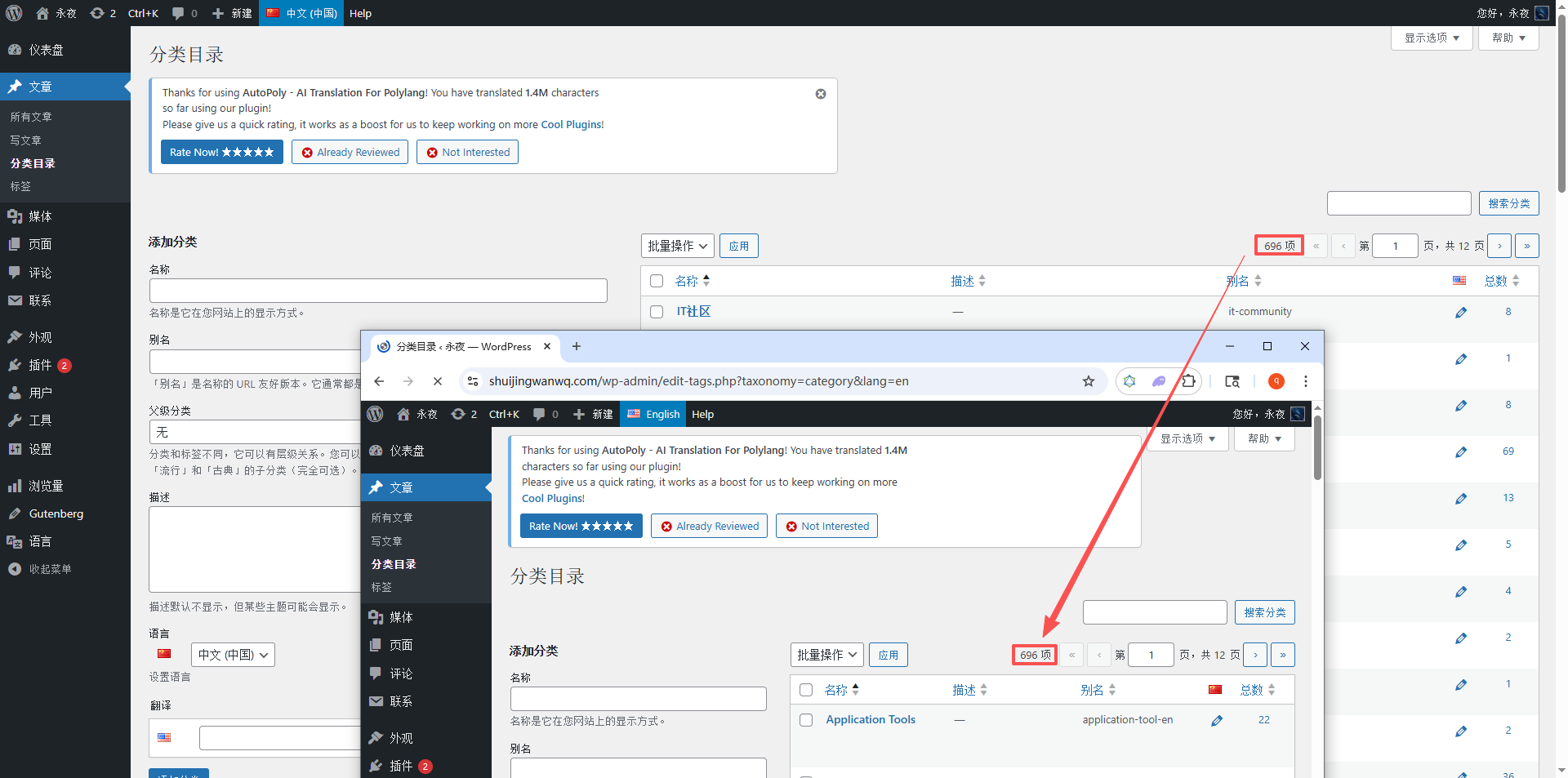
3. Compare the two totals: If the numbers match, nothing is missing; if the English category count is less than the Chinese count, it means new Chinese categories are untranslated, and you just need to fill them in.
Figure description (as in Figure 10): Screenshots of the Chinese and English category management pages (split-screen comparison), annotating the total category counts on both pages, demonstrating scenarios where the counts match or do not match.
5.2 Tag total count verification method
Operation path is the same as for categories:
1. WordPress Dashboard → Posts → Tags → Switch to the Chinese language, check the total tag count;
2. Switch to the English language, check the total English tag count;
3. Compare the two totals: If the numbers match, it means the script synchronized successfully and nothing was missed; if the English tag count is less than the Chinese count, it means the script synchronization failed, and you just need to re-run the script.
6. Summary: Complete workflow for multilingual translation of new articles (Minimalist version)
Combining the practical steps in this post, here is the complete preparation + body translation workflow for new Chinese articles. You can follow it directly for efficient, error-free operations:
1. Add a new Chinese article, determine the article categories and tags (record the new categories/tags);
2. Preparation 1: New tags → Use the script to sync to English with one click (verify total count after syncing);
3. Preparation 2: New categories → Manual translation → Search for untranslated categories → Enter English categories and associate them with Chinese categories (verify association and total count after entry);
4. Post-operation: Translate the article body (refer to the practice in Part 6), associate the translated English categories/tags, and publish the English translation.