

I believe many WordPress site owners encounter an “inconspicuous but visually disruptive” pain point when setting up their blogs: the default tag cloud block.
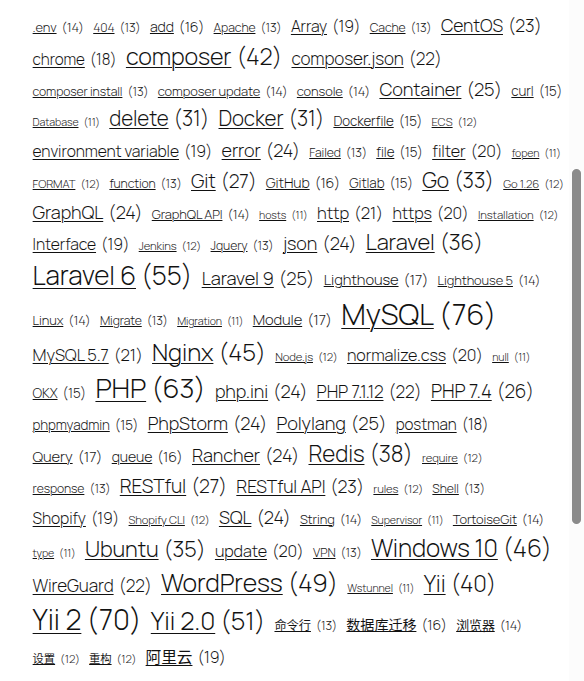
Recently, while optimizing the technical tags on my own site, I faced the awkward situation shown in Figure 1: the tags vary in length, causing the right edge to be extremely jagged; there are also ugly underlines below; and the overall lack of hierarchy makes it look like raw text pulled straight from a draft box.
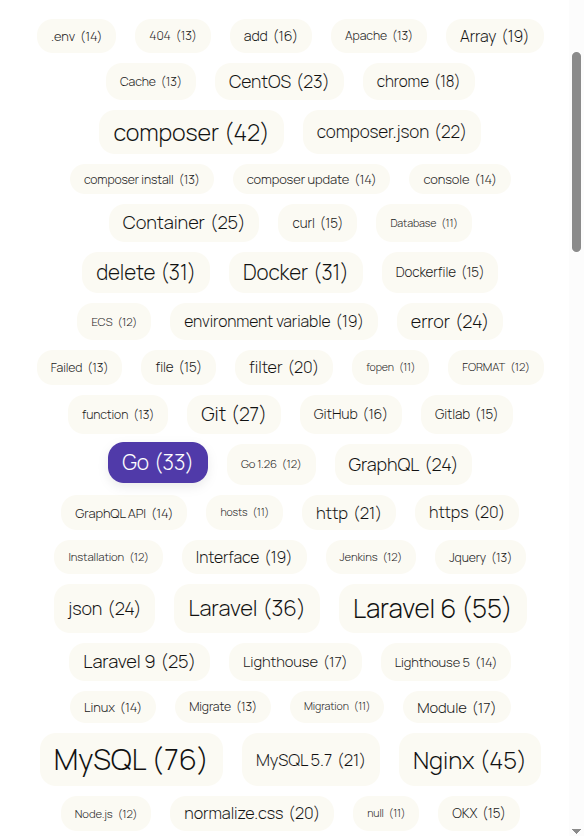
Without wanting to introduce bloated plugins, I tried revamping it using only native CSS, ultimately achieving the modern, clean capsule tag style shown in Figure 2. Today, I’m sharing my optimization approach and the code.
1. Analysis of the Original Pain Point
The native WordPress tag cloud we commonly use (under the 2025 theme) uses a flow layout by default.
Because each tag has a different character count, when they wrap to new lines, although the left side aligns perfectly, the right side always ends up with a jagged, uneven edge. Combined with the lack of background color styling, the entire block looks very messy.
2. Solution Approach
To achieve the effect shown in Figure 2, I established 4 core optimization points in my design:
- Fix right-side misalignment: Abandon the flow layout, use a
Flexboxlayout, and force center alignment. - Remove underlines and add capsule backgrounds: Remove the default link underlines and add a uniform rounded background to each tag to create a “pill” or “capsule” style.
- Perfect vertical centering: Use
inline-flexto ensure the text is perfectly vertically centered within the capsule background. - Integrate theme color palette: Stop using jarring colors and instead directly call the base and accent colors built into the 2025 theme.
3. Core CSS Code Implementation
In the WordPress dashboard, navigate to Appearance -> Customize -> Additional CSS, and paste the following code to apply it quickly:
/* ==========================================================================
   🔥 标签云(Tag Cloud)样式优化
   解决:原生标签云右侧边缘参差不齐、标签内文字未垂直居中、圆角生硬的问题。适配 2025 主题内建颜色变量。
   ========================================================================== */

/* 父容器:使用 Flex 居中解决右侧参差不齐 */
.wp-block-tag-cloud {
    display: flex;
    flex-wrap: wrap;
    justify-content: center; /* 核心:让所有标签在容器内居中排列 */
    gap: 10px 14px;          /* 标签之间的行间距和列间距 */
    padding: 10px 0;
}

/* 单个标签样式 */
.wp-block-tag-cloud a {
    /* 1. 解决背景内文本垂直居中问题 */
    display: inline-flex;
    align-items: center;
    justify-content: center;

    /* 2. 适当的圆角 */
    border-radius: 16px;

    /* 3. 采用 2025 主题自带的基准色和对比色 */
    background-color: #fbfaf3; /* 2025 主题浅米色背景 */
    color: #111111;            /* 2025 主题文字深色 */

    /* 基础布局 */
    padding: 6px 14px;
    text-decoration: none;     /* 去掉下划线 */
    font-family: inherit;
    transition: all 0.2s ease-in-out;
}

/* 鼠标悬浮效果:使用强调色搭配白色文字 */
.wp-block-tag-cloud a:hover {
    background-color: #503aa8; /* 2025 主题强调紫 */
    color: #ffffff;
    transform: translateY(-2px); /* 微微上浮增加交互感 */
    box-shadow: 0 4px 10px rgba(0, 0, 0, 0.08);
}4. Effect Evaluation
After applying the above code, the tag cloud immediately saw a qualitative leap:
- Visual centralization: All tags gather in the center of the block, with a symmetrical left-right layout that looks very harmonious;
- Enhanced breathing room:
gap: 10px 14pxleaves ample spacing between the tags; - Interactive friendliness: Hovering the mouse not only changes the color but also adds a slight floating shadow, making it feel less rigid.
- Highlighting high-weight terms: Because the native
font-sizemechanism that changes based on weight is preserved, high-frequency words likeMySQL (76)naturally appear larger visually, serving as an excellent emphasis.
5. Follow-up Thoughts (or Extended Ideas)
Actually, at first, I wanted to pursue an even more extreme effect: placing the most numerous tags right in the center, with the less frequent ones radiating outward like petals.
However, testing revealed that an effect similar to a 3D sphere or radial core cannot be achieved purely by relying on CSS flex layout (CSS can currently only center entire lines).
To achieve that kind of effect, you would have to introduce an external JavaScript library (like jQCloud) and restructure the HTML.
Since the current CSS 2.0 beautification solution works well enough, I decided to “quit while I’m ahead.”
I even thought that if I have ample time in the future, I could completely develop an extremely lightweight tag cloud beautification plugin for WordPress. It wouldn’t need complex interactions or 3D rotation; it would do just one thing: automatically generate this beautiful, centered capsule tag cloud with smooth hover feedback based on the user’s current theme’s primary color palette. Focusing on solving UI pain points might be more valuable than building a jack-of-all-trades plugin.
💡 Additional Suggestion:
If you are also using the 2025 theme, simply copying the code above will work perfectly. If you are using a different theme, just replace the color values at #fbfaf3, #503aa8, and #ffffff in the code above to match your own theme’s style.