Is the search result page too long? I did a “break away” for the WordPress 2025 theme

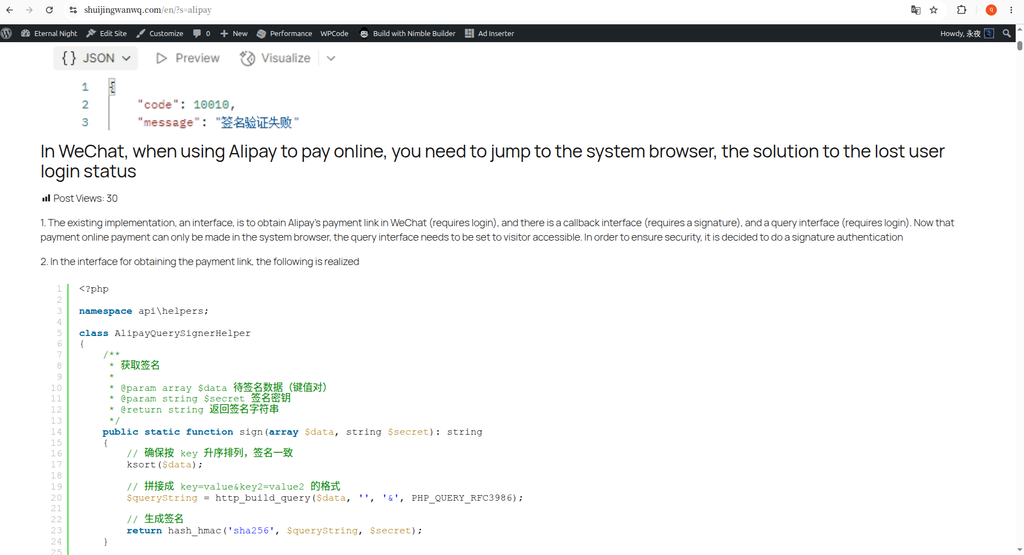
搜索“alipay”的结果,每篇文章都带了一张大尺寸的特色图片,紧跟着就是完整的正文内容。我的文章里还有代码片段,全都被拉出来显示在列表里,页面无限拉长,排版也乱糟糟的。如图1

From Classical to Block: Theme Migration

From Hueman to Twenty Twenty-Five, Topic Switching with Multilingual Menu Configuration

(1) From Hueman to Twenty Twenty-Five, Topic Switching with Multilingual Menu Configuration

经过以上步骤,语言切换器最终在页面上的效果符合预期。(见图 9)

(2) In a WordPress 2025 topic, move the Polylang language switch to the full record in the upper right corner

页眉导航宽度异常问题:导航被内容宽度限制(图 4)

(3) WordPress Twenty Twenty-Five Global Width Layout Practical Notes: Widescreen Full-Scale + Large Screen Limited Wide Configuration Scheme

中文(中国)前台首页:66主内容文章+33标准化侧边栏,区块正常显示(对应图6)

(4) Practice|WordPress Twenty-Five Block Theme Text Blog Home Transform the Classic Two-Column Homepage

改造完成最终首页效果(图5)

(5) WordPress Twenty Twenty-Five Two-column homepage transformation: Text Blog Small picture list template complete practical record

图11:样式重写后下拉美观,但层级子分类在原生 Option 标签下以空格缩进表示

(6) Debugging record of the beautification and rendering mechanism of the drop-down menu of the category list

图3:应用修正后的 CSS,日历占据了应有的侧边栏宽度,有文章的日子用主题同色系进行了高亮,悬停时会变黑

(7) Fixed the issue of “getting dissatisfaction” in the sidebar: WordPress 2025 theme calendar style optimization

图5:English 下的页面显示第二个 Language Visibility 区块

(8) Add the multi-language “Personal Brand” block to the sidebar of the blog homepage

图4:调整后的分页效果

(9) Troubleshooting and Repair of One FSE Page Loss: From Pure Layout Template to Query Loop

在英文页面(https://www.shuijingwanwq.com/en/)中,日历上每个日期点击后跳转的链接仍然是 https://www.shuijingwanwq.com/2026/06/08/ 的形式,而不是预期的 https://www.shuijingwanwq.com/en/2026/06/08/。

(10) WordPress 2025 Theme + Polylang: Fix a full record of the missing language directory for the calendar link

图4:中文站点,下拉菜单样式美观,显示“选择年份”。

(11) Optimize WordPress 2025 Themeser: A complete remodeling record of multilingual navigation, social links and archive drop-down bars

图2:分类页单栏效果

(12) From single column to two columns: the practical record of the sidebar and list structure of the WordPress category page unified first page

套用上述代码后,标签云立刻有了质的飞跃:

(13) Say goodbye to uneven! Create a modern label cloud for 2025 themes only with CSS

搜索“alipay”的结果,每篇文章都带了一张大尺寸的特色图片,紧跟着就是完整的正文内容。我的文章里还有代码片段,全都被拉出来显示在列表里,页面无限拉长,排版也乱糟糟的。如图1

(14) Is the search result page too long? I did a “break away” for the WordPress 2025 theme

在英文页面 https://www.shuijingwanwq.com/en/ 中,22 号显示蓝色链接

(15) Compatibility restoration practice of WordPress calendar in Polylang multi-language environment

Network检查确认:如图3

(16) WordPress Theme Migration: Does Emoji Process Code Need to Keep?

图2 Site Wide Header

(17) WordPress Tab NoIndex Optimization: Practical Sharing from Theme Migration to Code Refactoring

最近,我在检查我的 WordPress 网站时,发现浏览器开发者工具的控制台里出现了几个令人不安的红色错误信息:

(18) WordPress Console Error Troubleshooting Transcript: From jQuery conflict to Baidu statistical warning

I’ve changed my new WordPress 2025 theme in the last few days, and I’m adjusting the details one by one template at a time. When I tossed to the search result page, I found a problem that looked awkward – it was too long.

My blog often has large codes and configuration instructions. I searched for ‘alipay’ to see the effect. Good guy, the whole page was so long that the content of the pictures and the full article were so long, and it took a long time to see the next result. This is not a search result page, it is like directly hitting the entire article on the face.

So I decided to change it, and the goal is very simple:Let the search result pages return to the pure list form, only the title and summary are displayed, which is neat and neat.

Take a look at what it looks like before the transformation

Searching for the results of ‘alipay’, each article brings a large-sized feature picture, followed by the complete body content. There are also code snippets in my article, all of which are pulled out and displayed in the list. The page is infinitely elongated, and the layout is also messy. as shown in Figure 1

Searching for the results of "alipay", each article brings a large-sized feature picture, followed by the complete body content. There are also code snippets in my article, all of which are pulled out and displayed in the list. The page is infinitely elongated, and the layout is also messy. as shown in Figure 1

My idea is: the user finds the result, just wants to quickly determine which article he needs, there is no need to read a whole article on the search page.

Start to change: delete the content block and put on the abstract block

Enter the background, the path is Appearance → Editor → Templates → Search Results.

In the query loop, I selected the ‘content’ block and prepared to delete it.

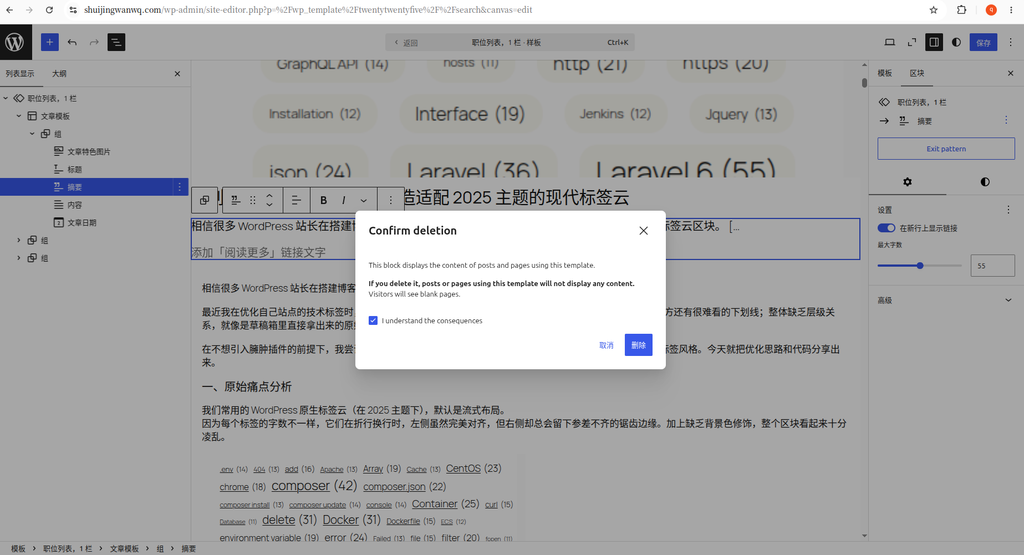
At this time, the system pops up a prompt box, to the effect that ‘delete this block, the page using the template will not display any content, and the visitor will see a blank page’, as shown in Figure 2.

At this time, the system pops up a prompt box, to the effect that "delete this block, the page using the template will not display any content, and the visitor will see a blank page", as shown in Figure 2.

Honestly, I was really stunned when I first saw this prompt. But on second thought, this warning is for the current template (search result page), deleting the content block will only affect the display of the search result page, and the details page of a single article is completely unaffected. So don’t worry, click to confirm deletion.

After deleting the ‘content’ block, I also deleted the ‘article picture’ block together. Each article in the search list is equipped with a large picture, which takes up too much space, and to be honest, it has no practical significance in this scenario.

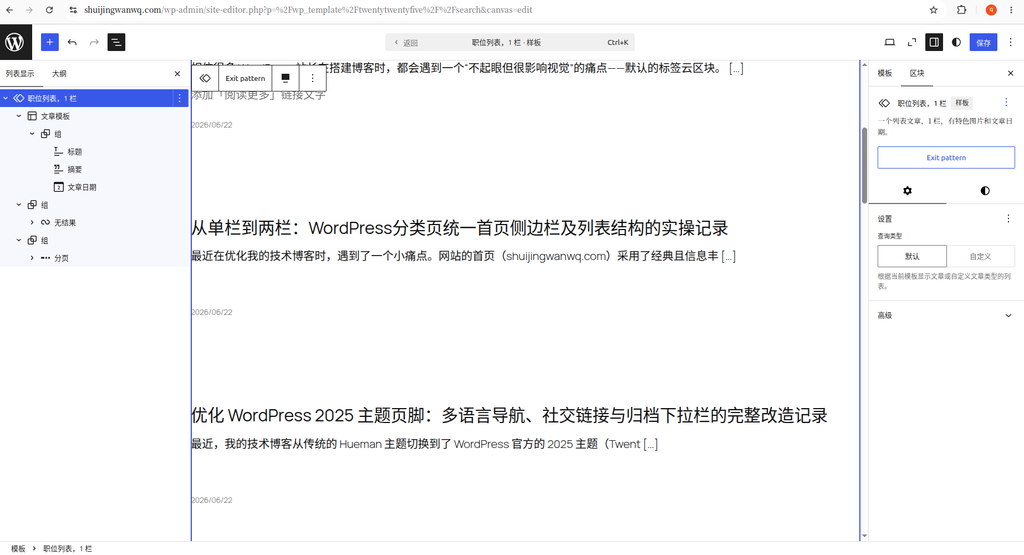
Next, add a ‘Summary’ block below the title, as shown in Figure 3. In this way, the search results have become a concise list of ‘Title + Summary + Date’, which is much more refreshing.

Next, add a "Summary" block below the title, as shown in Figure 3. In this way, the search results have become a concise list of "Title + Summary + Date", which is much more refreshing.

Why do I keep a single bar without adding a sidebar

After changing the summary, I actually considered a question: do you want to add the right sidebar to the search result page like the classification page?

After thinking about it, I decided not to add it. Two reasons:

First, the frequency of use of the search result pages is not high. Users come in with clear keywords, and they leave at a glance. There is no need to stack so many elements on this low-frequency page.

Second, it is also good to keep the search result pages and the classification list pages a certain visual difference. The category page is responsible for the function of ‘browsing and discovering’, and it is reasonable to recommend popular articles with the sidebar; the search page is more inclined to the attributes of the tool, and the minimalist design of the single-column makes users more focused on the matching result itself.

The effect after the change

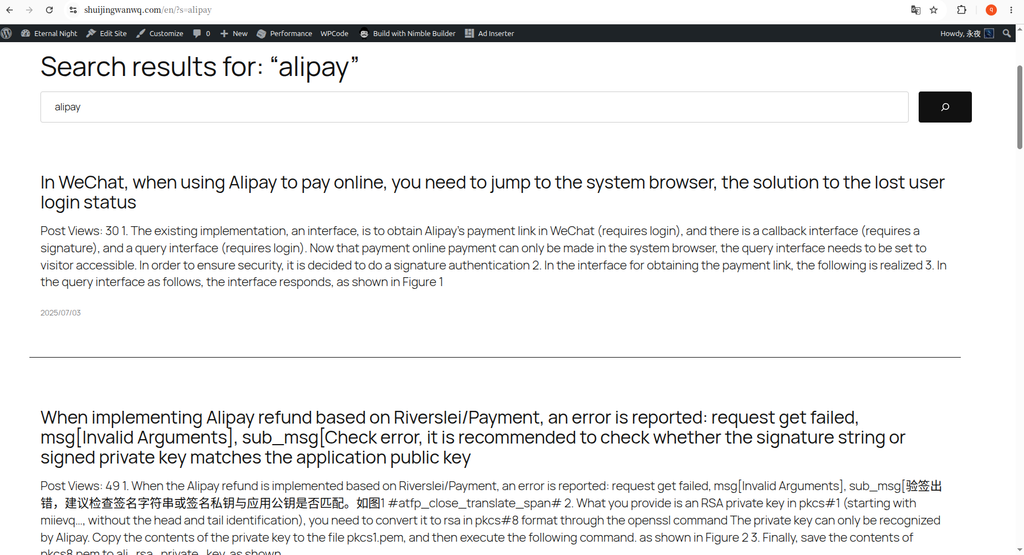
The final effect is shown in Figure 4, which is clean. No big picture, no full text overflow, only title, short summary and release date. The purpose of quickly positioning information can be achieved within one screen.

The final effect is shown in Figure 4, which is clean. No big picture, no full text overflow, only title, short summary and release date. The purpose of quickly positioning information can be achieved within one screen.

This change is actually very small. I only made a few clicks in the site editor, but I didn’t move a line of code. But it is this small adjustment that makes the experience of the search results page to a higher level.

Say goodbye to uneven! Create a modern label cloud for 2025 themes only with CSS Compatibility restoration practice of WordPress calendar in Polylang multi-language environment

评论

Leave a Reply

Your email address will not be published. Required fields are marked *

This site uses Akismet to reduce spam. Learn how your comment data is processed.