Input method selection failure record from Windows to Ubuntu:rime → wbpy

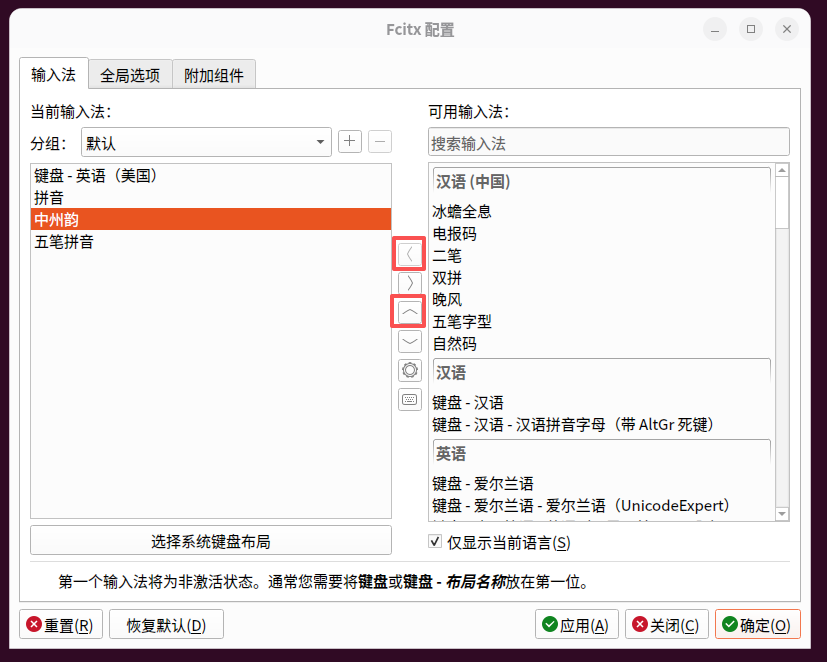
如图4:将中州韵加入输入法列表

作者:

From Windows to Ubuntu: A Complete Guide to Migration and Configuration

在启动项列表中找到刚创建的 Ubuntu Installer,通过右侧的 “上移” 按钮将其移到第一位。这样重启后电脑会优先从这个启动项引导。

(1) Migrate from Windows 10 to Ubuntu – Previous: Preparation before installation

如图24 – 选择 Ubuntu 外观,高亮默认

(2) Migrate to Ubuntu from Windows 10 – Next: Ubuntu 26.04 Installation and First Time Configuration

安装完成后,打开 Fcitx5 配置工具(fcitx5-configtool),在“输入法”选项卡中添加 “五笔拼音” 即可正常使用。

(3) Ubuntu initialization configuration (basic settings, software installation)

图10 – 新分区信息(UUID、卷标、文件系统)

(4) Ubuntu Disk Planning: Migrate /home to the second block SSD

如图10:点击 安装 按钮,进度条显示“正在准备…”。

(5) Ubuntu 26.04 software installation and maintenance best practices: take WeChat as an example

图中查找范围为 /home/wangqiang,名称列表里仅有「下载」和「xwechat_files」两个文件夹

(6) Solve the problem that the Linux WeChat “Save As” dialog box only displays two folders

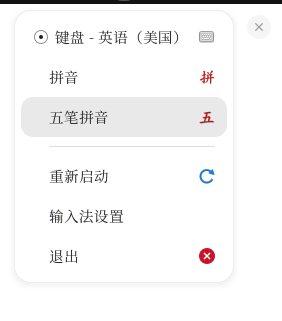
图1 重启后右上角没有输入法图标

(7) Ubuntu 26.04 Input Method Tossing Notes: From FcitX5 Self-Starting Failed to Wubi Pinyin Stable Use

下图为实拍照片(图3): (此处为双屏实物照片,展示左外接、右笔记本的布局,两台显示器并排亮起)

(8) Ubuntu dual-screen configuration actual combat: ThinkPad T570 external monitor, the left screen and the right are more convenient

中文部分显示为梦源宋体,清晰舒适

(9) From Siyuan to Mengyuan: Understand the “toss” of the Song Dynasty on Ubuntu 26.04

至此,三个数据库容器均已正常运行。

(10) Configure development environment: Manage multi-version MySQL and Redis with Docker

SOLO 模式欢迎界面,我切换到了 IDE

(11) Push from Baidu API to AI IDE selection: how do I get the trae installation and prepare to start work

如图15:授权完成后,Gmail 账号成功添加。最终,Thunderbird 账户列表里一共添加了 8 个邮箱。

(12) Ubuntu 26.04 Mail Client Tossing Notes: From NetEase Mailbox Master to Thunderbird, add 8 mailboxes in one go

图1:优化前60标签整机内存占用截图(原始满载19GB+)

(13) Under Ubuntu 26.04 High memory usage optimization full record | Same as 60 tags, Win10≈7GB, Ubuntu skyrocketed to 20GB row pit record

📸 浏览器显示 JSON 数据,如图4

(14) Ubuntu 26.04 + Docker build a Go Gin development environment (full record)

在保存对话框中找到 显示选项 - 编码 ,将其从“自动检测”改为 UTF-8。

(15) Ubuntu opens the Windows document and prompts “Invalid Characters”? my solution

从截图中可以看到,我连续执行了 mv、chmod、nano,最后 ssh aliyun 一气呵成,直接显示欢迎信息和上次登录时间,没有任何密码询问。

(16) Say goodbye to passwords and disconnects: Alibaba Cloud ECS SSH password-free login and heartbeat preservation practice

[截图 5:扩展显示“用户已全局禁用此扩展”及右键菜单]

(17) Try Dev Containers in Trae CN: A not very successful step on the pit record

Docker 扩展面板的容器操作菜单

(18) From zero to one: Build a Go + Gin development environment in Trae CN + Docker

Flameshot 的功能

(19) Farewell to WeChat window restrictions: use Flameshot to bind global ALT+A screenshots in Ubuntu 26.04

微信的内存占用高达 2.01 GB(1.5%);而在只开启一个标签页的情况下,Google Chrome 的内存占用更是达到了 2.96 GB(1.0%)。

(20) Ubuntu 26.04 Software Installation and Maintenance Best Practice Update: From Chrome Memory Surge to Discharge Pits to Deprecated Flatpak

deb 版 Firefox 更实用:能直接访问 Chrome 配置文件,资源占用更小。现在开启 4 个窗口,50 个标签页,内存占用 5 GB 左右

(21) Migrating from Chrome to Firefox under Ubuntu 26.04: my tossing experience

如图4:将中州韵加入输入法列表

(22) Input method selection failure record from Windows to Ubuntu:rime → wbpy

🧭 1. Background: Input experience changes from Windows to Ubuntu

I have been using: after migrating to Ubuntu Linux from Windows 10:

✔ FcitX5 + Wubi Pinyin (wbpy)

Refer to previous records:

👉 Ubuntu 26.04 Input Method Tossing Notes: From FcitX5 Self-Starting Failed to Wubi Pinyin Stable Use


Input experience under Windows

  • Use Sogou Wubi Pinyin
  • Wubi + Pinyin mixed input experience is very good
  • Input switching is natural and efficient

Input experience under ubuntu

  • Use fcitx5 + wbpy
  • Basically available
  • But the overall experience is not as good as the Sogou input method under Windows

🧪 2. Reasons for trying RIME

After using Ubuntu for a long time, I try to introduce Rime:

👉 I heard that the RIME input method is very strong, which can improve the experience

My goal is:

  • Improve input efficiency
  • Implement Wubi + Pinyin mixed input
  • As close as possible to the Windows Sogou input experience

⚙️ 3. Input method status after installing RIME

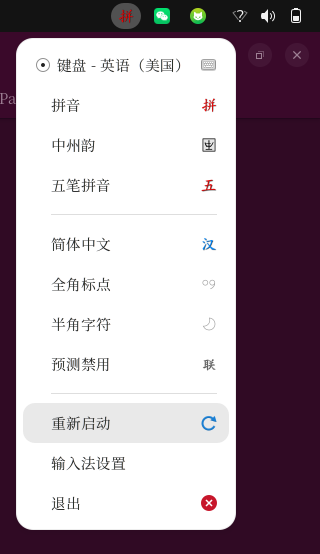
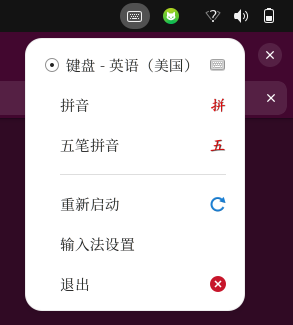
Figure 1: Fcitx5 input method list structure

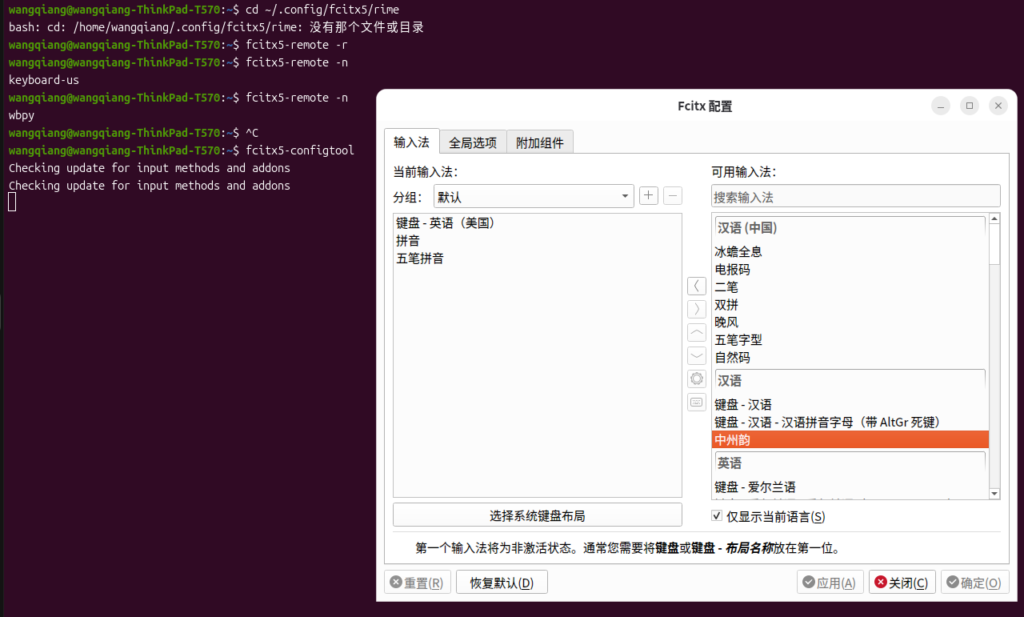
Figure 2: FcitX5 input method configuration interface (after installing Zhongzhou Yun)

⚠️ 4. System prompts and input process

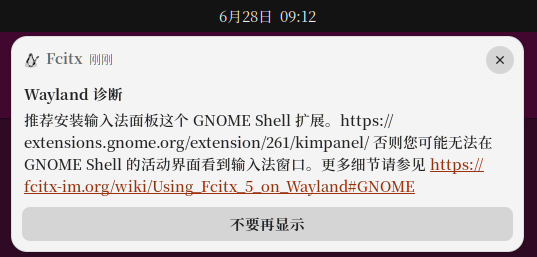
As shown in Figure 3: Input method status and system prompt

The system continues to prompt during the operation:

  • It is recommended to install the Gnome shell input method extension

➕ 5. Add Zhongzhou Yun to the input method

Figure 4: Add Zhongzhou Yun to the input method list

🔄 6. Restart FcitX5 using the graphical interface

As shown in Figure 5: Restart the input method using the GUI

🧠 7. Rime Schema Switch Behavior Verification

Figure 9: Ctrl + ~ Switch Schema

Actual result:

  • Only exists:
    • Wubi
    • Pinyin

❗ 8. Key conclusion: RIME does not meet the needs

Confirm after the full test:

✔ Rime supports ‘Wubi + Pinyin Mixed Input’ (via wubi_pinyin schema implementation)
❗ But the default configuration only includes pure five strokes and pure pinyin schema, you need to manually enable the mixed input scheme

Its structure is:

  • Wubi = Independent Schema
  • Pinyin = independent schema
  • Fusion input requires additional configuration of Schema

🔚 Nine, restore the system status after cleaning Rime

Figure 10: Restore the initial state after cleaning the RIME

Result:

  • RIME related components have been cleared
  • System restore Fcitx5 initial state
  • wbpy returns to normal use

🧾 10. The final regression plan

The final input method is restored to:

  • ✔ fcitx5
  • ✔ WBPY (Wubi Pinyin input method)

📌 Eleven, final summary

The conclusion of this attempt is very clear:

👉 Rime is not suitable for ‘Wubi + Pinyin Mixed Input’ scene
👉 WBPY is a more suitable solution


🧠 Summary in one sentence

From Windows to Ubuntu, the core of the input method experience difference is not in the strength of the tool, but whether it is in line with the input habit.

Migrating from Chrome to Firefox under Ubuntu 26.04: my tossing experience

Linux Server Deployment & Operations Consulting

I have extensive experience working with Ubuntu, Debian, Docker, Nginx, and cloud servers in production environments. This includes server deployment, website migration, performance tuning, and long-term maintenance.

Ideal For:
✅ Linux migration projects
✅ Website deployment
✅ Docker-based environments
✅ Nginx optimization
✅ Server performance tuning

What I Offer:
✅ Linux Environment Setup
✅ Website Migration & Deployment
✅ Docker Configuration & Maintenance
✅ Nginx Optimization
✅ Long-Term Technical Support

Please contact me and mention: Linux Operations Consultation.

Contact Me:
Telegram: @shuijingwan
WeChat: 13980074657
Email: shuijingwanwq@gmail.com

评论

Leave a Reply

Your email address will not be published. Required fields are marked *

This site uses Akismet to reduce spam. Learn how your comment data is processed.