

Before We Start: This Does Not Replace v3 — It Only Adds DNS Fallbacks
After several rounds of tuning, this ZgoCloud + Wstunnel + WireGuard + Clash Verge Rev setup has become fairly stable in daily use.
In normal use, Google, GitHub, Google Play, overseas job sites, and similar services are now mostly working as expected. In particular, after moving GEOSITE,google before GEOSITE,private in v3, the Google Play download and update issue was also resolved.
So this post is not about replacing the previous configuration or designing a more complicated rule set. It is a small follow-up fix on top of an already stable v3 setup:
Some overseas websites would hit a DNS resolution timeout roughly once every two or three days. After waiting a few seconds, or sometimes a dozen seconds, refreshing the page would bring it back to normal.
The goal of v4 is very clear:
- Do not make major changes to the proxy node;
- Do not make major changes to the proxy group;
- Do not make major changes to the routing rules;
- Do not introduce complicated site-specific rules;
- Only add the necessary fallback paths for DNS resolution;
- Keep the configuration as minimal as possible so it remains easy to debug later.
1. The Symptom: Low-Frequency DNS Timeouts in an Otherwise Stable Setup
This setup has been stable overall, but I noticed one low-frequency issue: about once every two or three days, some overseas websites would briefly fail to connect.
The example I ran into today was hubstafftalent.net.
Firefox showed:
建立安全连接失败

错误代码:PR_END_OF_FILE_ERROR
![[Screenshot 1: Firefox showing PR_END_OF_FILE_ERROR]](https://www.shuijingwanwq.com/wp-content/uploads/2026/07/1-15-1024x507.png)
This symptom is easy to misread.
If I only looked at the browser page, I might have suspected:
- A website certificate issue;
- A Firefox browser issue;
- A disconnected proxy node;
- An unstable WireGuard / Wstunnel tunnel;
- A problem inside Clash Verge Rev itself.
But judging from the actual behavior, it was not a persistent failure.
What I observed was:
- It did not happen every day;
- It appeared roughly once every two or three days;
- After it appeared, waiting a few seconds or a dozen seconds helped;
- Refreshing the page then made it load normally again.
This kind of low-frequency, short-lived, recoverable issue usually does not look like a blocked port or a completely broken proxy path. It looks more like a short timeout somewhere in the chain.
2. Checking the Logs: The Browser Error Was Only a Symptom; DNS Resolution Was the Real Bottleneck
I then checked the Clash Verge Rev logs and found this key error:
[TCP] dial Proxy (match Match/) 198.18.0.1:52086
--> hubstafftalent.net:443 error: dns resolve failed:
all DNS requests failed, first error: context deadline exceeded
![[Screenshot 2: Clash Verge Rev log showing dns resolve failed]](https://www.shuijingwanwq.com/wp-content/uploads/2026/07/2-15.png)
This log entry is important.
It shows that the request had not actually connected to:
hubstafftalent.net:443
Instead, it got stuck earlier, during DNS resolution.
So the Firefox error:
PR_END_OF_FILE_ERROR
was more of a surface-level symptom.
The actual failure chain looked more like this:
浏览器请求 hubstafftalent.net
  ↓
Clash Verge Rev 接管流量
  ↓
MetaCubeX 内核需要解析 hubstafftalent.net
  ↓
DNS 查询偶发超时
  ↓
HTTPS 连接无法建立
  ↓
Firefox 显示安全连接失败
In other words, the website certificate and Firefox itself should not be the first suspects here.
A more reasonable conclusion was:
The DNS resolution path was occasionally timing out.
The more important clue was that the same site loaded normally again after a short wait and a refresh.
![[Screenshot 3: Hubstaff Talent loading normally after a refresh]](https://www.shuijingwanwq.com/wp-content/uploads/2026/07/3-14-1024x597.png)
This suggests that:
- Hubstaff Talent itself was probably not the problem;
- Firefox itself was probably not the problem;
- The main WireGuard / Wstunnel path was not completely down;
- The Clash Verge Rev routing rules had not failed as a whole;
- The more likely cause was a low-frequency, short-lived timeout in the DNS upstream or DNS query path.
3. Looking Back at v3: The Setup Worked, but the DNS Upstreams Were Too Single-Pointed
The DNS section in v3 looked like this:
# ----- DNS 最小覆写(防污染) -----
dns:
  # 国内域名解析:使用阿里公共 DNS over HTTPS,直连不经过代理
  nameserver:
    - https://dns.alidns.com/dns-query

  # 【关键】让所有 DNS 查询(特别是 fallback)都通过代理组 Proxy 发出,避免本地 DNS 污染
  proxy: Proxy

  # 境外域名解析:使用 Cloudflare DNS over TLS,解析结果由代理隧道保护
  fallback:
    - tls://1.1.1.1:853

  # 只让非中国 IP 的域名使用 fallback,国内域名强制走 nameserver
  fallback-filter:
    geoip: true
    geoip-code: CN
The design of this configuration was not wrong.
It was designed to solve another core issue I had previously encountered: DNS pollution.
The overall idea was:
国内域名:使用阿里 DoH
境外域名:使用 Cloudflare DoT
fallback 查询:通过 Proxy 发出,避免本地 DNS 污染
国内 / 非国内结果:通过 fallback-filter 区分
That is why v3 had already been fairly stable in daily use.
However, this DNS configuration had one hidden risk:
nameserver 只有 1 个
fallback 只有 1 个
default-nameserver 没有显式配置
This is not necessarily a problem in normal use.
But if AliDNS DoH, Cloudflare DoT, the proxy path, or the remote DNS path briefly fluctuates during a request, this may happen:
all DNS requests failed
context deadline exceeded
This matched the log I saw today.
So v4 does not need to replace v3. It only needs to add the smallest possible DNS-level fallback.
4. The Fixing Principle: Add Only Necessary Fallbacks, Do Not Rebuild the Configuration
I did not choose to make major changes to the DNS structure this time.
I did not do any of the following:
- Do not change the WireGuard node;
- Do not change the Wstunnel mapping method;
- Do not change the proxy group;
- Do not change the routing rules;
- Do not add complicated domain-specific rules;
- Do not introduce SMTP / YouTube / special site rules;
- Do not rebuild the entire DNS setup;
- Do not turn the minimal version into an all-in-one configuration.
In the end, I only made three minimal improvements:
1. 增加 default-nameserver
2. nameserver 增加一个备用 DoH
3. fallback 增加一个备用 DoT
The goal was clear:
Do not change the original routing logic. Only reduce the chance of DNS single-point failure.
5. Core Change in v4: Add Minimal DNS Fallbacks
The DNS section in v4 is as follows:
# ----- DNS 最小覆写(防污染) -----
dns:
# 用于解析 DoH / DoT DNS 服务器自身域名,避免 dns.alidns.com 等 DNS 服务器域名解析失败
default-nameserver:
- 223.5.5.5
- 119.29.29.29
# 国内域名解析:使用阿里公共 DNS over HTTPS,直连不经过代理
# 增加腾讯 DNS over HTTPS 作为兜底,避免单一 DNS 偶发超时
nameserver:
- https://dns.alidns.com/dns-query
- https://doh.pub/dns-query
# 【关键】让所有 DNS 查询(特别是 fallback)都通过代理组 Proxy 发出,避免本地 DNS 污染
proxy: Proxy
# 境外域名解析:使用 Cloudflare DNS over TLS,解析结果由代理隧道保护
# 增加 Google DNS over TLS 作为兜底,避免单一 fallback 偶发超时
fallback:
- tls://1.1.1.1:853
- tls://8.8.8.8:853
# 只让非中国 IP 的域名使用 fallback,国内域名强制走 nameserver
fallback-filter:
geoip: true
geoip-code: CN
Compared with v3, the change is very small.
6. Change 1: Add default-nameserver
New configuration:
default-nameserver:
- 223.5.5.5
- 119.29.29.29
This item is mainly used to resolve the domain names of the DNS servers themselves.
For example:
dns.alidns.com
doh.pub
These are also domain names, so they need to be resolved first.
If this is not explicitly configured, Clash Verge Rev / MetaCubeX may use the system default DNS. That may work most of the time, but in a self-hosted proxy setup that mixes DoH and DoT, I prefer to make this initial resolution step more predictable.
So v4 adds two domestic public DNS IPs:
223.5.5.5
119.29.29.29
The purpose is not to change the final routing logic, but to avoid failures when resolving the DNS servers’ own domain names.
7. Change 2: Add Tencent DoH as a nameserver Fallback
In v3, nameserver was:
nameserver:
- https://dns.alidns.com/dns-query
In v4, it becomes:
nameserver:
- https://dns.alidns.com/dns-query
- https://doh.pub/dns-query
In other words, Tencent DoH is added as a fallback on top of AliDNS DoH.
The reason is simple:
A DNS upstream being usable does not mean it will never occasionally time out.
v3 had only one nameserver. If it responded slowly or briefly timed out, the whole resolution path could become unstable.
After adding a backup DoH in v4, the chance of single-point failure is reduced.
8. Change 3: Add Google DoT as a fallback
In v3, fallback was:
fallback:
- tls://1.1.1.1:853
In v4, it becomes:
fallback:
- tls://1.1.1.1:853
- tls://8.8.8.8:853
In other words, Google DoT is added as a fallback on top of Cloudflare DoT.
This issue appeared when accessing overseas websites, and the log clearly showed a DNS resolution failure.
So having only one upstream for overseas DNS fallback was still a bit fragile.
After adding tls://8.8.8.8:853 in v4, the goal is not to make the configuration more complex, but to give overseas DNS fallback a second path.
9. Why I Still Keep proxy: Proxy
I did not remove:
proxy: Proxy
The reason is clear: this was the key setting that solved DNS pollution in the earlier versions.
If it is removed, fallback queries may go back to direct local resolution. In my network environment, that may bring back DNS pollution for overseas domains.
So the idea of v4 is not to replace v2 or v3, but to make a small patch on top of them:
v2:解决 DNS 污染问题
v3:解决 Google Play 下载规则顺序问题
v4:解决 DNS 上游偶发超时问题
This also matches how I see this setup now:
The main path is already stable. I am only fixing low-frequency edge cases.
10. Full Configuration File: MetaCubeX Minimal Stable Version v4
Below is the full v4 configuration.
Note: when publishing an article, do not expose the real private-key or pre-shared-key. If real keys have ever appeared on a public page, in screenshots, or in chat logs, it is better to regenerate the WireGuard client key and pre-shared key.
# ==============================================
# ZgoCloud + Wstunnel + WireGuard
# MetaCubeX 极简稳定版 v4 (minimal DNS fallback)
#
# 特点:
# - 最小化 DNS 覆写(仅防污染 + 必要兜底)
# - 不使用 SMTP / YouTube 特殊规则
# - 基于 GEOSITE + GEOIP
# - 结构最小化,便于排错
#
# 调整:
# - 在 v3 基础上保留 GEOSITE,google 前置规则
# - 增加 default-nameserver,降低 DNS 服务器域名解析失败概率
# - nameserver 增加腾讯 DoH 兜底
# - fallback 增加 Google DoT 兜底
# - 不改代理节点、不改分流规则、不重构 DNS 体系
# ==============================================
# ----- 通用设置 -----
profile:
store-selected: true # 记住用户在 Proxy 组中手动选择的节点(重启后不丢失)
# ----- DNS 最小覆写(防污染) -----
dns:
# 用于解析 DoH / DoT DNS 服务器自身域名,避免 dns.alidns.com 等 DNS 服务器域名解析失败
default-nameserver:
- 223.5.5.5
- 119.29.29.29
# 国内域名解析:使用阿里公共 DNS over HTTPS,直连不经过代理
# 增加腾讯 DNS over HTTPS 作为兜底,避免单一 DNS 偶发超时
nameserver:
- https://dns.alidns.com/dns-query
- https://doh.pub/dns-query
# 【关键】让所有 DNS 查询(特别是 fallback)都通过代理组 Proxy 发出,避免本地 DNS 污染
proxy: Proxy
# 境外域名解析:使用 Cloudflare DNS over TLS,解析结果由代理隧道保护
# 增加 Google DNS over TLS 作为兜底,避免单一 fallback 偶发超时
fallback:
- tls://1.1.1.1:853
- tls://8.8.8.8:853
# 只让非中国 IP 的域名使用 fallback,国内域名强制走 nameserver
fallback-filter:
geoip: true
geoip-code: CN
# ----- 代理节点定义 -----
proxies:
- name: ZgoCloud-WG # 节点名称,可自定义
type: wireguard # 类型:WireGuard
server: 127.0.0.1 # 【必须修改】WireGuard 服务器的地址(此处为本地 wstunnel 映射端口)
port: 51820 # 【必须修改】WireGuard 端口
ip: 10.7.0.2 # 【必须修改】分配给本机的 WireGuard 内网 IP
public-key: xxx # 【必须修改】服务器公钥
private-key: xxx # 【必须修改】本机私钥,发布文章时不要公开真实值
pre-shared-key: xxx # 【必须修改】预共享密钥,发布文章时不要公开真实值
udp: true # 启用 UDP 转发
mtu: 1280 # MTU,若遇部分网站卡顿可尝试调整为 1200 或 1000
# ----- 代理组 -----
proxy-groups:
- name: Proxy # 代理组名称,被分流规则引用
type: select # 类型:手动选择
proxies:
- ZgoCloud-WG # 主代理节点
- DIRECT # 直连(不走代理)
# ----- 分流规则(基于地理数据集) -----
rules:
# Wstunnel 服务器 IP 强制直连,避免隧道自身流量回环(no-resolve 表示仅匹配 IP 规则,不触发 DNS 解析)
- IP-CIDR,x.x.x.x/32,DIRECT,no-resolve # 【必须修改】替换为你的 Wstunnel 服务器公网 IP
# ===== Google 服务走代理(提前匹配,避免被 private 等规则误拦) =====
# 经测试,此规则必须放在 GEOSITE,private 之前,Play 商店下载才能正常。
- GEOSITE,google,Proxy
# 本地/私有网络直连
- GEOSITE,private,DIRECT
- GEOIP,private,DIRECT,no-resolve
# 中国大陆域名和 IP 直连,保证国内访问速度
- GEOSITE,cn,DIRECT
- GEOIP,CN,DIRECT,no-resolve
# 所有非中国大陆域名走代理
- GEOSITE,geolocation-!cn,Proxy
# 未匹配到任何规则的流量,默认走代理(防止泄漏)
- MATCH,Proxy
11. How to Apply It: Reactivate the Subscription and Restart the Clash Core
This v4 update only changes the dns: section in the YAML configuration, so applying it is not complicated.
If, like me, you maintain the configuration through a local subscription file, you can follow these steps:
- Open the local YAML configuration file;
- Replace the original
dns:section with the v4 version; - Save the configuration file;
- Go back to Clash Verge Rev;
- On the Subscription page, click “Reactivate Subscription” in the upper-right corner;
- Then go to Settings and restart the Clash core;
- Finally, open the Logs page and confirm there are no YAML parsing errors.
It is worth distinguishing a few operations here.
1. Reactivate Subscription
In the upper-right corner of the Subscription page, there is a blue flame icon. When hovering over it, it shows:
重新激活订阅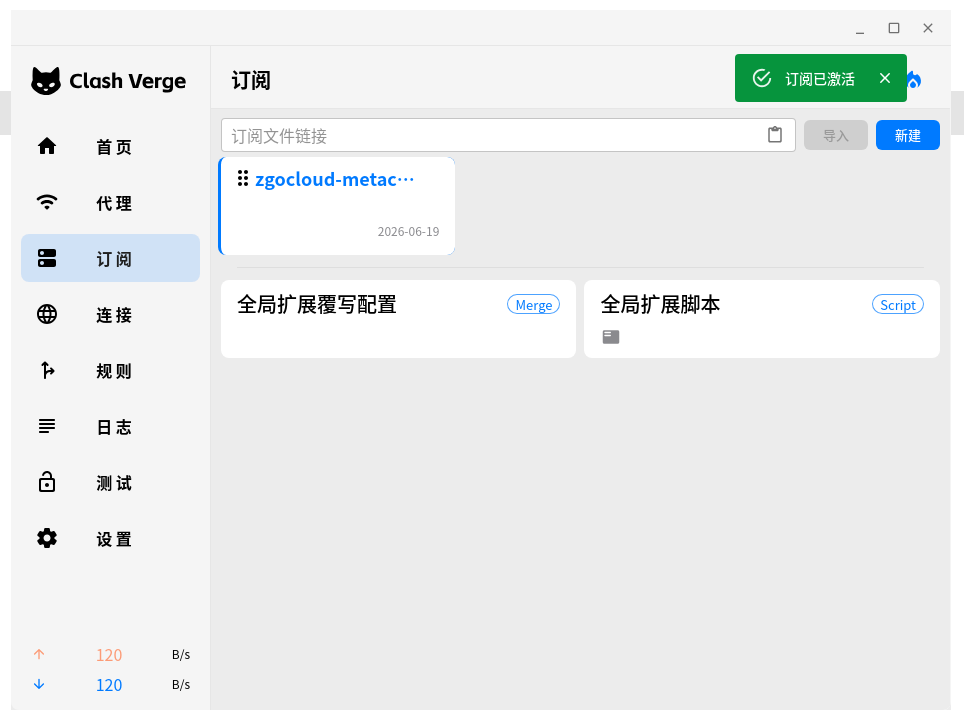
This action is closer to:
重新加载当前选中的订阅配置让当前配置重新生效Since this change only modifies a local YAML configuration, I used “Reactivate Subscription” first.
2. Update All Subscriptions
The refresh button next to it is usually used to:
重新从订阅链接拉取远程配置If your configuration comes from a remote subscription URL, then “Update All Subscriptions” is useful.
But if, like me, you maintain a local YAML configuration file, this is not the key step. The important thing is to reload the current configuration and make it active.
3. Restart the Clash Core
To make the DNS configuration take effect more thoroughly, I later found the restart-core entry in the Settings page.
The path is roughly:
设置 ↓Clash 内核 右侧齿轮按钮 ↓重启内核![[Screenshot 5: The Clash core gear button in Settings]](https://www.shuijingwanwq.com/wp-content/uploads/2026/07/5-14.png)
After clicking the gear button, the Clash core management window appears, where you can see:
重启内核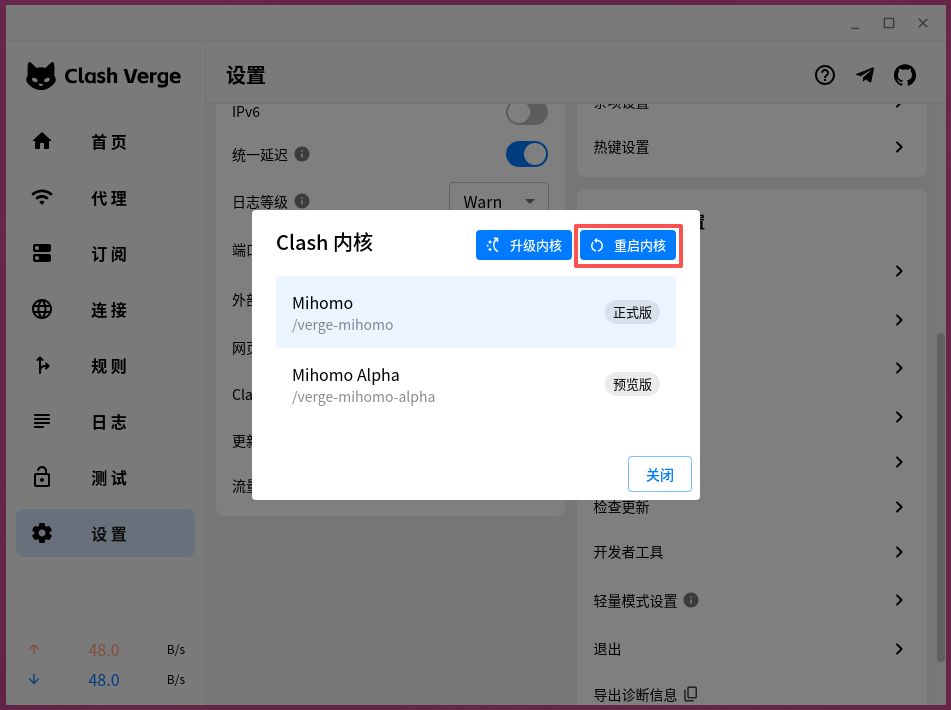
This step is more thorough than “Reactivate Subscription”. It effectively restarts the Mihomo core and reloads the current configuration.
So the final sequence I used was:
保存 YAML 配置 ↓重新激活订阅 ↓设置 → Clash 内核 → 重启内核 ↓查看日志是否有报错 ↓重新测试相关网站After restarting the core, it is a good idea to check the Logs page for errors like:
yaml errorparse errorconfig errorIf there are no such errors, and Google, GitHub, Hubstaff Talent, and similar sites all work normally, you can observe the setup for another two or three days to see whether the previous low-frequency DNS timeout disappears.
12. How to Verify It
This kind of issue is a bit special because it cannot be reproduced every time.
So it is not enough to check whether a site opens right now. It needs to be observed for a few more days.
I plan to keep watching the following areas:
| Item to verify | Expected result |
|---|---|
| Hubstaff Talent | No more low-frequency DNS resolution failures |
| Loads normally | |
| Google Play | Downloads and updates continue to work |
| GitHub | Loads normally |
| Overseas job sites | Loads normally |
| Domestic websites | Continue to use DIRECT and remain unaffected |
| Clash Verge Rev logs | No frequent dns resolve failed messages |
If the following still appears later:
dns resolve failed
all DNS requests failed
context deadline exceeded
That means this DNS fallback patch is still not enough, and the next things to check are:
proxy: Proxy
fallback 出口
WireGuard 链路
Wstunnel 进程
ZgoCloud 线路质量
But if the error changes from DNS failure to:
connect timeout
connection reset
tls handshake failed
then the problem is no longer at the DNS layer, and the proxy path itself should be investigated next.
13. Why I Did Not Build an All-in-One DNS Configuration
I could have added many more options this time, such as:
fake-ip;proxy-server-nameserver;- More nameservers;
- More fallback servers;
- A nameserver-policy for different domains;
- Special rules for specific websites.
But I did not do that for now.
The reason is simple: the main configuration is already stable, and the issue is only a low-frequency DNS timeout that appears once every two or three days. If I change too many things at once, it becomes hard to know which change actually worked, and it can also make a stable configuration unnecessarily complex.
So v4 still follows one principle:
Fix only the problem that actually appeared. Do not add complexity just to make the configuration look more complete.
This is also the maintenance style I now prefer.
For a self-hosted VPN / proxy setup, the biggest risk is not that the configuration is not advanced enough. The real problem is changing too many lines every time something breaks, until even I no longer know which line is actually doing the work.
14. Summary
This v4 change is very small, but I think it is necessary.
The core issue in v3 was not the overall direction, but the fact that the DNS upstreams were too single-pointed:
nameserver 只有 1 个
fallback 只有 1 个
default-nameserver 没有显式配置
In daily use, that configuration can work most of the time. But if the DNS upstream or proxy path fluctuates for a few seconds, some overseas websites may briefly fail to open.
The v4 change does not replace the previous design. It only adds the smallest fallback layer:
default-nameserver:223.5.5.5 + 119.29.29.29
nameserver:阿里 DoH + 腾讯 DoH
fallback:Cloudflare DoT + Google DoT
This still follows the principle of this series:
Do not add rules if they are not needed. Do not rebuild the configuration if it is not necessary. Only fix the problem that actually appeared.
This version still needs to be observed for a few more days.
If it remains stable, v4 can serve as a more reliable minimal DNS configuration for the Clash Verge Rev + WireGuard + Wstunnel combination.