My Technical Blog CTA System Design: From Classification to Series, Build Precision Conversion Solutions for Sustainable Maintenance
Recently, I have started to rethink the CTA (Call to Action) design of the personal technology blog.
With the continuous growth of blog content, the number of Chinese articles has reached 1187, and there are also corresponding English versions. In the past few years, I have paid more attention to content creation and technology accumulation, and I have not invested much in traffic conversion.
It wasn’t until I recently started trying to get technical advice, remote part-time and project collaboration opportunities through blogging that I realized:
CTA itself also requires architecture design.
Current blog content structure
Currently, blogs are mainly composed of the following dimensions:
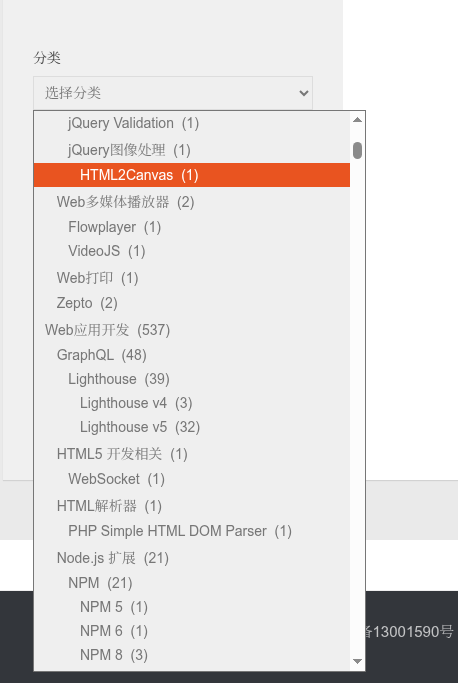
Category
For example:
- Yii2 (204 articles)
- Laravel (199)
- WordPress (55 articles)
- Docker (58 articles)
- shopify
- GraphQL
- wireguard
- linux
- go
and other technical classifications.
Classification is a knowledge system formed by the long-term accumulation of blogs, and it is also the way to belong to most of the historical articles. as shown in Figure 2
Series
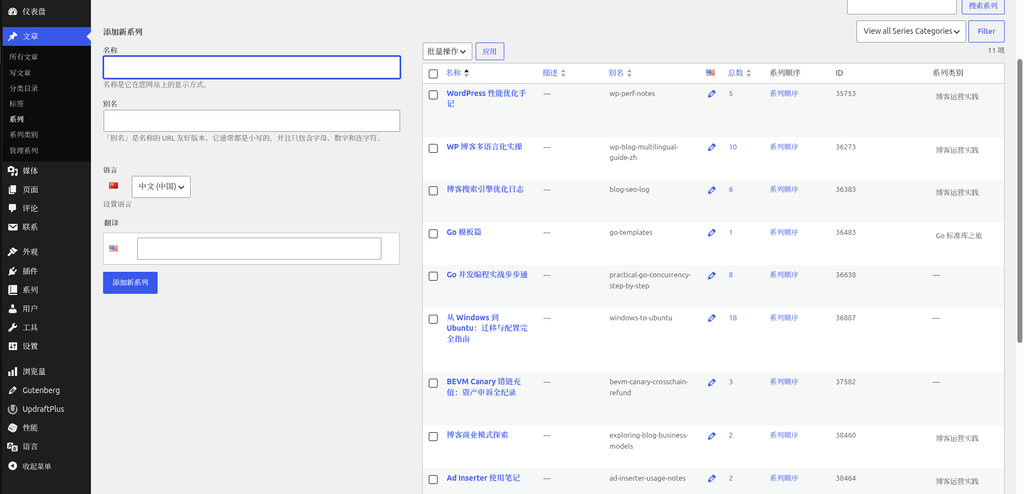
In the last two months, I have started to use PublishPress Series to organize some articles.
The following series has been established:
- AD Inserter usage notes
- Self-built VPN
- Yii2 Advanced Practical Series: RESTful API + RPC Service + Internationalization + Log and Test
- WordPress Performance Optimization Notes
- WP blog multilingual practice
- Blog Search Engine Optimization Log
- Go Template
- Go concurrent programming practice step by step
- From Windows to Ubuntu: The Complete Guide to Migration and Configuration
- Bevm Canary Wrong Chain Recharge: Full Record of Asset Complaint
- Blog Business Model Exploration
A total of about 85 articles in the series. as shown in Figure 1
Although the number is not many, the biggest value of the series is:
- Provide reading order
- Provide a complete learning path
- Focus on a single theme
- User intentions are more clear
Initial idea
Initially I wish:
Configure a dedicated CTA for each category.
For example:
yii2 classification
Show:
- Yii2 Project Maintenance
- RESTful API development
- performance optimization
- PHP development
WordPress Category
Show:
- WordPress Performance Optimization
- Plug-in development
- Multilingual website construction
- SEO optimization
This seems reasonable.
actual problems
As I thought deeper, I found a real problem:
An article may belong to multiple categories at the same time.
For example:
- yii2
- Laravel
- php
or:
- WordPress
- SEO
or:
- docker
- linux
If both the Yii2 and Laravel categories are configured with exclusive CTAs, then if an article belongs to these two categories at the same time, then two CTAs may be displayed at the same time.
At first my solution was:
Configure a blacklist for each CTA.
For example:
yii2 CTA:
Whitelist:
- yii2
Blacklist:
- Laravel
- WordPress
- docker
Laravel CTA:
Whitelist:
- Laravel
Blacklist:
- yii2
- WordPress
- docker
But it was quickly discovered that this approach was not sustainable.
As the number of classifications increases, the blacklist relationship will become more and more complex, and finally form a configuration system that is difficult to maintain.
The essential difference between series and classification
After analysis, I found that:
Category and series actually take on completely different responsibilities.
Category Representative Technology Fields
For example:
- yii2
- Laravel
- docker
- WordPress
They describe the technology stack.
Series represents user needs
For example:
WordPress Performance Optimization Notes
What users care about is:
- Website Speed
- Core Web Vitals
- redis
- Cache optimization
Self-built VPN
What users care about is:
- wireguard
- wstnnel
- vultr
- Client Configuration
Blog Search Engine Optimization Log
What users care about is:
- Google inclusion
- SEO
- Flow Growth
Blog Business Model Exploration
What users care about is:
- Adsense
- affiliate
- Blog monetization
The series often corresponds to a solution to a complete problem.
Therefore, its business value is usually higher than classification.
Finalized CTA architecture
After several rounds of adjustment, I finally decided to adopt:
Level 1: Series CTA (highest priority)
If the article belongs to the specified series:
Directly display the exclusive CTA of the series.
For example:
WordPress Performance Optimization Notes
CTA content:
- WordPress Performance Optimization
- Redis configuration
- Database optimization
- Core Web Vitals Optimization
Self-built VPN
CTA content:
- vpn build
- WireGuard configuration
- WSTUnnel deployment
- Client configuration support
WP blog multilingual practice
CTA content:
- WordPress Multilingual Construction
- Polylang configuration
- International SEO
The characteristics of the series CTA are:
Accuracy, professional and higher conversion rate.
Level 2: Category CTA
When the article does not belong to any series with dedicated CTAs configured:
Displays the category CTA.
For example:
yii2 classification
- Yii2 Project Maintenance
- RESTful API development
- PHP development
Laravel Category
- Laravel project development
- performance optimization
- System update
WordPress Category
- WordPress development
- Plug-in development
- website maintenance
For articles that belong to multiple categories at the same time:
Allows multiple categories of CTAs to be displayed at the same time.
After analysis, I don’t think this situation actually occurs too often.
And as long as the number of classified CTAs is controlled within a reasonable range, the impact on the user experience is limited.
Compared with maintaining a large number of blacklist rules, this solution is simpler and more reliable.
Level 3: Universal CTA
For articles that are neither series nor exclusive CTAs:
Displays a unified CTA.
For example:
- PHP development
- Go development
- Linux operation and maintenance
- Architecture Consulting
- system maintenance
As a whole station bottom plan.
Why abandon the classification priority scheme
In theory, the most ideal way is:
Yii2 Priority 100
Laravel Priority 90
WordPress Priority 80
Then only the CTA with the highest priority is displayed.
But what I’m currently using is to implement CTA inserts from ad inserter.
What AD INSERTER provides is:
- whitelist
- Blacklist
mechanism.
Category priority judgment is not supported.
If you force a blacklist to simulate priority, the configuration complexity will increase dramatically.
So finally abandoned this plan.
my final principle
The entire CTA system follows the following rules:
Series CTA > Category CTA > General CTA
Specifically:
- Responsible for precision conversion
- Category is responsible for expanding coverage
- GM CTA is responsible for the bottom line
For blogs with 1187 Chinese articles, this is a long-term solution that takes into account maintenance costs and business value.
In the future, only the corresponding series CTA needs to be added.
In the future, there is no need to re-adjust a large number of blacklist configurations.
From the scalability point of view, this is also the most suitable implementation for me right now.