

1. When logging in in WordPress 6, an error is reported: Error: cookies are blocked or not supported by your browser. You must enable cookies to use wordpress.. as shown in Figure 1
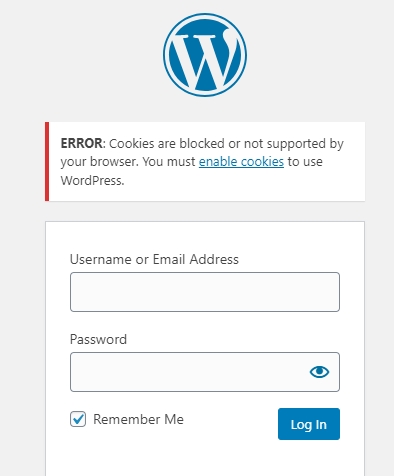
2. Click Enable Cookies to open:https://wordpress.org/documentation/article/cookies/#enable-cookies-in-your-browser. But in fact, my browser has not made any special settings, and in theory, it is impossible to have a situation that has been blocked or not supported.
3. The browser is Google Chrome, refer to:https://support.google.com/chrome/answer/95647. First delete the cookie from a website and remove the object-wp.local. as shown in Figure 2

4. Allow or block cookies, the default is to choose to block third-party cookies in seamless mode. as shown in Figure 3

5. When logging in again, no errors are reported, and the login is successful.
需要长期技术维护或远程问题排查?
我是拥有 15+ 年经验的 PHP / Go 后端工程师,长期关注已有系统维护、Bug 修复、性能优化、服务器排查、WordPress 网站维护和小功能迭代。
如果你的项目遇到以下情况,可以先从一次小问题排查开始合作:
- ✅ PHP / Laravel / Yii2 老项目无人维护
- ✅ Go / Gin 后端接口需要排查或优化
- ✅ WordPress 网站访问慢、报错或插件冲突
- ✅ Nginx / MySQL / Redis / Linux 服务器异常
- ✅ CDN / Cloudflare / DNS / HTTPS 配置问题
- ✅ 需要长期远程技术支持或兼职维护
更多介绍请查看:关于我 & 合作
微信:13980074657
邮箱:shuijingwanwq@gmail.com
Telegram:@shuijingwan
GitHub:https://github.com/shuijingwan
发表回复