

Preface
When choosing network acceleration tools, many of you might be looking for a solution that is both stable and efficient. Whether building your own VPN or using a commercial service, the core goal is to obtain a reliable internet experience. Today, I want to share a self-built VPN architecture that I use. Through actual test data (based on 14:00 Beijing Time, Chengdu, Sichuan, China Mobile environment) and comparative testing methods, combined with 9 key screenshots embedded in chronological order, I aim to help readers intuitively connect the operation steps with the results and clearly understand the scheme’s performance. Whether you are currently using other self-built schemes or commercial services, you can follow the steps in this article to verify it yourself and use data to make a choice that suits you.
Peak evening hours test updated, see Phase 3 and subsequent comprehensive comparison
You might be wondering: does this scheme remain stable during peak traffic hours? Tonight (June 2nd) around 21:00, I will conduct another test under the same environment to compare the data differences between daytime and peak evening hours, verifying its resilience.
1. Unveiling the Core Tech Stack
To balance stability, anti-interference capabilities, and low latency, I chose the following technology combination:
- Server Node: ZgoCloud Los Angeles, USA
Route advantages: Uses a Los Angeles triple-network optimized node (CN2 GIA + 9929 + CMIN2), optimized for mainland China to alleviate peak congestion. - Transport Protocol: Wstunnel + WireGuard
Technical principle: WireGuard handles core encrypted transmission and tunnel establishment, while Wstunnel encapsulates WireGuard traffic as HTTPS traffic, balancing stealth and penetrability. - Client Management: Clash Verge Rev (Ubuntu)
Feature highlights: Smart routing rules enable seamless switching between domestic direct connections and foreign proxies.
2. Test Environment Description
The test environment is as follows, ensuring data reproducibility:
- Operating System: Ubuntu Linux (26.04)
- Physical Location: Chengdu, Sichuan, China
- ISP: China Mobile, Gigabit bandwidth
- Testing Tool: Speedtest.net (Chrome browser version)
- Test Time: Around 14:00 Beijing Time
Note: The Speedtest App was not used due to system limitations; Android data will be added later.
(Figure 1: Screenshot of test environment configuration)
(Screenshot description: Shows the Ubuntu system version, network adapter information, and annotates the test time and device information.)
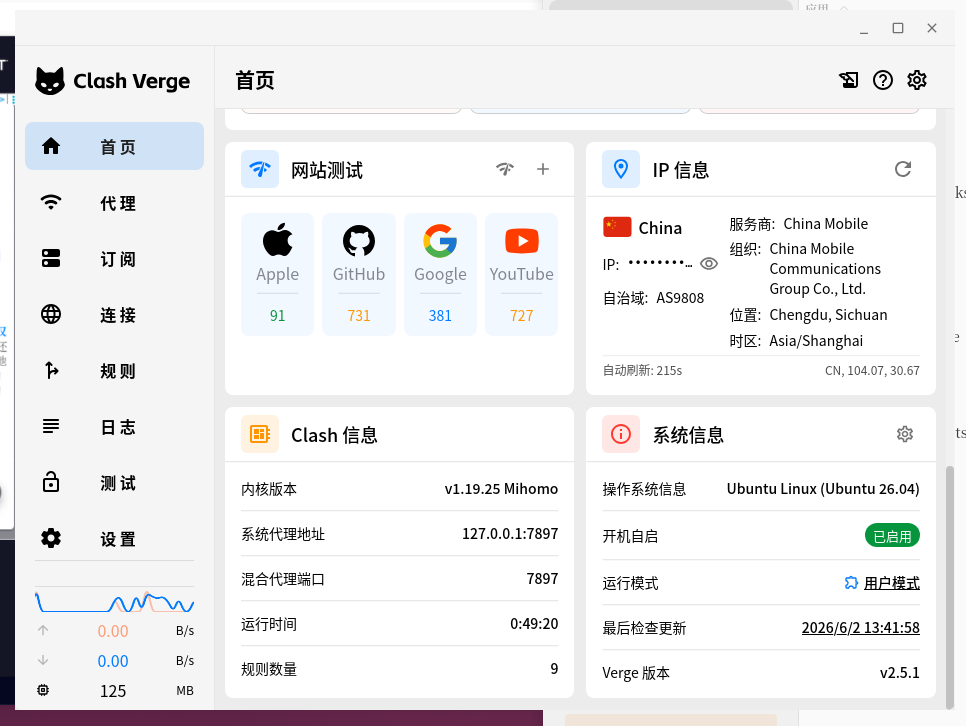
Note: The Speedtest App was not used due to system limitations; Android data will be added later. See Figure 9.
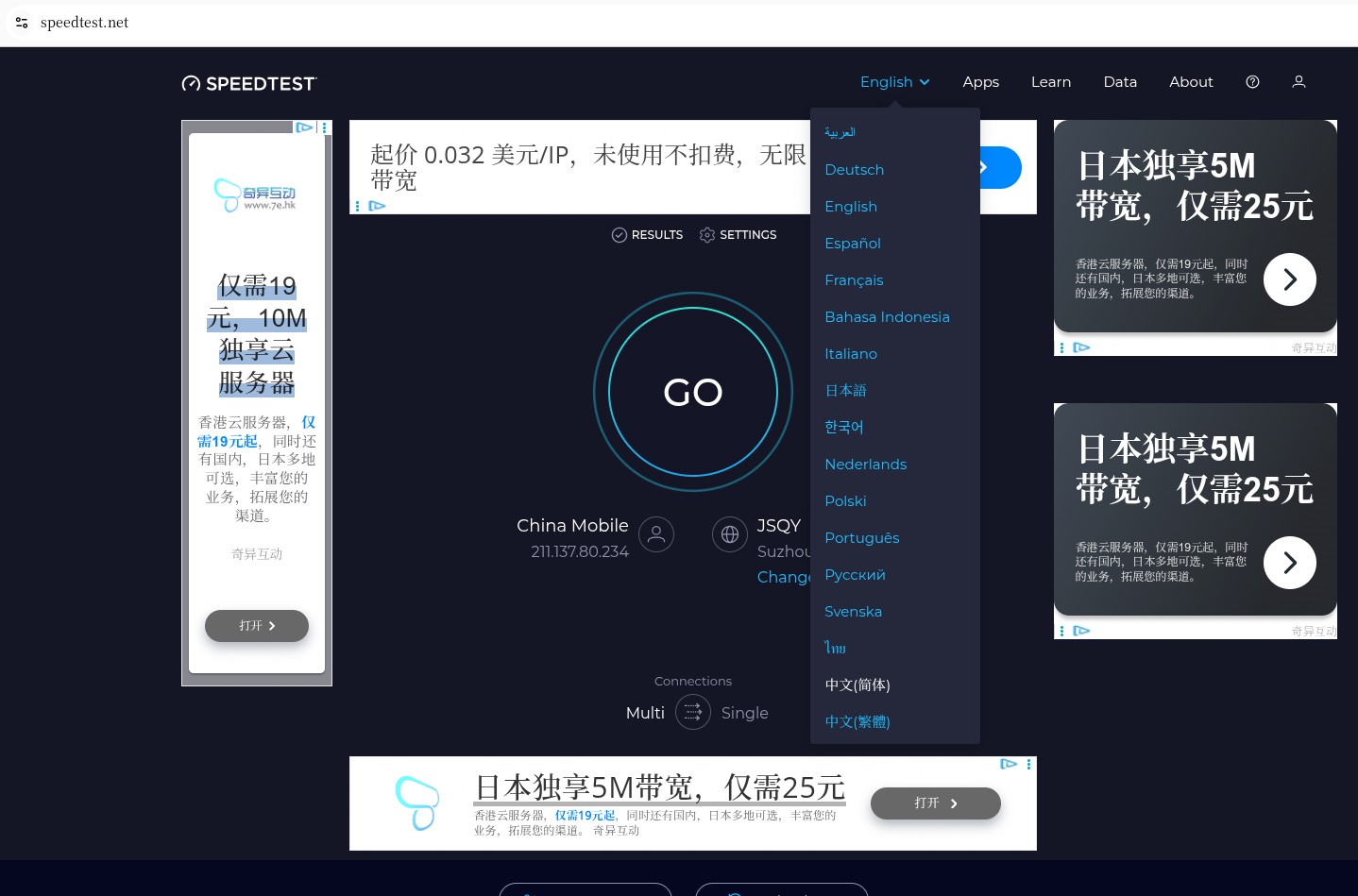
Open the Speedtest official website and switch the language to Chinese (Simplified). See Figure 2.
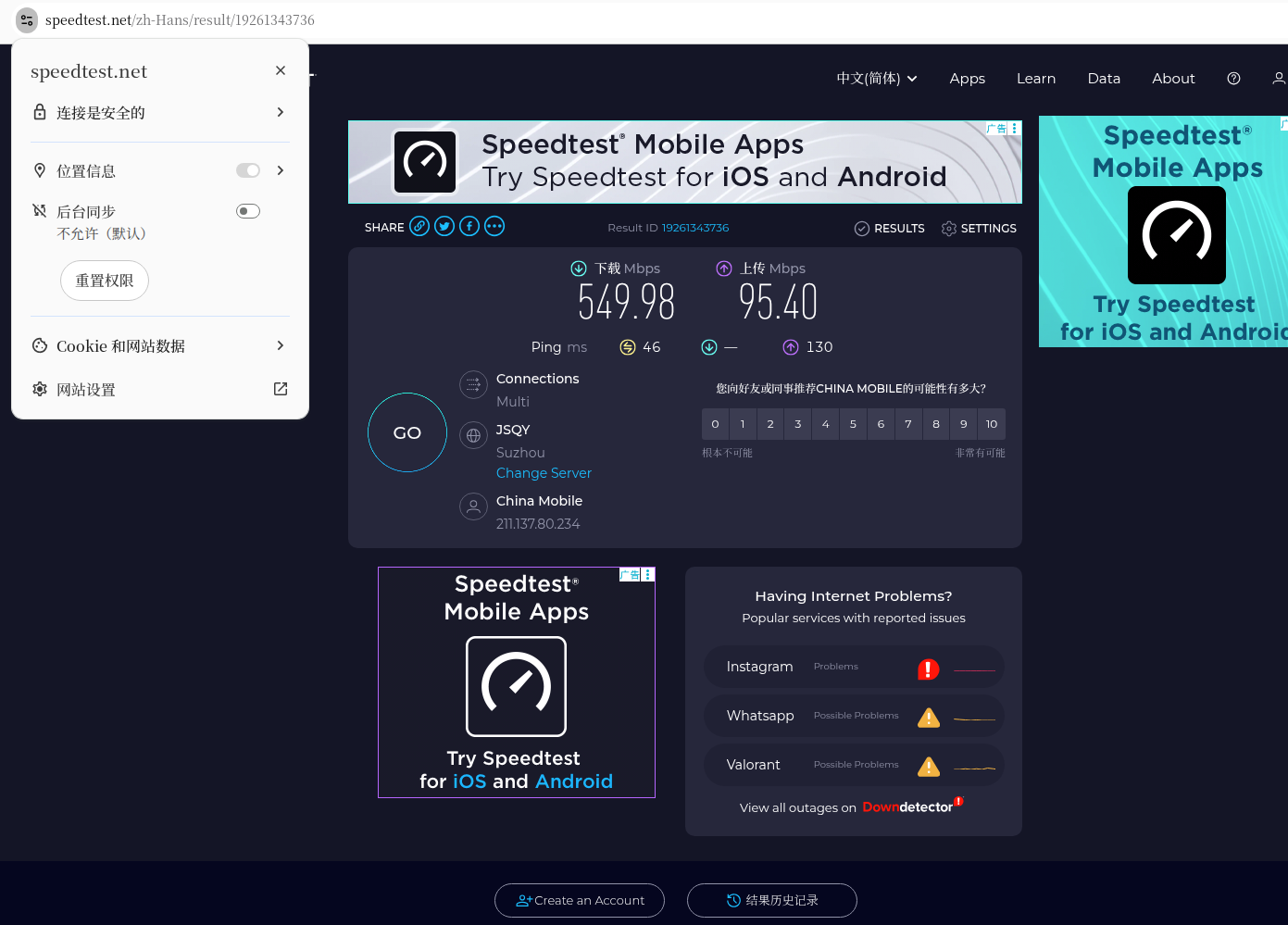
During the test, the browser requests relevant location permissions; set this to allow.
3. Phase 1: Local Network Benchmark Test (Control Group)
After disconnecting the proxy, the three test results are as follows:
- Local Test #1
Download: 549.98 Mbps, Upload: 95.40 Mbps → Typical performance for China Mobile broadband (fast download, limited upload).
(Figure 3: Local benchmark test #1 screenshot)
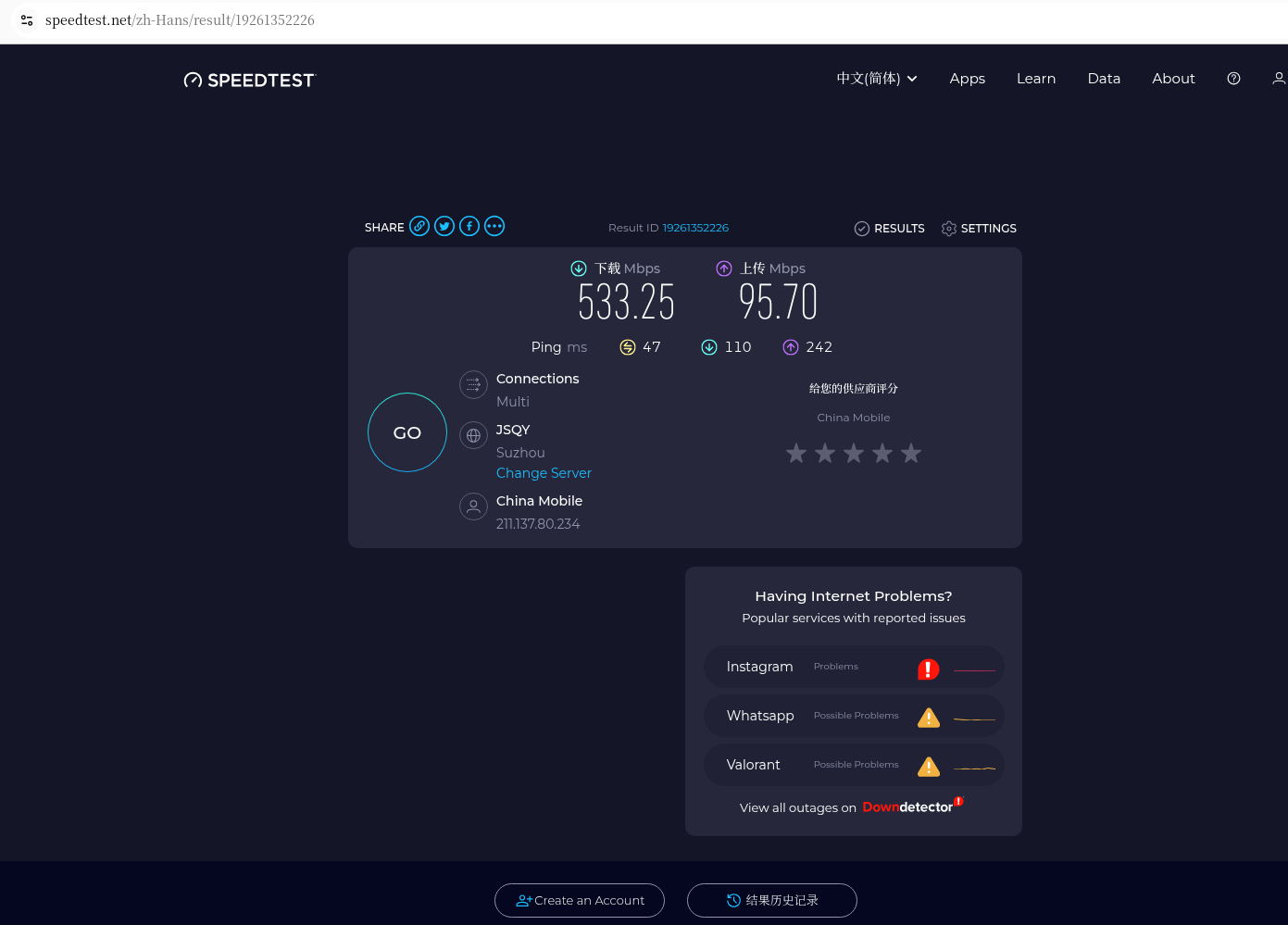
- Local Test #2
Download: 533.25 Mbps, Upload: 95.70 Mbps.
(Figure 4: Local benchmark test #2 screenshot)
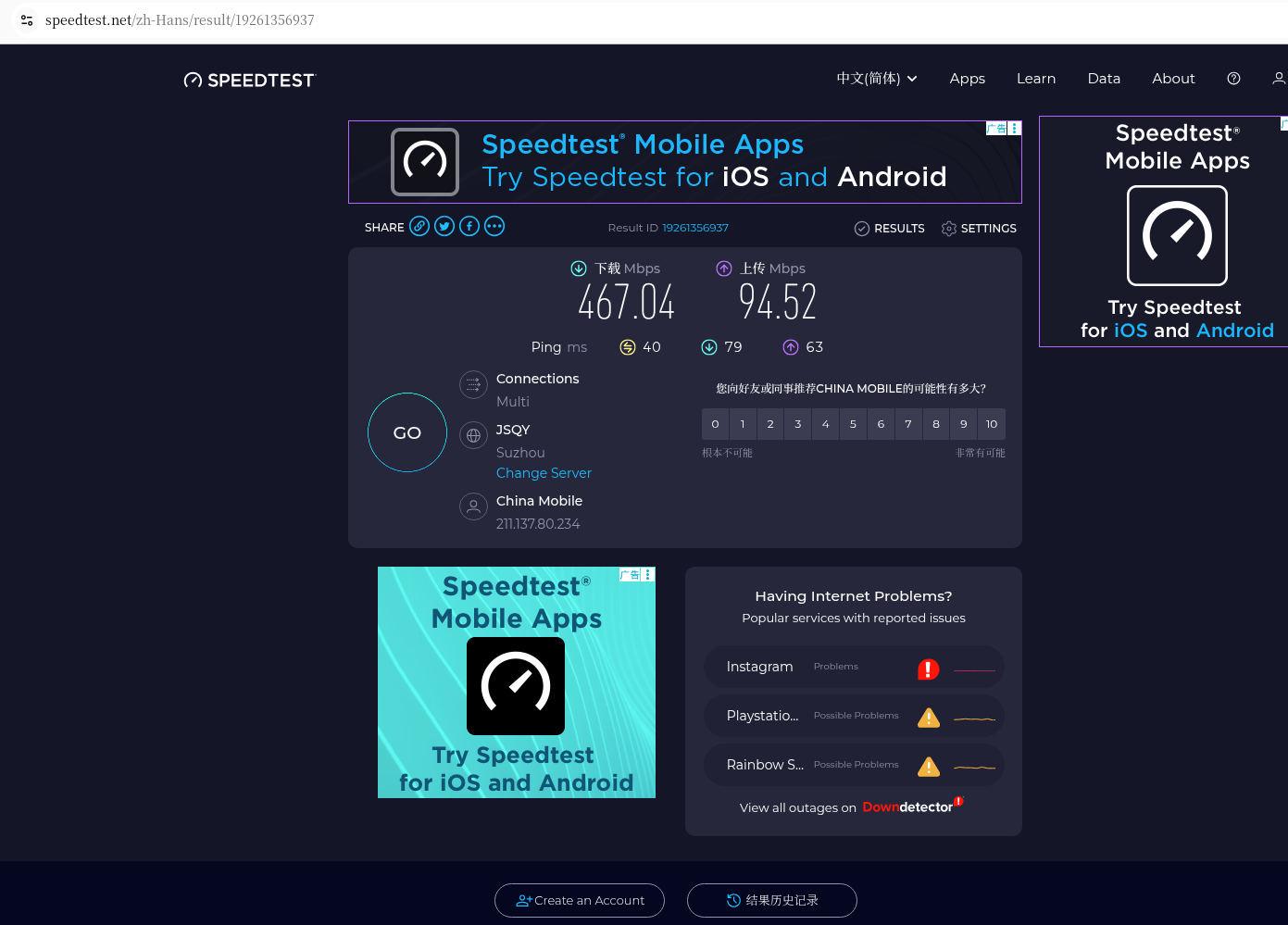
- Local Test #3
Download: 467.04 Mbps, Upload: 94.52 Mbps.
(Figure 5: Local benchmark test #3 screenshot)
📊 Local Benchmark Summary:
- Average Download: ~530 Mbps
- Average Upload: ~95 Mbps
- Average Latency: ~45 ms
4. Phase 2: Self-built VPN Test (Experimental Group)
After connecting to the VPN, the three test results are:
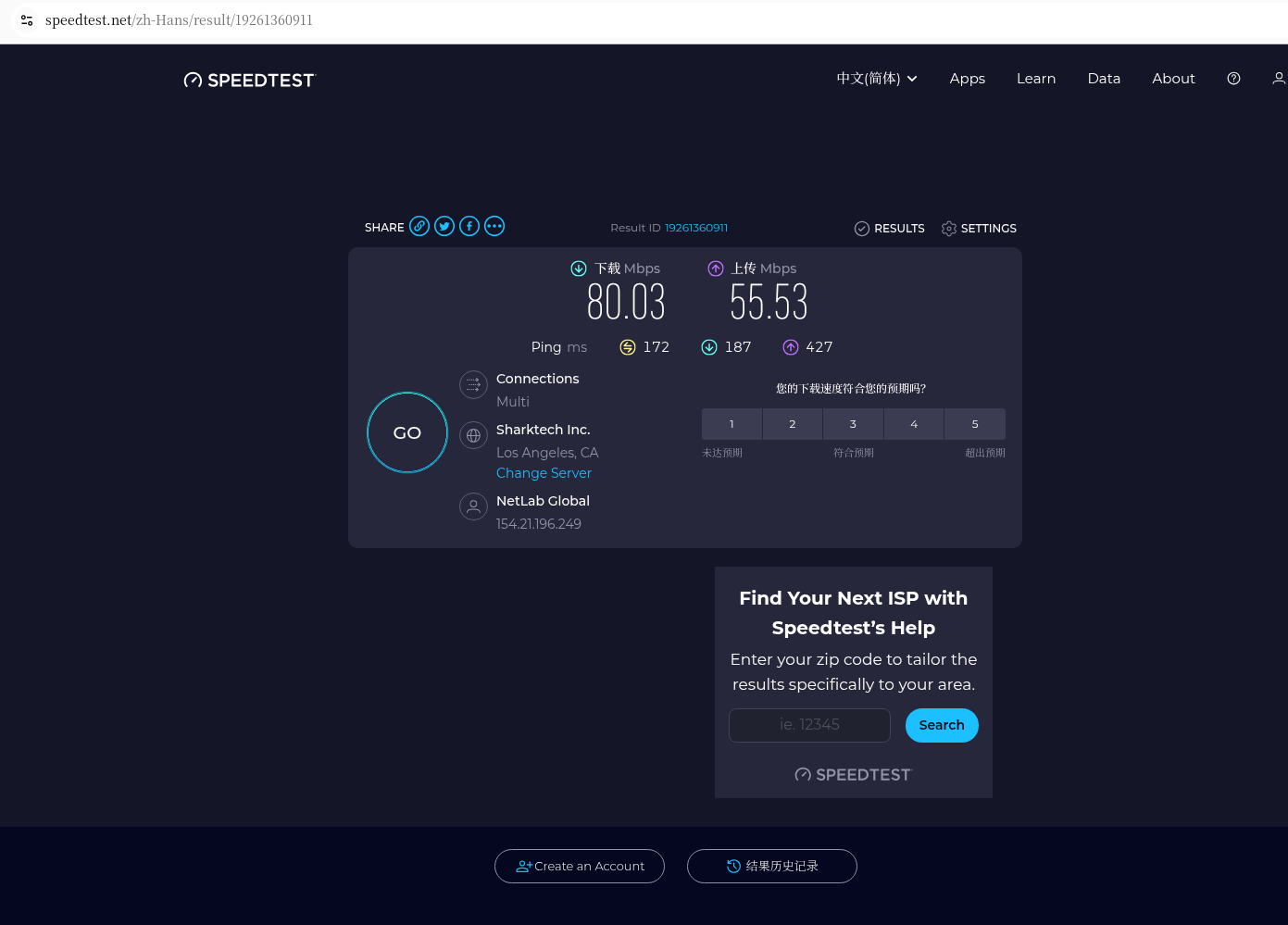
- VPN Test #1
Analysis: Although crossing the Pacific, the download still reached 80.03 Mbps, and the upload was 55.53 Mbps. For a transoceanic connection, this is an excellent result.
(Figure 6: VPN speed test #1 screenshot)
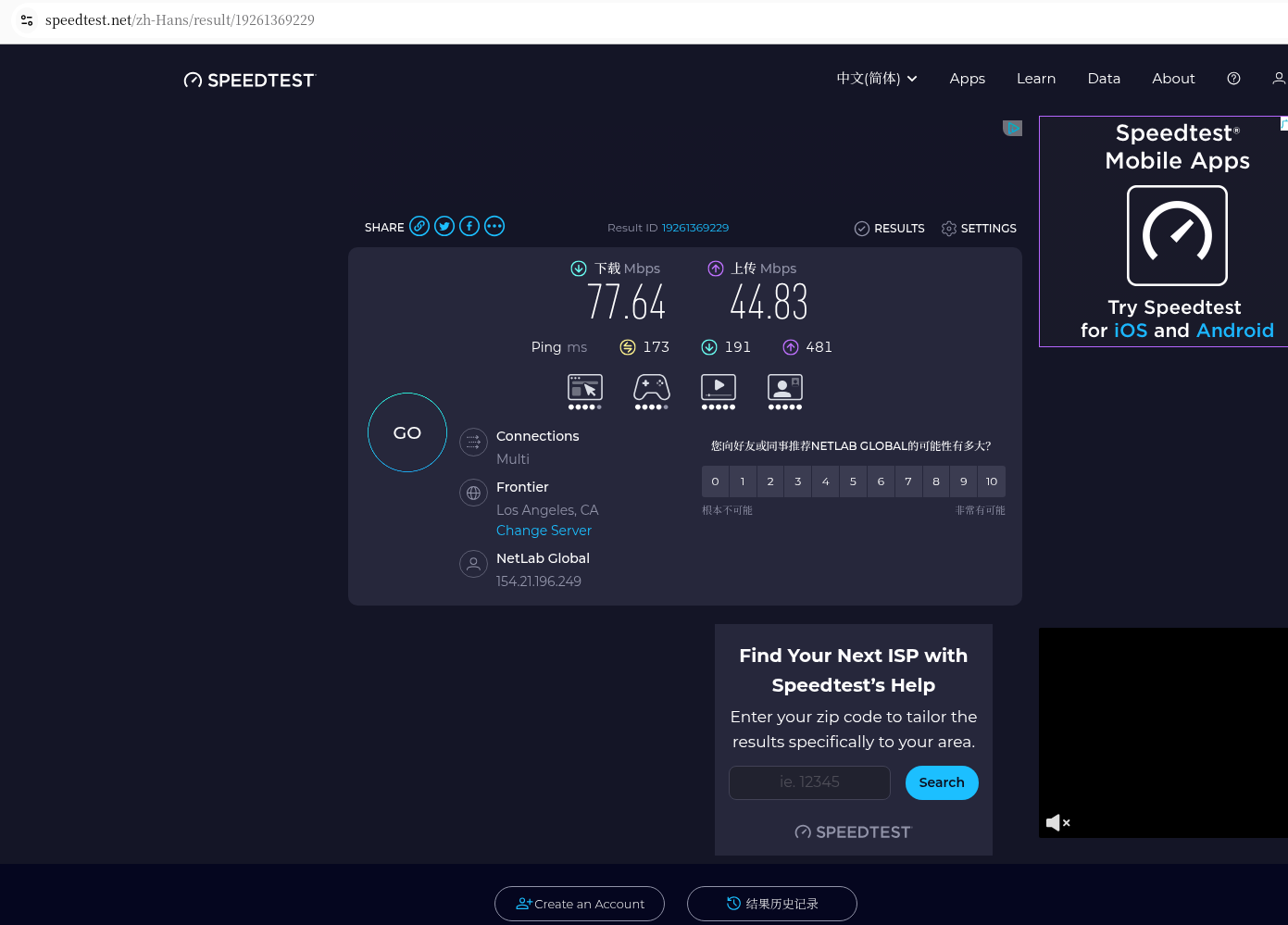
- VPN Test #2
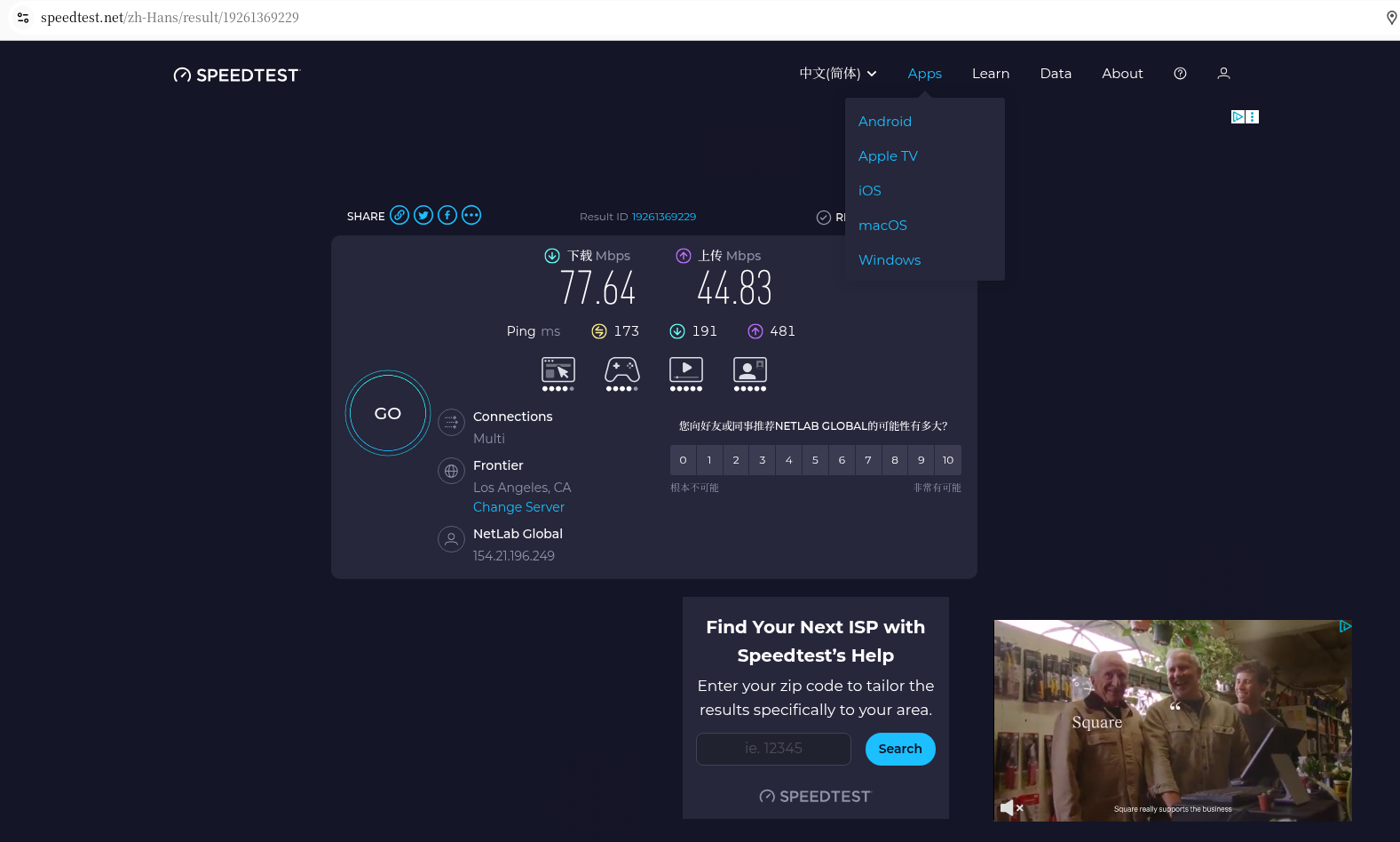
Analysis: Fluctuation is minimal, with a download of 77.64 Mbps and an upload of 44.83 Mbps. Idle Latency is controlled at 173ms, meaning there is almost no lag when browsing the web.
(Figure 8: VPN latency test screenshot)
- VPN Test #3
Analysis: The third test remains robust, and the upload even rebounded to 81.05 Mbps. This proves the excellent performance of the CN2 GIA + 9929 route during afternoon hours (not late at night).
(Figure 7: VPN speed test #3 detailed data screenshot)
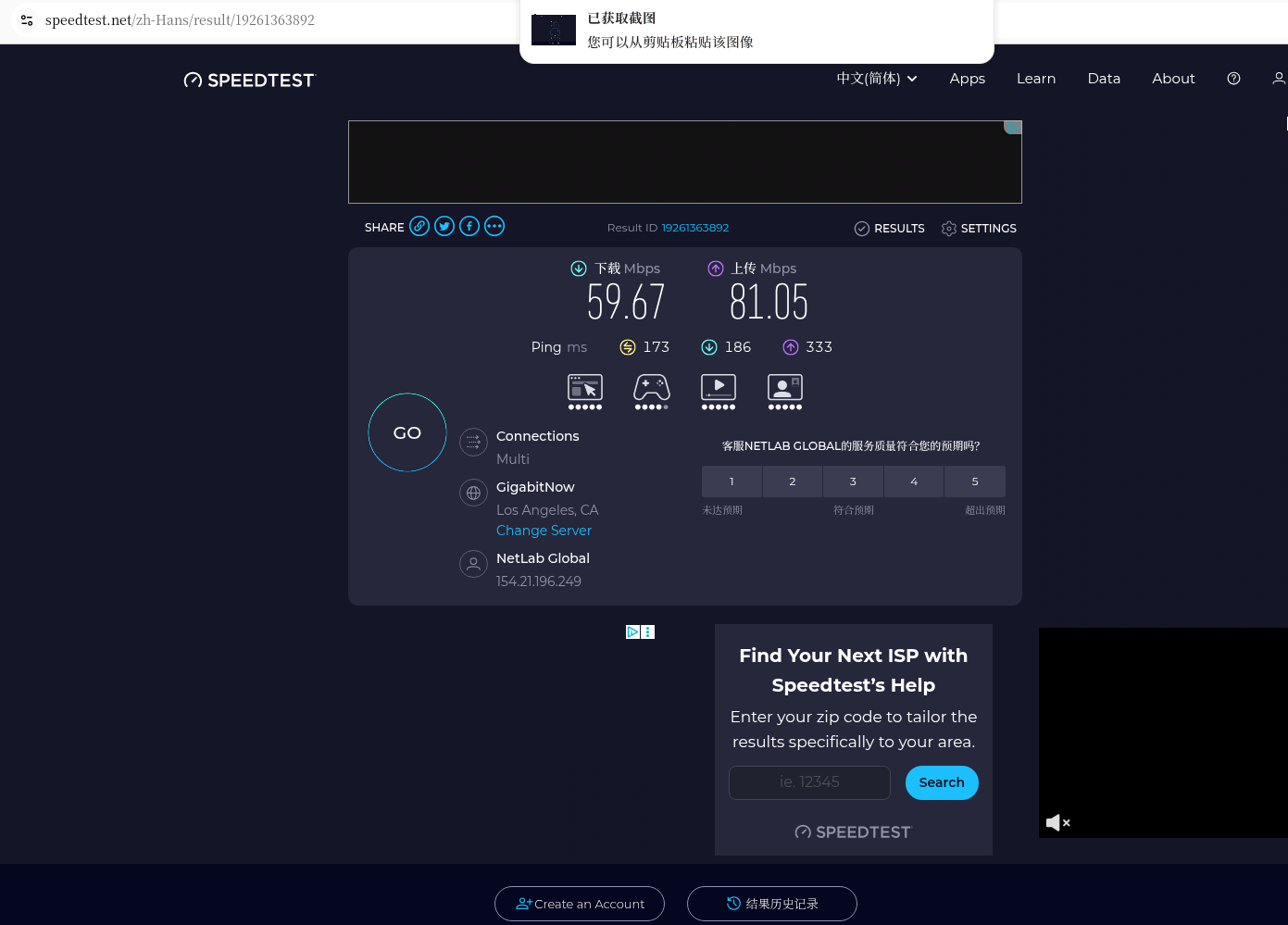
(Screenshot description: Speedtest detailed report page, showing download/upload rate charts and complete test results.)
5. Phase 3: Peak Evening Hours Stress Test (Supplementary Test at 21:00 Beijing Time)
At the request of readers, I retested under the same environment (Ubuntu + Chengdu China Mobile Gigabit) at around 21:00 in the evening to compare with the daytime (14:00) data and verify the scheme’s resilience.
🕘 Peak Evening Hours Local Benchmark Test (Control Group)
Disconnected the VPN and ran three consecutive speed tests:
Local Peak Evening #1
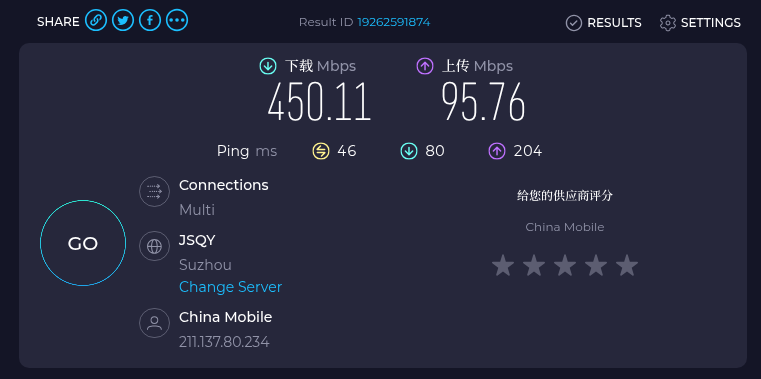
Download: 450.11 Mbps, Upload: 95.76 Mbps, Ping: 46 ms
→ During peak evening hours, the download speed dropped from the daytime 530 Mbps to 450 Mbps, a decrease of about 15%.
(Figure 10: Peak evening local speed test #1 screenshot)
Local Peak Evening #2
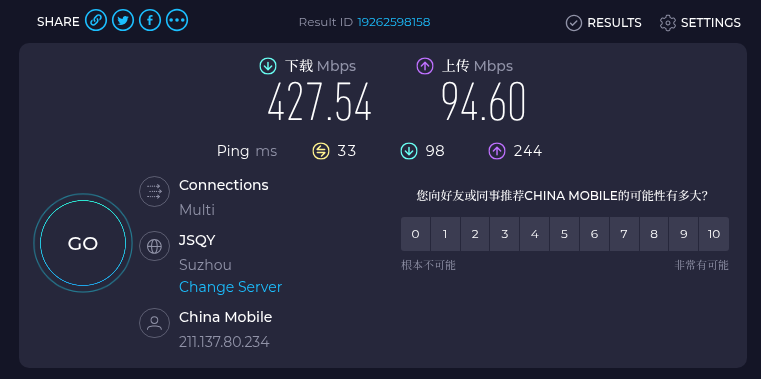
Download: 427.54 Mbps, Upload: 94.60 Mbps, Ping: 33 ms
(Figure 11: Peak evening local speed test #2 screenshot)
Local Peak Evening #3
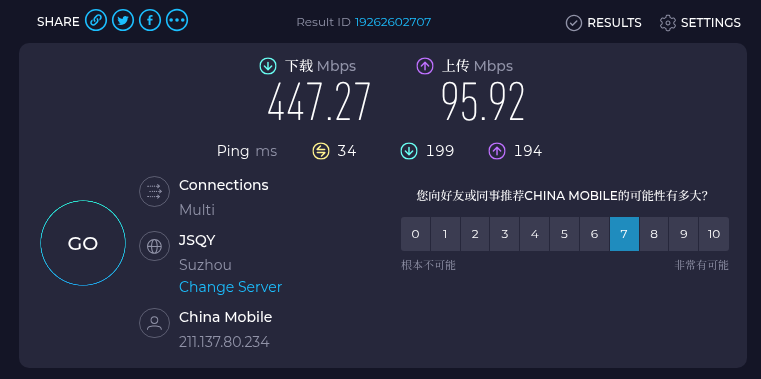
Download: 447.27 Mbps, Upload: 95.92 Mbps, Ping: 34 ms
(Figure 12: Peak evening local speed test #3 screenshot)
📊 Peak Evening Local Benchmark Summary (compared with daytime):
| Time Period | Average Download | Average Upload | Average Ping |
|---|---|---|---|
| Daytime (14:00) | ~530 Mbps | ~95 Mbps | ~45 ms |
| Peak Evening (21:00) | ~441.6 Mbps | ~95.4 Mbps | ~37.7 ms |
Analysis: The local download speed during peak evening hours decreased slightly (about 16%), but the upload speed remained almost unchanged, and the Ping even improved slightly. This indicates that the overall load on Chengdu China Mobile broadband during peak evening hours is acceptable, with no severe congestion.
🌙 Peak Evening VPN Test (Experimental Group)
After connecting to the VPN, three consecutive speed tests were run under the same environment:
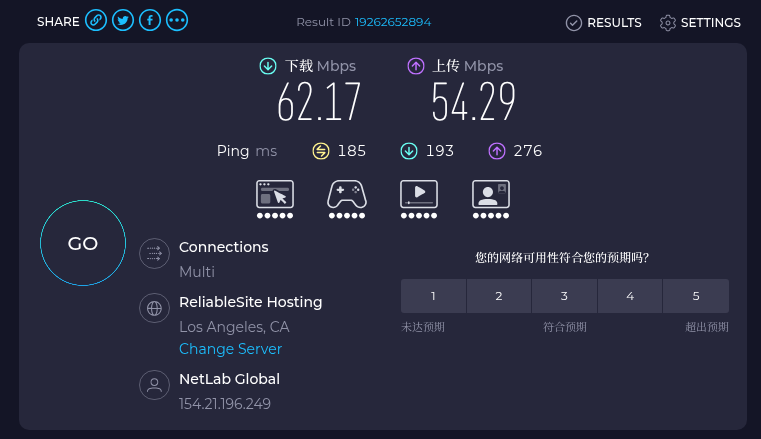
VPN Peak Evening #1
Download: 62.17 Mbps, Upload: 54.29 Mbps, Idle Latency: 185 ms
→ Compared to the daytime VPN download (72 Mbps), this is a drop of about 20%, but it is still far above the requirement for 4K streaming.
(Figure 13: Peak evening VPN speed test #1 screenshot)
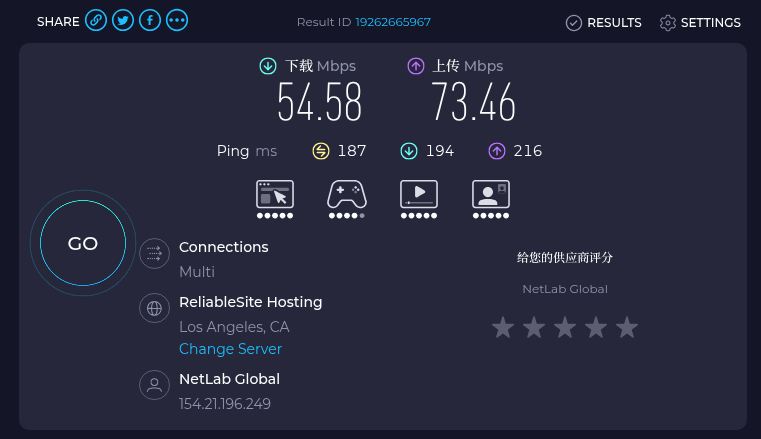
VPN Peak Evening #2
Download: 54.58 Mbps, Upload: 73.46 Mbps, Idle Latency: 187 ms
(Figure 14: Peak evening VPN speed test #2 screenshot)
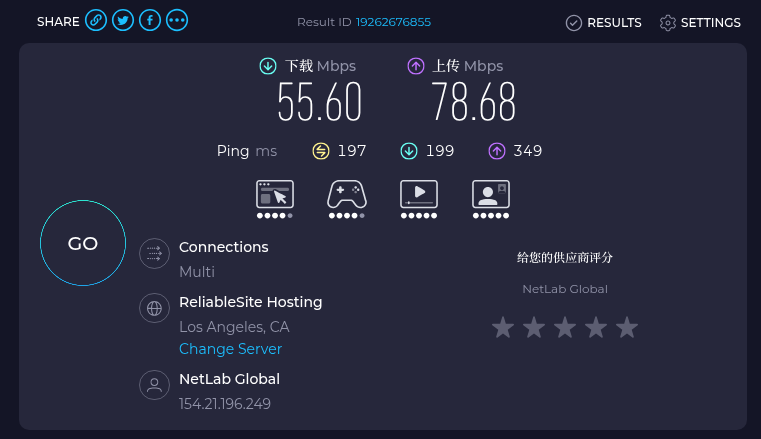
VPN Peak Evening #3
Download: 55.60 Mbps, Upload: 78.68 Mbps, Idle Latency: 197 ms
(Figure 15: Peak evening VPN speed test #3 screenshot)
📊 Peak Evening VPN Summary (compared with daytime VPN):
| Time Period | Average Download (VPN) | Average Upload (VPN) | Average Idle Latency |
|---|---|---|---|
| Daytime (14:00) | ~72.3 Mbps | ~60.7 Mbps | ~173 ms |
| Peak Evening (21:00) | ~57.5 Mbps | ~68.8 Mbps | ~189.7 ms |
Observation: The peak evening VPN upload speed (average 68.8 Mbps) is actually higher than during the daytime (60.7 Mbps). This might be due to fluctuations in the Speedtest nodes, or because upstream link resources are more abundant during peak evening hours. Regardless, this upload speed far exceeds the requirements for video conferencing.
6. Core Conclusions: Daytime vs. Peak Evening, How Does the Scheme Perform?
📊 Comprehensive Performance Comparison Table
| Scenario | Local Download | VPN Download | Local Upload | VPN Upload | Idle Latency (VPN) |
|---|---|---|---|---|---|
| Daytime (14:00) | 530 Mbps | 72.3 Mbps | 95 Mbps | 60.7 Mbps | 173 ms |
| Peak Evening (21:00) | 441.6 Mbps | 57.5 Mbps | 95.4 Mbps | 68.8 Mbps | 189.7 ms |
✅ Core Conclusions (Three Points)
- Absolute Performance: Peak evening VPN download remains stable at 55–62 Mbps, and upload reaches 55–78 Mbps. This bandwidth can easily support 4K video streaming, large file downloads, and multi-party HD video conferencing. Although the download decreased by about 20% compared to daytime, it is still more than sufficient.
- Reasonable Relative Loss Rate: The relative loss of the daytime VPN compared to local is about 86.4% (530→72.3), and the peak evening loss is about 87.0% (441.6→57.5). The tunnel efficiency is almost identical; the drop in download during peak evening hours mainly stems from the speed degradation of the local underlying network (530→441.6).
- Stable Latency Performance: The average idle latency during peak evening hours is 190 ms, only about 10% higher than during the daytime (173 ms). There is almost no perceptible difference when browsing the web; only highly latency-sensitive competitive games (on US servers) might feel a slight increase in operational lag.
7. Interpretation of Key Parameters for Self-built VPN Testing (Daytime vs. Peak Evening Data Comparison)
Besides upload and download speeds, the three latency parameters in the screenshots are very important. Here is an explanation based on the actual data from daytime and peak evening hours:
| Parameter | Meaning | Daytime VPN | Peak Evening VPN | Evaluation |
|---|---|---|---|---|
| Idle Latency | Ping value, reflecting network response time | 173 ms | 185–197 ms | Both excellent. Below 200ms is first-tier for transoceanic connections. |
| Download Latency | Latency jitter during download | 186–191 ms | 193–199 ms | Normal. Slight increase during peak evening hours, does not affect daily use. |
| Upload Latency | Latency jitter during upload | 333–481 ms | 216–349 ms | Peak evening upload jitter is actually better than daytime (max 349ms in Figures 13–15), indicating stable line quality. |
If you need to upload files at full speed while simultaneously holding a video conference, it is recommended to limit the upload bandwidth on your router or computer (e.g., limit it to 30 Mbps) to avoid stuttering caused by high upload latency.
8. Why Do “Suzhou Mobile” and “Los Angeles” Appear as Two Results?
Whether during the daytime or peak evening hours, the principle behind local speed tests and VPN speed tests pointing to different nodes is the same:
- Figures 10–12 (Local): Speedtest automatically matched the
JSQY (Suzhou)node. This is a China Mobile backbone network node in Jiangsu Province; despite the physical distance, it belongs to the carrier’s internal high-speed channel, so it achieved speeds of 400+ Mbps. - Figures 13–15 (VPN): Speedtest intelligently recognized that my current exit IP is in the United States, so it automatically matched the
NetLab Global / ReliableSite Hosting (Los Angeles)node.
Conclusion: This is the real transnational network speed! If you could still connect to the Suzhou node and test 400+ Mbps while the VPN is active, that would be data falsification (because the traffic cannot instantly route back to China and then out again). 55–62 Mbps (peak evening) is my actual usable overseas bandwidth.
9. Experience Differences Among Various Carriers During Peak Hours (Reference for Telecom/Unicom Users)
- China Mobile Broadband Characteristics: Peak evening local download dropped from 530 to 442 Mbps, a manageable decrease. The final usable VPN bandwidth is about 55–60 Mbps, and upload performance is even better than during the day. The data in this article is of high reference value for China Mobile users.
- Potential Advantages of Telecom/Unicom: Because CN2 GIA / 9929 routes offer better routing optimization for Telecom and Unicom, line congestion control during peak evening hours may be superior, and the actual usable bandwidth may be higher than the test data from this China Mobile environment.
Summary: If you use Telecom or Unicom, the peak evening experience may be better than the China Mobile data in this article; if you are also a China Mobile user, the data in this article is directly applicable as a reference.
10. Teaching to Fish: Comparative Testing Guide
To verify the performance of any VPN or proxy service during peak hours, you can refer to the following steps:
- Fix the Speed Test Node
Avoid automatic server selection; manually specify the same node (e.g., use Suzhou JSQY for daytime, and Los Angeles NetLab or the same third-party node for VPN). - Run Three Consecutive Tests and Take the Average
A single result is easily affected by fluctuations; run 3 consecutive tests and take the average. - Focus on Core Metrics (Excellent Transoceanic Standards):
| Parameter | Meaning | Excellent Transoceanic Standard |
|---|---|---|
| Download | Download bandwidth | > 50 Mbps (Daytime > 60) |
| Upload | Upload bandwidth | > 20 Mbps |
| Idle Latency | Idle latency (Ping) | < 200ms |
- Always Test the Local Benchmark Simultaneously
Only by knowing the true speed of the local network during the same time period can you determine whether the VPN’s loss is reasonable.
11. Summary
Test data shows (including the supplementary peak evening test at 21:00) that the ZgoCloud + Wstunnel + WireGuard scheme, at the cost of some local bandwidth, still stably provides a transnational download bandwidth of 55–60 Mbps during peak hours, with upload reaching 55–78 Mbps and latency controlled within 190 ms.
- Daytime usable speed is about 72 Mbps, and peak evening is about 57 Mbps, both far exceeding the requirements for 4K streaming (25 Mbps) and video conferencing (10 Mbps).
- Tunnel efficiency does not deteriorate with time; the speed drop during peak evening hours mainly comes from the speed degradation of the local carrier’s underlying network (530→442 Mbps).
- It is suitable for users seeking a stable cross-border network experience, especially China Mobile broadband users for whom it has high reference value; Telecom/Unicom users can expect even better performance.
If you want to build it yourself or verify other schemes, the testing methods in this article can help you make your own judgment using data.
Preview: The peak evening test on Android phones (including a complete configuration tutorial) will be published as a separate article, expected to be released within this week. Stay tuned.