

Preface
A few days ago, a reader contacted me on WeChat and sent the following message:
“Hello, I followed the procedures in your blog post to set up the server, and the server firewall is open, but after changing the port on my phone, there is still no handshake prompt, and I can’t access the internet. Where is the problem?”
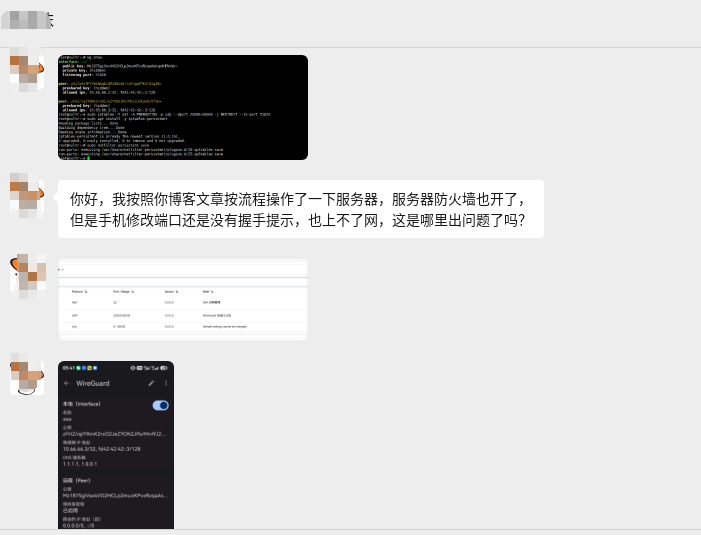
He was referencing two articles on my blog:
- “Full Review of Moving from LetsVPN to a Self-hosted WireGuard VPN (With Pitfall Guide)”
- “Ultimate Minimalist Solution for Self-hosted WireGuard to Fix Frequent Port Blocking (Beginner-Friendly and Reproducible)”
Technically, if he had also referenced “Full Review of Intermittent Unavailability of Self-hosted WireGuard VPN“, he should have been able to solve it himself. However, since the client reached out, I took the opportunity to help him troubleshoot remotely and documented the entire process for anyone encountering similar issues.
Step 1: Obtain Server Access and Begin Troubleshooting
I asked the client for the SSH login credentials to see what was happening on the server.
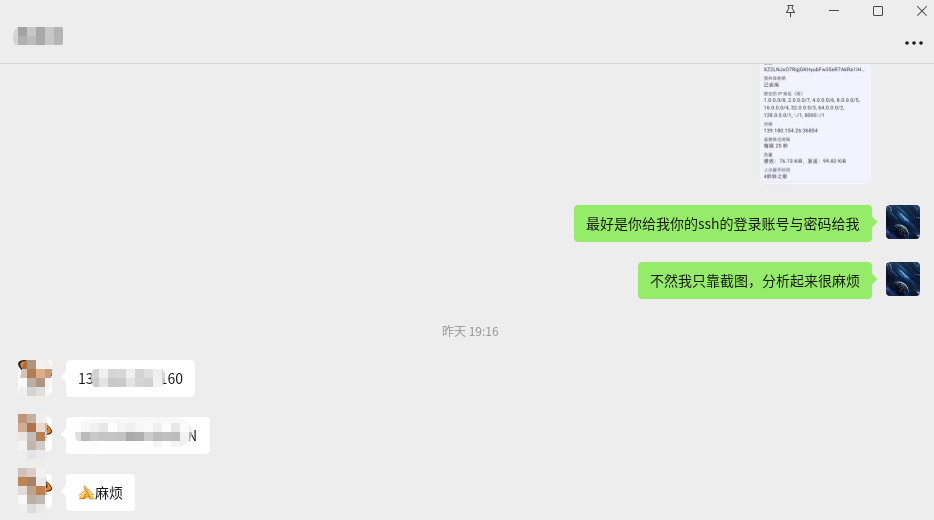
After logging in, I first checked the WireGuard service status and the currently active iptables rules.
1. Check WireGuard Status
wg showOutput:
interface: wg0
  public key: Mz1875giVsx4VO2HCLp2muoKPvxRzqaAskxpdHPkkWc=
  private key: (hidden)
  listening port: 51820

peer: oGifzA+TPY7W1AmqEc0R18Wv4dr/sFHguP7kCr81gX8=
  preshared key: (hidden)
  allowed ips: 10.66.66.2/32, fd42:42:42::2/128

peer: zFHZ//qIYRmK2rxO2JeZYON2JPo/Mni9J2kaeUIVfxk=
  preshared key: (hidden)
allowed ips: 10.66.66.3/32, fd42:42:42::3/128The WireGuard service itself was running normally, with peer configurations present and listening on port 51820, but there was no latest handshake, indicating that the phone had not completed the handshake with the server at all.
2. Check PREROUTING Port Forwarding Rules
iptables -t nat -L PREROUTING -n -v --line-numbersOutput:
Chain PREROUTING (policy ACCEPT 0 packets, 0 bytes)
num   pkts bytes target     prot opt in     out     source               destination
1      330 59076 REDIRECT   udp  --  *      *       0.0.0.0/0            0.0.0.0/0            udp dpts:20000:60000 redir ports 51820
2 0 0 REDIRECT udp -- * * 0.0.0.0/0 0.0.0.0/0 udp dpts:20000:60000 redir ports 51820Here, I found two identical REDIRECT rules. One of them had pkts=0 (never hit), which was caused by previously running the command repeatedly. It doesn’t affect functionality, but it’s not clean. I deleted one:
iptables -t nat -D PREROUTING 2Checking again, only one remained:
Chain PREROUTING (policy ACCEPT 0 packets, 0 bytes)
num   pkts bytes target     prot opt in     out     source               destination
1 330 59076 REDIRECT udp -- * * 0.0.0.0/0 0.0.0.0/0 udp dpts:20000:60000 redir ports 518203. Save Rules
netfilter-persistent saveOutput:
run-parts: executing /usr/share/netfilter-persistent/plugins.d/15-ip4tables save
run-parts: executing /usr/share/netfilter-persistent/plugins.d/25-ip6tables save4. Confirm iptables-persistent is Installed
dpkg -l iptables-persistent||/ Name Version Architecture Description
+++-===================-============-============-=====================================================
ii iptables-persistent 1.0.16 all boot-time loader for netfilter rules, iptables pluginii indicates it is installed, which is fine.
Step 2: Identify the Core Problem — INPUT Chain Default DROP
Next, I checked the INPUT chain (inbound traffic filtering):
iptables -L INPUT -n -v --line-numbersOutput:
Chain INPUT (policy DROP 237K packets, 13M bytes)
num   pkts bytes target     prot opt in     out     source               destination
1        0     0 ACCEPT     udp  --  *      *       0.0.0.0/0            0.0.0.0/0            udp dpt:54712
2    1009K  477M ufw-before-logging-input  all  --  *      *       0.0.0.0/0            0.0.0.0/0
3    1009K  477M ufw-before-input  all  --  *      *       0.0.0.0/0            0.0.0.0/0
4     237K   13M ufw-after-input  all  --  *      *       0.0.0.0/0            0.0.0.0/0
5     237K   13M ufw-after-logging-input  all  --  *      *       0.0.0.0/0            0.0.0.0/0
6     237K   13M ufw-reject-input  all  --  *      *       0.0.0.0/0            0.0.0.0/0
7 237K 13M ufw-track-input all -- * * 0.0.0.0/0 0.0.0.0/0 Problem found!
- The INPUT chain default policy is DROP (drop all inbound traffic)
- Currently, only
udp dpt:54712is allowed (possibly a temporary port), but UDP 20000-60000 or 51820 are not allowed - Although the Vultr backend firewall (Screenshot 4) has correctly allowed UDP 20000-60000, the iptables INPUT chain inside the server directly drops the packets
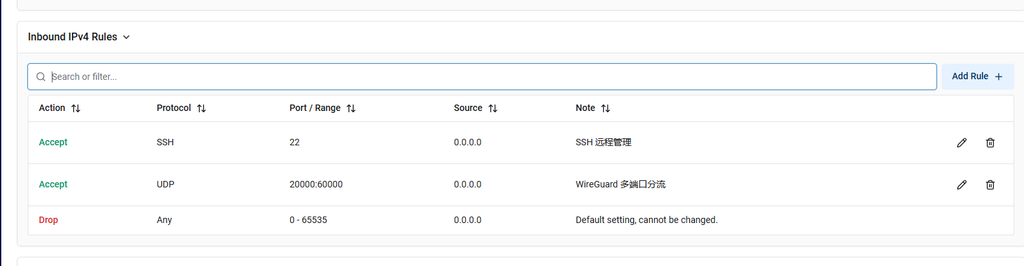
This is the root cause of the phone consistently failing to handshake.
Fix: Allow UDP 20000-60000
iptables -I INPUT 1 -p udp --dport 20000:60000 -j ACCEPTVerify the rule has taken effect:
iptables -L INPUT -n -v --line-numbers | head -5Chain INPUT (policy DROP 237K packets, 13M bytes)
num pkts bytes target prot opt in out source destination
1 0 0 ACCEPT udp -- * * 0.0.0.0/0 0.0.0.0/0 udp dpts:20000:60000
2 0 0 ACCEPT udp -- * * 0.0.0.0/0 0.0.0.0/0 udp dpt:54712
3 1009K 477M ufw-before-logging-input all -- * * 0.0.0.0/0 0.0.0.0/0 The first rule has been correctly inserted and takes priority.
Save Rules
netfilter-persistent saveStep 3: Solve the Internet Access Problem — IP Forwarding + FORWARD + NAT
After allowing traffic through INPUT, the phone should be able to complete the handshake, but it might still not be able to access the internet (e.g., visiting Google). IP forwarding, FORWARD chain allowance, and NAT masquerading still need to be configured.
Enable IP Forwarding
sysctl -w net.ipv4.ip_forward=1
grep -q "net.ipv4.ip_forward=1" /etc/sysctl.conf || echo "net.ipv4.ip_forward=1" >> /etc/sysctl.confAllow the FORWARD Chain
iptables -P FORWARD ACCEPT
iptables -A FORWARD -i wg0 -j ACCEPT
iptables -A FORWARD -o wg0 -j ACCEPTAdd NAT Masquerade (SNAT/MASQUERADE)
Phone traffic must go out through the server’s public IP to access the external network.
Automatically obtain the public network interface and WireGuard subnet:
PUBLIC_IFACE=$(ip route | grep default | awk '{print $5}')
WG_SUBNET=$(grep -oP 'Address\s*=\s*\K[0-9.]+/[0-9]+' /etc/wireguard/wg0.conf 2>/dev/null | head -1 | cut -d/ -f1 | sed 's/\.[0-9]*$/.0\/24/')
WG_SUBNET=${WG_SUBNET:-10.0.0.0/24}
PUBLIC_IFACE=${PUBLIC_IFACE:-eth0}iptables -t nat -A POSTROUTING -s ${WG_SUBNET} -o ${PUBLIC_IFACE} -j MASQUERADEOutput:
NAT masquerade added (Subnet: 10.66.66.0/24, Interface: enp1s0)Save All Rules
netfilter-persistent saveRestart WireGuard Service
systemctl restart wg-quick@wg0Step 4: Verify the Fix Results
Check WireGuard status:
wg showOutput:
interface: wg0
public key: Mz1875giVsx4VO2HCLp2muoKPvxRzqaAskxpdHPkkWc=
private key: (hidden)
listening port: 51820
peer: zFHZ//qIYRmK2rxO2JeZYON2JPo/Mni9J2kaeUIVfxk=
preshared key: (hidden)
endpoint: 117.176.187.98:24535
allowed ips: 10.66.66.3/32, fd42:42:42::3/128
latest handshake: 1 minute, 4 seconds ago
transfer: 28.48 KiB received, 40.54 KiB sent
peer: oGifzA+TPY7W1AmqEc0R18Wv4dr/sFHguP7kCr81gX8=
preshared key: (hidden)
allowed ips: 10.66.66.2/32, fd42:42:42::2/128latest handshake: 1 minute, 4 seconds ago — the handshake succeeded!
Phone-Side Verification
After importing the WireGuard configuration on my own phone, Screenshot 5 shows:
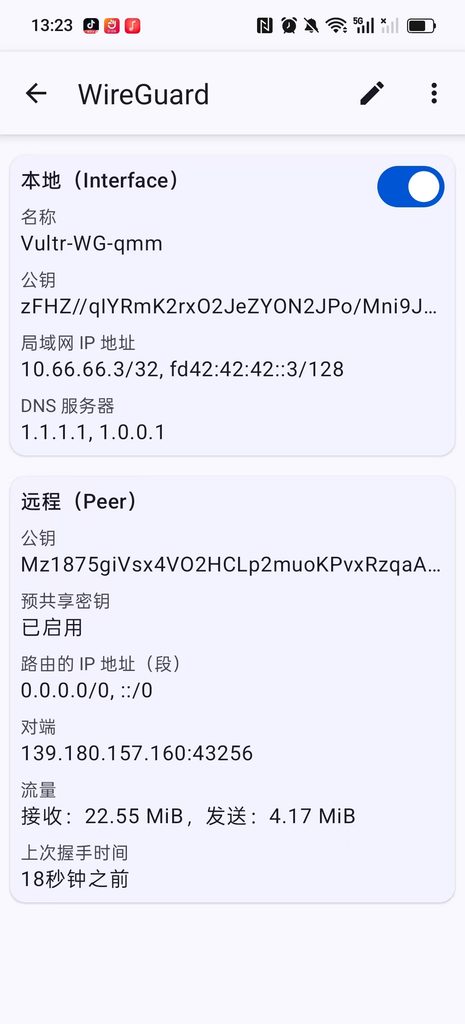
- Latest handshake: 18 seconds ago
- Received: 22.55 MiB, Sent: 4.17 MiB
Traffic is already transmitting normally.
Then I opened the browser to visit Google:

Google opened normally, the problem is completely solved!
Root Cause Summary
| Check Item | Status | Description |
|---|---|---|
| WireGuard Service | ✅ Normal | Listening on 51820, has peer configuration |
| Vultr Backend Firewall | ✅ Correct | UDP 20000-60000 allowed |
| PREROUTING REDIRECT | ✅ Correct | Redirects 20000-60000 to 51820 |
| iptables-persistent | ✅ Installed | Rules can be persisted |
| INPUT Chain Allow UDP 20000-60000 | ❌ Missing | INPUT default DROP caused handshake packets to be dropped |
| IP Forwarding (net.ipv4.ip_forward) | ❌ Not Enabled | Cannot route VPN traffic |
| FORWARD Chain Allow wg0 | ❌ Not Configured | Cannot forward VPN data packets |
| NAT Masquerade (MASQUERADE) | ❌ Not Configured | Phone traffic cannot go out through the public IP |
Core problem: The client only configured the PREROUTING redirect but ignored the allow rules for the INPUT chain. Although the Vultr backend firewall allowed the ports, the server’s internal iptables INPUT chain had a default policy of DROP, directly dropping all inbound packets.
Secondary problem: IP forwarding and NAT masquerading were not enabled, meaning that even if the handshake succeeded, internet access was still impossible.
Complete Fix Command Summary
If you encounter a similar problem (no handshake, no internet access), assuming the PREROUTING rules are already configured, executing the following commands will fix it:
# 1. 放行 UDP 端口范围(解决 INPUT DROP 导致无握手)
iptables -I INPUT 1 -p udp --dport 20000:60000 -j ACCEPT
# 2. 开启 IP 转发
sysctl -w net.ipv4.ip_forward=1
grep -q "net.ipv4.ip_forward=1" /etc/sysctl.conf || echo "net.ipv4.ip_forward=1" >> /etc/sysctl.conf
# 3. 放通 FORWARD 链
iptables -P FORWARD ACCEPT
iptables -A FORWARD -i wg0 -j ACCEPT
iptables -A FORWARD -o wg0 -j ACCEPT
# 4. 添加 NAT 伪装(自动获取网卡和子网)
PUBLIC_IFACE=$(ip route | grep default | awk '{print $5}')
WG_SUBNET=$(grep -oP 'Address\s*=\s*\K[0-9.]+/[0-9]+' /etc/wireguard/wg0.conf 2>/dev/null | head -1 | cut -d/ -f1 | sed 's/\.[0-9]*$/.0\/24/')
WG_SUBNET=${WG_SUBNET:-10.0.0.0/24}
PUBLIC_IFACE=${PUBLIC_IFACE:-eth0}
iptables -t nat -A POSTROUTING -s ${WG_SUBNET} -o ${PUBLIC_IFACE} -j MASQUERADE
# 5. 保存规则
netfilter-persistent save
# 6. 重启 WireGuard
systemctl restart wg-quick@wg0Pitfall Avoidance Tips
- Vultr Backend Firewall ≠ Server Internal iptables
Allowing ports in the backend only “permits traffic to reach the server’s network interface,” but the server’s internaliptables INPUTchain may still drop the traffic. Be sure to check theINPUTchain policy; if it isDROP, you must explicitly allow the required ports. PREROUTINGREDIRECT only performs port translation, it does not handle traffic allowance
Thenattable’sPREROUTINGchain takes effect before the routing decision, but if theINPUTchain drops the packets, the redirected traffic still cannot reach the WireGuard service.- Phone internet access requires IP forwarding and NAT
If the phone needs to access the external network (Google, ChatGPT, etc.), you must enablenet.ipv4.ip_forward=1, allow theFORWARDchain, and addMASQUERADErules. - Check the subnet in the WireGuard configuration file
The correct subnet must be used during NAT masquerading (e.g.,10.66.66.0/24); otherwise, traffic cannot be routed correctly.
Conclusion
The problem this client encountered is actually quite typical: port forwarding was configured, but inbound allowance and routing forwarding were overlooked. During troubleshooting, you only need to check the iptables rules one by one to quickly locate the issue.
I hope this record helps friends who encounter similar problems. If you also want to set up your own WireGuard VPN but don’t want the hassle, feel free to contact me for a dedicated solution.