

My blog has always used WordPress + Polylang for Chinese-English bilingual support. While reorganizing the homepage sidebar recently, I noticed some empty space on the right after the category list. The left side already had 10 articles, and the right side barely aligned with 6 articles on the left. I could use this space to display personal brand information.
Why put a “Personal Brand” in the sidebar?
For a technical blog, the sidebar is not just a navigation tool but an entry point for building trust. I want first-time visitors to quickly understand—who I am, how long I’ve been writing, and what value I can provide.
After several rounds of adjustments, I finalized this positioning: the sidebar is not a sales page, but a trust entry point. I kept it within 80–120 characters (Chinese) and 60–100 words (English). Users can click through to the full “About Me & Contact” page for more details.
The final Chinese copy is as follows:
👨💻 Personal Brand
Wang Shiqiang | PHP / Go Technical Consultant
15+ years of Web backend development experience, focusing on system maintenance, architecture optimization, performance tuning, and Linux operations.
Maintaining a technical blog for 10+ years, with over 1,000 original technical articles published.
Providing long-term technical support and remote collaboration services for startup teams, SMEs, and independent developers.
The corresponding English translation:
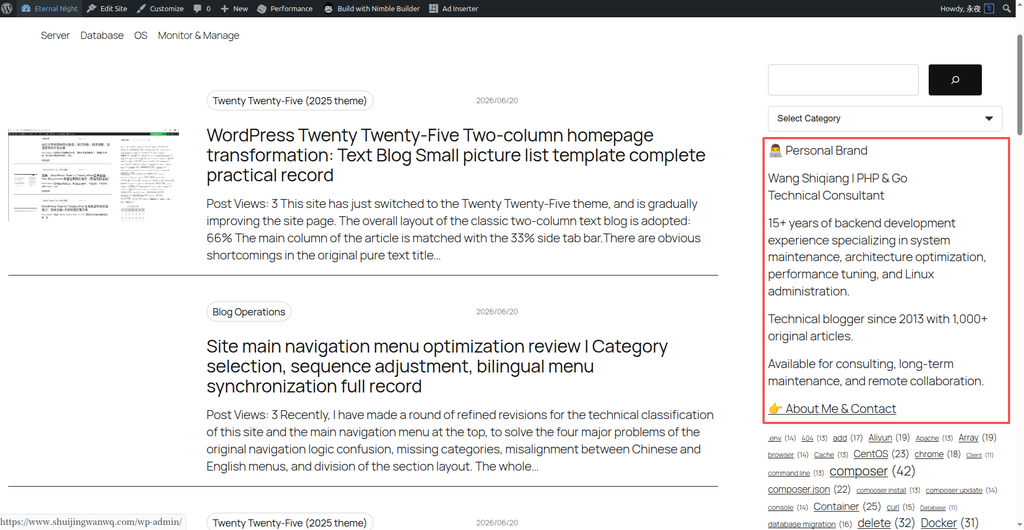
👨💻 Personal Brand
Wang Shiqiang | PHP & Go Technical Consultant
15+ years of backend development experience specializing in system maintenance, architecture optimization, performance tuning, and Linux administration.
Technical blogger since 2013 with 1,000+ original articles.
Available for consulting, long-term maintenance, and remote collaboration.
Multilingual Challenges
Because the blog uses WordPress Polylang + TMS Extensions for Polylang for multilingual support, the sidebar content needs to display different versions based on the language. TMS Extensions provides the Language Visibility block, which can show or hide content based on a selected language, perfectly meeting this requirement.
Steps
Step 1: Check the current sidebar state
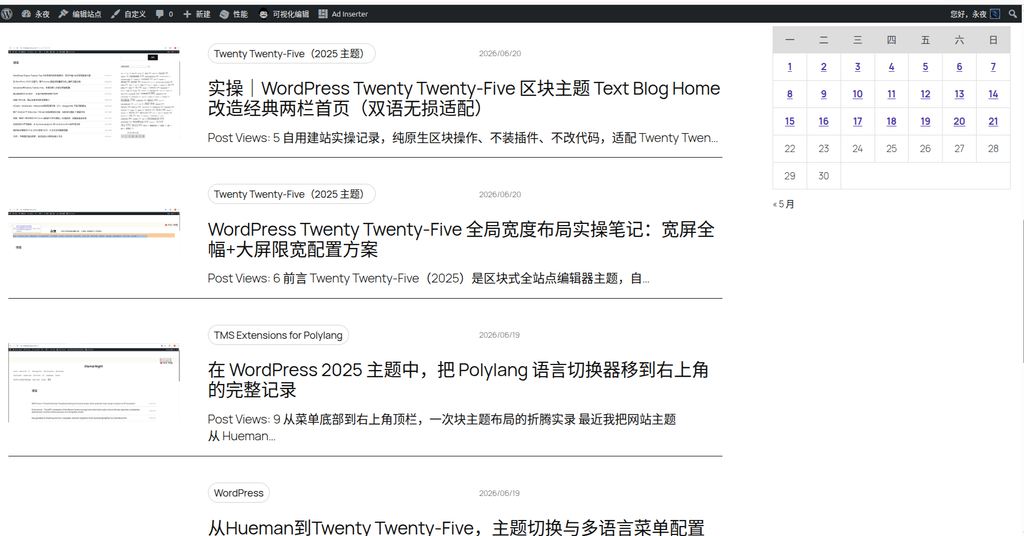
Before adding new content, I first reviewed the current homepage sidebar layout. The right side already had a search box, category list, tag cloud, and calendar, but there was still an empty area after the category list.
Figure 1: The right sidebar has empty space relative to the left article list
Step 2: Enter the Site Editor and find the Blog Home template
In the WordPress dashboard, go to “Appearance → Editor“. Once inside, find and click the “Blog Home” template in the template list to enter the template editing interface.
Step 3: Add the Language Visibility block to the sidebar
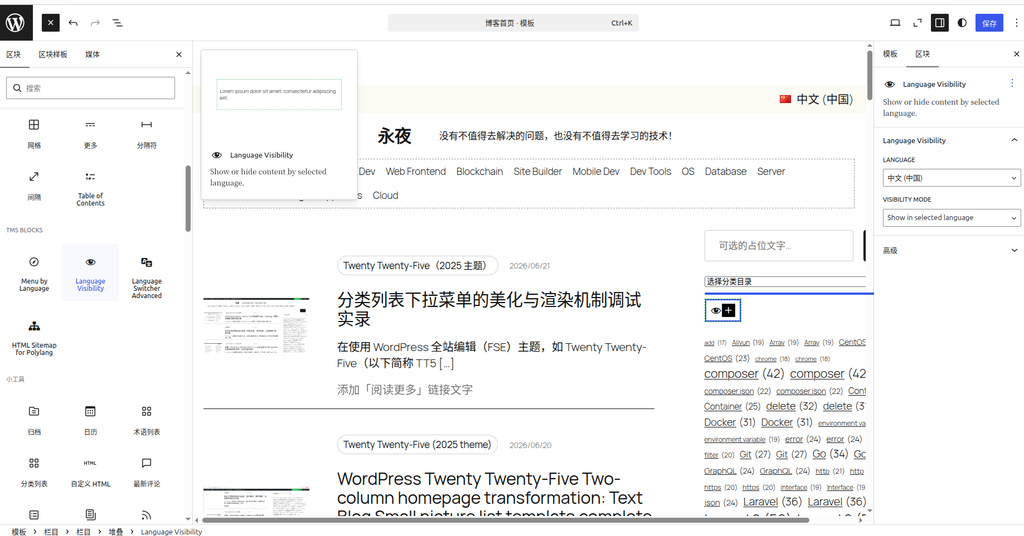
After entering the “Blog Home” template editing interface, find the sidebar area on the right side of the page layout. Click the “+” button at the end of the sidebar area, search for, and select the Language Visibility block.
Figure 2: Selecting Language Visibility when adding a block after the category list
Step 4: Configure the Chinese and English blocks separately
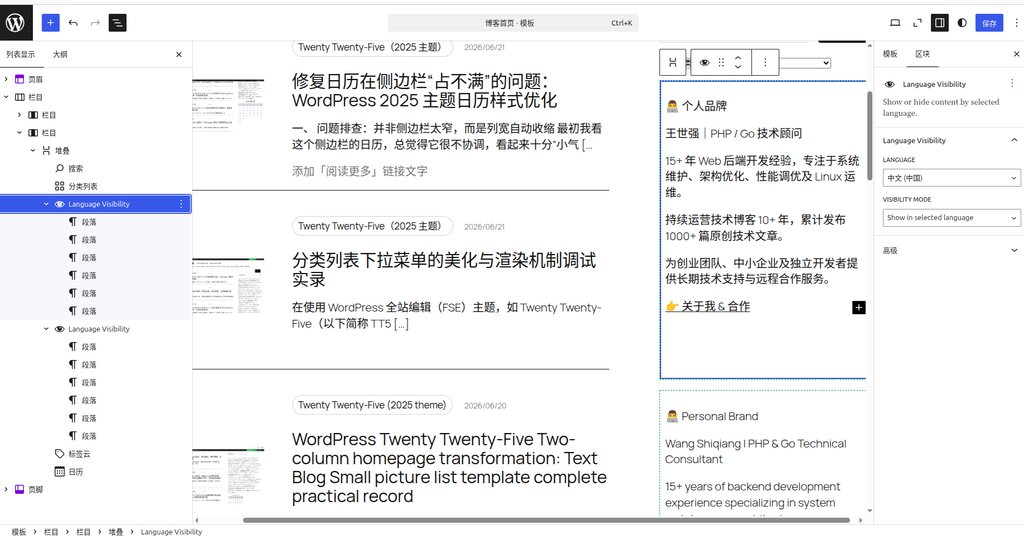
Since I needed to support both Chinese and English, I added two Language Visibility blocks:
- First block: Language set to “中文(中国)”, Visibility mode set to “Show in selected Language”, with the Chinese copy placed inside
- Second block: Language set to “English”, Visibility mode set to “Show in selected Language”, with the English copy placed inside
Figure 3: Two Language Visibility blocks added and configured respectively
Step 5: Save and verify the frontend display
Click the “Save” button in the upper right corner. Switch to the frontend to check:
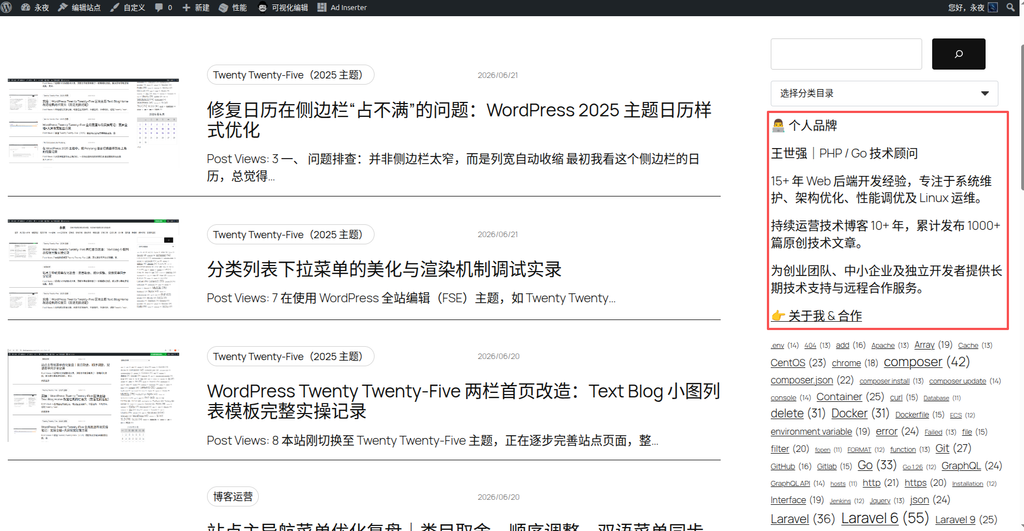
- Under the Chinese language, the Chinese version of the “Personal Brand” block is displayed
Figure 4: The page under 中文(中国) displays the first Language Visibility block
- Switching to the English language automatically switches to the English version of the “Personal Brand” block
Figure 5: The page under English displays the second Language Visibility block
Final Results and Thoughts
Through this adjustment, a dedicated “Personal Brand” section was added to the homepage sidebar after the category list, automatically adapting to both Chinese and English. This fills the visual gap and builds reader trust.
The core idea of this solution is: use the most concise text to convey the most core differentiated information. A tech stack can list many things, but “blogging continuously for 10+ years” and “1,000+ articles in both Chinese and English” are the truly irreplaceable competitive advantages. The sidebar sparks interest, while the full “About Me & Contact” page handles conversion.
If you are also using Polylang to build a multilingual website, consider trying the Language Visibility block to achieve multilingual content control in the sidebar—simple, clean, and effective.