

This site had just completed the two-column homepage redesign for the Twenty Twenty-Five theme, referencing the previous article WordPress Twenty Twenty-Five Two-Column Homepage Redesign: Complete Step-by-Step Record of the Text Blog Small Image List Template. After the redesign, the homepage article list adopted the “Small Image and Title” block pattern, featuring a neat layout and clear information hierarchy.
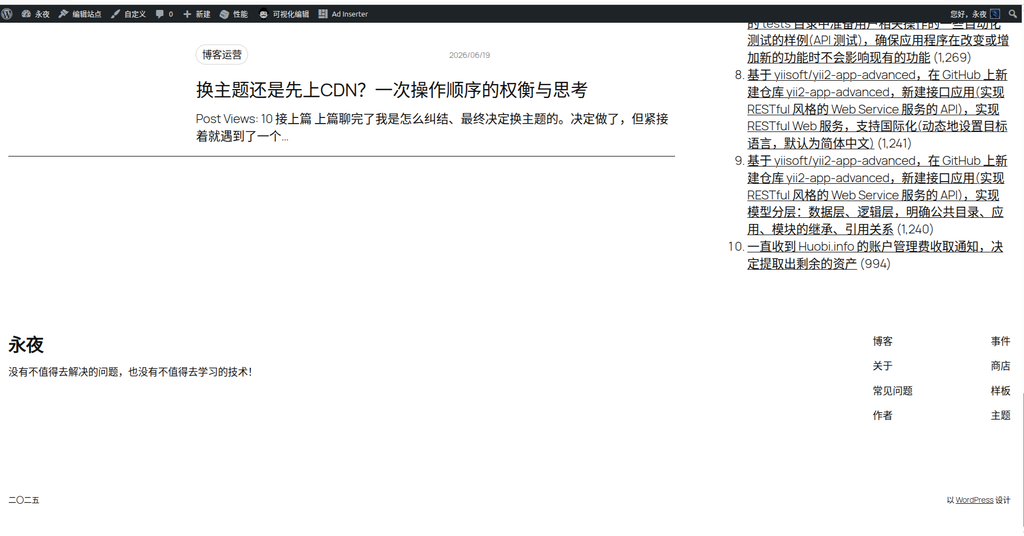
But a problem immediately emerged: the pagination at the bottom of the homepage disappeared.
1. Problem Description
On the redesigned homepage, the article list displayed normally, but there was no page number navigation at the bottom. The specific symptoms were:
- The homepage only showed a fixed number of articles, with no way to paginate to view earlier content;
- The Pagination block did not render at all on the front end;
- The same issue occurred on both the Chinese and English bilingual pages (Polylang).
As seen in the screenshot below, the bottom of the article list is completely empty, without any pagination controls.
2. Troubleshooting Process
Step 1: Check the block hierarchy
I went to Appearance → Editor, opened the homepage template, and expanded the block hierarchy in the left-hand List View (Outline).
The initial structure looked like this:
📦 Columns (root)
   ├── 📦 Column (70% width)
   │   └── 📦 Group
   │       └── 📄 Small Image and Title (block pattern)
   └── 📦 Column (30% width)
       ├── 🔍 Search
       ├── 📂 Category List
└── 📅 CalendarStep 2: Identify the root cause — the pattern lacks a Query Loop
After expanding the “Small Image and Title” pattern to inspect its internal structure, I found that this pattern is purely a layout template—it only contains display blocks like the post featured image, categories, post date, post title, and excerpt, and does not include the two core functional components: “Query Loop” and “Pagination”.
In other words, the pattern defines “what a single post looks like,” but it does not define “where to fetch the post list from” or “how to paginate it.”
The structure at the time looked roughly like this (schematic):
📦 Small Image and Title (block pattern)
   ├── 📄 Columns (two columns)
   │   ├── 🖼️ Post Featured Image
   │   ├── 📂 Categories
   │   ├── 📝 Post Title
   │   ├── 📅 Post Date
   │   └── 📄 Excerpt
└── (No Query Loop, no Pagination)When this pattern was placed in the 70% main column of the homepage, it could display posts (because WordPress inherits the main query by default), but without an explicit “Query Loop” wrapping them, the pagination function could not be activated.
3. Solution
Core action: Add a Query Loop inside the pattern
Manually add a “Query Loop” block inside the “Small Image and Title” pattern.
After adding the Query Loop, it includes by default three sub-components:
- Post Template — defines the display style of each post;
- Pagination — automatically generates page number navigation;
- No Results — the content displayed when there are no posts.
Then, drag and drop the pattern’s original content blocks (post featured image, categories, post title, post date, excerpt, etc.) entirely into the “Post Template”, replacing the default placeholder content.
Corrected structure after adjustment
📦 Columns (root)
   ├── 📦 Column (70% width)
   │   └── 📦 Small Image and Title (block pattern)
   │       ├── 📄 Query Loop (manually added)  ← New, includes pagination
   │       │   ├── 📄 Post Template
   │       │   │   ├── 🖼️ Post Featured Image
   │       │   │   ├── 📂 Categories
   │       │   │   ├── 📝 Post Title
   │       │   │   ├── 📅 Post Date
   │       │   │   └── 📄 Excerpt
   │       │   ├── 📄 Pagination (included with Query Loop)
   │       │   └── 📄 No Results (included with Query Loop)
   └── 📦 Column (30% width)
       ├── 🔍 Search
       ├── 📂 Category List
       └── 📅 Calendar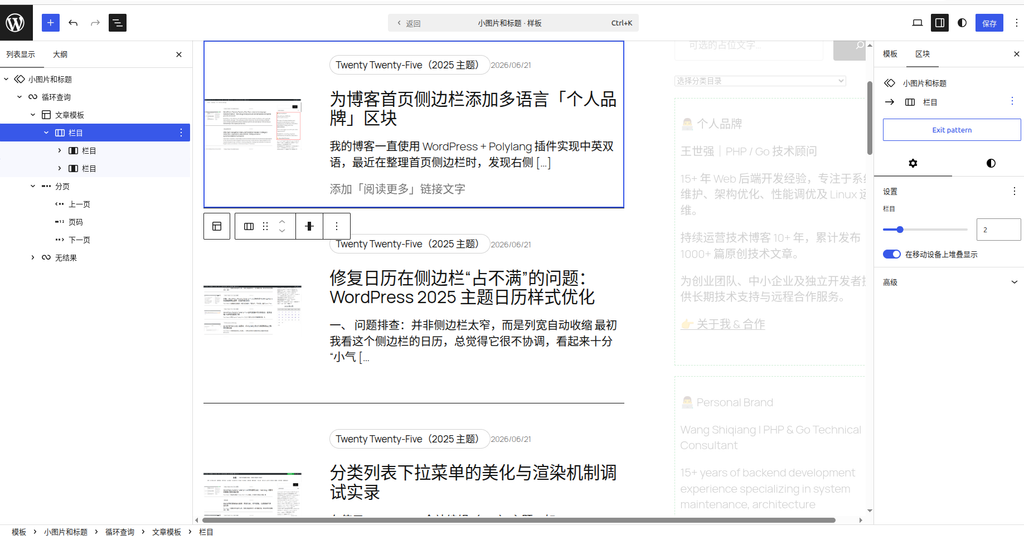
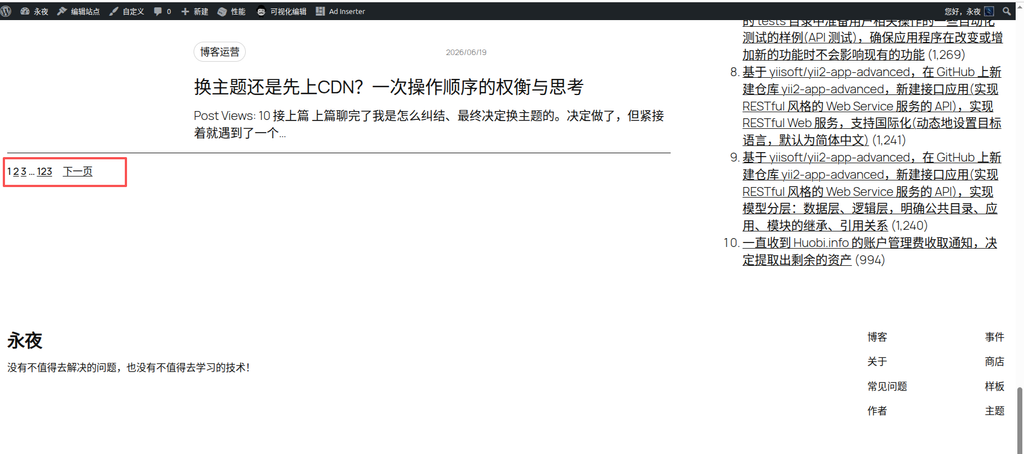
After saving the template, pagination immediately recovered. However, the default pagination style was quite simple, just plain number links.
4. Pagination style fine-tuning
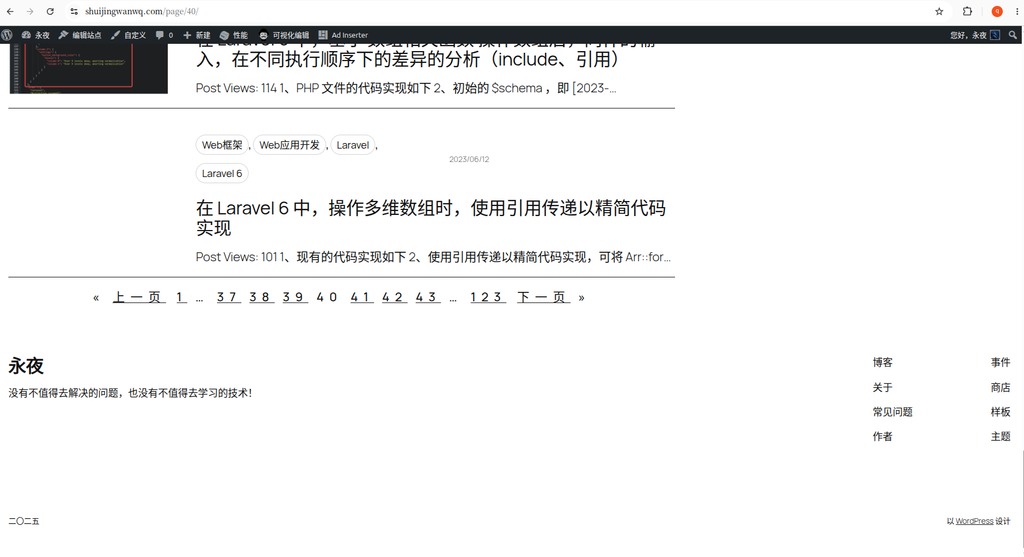
After restoring pagination, I made several style adjustments to the Pagination block in the editor:
- Font size: Slightly enlarged to improve readability;
- Color: Adjusted to match the site’s theme color;
- Spacing: Added top and bottom padding to create a clearer visual separation between the pagination area and the article list;
- Display style: Selected the “Numbers” style to clearly show the total number of pages.
Although the adjusted pagination effect is not flashy, it is refined enough and coordinates with the overall style.
5. Summary and takeaways
The root cause of the missing pagination this time:
The “Small Image and Title” pattern is purely a layout template and does not include a Query Loop. Using it directly on the homepage can display posts (by inheriting the main query), but the pagination function will not activate automatically. You need to manually add a “Query Loop” block inside the pattern—it includes pagination by default—and then move the content blocks into the “Post Template”, and pagination will automatically recover.
This approach applies to all block pattern-based homepage redesigns. Regardless of the pattern name or what display blocks it contains internally (post featured image, categories, post date, title, excerpt, etc.), the core inspection logic remains the same:
- First, check if there is a “Query Loop” inside the pattern;
- If not, manually add a “Query Loop”;
- Move all the pattern’s original content blocks into the “Post Template”;
- Keep the “Pagination” and “No Results” sub-components included with the Query Loop.
Adjust both old and new structures in this way, and pagination will work normally.
A few key points worth remembering:
- Block pattern ≠ Query Loop. A preset pattern might only contain a layout structure and not necessarily come with data querying capabilities. If you find pagination missing after using a pattern, first check if there is a “Query Loop” inside the pattern;
- A Query Loop includes pagination by default; after adding it, there is no need to insert an additional pagination block;
- The Pagination block must be inside the Query Loop, at the same level as the Post Template (the Query Loop defaults to this structure, so do not disrupt it);
- List View (Outline) is the best tool for troubleshooting block hierarchy issues, much more precise than visually dragging blocks in the page;
- The number of posts per page can be adjusted via “Items per page” in the Query Loop’s right-hand settings panel, or by adjusting “Blog pages show at most” in the WordPress dashboard under Settings → Reading;
- In a Polylang bilingual environment, as long as the Query Loop structure is correct, pagination will automatically adapt to the total number of posts in the corresponding language, requiring no extra configuration.
If you are also using an FSE block theme and encounter the issue of pagination not displaying, try checking this first: whether there is a “Query Loop” block inside the pattern. Most likely, that is the cause.