

Recently, while migrating to a new theme, I took the opportunity to clean up the old theme’s code for adding the noindex tag to thin-content tag pages. Taking this chance, I compared three different implementation approaches and found that the choice of code style and plugin insertion location actually matters quite a bit. I’d like to share my trial-and-error process and final choice with you.
📋 Background
In the old theme, to prevent thin-content tag pages with fewer than 2 posts from being indexed by search engines, I directly added code to
functions.php. For this migration to the new theme, I decided to consolidate all custom code into the WPCode plugin for management, and I also wanted to optimize the code structure.🔍 Comparison of Three Implementation Approaches
1. Original Code (Legacy Version from Old Theme)
This is the code originally used in the old theme, hooked directly into
wp_head, with all logic nested inside conditional statements:
// 为文章数小于2的薄内容标签页添加 noindex 标签
add_action( 'wp_head', 'add_noindex_to_thin_tag_pages' );
function add_noindex_to_thin_tag_pages() {
    // 仅在标签归档页面执行
    if ( is_tag() ) {
        // 获取当前标签对象
        $tag = get_queried_object();
        // 判断是否存在且文章计数小于2
        if ( $tag && isset( $tag->count ) && $tag->count < 2 ) {
            // 针对您需求中的 Googlebot
            echo '<meta name="googlebot" content="noindex, follow">' . "\n";
            // 建议同时添加通用 robots 标签,以便 Bing、百度等其他搜索引擎也遵循此规则
            echo '<meta name="robots" content="noindex, follow">' . "\n";
        }
    }
}2. Frontend Only + wp_head (Intermediate Optimized Version)
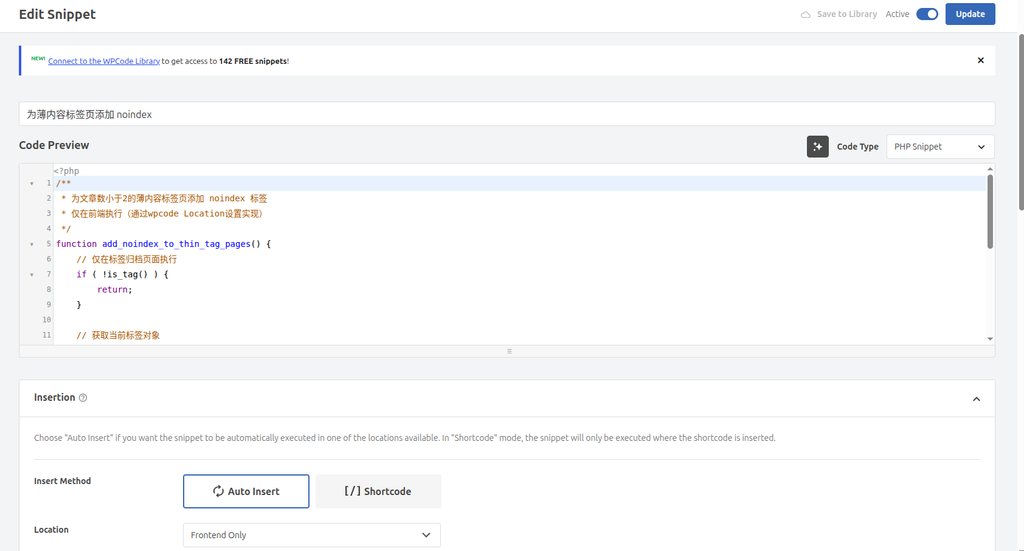
After migrating to WPCode, I noticed the plugin had a “Frontend Only” option. Selecting this prevents the code from executing in the backend, allowing me to omit the is_admin() check. At the same time, I changed the code style to a guard clause style that “eliminates unmet conditions first and directly return returns”:
<?php
/**
 * 为文章数小于2的薄内容标签页添加 noindex 标签
 * 仅在前端执行(通过wpcode Location设置实现)
 */
function add_noindex_to_thin_tag_pages() {
    // 仅在标签归档页面执行,不是标签页直接返回
    if ( !is_tag() ) {
        return;
    }
    // 获取当前标签对象,不存在则返回
    $tag = get_queried_object();
    if ( !$tag || !isset( $tag->count ) ) {
        return;
    }
    // 判断文章计数小于2
    if ( $tag->count < 2 ) {
        echo '<meta name="googlebot" content="noindex, follow">' . "\n";
        echo '<meta name="robots" content="noindex, follow">' . "\n";
    }
}
add_action( 'wp_head', 'add_noindex_to_thin_tag_pages' );
?>
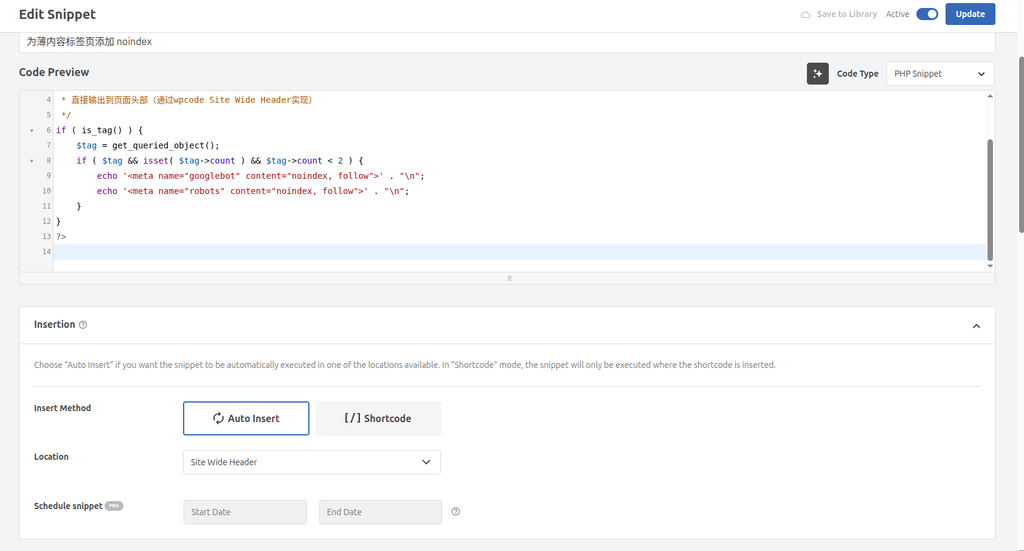
3. Site Wide Header (Final Adopted Version)
Later, I found that WPCode also has a “Site Wide (Frontend) → Site Wide Header” location option. Selecting this makes the plugin insert the code directly into the page’s <head> tag, eliminating the need for the add_action( 'wp_head', ... ) hook entirely, allowing the code to execute and output directly. Combining this with the clean style from Code 2, I put together the final code:
<?php
/**
 * 为文章数小于2的薄内容标签页添加 noindex 标签
 * 直接输出到页面头部(通过wpcode Site Wide Header实现)
 */
// 不是标签页直接返回
if ( !is_tag() ) {
    return;
}
// 获取当前标签对象,不存在则返回
$tag = get_queried_object();
if ( !$tag || !isset( $tag->count ) ) {
    return;
}
// 判断文章计数小于2
if ( $tag->count < 2 ) {
    echo '<meta name="googlebot" content="noindex, follow">' . "\n";
    echo '<meta name="robots" content="noindex, follow">' . "\n";
}
?>
📊 Code Comparison and Selection Analysis
I compared these three code snippets from the following perspectives:
| Comparison Dimension | Code 1 (Original Version) | Code 2 (Frontend Only + wp_head) | Code 3 (Site Wide Header) |
|---|---|---|---|
| Code Structure | Deeply nested if, logic is not intuitive | Guard clause style, clear logic, flat hierarchy | Same guard clause style, but completely decoupled from the hook mechanism |
| Execution Dependency | Depends on the theme’s wp_head() function call | Depends on the theme’s wp_head() function call | Does not depend on any theme hook, direct injection |
| Execution Scope | Executes in both frontend and backend (requires manual backend check) | Executes only on the frontend via plugin location settings | Executes only on the frontend via plugin location settings |
| Compatibility | Affected by the theme; fails if the theme does not call wp_head() | Affected by the theme; fails if the theme does not call wp_head() | Almost unaffected by the theme, as long as the theme has a <head> tag |
| Execution Efficiency | Requires hook queuing and callbacks | Requires hook queuing and callbacks | Direct execution, bypasses the hook mechanism |
| Ultimately, I chose Code 3 for the following main reasons: |
- Cleaner code style: I prefer the guard clause style that “eliminates unmet conditions first and directly
return“. The logic is clear at a glance, nesting levels are reduced, and the reading and maintenance experience is better. - More direct and efficient execution: Utilizing WPCode’s “Site Wide Header” insertion mechanism, the code is output directly in the header and does not depend on the theme’s
wp_head()hook call, making it superior in both compatibility and execution efficiency. This avoids the risk of the code failing because the theme did not correctly callwp_head(). - More thorough separation of concerns: The code itself focuses solely on business logic (checking the tag page and post count), while the condition of “executing on the frontend” is guaranteed by WPCode’s location settings. This achieves separation of configuration and code, aligning better with modern plugin management concepts.
✅ Actual Effect Verification
After deploying the code, I specifically checked two different tag pages to verify the effect:
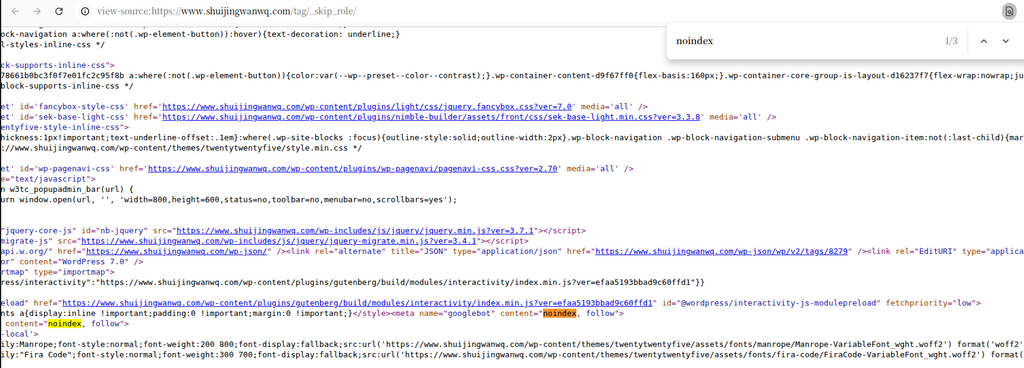
Scenario 1: Thin-content tag page (only 1 post)
Visiting a tag page with only 1 post and viewing the page source, I could clearly see that the noindex tag was successfully output in the <head>, indicating that the logic check took effect.
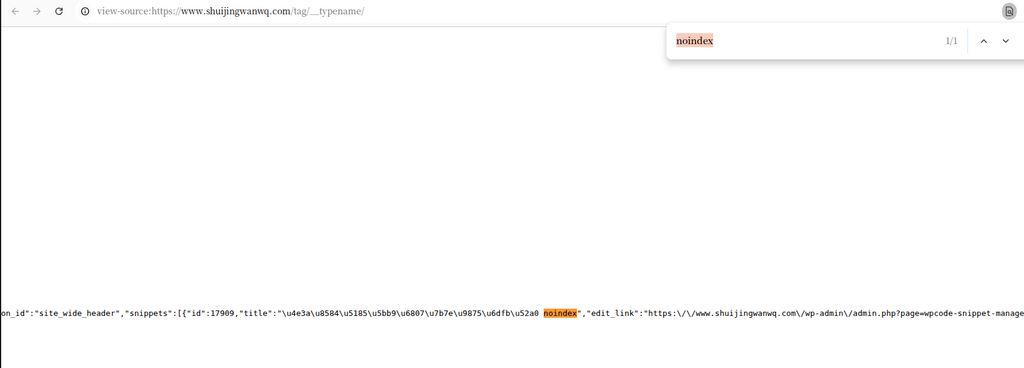
Scenario 2: Normal tag page (more than 1 post)
Visiting a normal tag page with multiple posts and viewing the source code, it was completely clean, with no extraneous noindex tag output, perfectly avoiding accidentally harming the indexing of normal pages.
💡 Summary and Thoughts
The takeaway from this endeavor is: Utilizing the plugin’s smart placement combined with a clean code style achieves the goal while keeping the code clean.
For WordPress developers, understanding the Hook mechanism (like wp_head) and conditional functions (like is_tag(), get_queried_object()) is important, but equally important is making good use of the tools and configuration options provided by modern plugins. This allows us to write less boilerplate code and focus more on the business logic itself.
If you are also doing a theme migration or code optimization, you might want to give this approach a try. Of course, regardless of the method you choose, be sure to check the page source code after deployment to ensure the effect meets expectations; this is the most crucial step.
One final tip: Be cautious when adding
noindexto tag pages. Make sure it targets “thin content” pages to avoid accidentally harming content-rich normal tag pages, which could affect your site’s indexing and traffic.