

Over the past few days, I wrote several posts about WordPress CDN optimization, Cloudflare Free, and Tencent Cloud EdgeOne.
The original question was:
After enabling a CDN for my main WordPress site, did it actually become faster?
Later, I found another issue:
Even when Cloudflare Free was already serving cached HTML, access from mainland China could still fluctuate heavily on China Mobile and China Unicom networks.
This post does not repeat the EdgeOne setup process or go through the cache rules again. Instead, it focuses on a direct data comparison.
I am comparing only three stages:
阶段一:CDN 上线前
阶段二:Cloudflare Free 上线后
阶段三:腾讯云 EdgeOne 上线后
I also keep the comparison to just two dimensions:
boce 国内多节点测速
WebPageTest 页面性能测试
This makes it easier to answer one practical question:
After migrating from Cloudflare Free to Tencent Cloud EdgeOne, did my main WordPress site actually get faster?
1. Test Background
My site setup is as follows:
主站:https://www.shuijingwanwq.com/
英文站:https://www.shuijingwanwq.com/en/
源站:阿里云杭州 ECS
程序:WordPress + Polylang + W3 Total Cache
缓存:页面缓存 + 对象缓存 + CDN 边缘缓存
The first CDN I used was Cloudflare Free.
Cloudflare Free works very well for overseas access, HTTPS, static asset caching, and Cloudflare Cache Rules. However, most visitors to my site still come from mainland China, so the real user experience cannot be judged only by cf-cache-status: HIT. I also need to look at routing quality across the three major Chinese carriers.
Before the migration, I had already confirmed a few things:
W3 Total Cache Page Cache 是有效的
Cloudflare HTML 页面可以 HIT
缓存闭环本身没有问题
问题主要出在中国大陆访问链路波动
So after migrating to EdgeOne, my main concern was not simply whether the configuration worked, but whether:
国内 boce 节点是否更稳定
WebPageTest 核心性能指标是否继续保持
TTFB / FCP / LCP / Speed Index 是否变好
总请求数和页面体积是否有异常
2. boce Three-Stage Comparison: Before CDN, After Cloudflare, and After EdgeOne
Let’s start with the boce results.
The value of boce is that it can test response time from many regions and carrier networks across mainland China. For a Chinese-language main site, this is closer to the real access environment than running WebPageTest from overseas only.
1. Before CDN vs. After Cloudflare
In the earlier tests, the before-and-after CDN results looked roughly like this:
| Stage | Average response | Slowest node | Unreachable | Stability |
|---|---|---|---|---|
| Before CDN | 4–5s | about 10s | a few | moderate |
| After Cloudflare | 1–2s | 8–10s | very few | clearly improved |
Based on these results, enabling Cloudflare did bring a clear improvement.
After I reconfirmed that W3 Total Cache Page Cache was working and that the Cloudflare HTML Cache Rule was hitting correctly, the overall site response became much better than before the CDN was enabled.
That was also my initial conclusion:
WordPress performance optimization is not just about whether a CDN is enabled. The key is whether the CDN, page cache, object cache, response headers, and cache hit status form a complete working loop.
However, later tests showed that Cloudflare Free was not always stable for access from mainland China.
3. The Issue with Cloudflare Free: Not Unusable, but Unstable
In the follow-up test, I specifically used boce to test the homepage while it was still behind Cloudflare Free.
The first test result was not ideal:
| Network | Average response |
|---|---|
| Overall average | 5.245s |
| China Telecom average | 0.967s |
| China Mobile average | 7.286s |
| China Unicom average | 7.341s |
This result was very typical.
China Telecom was still acceptable, but China Mobile and China Unicom were noticeably slow.
When I tested again later, Cloudflare Free returned to a much better state:
| Network | Average response |
|---|---|
| Overall average | 1.256s |
| China Telecom average | 1.033s |
| China Mobile average | 1.799s |
| China Unicom average | 0.895s |
This means the issue with Cloudflare Free is not that it is “always slow,” but that:
its performance can fluctuate significantly when accessed from mainland China.
If I had only seen the second test, it would be easy to conclude that Cloudflare Free was fine. But if users hit the first condition, the experience for China Mobile and China Unicom users would be poor.
For a regular site, this might only mean occasional slowness.
But for a WordPress blog that depends on search traffic, ad impressions, and affiliate conversions, this kind of instability is worth addressing seriously.
4. First boce Test After EdgeOne Went Live
After migrating to Tencent Cloud EdgeOne, I first ran a boce test.
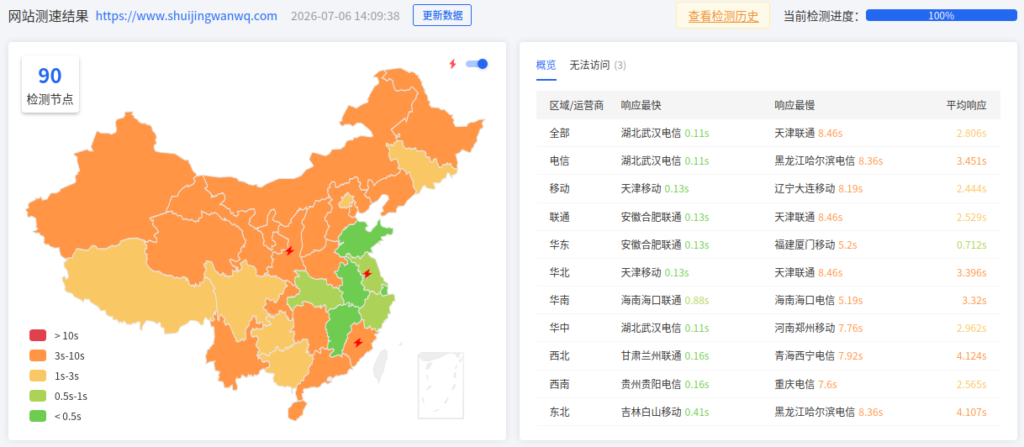
The result was as follows:
| Network | Fastest response | Slowest response | Average response |
|---|---|---|---|
| Overall | 0.11s | 8.46s | 2.806s |
| China Telecom | 0.11s | 8.36s | 3.451s |
| China Mobile | 0.13s | 8.19s | 2.444s |
| China Unicom | 0.13s | 8.46s | 2.529s |
Looking only at this first EdgeOne test, I would not say it was fully stable yet.
It was better than the worst Cloudflare Free result of 5.245s, but there were still a few issues:
全部平均响应还有 2.806s
电信平均达到 3.451s
最慢节点仍然超过 8s
不可访问节点有 3 个
So based on this test alone, I would not rush to conclude that EdgeOne had clearly won.
This is also a common pitfall when testing CDNs:
A single test does not represent long-term performance. This is especially true right after DNS migration, rule deployment, or edge network switching, when results can fluctuate noticeably.
5. Second boce Test After EdgeOne Went Live
After a while, I ran a second boce test.
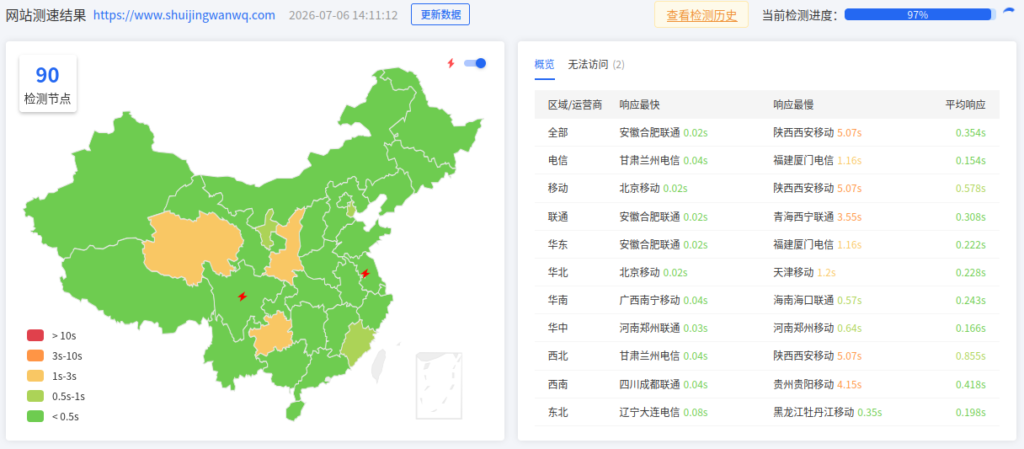
This time, the result was much better:
| Network | Fastest response | Slowest response | Average response |
|---|---|---|---|
| Overall | 0.02s | 5.07s | 0.354s |
| China Telecom | 0.04s | 1.16s | 0.154s |
| China Mobile | 0.02s | 5.07s | 0.578s |
| China Unicom | 0.02s | 3.55s | 0.308s |
This was very close to the state I wanted to see.
The average response times across the three major carriers were especially encouraging:
电信:0.154s
移动:0.578s
联通:0.308s
Compared with the worst Cloudflare Free result:
电信:0.967s
移动:7.286s
联通:7.341s
The improvement was very obvious.
That said, this still needs to be interpreted conservatively.
In the second screenshot, the test progress was 97%, and there were still 2 unreachable nodes. So this was not a “perfect” result, but it was enough to show that:
EdgeOne’s overall response across mainstream mainland China nodes was much more stable than Cloudflare Free in its worst state, and clearly better than the pre-CDN baseline.
6. Core boce Comparison Across the Three Stages
Putting the stages together makes the picture clearer.
| Stage | Representative average response | Notes |
|---|---|---|
| Before CDN | 4–5s | Direct origin access; overall slow |
| After Cloudflare | 1–2s | Clearly improved after the cache loop was working |
| Cloudflare Free during a fluctuating period | 5.245s | China Mobile and China Unicom slowed down significantly |
| First EdgeOne test | 2.806s | Still fluctuating right after migration |
| Second EdgeOne test | 0.354s | Clearly improved across multiple mainland China networks |
This table supports a fairly solid conclusion:
When the cache loop is working properly, Cloudflare Free can indeed make the site faster than the pre-CDN baseline. But for mainland China access, its performance can fluctuate heavily. After EdgeOne went live, the second boce test showed an average response of 0.354s, which better matches the needs of a Chinese-language main site.
However, I would not frame the conclusion as “EdgeOne is always faster than Cloudflare.”
A more accurate way to put it is:
For my WordPress main site, with the origin server hosted on Alibaba Cloud ECS in Hangzhou and most traffic coming from mainland China, EdgeOne is a better fit than Cloudflare Free as the unified acceleration layer for the www domain.
7. WebPageTest Three-Stage Comparison
boce mainly reflects multi-node response time inside mainland China.
WebPageTest is better for understanding the page loading process, including:
TTFB
FCP
LCP
Speed Index
CLS
TBT
请求数
页面体积
总加载时间
The previous WebPageTest data before the CDN and after Cloudflare looked like this:
| Metric | Before CDN | After Cloudflare |
|---|---|---|
| TTFB | 0.668s | 0.175s |
| FCP | 2.053s | 0.907s |
| LCP | 2.261s | 1.217s |
| Speed Index | 2.353s | 1.787s |
| Requests | 76 | 78 |
After Cloudflare went live, the core WebPageTest metrics improved significantly.
TTFB, in particular, dropped from 0.668s to 0.175s, which shows a major improvement in first-byte response time.
This was also the main evidence I used to confirm that the Cloudflare cache loop was working.
8. WebPageTest Result After EdgeOne Went Live
After migrating to EdgeOne, I ran WebPageTest again.
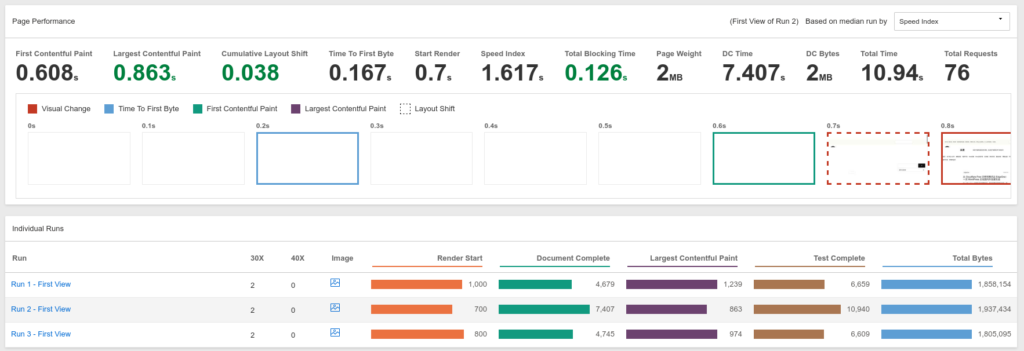
The core data after EdgeOne went live was as follows:
| Metric | After EdgeOne |
|---|---|
| TTFB | 0.167s |
| FCP | 0.608s |
| LCP | 0.863s |
| CLS | 0.038 |
| Start Render | 0.7s |
| Speed Index | 1.617s |
| TBT | 0.126s |
| Page Weight | 2MB |
| Total Requests | 76 |
| Total Time | 10.94s |
From the perspective of core user-experience metrics, the EdgeOne result was quite good.
In particular:
TTFB:0.167s
FCP:0.608s
LCP:0.863s
Speed Index:1.617s
These metrics indicate that:
HTML 首字节返回很快
首屏内容出现很快
最大内容绘制已经进入 1 秒以内
页面视觉完成速度继续改善
This was slightly better than the WebPageTest result after Cloudflare went live.
9. Core WebPageTest Comparison Across the Three Stages
Here are the three stages side by side:
| Metric | Before CDN | After Cloudflare | After EdgeOne |
|---|---|---|---|
| TTFB | 0.668s | 0.175s | 0.167s |
| FCP | 2.053s | 0.907s | 0.608s |
| LCP | 2.261s | 1.217s | 0.863s |
| Speed Index | 2.353s | 1.787s | 1.617s |
| CLS | Not recorded | 0.042 | 0.038 |
| TBT | Not recorded | 0.073s | 0.126s |
| Requests | 76 | 78 | 76 |
| Page size | about 2MB | 2MB | 2MB |
| Fully Loaded / Total Time | Not recorded | 5.795s | 10.94s |
There are several key signals in this table.
First, the TTFB after EdgeOne was very close to the Cloudflare result, and slightly lower:
Cloudflare 后:0.175s
EdgeOne 后:0.167s
This means that HTML first-byte performance did not get worse after migrating to EdgeOne.
Second, FCP, LCP, and Speed Index continued to improve after EdgeOne:
FCP:0.907s → 0.608s
LCP:1.217s → 0.863s
Speed Index:1.787s → 1.617s
This suggests that, based on WebPageTest’s core experience metrics, EdgeOne did not slow the page down. In this test, it actually performed better than the Cloudflare result.
Third, TBT increased from 0.073s to 0.126s.
Although this value increased, it is still not serious. If I continue optimizing later, I can look at JavaScript execution, plugin scripts, ad scripts, and third-party resources.
Fourth, Total Time increased from 5.795s to 10.94s.
This metric needs to be interpreted separately. It should not be directly equated with “the page feels slower to users.”
What users notice first are:
TTFB
Start Render
FCP
LCP
Speed Index
Total Time, on the other hand, may be affected by later-loading images, analytics scripts, ad scripts, and low-priority resources.
Based on this screenshot, the core page metrics are already good, but long-tail resources are still worth investigating.
10. Request Table Observation: Homepage HTML Is No Longer the Bottleneck
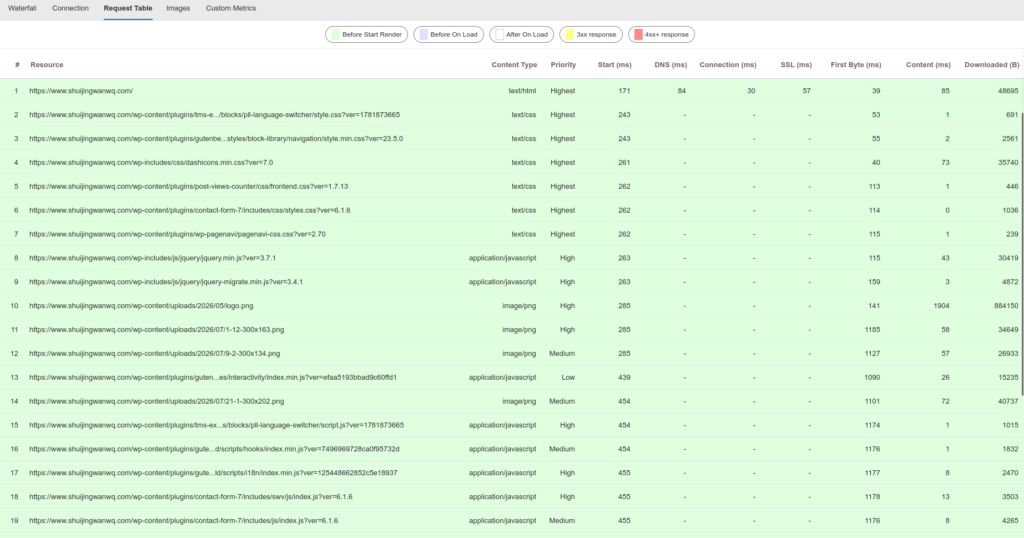
In WebPageTest’s Request Table, the first request was the homepage HTML:
资源:https://www.shuijingwanwq.com/
Content Type:text/html
DNS:84ms
Connection:30ms
SSL:57ms
First Byte:39ms
Content:85ms
Downloaded:48695B
This result shows that:
The homepage HTML itself is already very fast and is no longer the main bottleneck.
In other words, after EdgeOne was enabled, the edge response for the main HTML document looked normal.
If I want to optimize Total Time further, I should focus more on:
图片体积
CSS / JS 数量
插件资源
第三方脚本
广告脚本
统计脚本
首屏大图
One obvious issue in the screenshot is:
/wp-content/uploads/2026/05/logo.png
Downloaded:884150B
Content:1904ms
This file is close to 900KB, which is too large for a logo.
Next, I can consider:
压缩图片
改成 WebP
控制实际显示尺寸
减少首屏大图体积
检查是否存在不必要的大图加载
At this point, the issue is no longer CDN selection. It is page resource optimization.
11. Conclusions from This Comparison
After this comparison, I would summarize the conclusions in three layers.
1. Before the CDN, the site was indeed slow
Before the CDN was enabled, the boce average response time was around 4–5s. WebPageTest showed a TTFB of 0.668s, while FCP and LCP were both above 2 seconds.
This shows that, under direct origin access, there was still clear room for performance optimization.
2. After Cloudflare went live, the cache loop was indeed effective
After Cloudflare went live, WebPageTest metrics improved significantly:
TTFB:0.668s → 0.175s
FCP:2.053s → 0.907s
LCP:2.261s → 1.217s
Speed Index:2.353s → 1.787s
So it would be wrong to say that Cloudflare Free had no value.
It did make the WordPress cache loop effective, and it did improve the core WebPageTest metrics.
The issue is:
Cloudflare Free can fluctuate noticeably when accessed from mainland China, especially on China Mobile and China Unicom networks.
3. EdgeOne is a better fit for this Chinese-language main site right now
After EdgeOne went live, the second boce test showed an average response time of 0.354s.
The core WebPageTest metrics also continued to improve:
TTFB:0.167s
FCP:0.608s
LCP:0.863s
Speed Index:1.617s
This suggests that, at least under the current test conditions, EdgeOne fits my goals better:
不换主域名
不拆 /en/ 英文目录
不新增 cn 子域名
继续使用同一个 www 主站
改善中国大陆访问
保持 WebPageTest 核心指标
12. Final Judgment
This migration was not because Cloudflare is bad.
Cloudflare Free is still an excellent global CDN, especially for overseas access, static asset caching, and low-cost global acceleration.
But for my WordPress main site, the situation is a bit more specific:
源站在阿里云杭州 ECS
域名已经备案
主要访问用户在中国大陆
同时存在 /en/ 英文目录
不希望拆分主域名结构
不希望重做 Polylang SEO 结构
Given this context, Tencent Cloud EdgeOne is a better fit for the current stage.
From the boce results, the second EdgeOne test brought the mainland China average response down to 0.354s.
From WebPageTest, TTFB, FCP, LCP, and Speed Index after EdgeOne all stayed within a very reasonable range.
So I would now phrase the conclusion like this:
Cloudflare Free solved the WordPress cache-loop problem, but it did not fully solve routing fluctuations from mainland China. EdgeOne further improved mainland China access without changing the WordPress main-site structure, while not noticeably sacrificing the core WebPageTest performance metrics.
That is the most important practical value I observed from migrating from Cloudflare Free to Tencent Cloud EdgeOne.
13. What Still Needs to Be Monitored
The data from this test is already useful, but it does not mean every issue has been completely resolved.
I will continue monitoring a few things:
boce 多次测试是否长期稳定
移动、联通线路是否还会偶发变慢
Google Search Console 核心网页指标是否变化
Bing 和百度抓取是否正常
EdgeOne HTML 缓存是否需要接入自动刷新
Total Time 偏高是否来自图片或第三方脚本
In particular, the Total Time value of 10.94s does not change the current judgment on TTFB, FCP, and LCP, but it is still worth optimizing separately later.
The next optimization work may focus on:
压缩 logo.png
检查首屏图片体积
减少不必要插件资源
继续观察 EdgeOne 缓存命中
考虑 EdgeOne API 自动清缓存
So far, I would consider this migration successful.
It did not change the WordPress structure, did not split the English site, and did not affect admin access. At the same time, mainland China access and the core WebPageTest metrics both stayed within a much better range.