Console commands based on Yii 2.0 advanced template to implement the flow of timing tasks
1. Copy\vendor\yiisoft\yii2\console\controllers\cacheController .php to \console\controllers\luagameteamskillController.php, as shown in Figure 1

Figure 1
2. Rename \console\controllers\luagameteamskillcontroller.php to \console\controllers\luagameteamskillcontroller.php, as shown in Figure 2

Figure 2
3. Modify the namespace to namespace console\controllers;, and the class name is modified to luagameteamskillController, as shown in Figure 3

Figure 3
4. Only keep ActionIndex(), other methods are deleted, as shown in Figure 4

Figure 4
5. In Windows PowerShell, enter the program root directory and run ./yii, it will give you some available command list, which has added the available commands lua-game-team-skill, as shown in Figure 5

Figure 5
6. Using the exit code is the best practice for console application development. Usually, the command that executes successfully returns 0(controller::exit_code_normal), and the execution fails to return 1 (controller::exit_code_error), as shown in Figure 6
const exit_code_normal = 0;
const exit_code_error = 1;

Figure 6
7. Run ./Yii lua-game-team-skill, run successfully, if the route provided during the execution does not contain the method ID of the route, the default operation will be performed, that is, the actionIndex() method, as shown in Figure 7

Figure 7
8. Upload the program to CentOS 7, run yii in the root directory, and report an error-bash: yii: command not found, as shown in Figure 8

8
9. Run php yii in the root directory, and report the error php warningYii\Base\ErrorExceptionwith messageexec() has been disabled for security reasons, as shown in Figure 9

Figure 9
10. Edit the php.ini file, find disable_functions, delete exec, and save, as shown in Figure 10

Figure 10
11, restart php-fpm, run php yii again, the list of available commands is successfully displayed, the lua-game-team-skill command already exists, as shown in Figure 11

Figure 11
12. Run php yii lua-game-team-skill, as shown in Figure 12

Figure 12
13. After the command is successfully run, generate corresponding data in Redis, as shown in Figure 13

Figure 13
14. Use crontab to execute php regularly, execute the command, crontab -e, and then open a file, as shown in Figure 14

Figure 14
15. Add the following content to the file, indicating that it is executed every minute and save, as shown in Figure 15
*/1 * * * /usr/local/php/bin/php/data/wwwroot/api.kaiqiu.shuijingwanwq.com/yii lua-game-team-skill

Figure 15
16. Use the Linux Flock file lock to achieve task lock, re-edit, and save, as shown in Figure 16
*/1 * * * flock -xn /tmp/sleep.lock -c/usr/local/php/bin/php/data/wwwroot/api.kaiqiu.shuijingwanwq.com/yii lua-game-team-skill

Figure 16
17. View the /tmp/ directory, the sleep.lock file exists, as shown in Figure 17

Figure 17
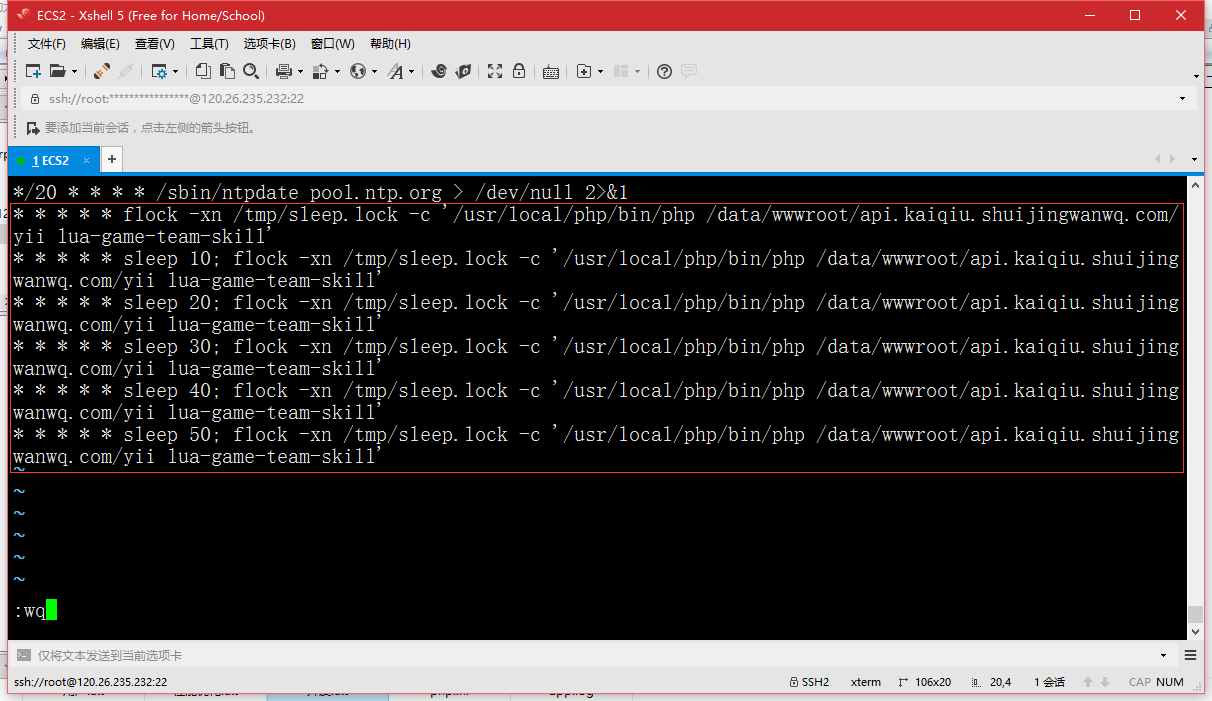
18. Use the Linux Flock file lock to achieve task lock, re-edit, and it means that it will be executed every 10 seconds, save it, as shown in Figure 18
* * * * * flock -xn /tmp/sleep.lock -c/usr/local/php/bin/php/data/wwwroot/api.kaiqiu.shuijingwanwq.com/yii lua-game-team-skill
* * * * Sleep 10; flock -xn /tmp/sleep.lock -c/usr/local/php/bin/php/data/wwwroot/api.kaiqiu.shuijingwanwq.com/yii lua-game-team-skill
* * * * Sleep 20; flock -xn /tmp/sleep.lock -c/usr/local/php/bin/php/data/wwwroot/api.kaiqiu.shuijingwanwq.com/yii lua-game-team-skill
* * * * Sleep 30; flock -xn /tmp/sleep.lock -c/usr/local/php/bin/php/data/wwwroot/api.kaiqiu.shuijingwanwq.com/yii lua-game-team-skill
* * * * Sleep 40; flock -xn /tmp/sleep.lock -c/usr/local/php/bin/php/data/wwwroot/api.kaiqiu.shuijingwanwq.com/yii lua-game-team-skill
* * * * Sleep 50; flock -xn /tmp/sleep.lock -c/usr/local/php/bin/php/data/wwwroot/api.kaiqiu.shuijingwanwq.com/yii lua-game-team-skill
18