1. Based on the AB test tool, carry out a simulation test in a high-concurrency situation, open: http://httpd.apache.org/docs/current/platform/windows.html#down, as shown in Figure 1

2. Select apachehaus, download, the binary file of the 2.4 version of x64, as shown in Figure 2

3. The download file name is: httpd-2.4.25-x64-vc14-r1.zip, as shown in Figure 3

4. After decompression, copy Apache24 to C:\Apache24, as shown in Figure 4

5. Enter the directory in cmd: C:\apache24\bin, run the command: httpdd -k install, install apache as a service, and report an error: This program cannot be started because it is lost vCruntime140.dll. Try reinstalling the program to fix the problem. as shown in Figure 5

6. Install Visual C++ 2015, Visual C++ 2015 x64, as shown in Figure 6

7. Enter the directory in cmd: C:\apache24\bin, run the command: httpdd -k install, install apache as a service, and report an error: . as shown in Figure 7
installing theapache2.4Service
(OS 5) Access denied. : Ah00369: Failed to open the Windows Service Manager, perhaps you forget to log in as administrator?

8. Right-click the Windows icon to open the command prompt (admin), as shown in Figure 8

9. Install again, the installation is successful, as shown in Figure 9

10. Edit C:\Apache24\conf\httpd.conf, modify the default port to 8080, as shown in Figure 10

11. Find apache2.4 in the service list and start the service, as shown in Figure 11

12. Open the URL: http://localhost:8080/, run successfully, as shown in Figure 12

13. Because it is a stress test for executing a POST request, you need to prepare a POST data file first, create a new file: C:\Apache24\bin\Post\Amiscos.txt, as shown in Figure 13

14. Edit file: C:\Apache24\bin\post\Amiscos.txt, fill the data, as shown in Figure 14

15. Execute the GET request, enter the directory in cmd: C:\apache24\bin, run the command:, report error:, as shown in Figure 15
It is recommended to refer to the URL: https://www.shuijingwanwq.com/2017/04/14/1564/ (AB – Apache HTTP Server BenchMarking before using the tool). tool, translated into Chinese)
ab -c 3 -n 15http://www.xxx.com/v1/game-team-skills/2721
This is apachebench, version 2.3 <$revision: 1757674 $>
Copyright 1996 Adam Twiss, Zeus Technology Ltd, http://www.zeustech.net/
licensesed to the apache software foundation, http://www.apache.org/
bedmarkinghttp: (be patient)…apr_sockaddr_info_get() forhttp:: I don’t know about such a host. (731001)

16. Execute the GET request, enter the directory in cmd: C:\apache24\bin, run the command:, remove the single quotes of the request URL, and run it successfully, as shown in Figure 16
ab -c 3 -n 15 http://www.xxx.com/v1/game-team-skills/2721

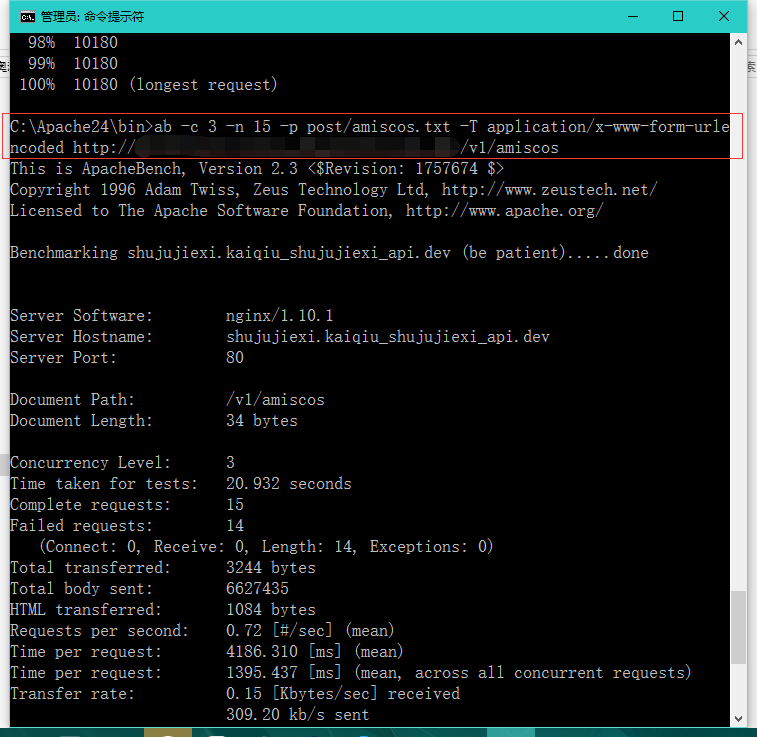
17. Execute a POST request and enter the directory in cmd: C:\apache24\bin, run the command:, run successfully, as shown in Figure 17
ab -c 3 -n 15 -p post/amiscos.txt -t application/x-www-form-urlencoded http://www.xxx.com/v1/Amiscos
Leave a Reply