When composer install, prompt: package yiisoft/yii2-codeception is abandoned, you should avoid using it. Use Codeception/Codeception instead.
1,composer install When prompted: package yiisoft/yii2-codeception is bandoned, you should avoid using it. Use codeception/codeception Instead., as shown in Figure 1
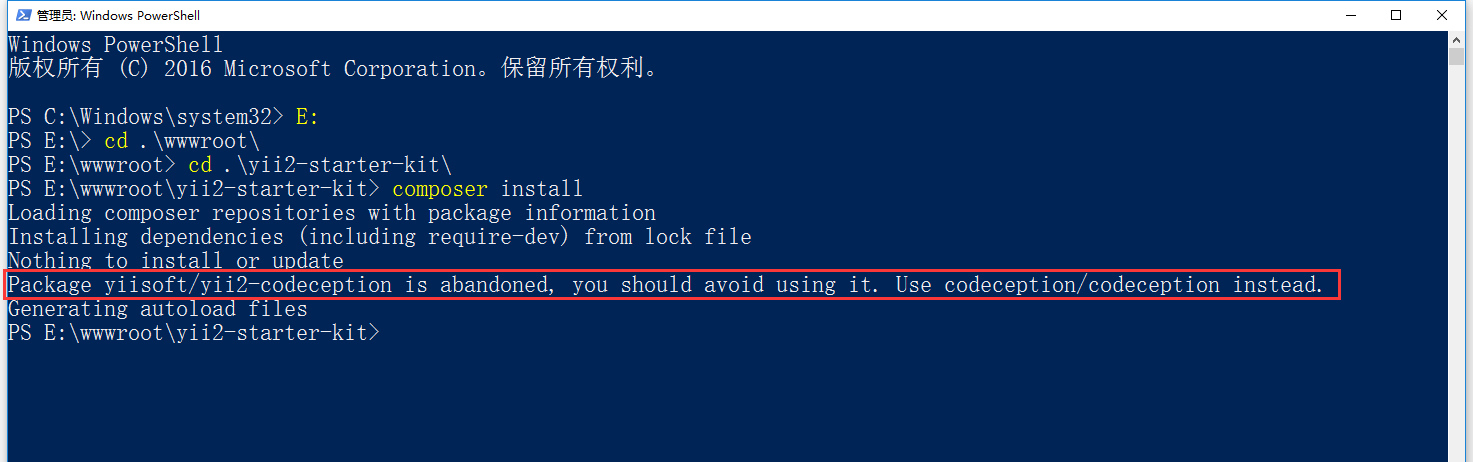
Figure 1
2. Execute the command:composer show -s, only list the current project information, as shown in Figure 2

Figure 2
3. Check the requirements (dev) option and find that codeception/codeception already exists, so you only need to delete yiisoft/yii2-codeception, as shown in Figure 3

Figure 3
4. Find out whether the yiisoft/yii2-codeception that has been installed in your project is being depended on by other packages, and list them, as shown in Figure 4
composer depends –link-type=require-dev yiisoft/yii2-codeception

Figure 4
5. Execute the command:composer remove yiisoft/yii2-codeception, delete yiisoft/yii2-codeception, as shown in Figure 5

Figure 5
6,composer install normal, as shown in Figure 6

Figure 6