Under Windows 10, Nginx 1.10.1, reload nginx, and report an error: nginx:[emerg]host not found in upstream “default.creditshop.shenzhen.localhost” in c:/nginx-1.10.1/conf/vhosts/credits The solution of hop_shenzhen.conf:26
1. Under Windows 10, Nginx 1.10.1, execute the command: nginx -s reload, reload the nginx configuration, and report an error:
nginx:[emerg]host not found in upstream “default.creditshop.shenzhen.localhost” in c:/nginx-1.10.1/conf/vhosts/credits
Hop_shenzhen.conf:26, as shown in Figure 1
![在 Windows 10、Nginx 1.10.1 下,执行命令:nginx -s reload,重新加载 Nginx 配置,报错: nginx: [emerg] host not found in upstream "default.creditshop.shenzhen.localhost" in C:/nginx-1.10.1/conf/vhosts/credits hop_shenzhen.conf:26](https://www.shuijingwanwq.com/wp-content/uploads/2017/12/1-3.png)
Figure 1

Figure 2
3. Edit the hosts file and configure the parsing of default.creditshop.shenzhen.localhost, as shown in Figure 3

Figure 3
4. Execute the command: nginx -s reload, reload the nginx configuration, normal, as shown in Figure 4
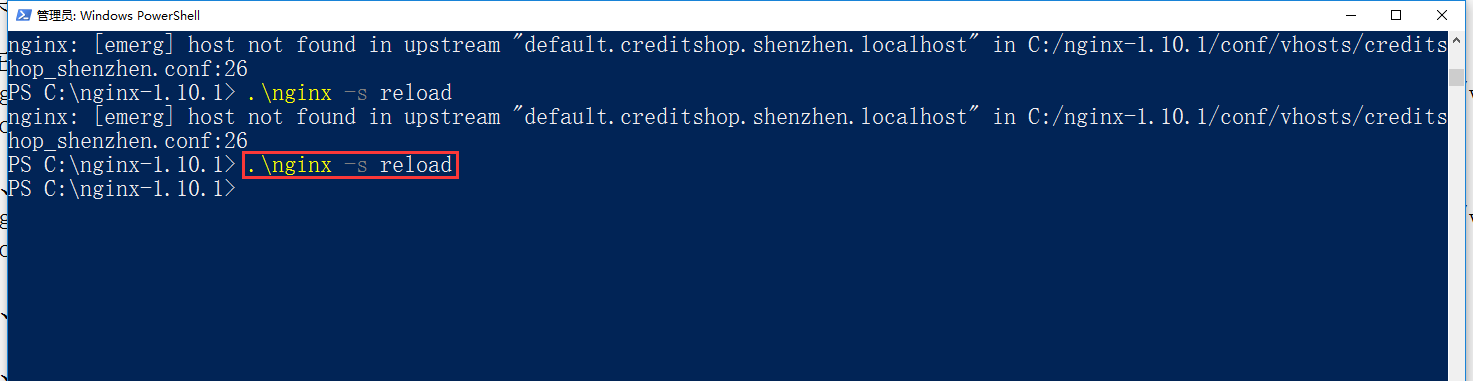
Figure 4
5. From this, it is found that .localhost will only be automatically converted to 127.0.0.1 under some browsers such as chrome, refer to the URL:https://www.shuijingwanwq.com/en/2017/12/12/10174/and will not convert in nginx