There is no problem not worth solving, and no technology not worth learning!
Based on yiisoft/yii2-app-advanced, create a new repository yii2-app-advanced on github, and create a new interface application (implement RESTful-style web service services. API), support for creating new API directories, configuration and environment, testing, vagrant, etc.
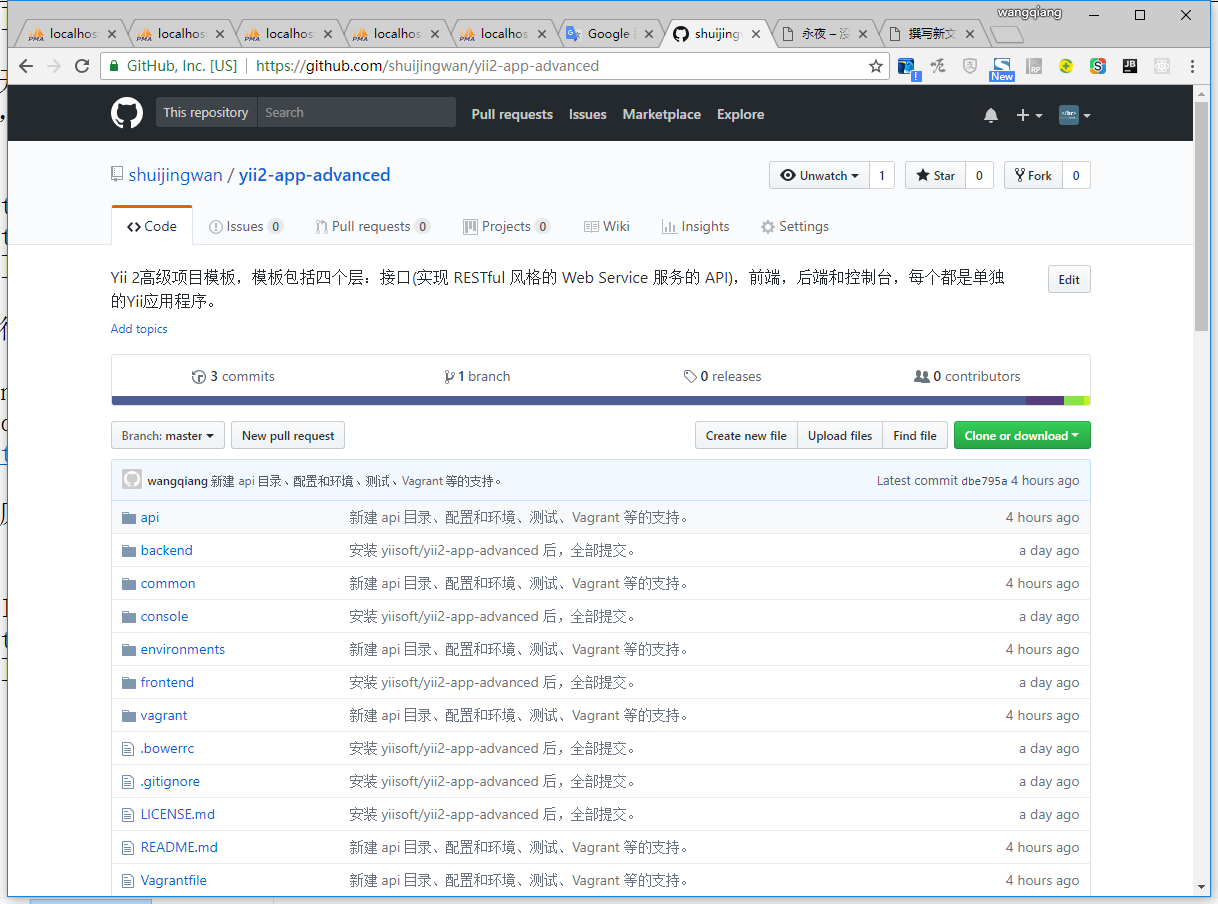
1. Create a new warehouse, shuijingwan/yii2-app-advanced, as shown in Figure 1
Yii 2 advanced project template, the template includes four layers: interface (the API to implement the RESTful style web service service), front-end, back-end and console, each of which is a separate YII application.
Figure 1
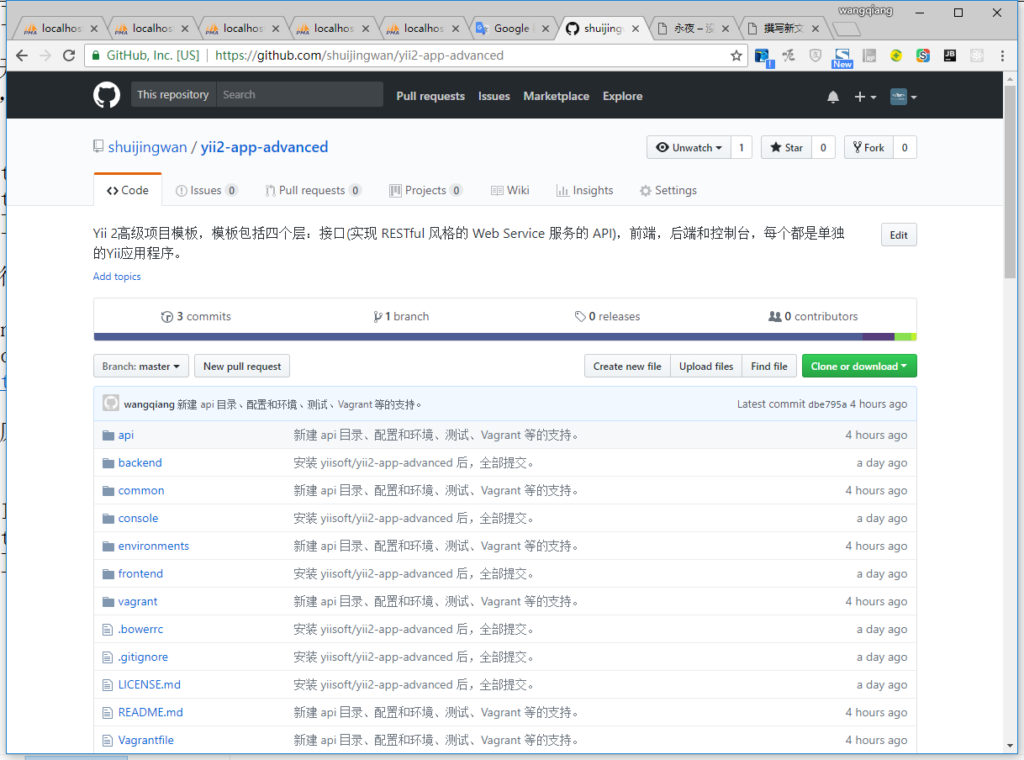
2. Successfully created the warehouse, as shown in Figure 2
Figure 2
3. Use the following command to install the application: yiisoft/yii2-app-advanced, as shown in Figure 3
Figure 3
4. Create a new warehouse on the command line and push the existing repository to shuijingwan/yii2-app-advanced, based on the second step, as shown in Figure 4
Figure 4
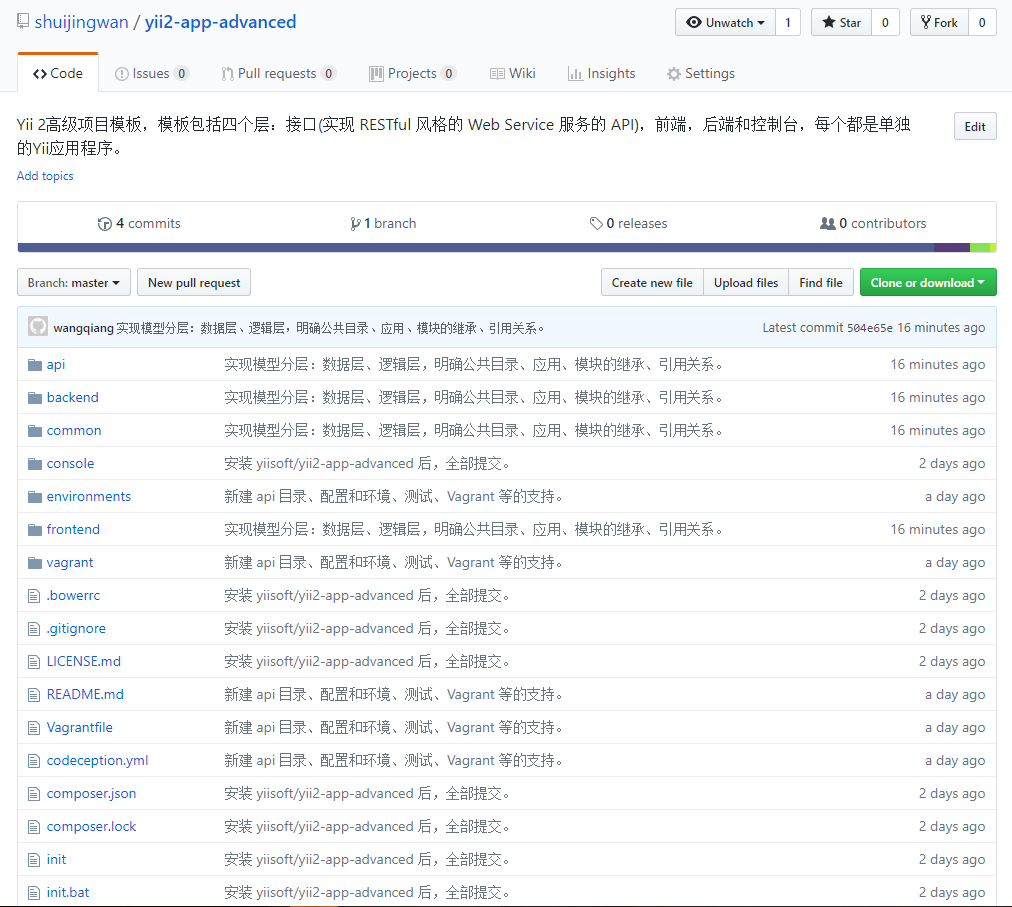
5. Open: https://github.com/shuijingwan/yii2-app-advanced, the warehouse has been successfully pushed, as shown in Figure 5
Figure 5
6. Open Windows PowerShell, execute the init command and select dev as the environment, as shown in Figure 6
Figure 6
.\init
0
yes
7. Change the host file to point the domain to your server, configure the C:\Windows\System32\Drivers\etc\hosts file, as shown in Figure 7
Figure 7
8. Configure the Web server based on Nginx, configure virtual hosts: WWW, Backend, API to suspend configuration, edit C:\nginx-1.10.1\conf\vhosts\github-shuijingwan-yii2-app-advanced.conf
## FRONTEND ##
server {
    charset utf-8;
    client_max_body_size 128M;

    listen 80; ## listen for ipv4
    #listen [::]:80 default_server ipv6only=on; ## listen for ipv6

    server_name www.github-shuijingwan-yii2-app-advanced.localhost;
    root        E:/wwwroot/github-shuijingwan-yii2-app-advanced/frontend/web;
    index       index.php;

    access_log  logs/www.github-shuijingwan-yii2-app-advanced.localhost.access.log;
    error_log   logs/www.github-shuijingwan-yii2-app-advanced.localhost.error.log;

	location / {
		# Redirect everything that isn't a real file to index.php
		try_files $uri $uri/ /index.php$is_args$args;
	}

	# uncomment to avoid processing of calls to non-existing static files by Yii
	#location ~ \.(js|css|png|jpg|gif|swf|ico|pdf|mov|fla|zip|rar)$ {
	#    try_files $uri =404;
	#}
	#error_page 404 /404.html;

	# deny accessing php files for the /assets directory
	location ~ ^/assets/.*\.php$ {
		deny all;
	}

	location ~ \.php$ {
		include fastcgi_params;
		fastcgi_param SCRIPT_FILENAME $document_root$fastcgi_script_name;
		fastcgi_pass 127.0.0.1:9000;
		#fastcgi_pass unix:/var/run/php5-fpm.sock;
		try_files $uri =404;
	}

	location ~* /\. {
		deny all;
	}
}

## BACKEND ##
server {
    charset utf-8;
    client_max_body_size 128M;

    listen 80; ## listen for ipv4
    #listen [::]:80 default_server ipv6only=on; ## listen for ipv6

    server_name backend.github-shuijingwan-yii2-app-advanced.localhost;
    root        E:/wwwroot/github-shuijingwan-yii2-app-advanced/backend/web;
    index       index.php;

    access_log  logs/backend.github-shuijingwan-yii2-app-advanced.localhost.access.log;
    error_log   logs/backend.github-shuijingwan-yii2-app-advanced.localhost.error.log;

	location / {
		# Redirect everything that isn't a real file to index.php
		try_files $uri $uri/ /index.php$is_args$args;
	}

	# uncomment to avoid processing of calls to non-existing static files by Yii
	#location ~ \.(js|css|png|jpg|gif|swf|ico|pdf|mov|fla|zip|rar)$ {
	#    try_files $uri =404;
	#}
	#error_page 404 /404.html;

	# deny accessing php files for the /assets directory
	location ~ ^/assets/.*\.php$ {
		deny all;
	}

	location ~ \.php$ {
		include fastcgi_params;
		fastcgi_param SCRIPT_FILENAME $document_root$fastcgi_script_name;
		fastcgi_pass 127.0.0.1:9000;
		#fastcgi_pass unix:/var/run/php5-fpm.sock;
		try_files $uri =404;
	}

	location ~* /\. {
		deny all;
	}
}

## MISC ##

### WWW Redirect ###
server {
    listen       80;
    server_name  github-shuijingwan-yii2-app-advanced.localhost;
    return       301 http://www.github-shuijingwan-yii2-app-advanced.localhost$request_uri;
}
9. Check whether the current PHP environment meets the most basic needs of Yii, copy /requirements.php to /frontend/web/requirements.php, and then access the url through the browser http://www.github-shuijingwan-yii2-app-advanced.localhost/requirements.php , as shown in Figure 8
8
10. Create a new database (g-s-yii2-app-advanced) and adjust the components in /common/config/main-local.php accordingly[‘db’]Configuration, the character set is utf8mb4.
CREATE USER 'g-s-yii2-app-advanced'@'%' IDENTIFIED WITH mysql_native_password AS '***';GRANT USAGE ON *.* TO 'g-s-yii2-app-advanced'@'%' REQUIRE NONE WITH MAX_QUERIES_PER_HOUR 0 MAX_CONNECTIONS_PER_HOUR 0 MAX_UPDATES_PER_HOUR 0 MAX_USER_CONNECTIONS 0;CREATE DATABASE IF NOT EXISTS `g-s-yii2-app-advanced`;GRANT ALL PRIVILEGES ON `g-s-yii2-app-advanced`.* TO 'g-s-yii2-app-advanced'@'%';
11. Execute the migration command, as shown in Figure 9
Figure 9
.\yii migrate
yes
12. Check the database, the sorting rule is: utf8mb4_unicode_ci, as shown in Figure 10
Figure 10
13. Create a test database (g-s-yii2-app-advanced-test) and adjust the components in /common/config/test-local.php accordingly[‘db’]Configuration, the character set is utf8mb4.
CREATE USER 'g-s-yii2-app-advanced-test'@'%' IDENTIFIED WITH mysql_native_password AS '***';GRANT USAGE ON *.* TO 'g-s-yii2-app-advanced-test'@'%' REQUIRE NONE WITH MAX_QUERIES_PER_HOUR 0 MAX_CONNECTIONS_PER_HOUR 0 MAX_UPDATES_PER_HOUR 0 MAX_USER_CONNECTIONS 0;CREATE DATABASE IF NOT EXISTS `g-s-yii2-app-advanced-test`;GRANT ALL PRIVILEGES ON `g-s-yii2-app-advanced-test`.* TO 'g-s-yii2-app-advanced-test'@'%';
14. Execute the migration command and report an error: ExceptionYii\Base\UnknownPropertyExceptionwith messageSetting unknown property: yii\console\request::cookieValidat
ionkeyIn e:\wwwroot\github-shuijingwan-yii2-app-advanced\vendor\yiisoft\yii2\base\component.php:209, as shown in Figure 11
Figure 11
./yii_test migrate
15. Since the console application uses different request components, edit \common\config\test.php, and annotate the request component (uncomment in the web application), as shown in Figure 12
Figure 12
16. Execute the migration command, build the test suite, and then run all the sample tests, as shown in Figure 13
Note: After executing the migration command (./yii_test migrate), you need to uncomment the request component, otherwise an error will be reported:
Figure 13
 Test  ..\common\tests\unit\models\LoginFormTest.php:testLoginCorrect

  [yii\base\InvalidConfigException] yii\web\Request::cookieValidationKey must be configured with a secret key.
./yii_test migrate
vendor/bin/codecept build
vendor/bin/codecept run
17. Check the test database, the sorting rule is: utf8mb4_unicode_ci, as shown in Figure 14
Figure 14
18. Add interface application (API), copy frontend to API, environments/dev/frontend to environments/dev/api and environments/prod/frontend to environments/prod/api, as shown in Figure 15
Figure 15
19. Delete all the files under the directory \API\Runtime\Debug, and adjust the namespace and path in the directory /API to start with the API (replace frontend to API), as shown in Figure 16
Figure 16
20. Add yii::setAlias in Common\Config\Bootstrap.php(API, dirname(dirname(__dir__)) ./api), as shown in Figure 17
Figure 17
21. Edit environments/index.php, search for this file with 6 frontends, then copy 6 copies accordingly, and replace them with api, as shown in Figure 18
18
22, \vagrant\nginx\app.conf, add virtual host API
\vagrant\nginx\app.conf
server {
   charset utf-8;
   client_max_body_size 128M;
   sendfile off;

   listen 80; ## listen for ipv4
   #listen [::]:80 default_server ipv6only=on; ## listen for ipv6

   server_name y2aa-frontend.test;
   root        /app/frontend/web/;
   index       index.php;

   access_log  /app/vagrant/nginx/log/frontend-access.log;
   error_log   /app/vagrant/nginx/log/frontend-error.log;

   location / {
       # Redirect everything that isn't a real file to index.php
       try_files $uri $uri/ /index.php$is_args$args;
   }

   # uncomment to avoid processing of calls to non-existing static files by Yii
   #location ~ \.(js|css|png|jpg|gif|swf|ico|pdf|mov|fla|zip|rar)$ {
   #    try_files $uri =404;
   #}
   #error_page 404 /404.html;

   location ~ \.php$ {
       include fastcgi_params;
       fastcgi_param SCRIPT_FILENAME $document_root$fastcgi_script_name;
       #fastcgi_pass   127.0.0.1:9000;
       fastcgi_pass unix:/var/run/php/php7.0-fpm.sock;
       try_files $uri =404;
   }

   location ~ /\.(ht|svn|git) {
       deny all;
   }
}

server {
   charset utf-8;
   client_max_body_size 128M;
   sendfile off;

   listen 80; ## listen for ipv4
   #listen [::]:80 default_server ipv6only=on; ## listen for ipv6

   server_name y2aa-backend.test;
   root        /app/backend/web/;
   index       index.php;

   access_log  /app/vagrant/nginx/log/backend-access.log;
   error_log   /app/vagrant/nginx/log/backend-error.log;

   location / {
       # Redirect everything that isn't a real file to index.php
       try_files $uri $uri/ /index.php$is_args$args;
   }

   # uncomment to avoid processing of calls to non-existing static files by Yii
   #location ~ \.(js|css|png|jpg|gif|swf|ico|pdf|mov|fla|zip|rar)$ {
   #    try_files $uri =404;
   #}
   #error_page 404 /404.html;

   location ~ \.php$ {
       include fastcgi_params;
       fastcgi_param SCRIPT_FILENAME $document_root$fastcgi_script_name;
       #fastcgi_pass   127.0.0.1:9000;
       fastcgi_pass unix:/var/run/php/php7.0-fpm.sock;
       try_files $uri =404;
   }

   location ~ /\.(ht|svn|git) {
       deny all;
   }
}

server {
   charset utf-8;
   client_max_body_size 128M;
   sendfile off;

   listen 80; ## listen for ipv4
   #listen [::]:80 default_server ipv6only=on; ## listen for ipv6

   server_name y2aa-api.test;
   root        /app/api/web/;
   index       index.php;

   access_log  /app/vagrant/nginx/log/api-access.log;
   error_log   /app/vagrant/nginx/log/api-error.log;

   location / {
       # Redirect everything that isn't a real file to index.php
       try_files $uri $uri/ /index.php$is_args$args;
   }

   # uncomment to avoid processing of calls to non-existing static files by Yii
   #location ~ \.(js|css|png|jpg|gif|swf|ico|pdf|mov|fla|zip|rar)$ {
   #    try_files $uri =404;
   #}
   #error_page 404 /404.html;

   location ~ \.php$ {
       include fastcgi_params;
       fastcgi_param SCRIPT_FILENAME $document_root$fastcgi_script_name;
       #fastcgi_pass   127.0.0.1:9000;
       fastcgi_pass unix:/var/run/php/php7.0-fpm.sock;
       try_files $uri =404;
   }

   location ~ /\.(ht|svn|git) {
       deny all;
   }
}
23. Edit \vagrant\nginx\log\.gitignore, the log file of the configuration API is ignored
25. Configure the web server based on Nginx, configure virtual hosts: WWW, Backend, API, edit C:\nginx-1.10.1\conf\vhosts\github-shuijingwan-yii2-app-advanced.conf
## FRONTEND ##
server {
    charset utf-8;
    client_max_body_size 128M;

    listen 80; ## listen for ipv4
    #listen [::]:80 default_server ipv6only=on; ## listen for ipv6

    server_name www.github-shuijingwan-yii2-app-advanced.localhost;
    root        E:/wwwroot/github-shuijingwan-yii2-app-advanced/frontend/web;
    index       index.php;

    access_log  logs/www.github-shuijingwan-yii2-app-advanced.localhost.access.log;
    error_log   logs/www.github-shuijingwan-yii2-app-advanced.localhost.error.log;

	location / {
		# Redirect everything that isn't a real file to index.php
		try_files $uri $uri/ /index.php$is_args$args;
	}

	# uncomment to avoid processing of calls to non-existing static files by Yii
	#location ~ \.(js|css|png|jpg|gif|swf|ico|pdf|mov|fla|zip|rar)$ {
	#    try_files $uri =404;
	#}
	#error_page 404 /404.html;

	# deny accessing php files for the /assets directory
	location ~ ^/assets/.*\.php$ {
		deny all;
	}

	location ~ \.php$ {
		include fastcgi_params;
		fastcgi_param SCRIPT_FILENAME $document_root$fastcgi_script_name;
		fastcgi_pass 127.0.0.1:9000;
		#fastcgi_pass unix:/var/run/php5-fpm.sock;
		try_files $uri =404;
	}

	location ~* /\. {
		deny all;
	}
}

## BACKEND ##
server {
    charset utf-8;
    client_max_body_size 128M;

    listen 80; ## listen for ipv4
    #listen [::]:80 default_server ipv6only=on; ## listen for ipv6

    server_name backend.github-shuijingwan-yii2-app-advanced.localhost;
    root        E:/wwwroot/github-shuijingwan-yii2-app-advanced/backend/web;
    index       index.php;

    access_log  logs/backend.github-shuijingwan-yii2-app-advanced.localhost.access.log;
    error_log   logs/backend.github-shuijingwan-yii2-app-advanced.localhost.error.log;

	location / {
		# Redirect everything that isn't a real file to index.php
		try_files $uri $uri/ /index.php$is_args$args;
	}

	# uncomment to avoid processing of calls to non-existing static files by Yii
	#location ~ \.(js|css|png|jpg|gif|swf|ico|pdf|mov|fla|zip|rar)$ {
	#    try_files $uri =404;
	#}
	#error_page 404 /404.html;

	# deny accessing php files for the /assets directory
	location ~ ^/assets/.*\.php$ {
		deny all;
	}

	location ~ \.php$ {
		include fastcgi_params;
		fastcgi_param SCRIPT_FILENAME $document_root$fastcgi_script_name;
		fastcgi_pass 127.0.0.1:9000;
		#fastcgi_pass unix:/var/run/php5-fpm.sock;
		try_files $uri =404;
	}

	location ~* /\. {
		deny all;
	}
}

## API ##
server {
    charset utf-8;
    client_max_body_size 128M;

    listen 80; ## listen for ipv4
    #listen [::]:80 default_server ipv6only=on; ## listen for ipv6

    server_name api.github-shuijingwan-yii2-app-advanced.localhost;
    root        E:/wwwroot/github-shuijingwan-yii2-app-advanced/api/web;
    index       index.php;

    access_log  logs/api.github-shuijingwan-yii2-app-advanced.localhost.access.log;
    error_log   logs/api.github-shuijingwan-yii2-app-advanced.localhost.error.log;

	location / {
		# Redirect everything that isn't a real file to index.php
		try_files $uri $uri/ /index.php$is_args$args;
	}

	# uncomment to avoid processing of calls to non-existing static files by Yii
	#location ~ \.(js|css|png|jpg|gif|swf|ico|pdf|mov|fla|zip|rar)$ {
	#    try_files $uri =404;
	#}
	#error_page 404 /404.html;

	# deny accessing php files for the /assets directory
	location ~ ^/assets/.*\.php$ {
		deny all;
	}

	location ~ \.php$ {
		include fastcgi_params;
		fastcgi_param SCRIPT_FILENAME $document_root$fastcgi_script_name;
		fastcgi_pass 127.0.0.1:9000;
		#fastcgi_pass unix:/var/run/php5-fpm.sock;
		try_files $uri =404;
	}

	location ~* /\. {
		deny all;
	}
}

## MISC ##

### WWW Redirect ###
server {
    listen       80;
    server_name  github-shuijingwan-yii2-app-advanced.localhost;
    return       301 http://www.github-shuijingwan-yii2-app-advanced.localhost$request_uri;
}
26. Open Windows PowerShell, execute the init command and select dev as the environment, and the environment configuration file required by the API application is automatically generated, as shown in Figure 19
Figure 19
.\init
0
yes
Yes
Yes
Yes
Yes
Yes
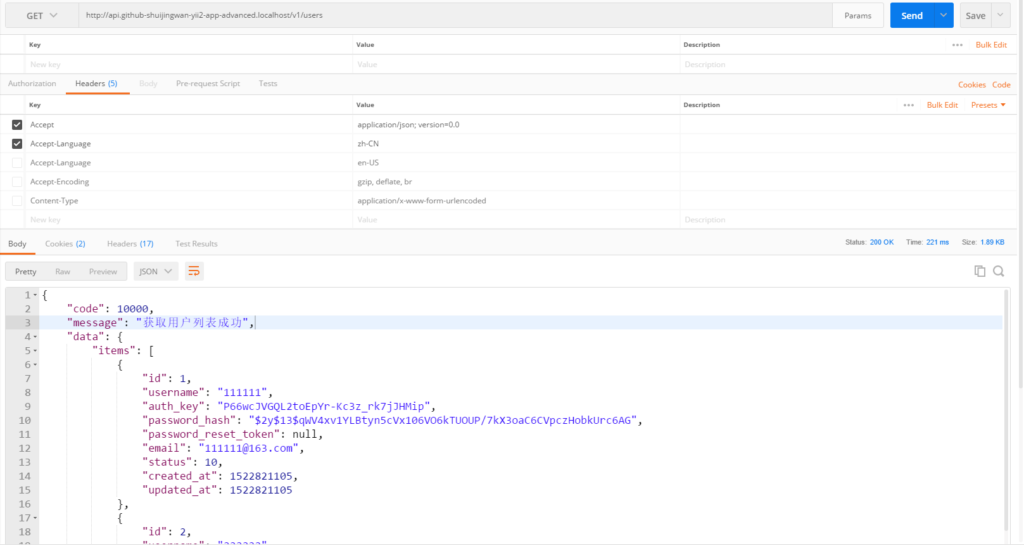
27. Open: http://api.github-shuijingwan-yii2-app-advanced.localhost/ , as expected, as shown in Figure 20
Figure 20
28. Edit the codeception.yml configuration that contains the tests of all applications, as shown in Figure 21
Figure 21
# global codeception file to run tests from all apps
include:
    - common
    - frontend
    - backend
    - api
paths:
    log: console/runtime/logs
settings:
    colors: true
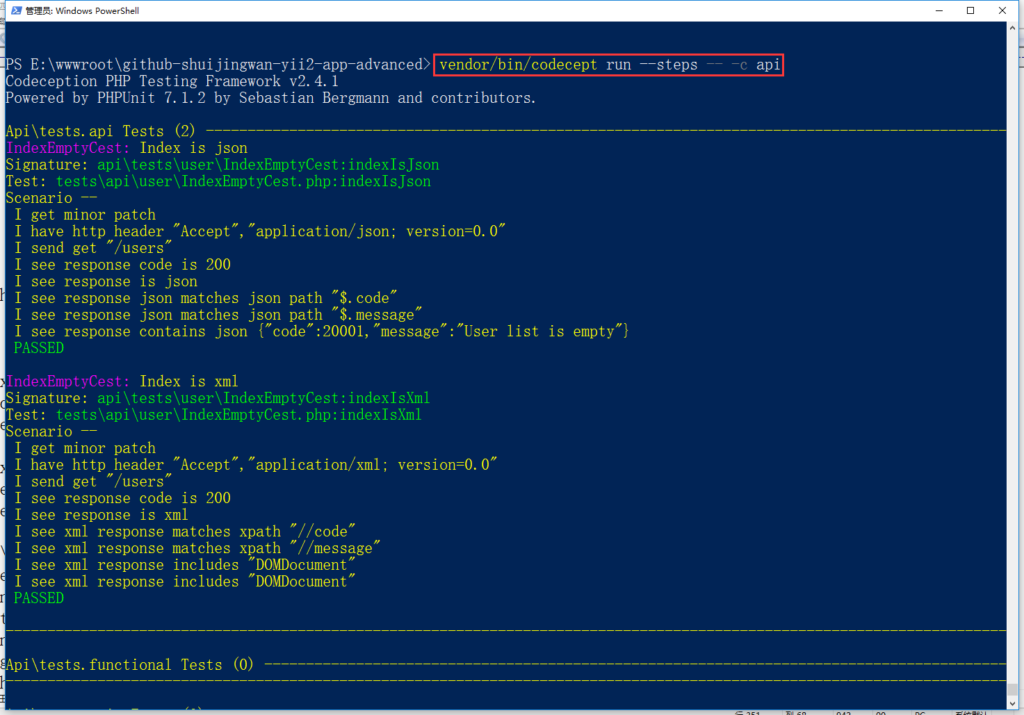
29. Run all sample tests, including the API, as shown in Figure 22
Figure 22
vendor/bin/codecept run
30. Edit readme.md and add an API to the directory structure
<p align="center">
<a href="https://github.com/yiisoft" target="_blank">
<img src="https://avatars0.githubusercontent.com/u/993323" height="100px">
</a>
<h1 align="center">Yii 2 Advanced Project Template</h1>
<br>
</p>
Yii 2 Advanced Project Template is a skeleton [Yii 2](http://www.yiiframework.com/) application best for
developing complex Web applications with multiple tiers.
The template includes three tiers: front end, back end, and console, each of which
is a separate Yii application.
The template is designed to work in a team development environment. It supports
deploying the application in different environments.
Documentation is at [docs/guide/README.md](docs/guide/README.md).
[](https://packagist.org/packages/yiisoft/yii2-app-advanced)
[](https://packagist.org/packages/yiisoft/yii2-app-advanced)
[](https://travis-ci.org/yiisoft/yii2-app-advanced)
DIRECTORY STRUCTURE
-------------------
```
common
config/ contains shared configurations
mail/ contains view files for e-mails
models/ contains model classes used in both api and backend and frontend
tests/ contains tests for common classes
console
config/ contains console configurations
controllers/ contains console controllers (commands)
migrations/ contains database migrations
models/ contains console-specific model classes
runtime/ contains files generated during runtime
backend
assets/ contains application assets such as JavaScript and CSS
config/ contains backend configurations
controllers/ contains Web controller classes
models/ contains backend-specific model classes
runtime/ contains files generated during runtime
tests/ contains tests for backend application
views/ contains view files for the Web application
web/ contains the entry script and Web resources
frontend
assets/ contains application assets such as JavaScript and CSS
config/ contains frontend configurations
controllers/ contains Web controller classes
models/ contains frontend-specific model classes
runtime/ contains files generated during runtime
tests/ contains tests for frontend application
views/ contains view files for the Web application
web/ contains the entry script and Web resources
widgets/ contains frontend widgets
api
assets/ contains application assets such as JavaScript and CSS
config/ contains api configurations
controllers/ contains Web controller classes
models/ contains api-specific model classes
runtime/ contains files generated during runtime
tests/ contains tests for api application
views/ contains view files for the Web application
web/ contains the entry script and Web resources
widgets/ contains api widgets
vendor/ contains dependent 3rd-party packages
environments/ contains environment-based overrides
```
31. Test whether to use vagrant to install, whether to support API, reference URL: https://github.com/yiisoft/yii2-app-advance d/blob/master/docs/guide-en-en/start-installation.md , using Vagrant to install (Windows User Manual)
32. Go to the /vagrant/config folder, rename vagrant-local.example.yml as vagrant-local.yml (recommended to copy), and place the github personal API token to vagrant-local.yml, as shown in Figure 23
Figure 23
33. Add the following code to the hosts file
34. Open Windows PowerShell, switch the path to the root directory of the project, and execute the following commands (need to overturn the wall, it may need to be executed multiple times), there is an error during the period, refer to step 15 processing, as shown in Figure 24 and Figure 25
Figure 24Figure 25
vagrant plugin install vagrant-hostmanager
vagrant up
35. After waiting for completion, just access the following URL in the browser, which is in line with expectations, as shown in Figure 26
frontend: http://y2aa-frontend.test
backend: http://y2aa-backend.test
API: http://y2aa-api.test
Figure 26
36. Restore the modification made in step 32, and edit \vagrant\config\.gitignore
![在 Postman 中,GET http://api.github-shuijingwan-yii2-app-advanced.localhost/v1/logs?filter[level]=4&filter[category][like]=api\behaviors\RequestLogBehavior&filter[prefix][like]=app-api&filter[log_time][gte]=1528090828&filter[log_time][lte]=1529564924.6648 ,200响应,空数组已经被自动转换为空对象,以保证字段格式的统一,GET http://api.github-shuijingwan-yii2-app-advanced.localhost/v1/logs/3](https://www.shuijingwanwq.com/wp-content/uploads/2018/06/16-1024x680.png)


Leave a Reply