After upgrading under the Chinese home version of Windows 10, manually delete the previous version to release the C drive space immediately
1. The Windows 10 system has been upgraded once on 2018/06/26, and the previous version of Windows is backed up in the windows.old directory, as shown in Figure 1
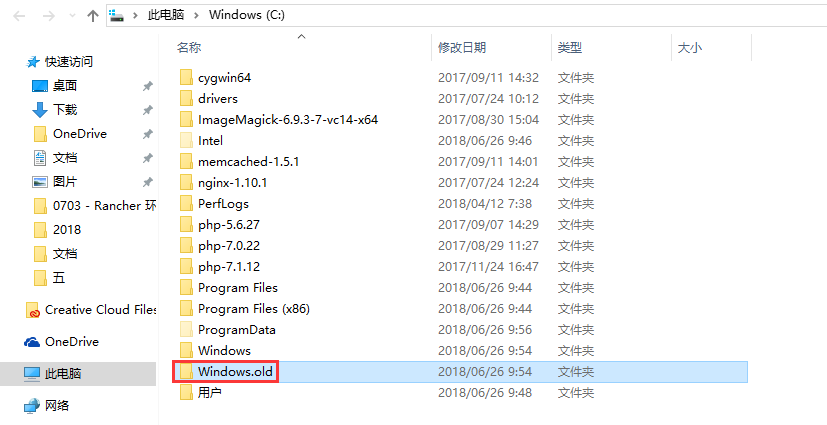
Figure 1
2. Check the C drive space, 36.0 GB is available, as shown in Figure 2

Figure 2
3. Check the URL:https://support.microsoft.com/zh-cn/help/4028075/windows-delete-your-previous-version-of-windows, ten days after upgrading to Windows 10, the previous version of Windows will be automatically deleted from the computer. However, now you need to release the C disc space immediately.
4. In the search box on the taskbar, type “Settings”, and then select it from the result list, as shown in Figure 3

Figure 3
5. Select “System” > “Storage” > “Release Space Immediately”, as shown in Figure 4

Figure 4
6. Under Delete temporary files, select the “Windows Upgrade Log File”, “Previous Version of Windows” check boxes, and then click “Delete File”. as shown in Figure 5

Figure 5
7. Delete the temporary file to complete, the size of “Windows Upgrade Log File” and “Previous Version of Windows” is 0 bytes, as shown in Figure 6

Figure 6
8. Check the C drive space, 50.3 GB is available, freeing the space of 14.3 GB, as shown in Figure 7

Figure 7

![composer self-update 出现 [ErrorException] zlib_decode(): data error提示](https://www.shuijingwanwq.com/wp-content/uploads/2015/06/14-520x245.png)