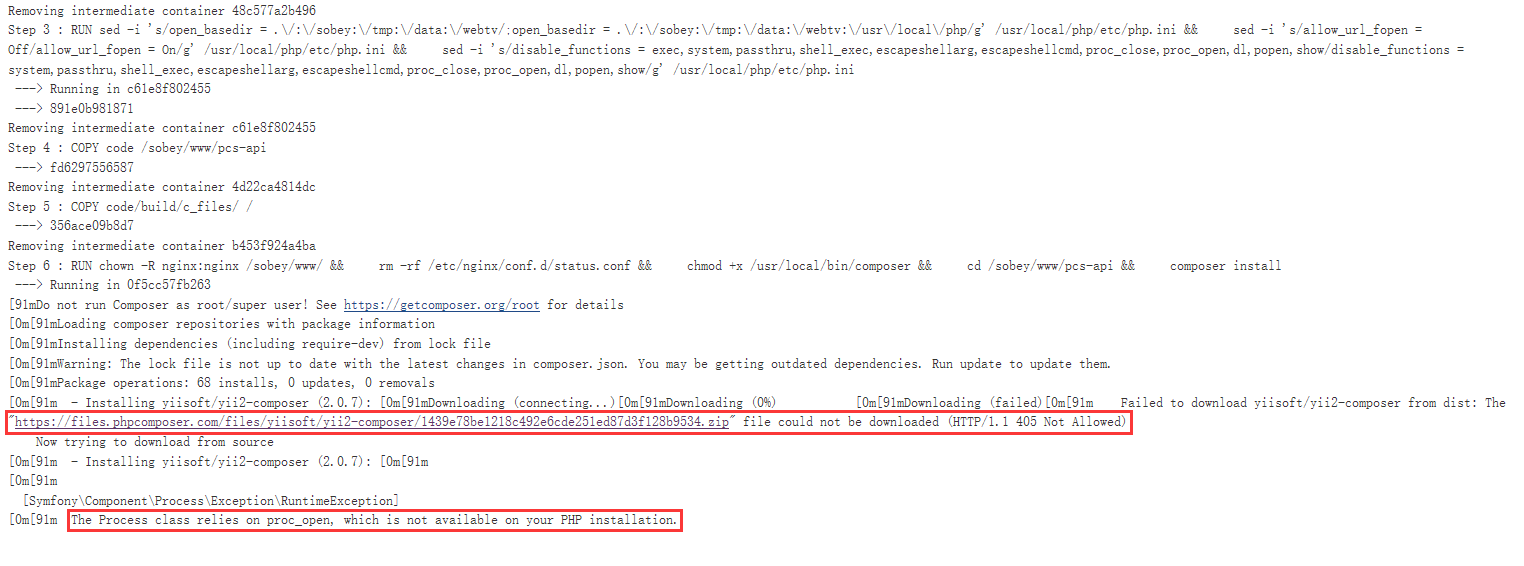
1. Since the yiisoft/yii2-composer (2.0.7) cannot be downloaded from dist, now try to download from the source code, the process class depends on proc_open , which is not available in php installation, as shown in Figure 1
Figure 1
2. Edit Dockerfile, delete proc_open, proc_close in disable_functions
FROM registry-vpc.cn-beijing.aliyuncs.com/cmc/centos-nginx112-php71:0.2.4

MAINTAINER wjtester@sobey.com

RUN sed -i 's/open_basedir = .\/:\/sobey:\/tmp:\/data:\/webtv/;open_basedir = .\/:\/sobey:\/tmp:\/data:\/webtv:\/usr\/local\/php/g' /usr/local/php/etc/php.ini && \
    sed -i 's/allow_url_fopen = Off/allow_url_fopen = On/g' /usr/local/php/etc/php.ini && \
    sed -i 's/disable_functions = exec,system,passthru,shell_exec,escapeshellarg,escapeshellcmd,proc_close,proc_open,dl,popen,show/disable_functions = system,passthru,shell_exec,escapeshellarg,escapeshellcmd,dl,popen,show/g' /usr/local/php/etc/php.ini

COPY code /sobey/www/pcs-api
COPY code/build/c_files/ /

RUN chown -R nginx:nginx /sobey/www/ && \
    rm -rf /etc/nginx/conf.d/status.conf && \
    chmod +x /usr/local/bin/composer && \
    cd /sobey/www/pcs-api && \
    composer install
3. The previous proc_open and proc_close were also disabled and can be built normally, because you can download yiisoft/yii2-composer normally from dist (2.0.6), therefore, it will not be downloaded from the source code, and proc_open and proc_close will not be used, as shown in Figure 2
Figure 2
4. Rebuild the image, download from the source code, and the build is successful, as shown in Figure 3
Figure 3


Leave a Reply