There is no problem not worth solving, and no technology not worth learning!
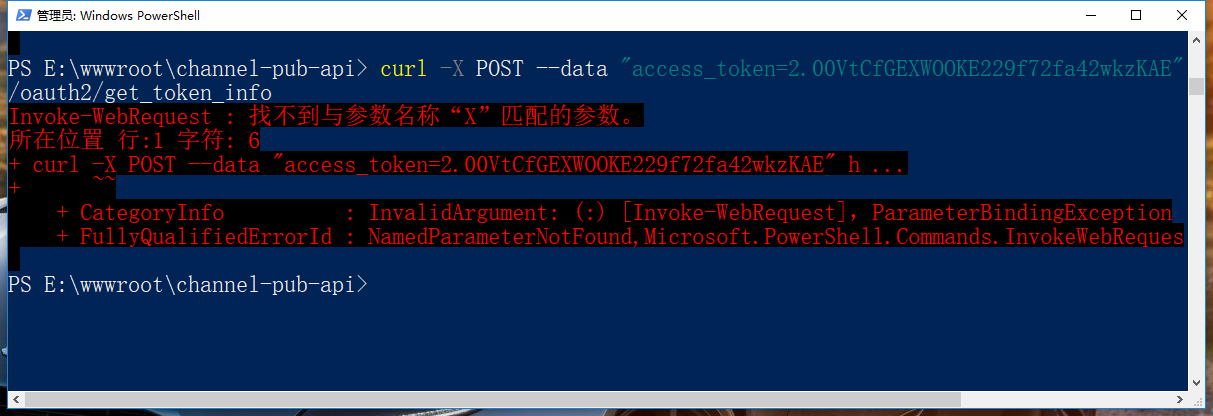
Execute the command in Windows PowerShell: curl -x POST –data, and report an error: invoke-webrequest : The location formal parameter that accepts the actual parameter “post” cannot be found. analysis solution
1. Execute the command in Windows PowerShell: curl -x POST –data, report an error: invoke-webrequest : The location formal parameter that accepts the actual parameter “post” cannot be found. as shown in Figure 1
Figure 1
2. Invoke-WebRequest is a command-line tool similar to curl on the Windows platform. Execute the command: get-help invoke-webrequest, as shown in Figure 2
Figure 2
PS E:\wwwroot\channel-pub-api> Get-Help Invoke-WebRequest

是否要运行 Update-Help?
Update-Help cmdlet 下载 Windows PowerShell 模块的最新帮助文件,并将其安装在你的计算机上。有关
Update-Help cmdlet 的详细信息,请参阅 https:/go.microsoft.com/fwlink/?LinkId=210614。
[Y] 是(Y)  [N] 否(N)  [S] 暂停(S)  [?] 帮助 (默认值为“Y”):

名称
    Invoke-WebRequest

摘要
    Gets content from a web page on the Internet.


语法
    Invoke-WebRequest [-Uri] <Uri> [-Body <Object>] [-Certificate <X509Certificate>] [-CertificateT
    [-ContentType <String>] [-Credential <PSCredential>] [-DisableKeepAlive] [-Headers <IDictionary
    ] [-MaximumRedirection <Int32>] [-Method {Default | Get | Head | Post | Put | Delete | Trace |
    tch}] [-OutFile <String>] [-PassThru] [-Proxy <Uri>] [-ProxyCredential <PSCredential>] [-ProxyU
    ] [-SessionVariable <String>] [-TimeoutSec <Int32>] [-TransferEncoding {chunked | compress | de
    ity}] [-UseBasicParsing] [-UseDefaultCredentials] [-UserAgent <String>] [-WebSession <WebReques
    arameters>]


说明
    The Invoke-WebRequest cmdlet sends HTTP, HTTPS, FTP, and FILE requests to a web page or web ser
    response and returns collections of forms, links, images, and other significant HTML elements.

    This cmdlet was introduced in Windows PowerShell 3.0.


相关链接
    Online Version: http://go.microsoft.com/fwlink/?LinkId=821826
    Invoke-RestMethod
    ConvertFrom-Json
    ConvertTo-Json

备注
    若要查看示例,请键入: "get-help Invoke-WebRequest -examples".
    有关详细信息,请键入: "get-help Invoke-WebRequest -detailed".
    若要获取技术信息,请键入: "get-help Invoke-WebRequest -full".
    有关在线帮助,请键入: "get-help Invoke-WebRequest -online"
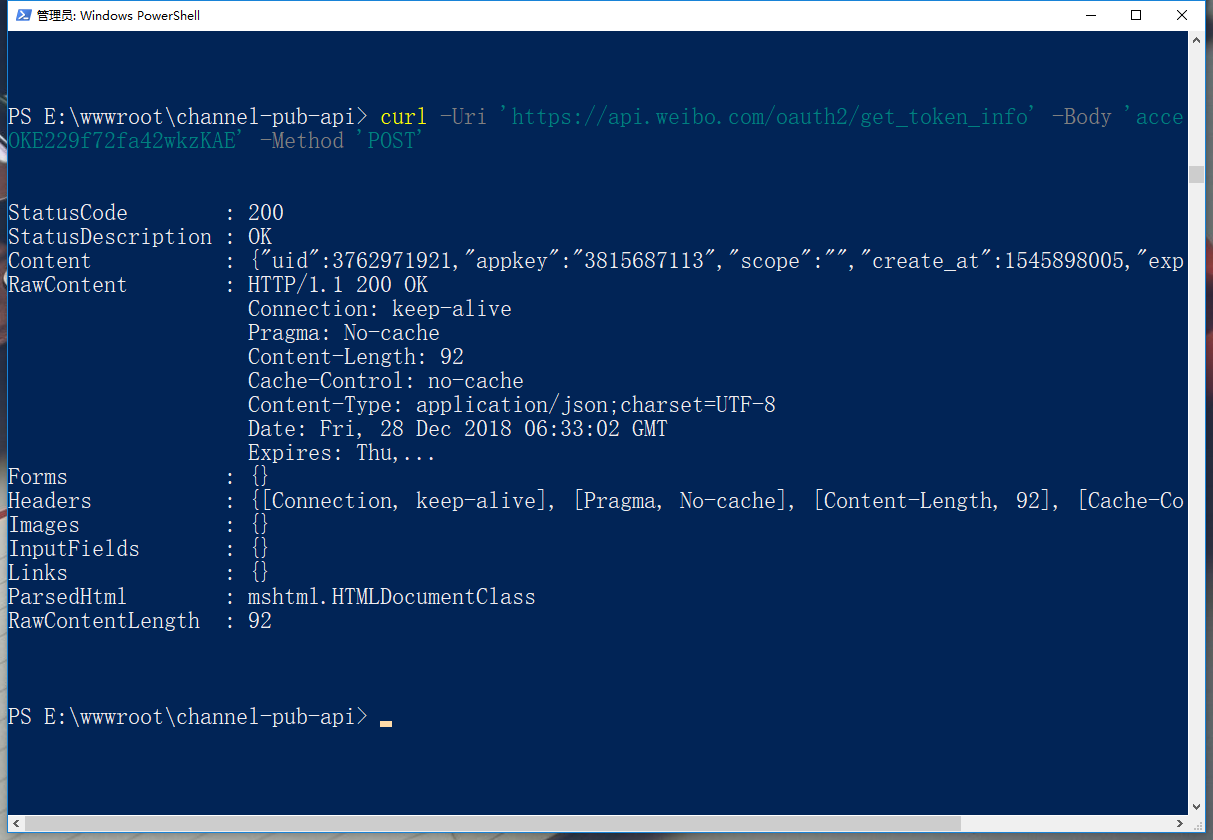
3. Refer to the help document, adjust the command, execute the command, and the request is successful, as shown in Figure 3
Figure 3

Leave a Reply