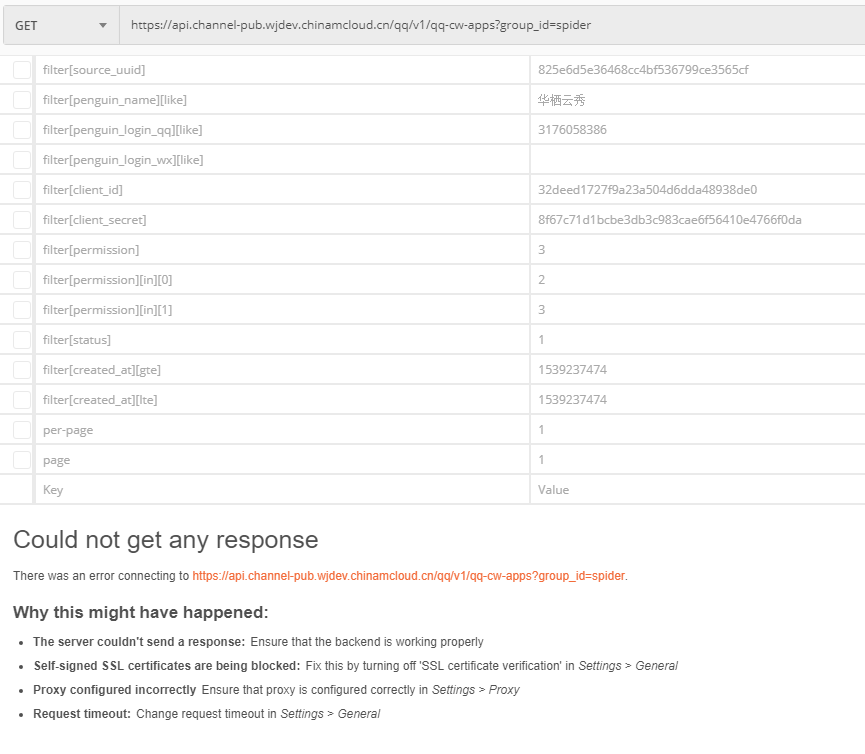
1. Request in Postman: https://api.channel-pub.wjdev.chinamcloud.cn/qq/v1/qq-cw-apps?group_id=spider , error: self-signed ssl certificates are being blocked, as shown in Figure 1
Figure 1
Could not get any response
There was an error connecting to https://api.channel-pub.wjdev.chinamcloud.cn/qq/v1/qq-cw-apps?group_id=spider.
Why this might have happened:
The server couldn't send a response:
Ensure that the backend is working properly
Self-signed SSL certificates are being blocked:
Fix this by turning off 'SSL certificate verification' in Settings > General
Proxy configured incorrectly
Ensure that proxy is configured correctly in Settings > Proxy
Request timeout:
Change request timeout in Settings > General
2. In the browser firefox Medium request: https://api.channel-pub.wjdev.chinamcloud.cn/qq/v1/qq-cw-apps?group_id=spider , prompt: api.channel-pub.wjdev.chinamcloud.cn uses an invalid security certificate. , as shown in Figure 2
Figure 2
3. Add a security exception to the browser Firefox, as shown in Figure 3
Figure 3
4. In the browser firefox Medium request: https://api.channel-pub.wjdev.chinamcloud.cn/qq/v1/qq-cw-apps?group_id=spider , respond 200, as shown in Figure 4
Figure 4
5. In Postman, turn off “SSL Certificate Verification” in “Settings” > “General” to solve this problem, as shown in Figure 5
Figure 5
6. Request in Postman: https://api.channel-pub.wjdev.chinamcloud.cn/qq/v1/qq-cw-apps?group_id=spider , the response 200, as shown in Figure 6
Figure 6


Leave a Reply