The web application of Weibo’s micro-connection is authorized (the user who guides the user to the authorization page to log in and agree to authorize and create the micro-connected web application of Weibo), in the same browser, after the first user is created, the analysis and solution of the second user cannot be created.
1. Obtain the link to the web application authorization of the micro-connection of Weibo (the user who guides the user to the authorization page to log in to the authorization page to agree to the authorization, and create the micro-connected web application of Weibo), as shown in Figure 1

Figure 1
2. Open the URL:https://weibo.com/, confirm that the Weibo account is not logged in, as shown in Figure 2

Figure 2
3. The web application of the micro-connection of Weibo is authorized (the user who guides the user to log in to the authorization page to log in to agree to authorize and create the micro-connected web application of Weibo), and log in to agree to authorize, as shown in Figure 3

Figure 3
4. Use code to exchange third-party authorization Access Token, users of the corresponding data operation, and users who create the micro-connected web application of Weibo, and obtain the user list of the micro-connected web application of Weibo. as shown in Figure 4

Figure 4
5. Open the URL:https://weibo.com/, confirm that the Weibo account (Yongyeyan) has been logged in, as shown in Figure 5

Figure 5
6. At this time, you need to enter the authorization page to log in to agree to authorize in the same browser, and log in to another Weibo account (Terryhong123), users who create a micro-connected web application of Weibo, In the end, the creation failed, analysis: the first Weibo account (Eternal Night Smoke) is already in the login state in the same browser. Therefore, the user who automatically skips the login page and creates the micro-connected web application of Weibo, however, due to The user_id has set a unique index, and the creation failed. as shown in Figure 6
If the user reopens the authorization page authorization within the authorization validity period (if the user has a Weibo login status at this time, this page will flash by).

Figure 6
7. The current requirement is that users who hope to be able to repeatedly create micro-connected web applications in the same browser (when creating the second When users, they need to enter the authorization page to log in to agree to authorization), check the OAuth2.0 document, and find that it supports the forced login function, as shown in Figure 7
Mandatory login
The authorization page will read the current user’s Weibo login status by default. If you want the user to log in again, please pass in the parameters when calling the Authorize interface: forcelogin=true, and the default is not filled in forcelogin=false.

Figure 7
8. Edit the public function of \frontend\controllers\weibooauth2controller.php ActionAuthorize(), pass in the parameter when the Authorize interface is called: forcelogin=true
        /* 浏览器 302 跳转:引导用户进入授权页面登录同意授权,获取 code */
        Yii::$app->response->redirect(Yii::$app->params['weiboAuth']['hostInfo'] . Yii::$app->params['weiboAuth']['baseUrl'] . '/authorize?response_type=code&forcelogin=true&client_id=' . Yii::$app->params['weiboAuth']['weiboConnectWebApp']['appId'] . '&redirect_uri=' . $redirectUri);
9. At this time, in the same browser, you can enter the authorization page to log in to agree to authorize, and log in to another Weibo account (Terryhong123), as shown in Figure 8
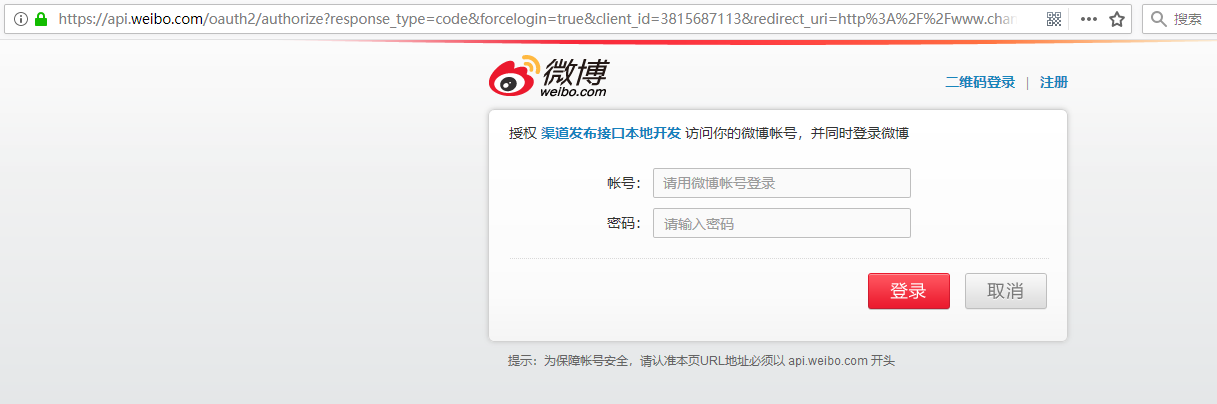
8
10. Use code to exchange third-party authorization Access Token, users of the corresponding data operation, create the micro-connected web application of Weibo, and obtain the user list of the micro-connected web application of Weibo. as shown in Figure 9

Figure 9
11. Open the URL:https://weibo.com/, confirm that the Weibo account (Yongyeyan) has been withdrawn, as shown in Figure 10

Figure 10
12. Refresh the URL:https://weibo.com/, confirm that the Weibo account (terryhong123) has been logged in, as shown in Figure 11

Figure 11