In Yii 2.0, based on the RESTful APIs on the desktop application side, the realization of multiplexing and overriding fine-tuning on the mobile application side (2)
1. Obtain the topic details interface, the operation permission of the topic includes all the permission buttons of the current user, which can be customized for the mobile terminal
2. Edit method file: \api\rests\plan\viewaction.php, get the controller ID (yii::$app->controller->id), when its route is: /v1/plans/2, its value is: plan, as shown in Figure 1

Figure 1
3. Edit the method file: \api\rests\plan\viewaction.php, get the controller ID (yii::$app->controller->id), when its route is: /v1/mobile/plans/2, its value is: mobile/plan, as shown in Figure 2
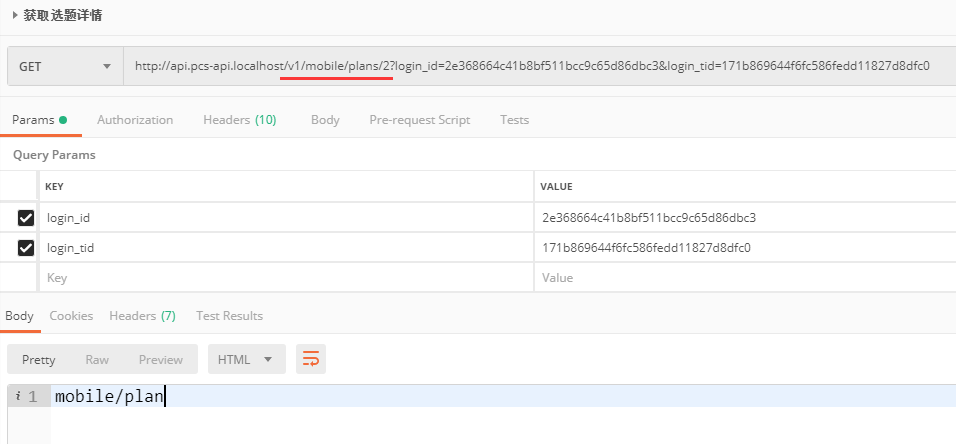
Figure 2
4. Customized for the mobile terminal (when the status, 2: pending review, edit the permission of the topic, 0: no, update the permission of the topic, 0: no), you can judge the controller ID (yii::$app->controller->id), corresponding processing is carried out, editing the method file: \api\rests\plan\viewaction.php
5. When its route is: /v1/plans/2, $actions[‘edit’]with $actions[‘update’]All are: 1, in line with expectations, as shown in Figure 3
![当其路由为:/v1/plans/2 时,$actions['edit'] 与 $actions['update'] 皆为:1,符合预期](https://www.shuijingwanwq.com/wp-content/uploads/2019/06/3.png)
Figure 3
![当其路由为:/v1/mobile/plans/2 时,$actions['edit'] 与 $actions['update'] 皆为:0,符合预期](https://www.shuijingwanwq.com/wp-content/uploads/2019/06/4.png)
Figure 4