Docker deployment, the implementation of Supervisor-based crontab (bash sleep) to reduce memory footprint
1. The operation of the command-line script is supported based on Supervisor. During the continuous operation, the problem of occupying too much memory is still not fundamentally solved. Check the URL:https://www.shuijingwanwq.com/2019/07/24/3376/
2. Check the URL:https://stackoverflow.com/questions/27341846/using-supervisor-as-cron, by calling the bash sleep command to execute the command-line script at a certain time interval to avoid continuous uninterrupted operation, so as to reduce the memory usage
3. Development environment, the CPU of the Docker container: 0.04%, memory: 168MB, as shown in Figure 1

Figure 1
4. Check the running status of supervisord: supervisorctl status
[root@09a3838784ce /]# ps aux|grep superviosrd
root      1379  0.0  0.0  10696   996 pts/2    S+   15:09   0:00 grep --color=auto superviosrd
[root@09a3838784ce /]# supervisorctl status
cronolog                         RUNNING   pid 446, uptime 0:30:20
nginx                            RUNNING   pid 441, uptime 0:30:20
php-fpm                          RUNNING   pid 440, uptime 0:30:20
report_client                    RUNNING   pid 444, uptime 0:30:20
yii-cmc-console-user-sync        RUNNING   pid 1341, uptime 0:00:58
yii-config-column-user-sync      RUNNING   pid 1382, uptime 0:00:02
yii-log-delete                   RUNNING   pid 1377, uptime 0:00:16
5. Edit /etc/supervisord.d/yii-cmc-console-user-sync.ini, /etc/supervisord.d/yi i-config-column-user-sync.ini, /etc/supervisord.d/yii-log-delete.ini, this will Run command every 60 seconds, every 60 seconds, every 300 seconds
[program:yii-cmc-console-user-sync]
command = bash -c 'sleep 60 && exec php /mcloud/www/pcs-api/yii cmc-console-user/sync'
autorestart = true
startsecs = 0
stopwaitsecs = 10
stderr_logfile = /data/logs/yii-cmc-console-user-sync-stderr.log
stdout_logfile = /data/logs/yii-cmc-console-user-sync-stdout.log
[program:yii-config-column-user-sync]
command = bash -c 'sleep 60 && exec php /mcloud/www/pcs-api/yii config-column-user/sync'
autorestart = true
startsecs = 0
stopwaitsecs = 10
stderr_logfile = /data/logs/yii-config-column-user-sync-stderr.log
stdout_logfile = /data/logs/yii-config-column-user-sync-stdout.log
[program:yii-log-delete]
command = bash -c 'sleep 300 && exec php /mcloud/www/pcs-api/yii log/delete'
autorestart = true
startsecs = 0
stopwaitsecs = 10
stderr_logfile = /data/logs/yii-log-delete-stderr.log
stdout_logfile = /data/logs/yii-log-delete-stdout.log
6. Write the corresponding text file at the initial position of the three command lines to detect the interval time between the command line running
file_put_contents('/mcloud/www/pcs-api/console/runtime/logs/cmc-console-user-sync-memory-get-usage-' . date('Y-m-d H:i:s', time()) . '.txt', memory_get_usage() / 1024 / 1024 . 'MB');
return ExitCode::OK;

file_put_contents('/mcloud/www/pcs-api/console/runtime/logs/config-column-user-sync-memory-get-usage-' . date('Y-m-d H:i:s', time()) . '.txt', memory_get_usage() / 1024 / 1024 . 'MB');
return ExitCode::OK;

file_put_contents('/mcloud/www/pcs-api/console/runtime/logs/log-delete-memory-get-usage-' . date('Y-m-d H:i:s', time()) . '.txt', memory_get_usage() / 1024 / 1024 . 'MB');
return ExitCode::OK;
7. View the written text file to detect the interval time between the command line running, as expected, as shown in Figure 2
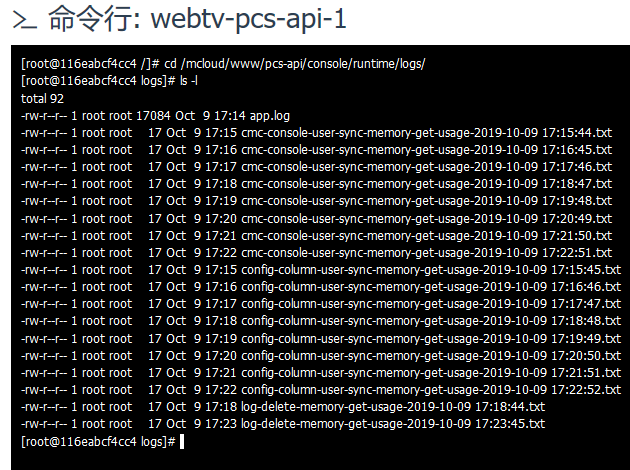
Figure 2
[root@38b6559d8629 /]# cd /mcloud/www/pcs-api/console/runtime/logs/
[root@38b6559d8629 logs]# ls -l
total 124
-rw-r--r-- 1 root root 17084 Oct  9 16:39 app.log
-rw-r--r-- 1 root root    17 Oct  9 16:40 cmc-console-user-sync-memory-get-usage-2019-10-09 16:40:56.txt
-rw-r--r-- 1 root root    17 Oct  9 16:41 cmc-console-user-sync-memory-get-usage-2019-10-09 16:41:57.txt
-rw-r--r-- 1 root root    17 Oct  9 16:42 cmc-console-user-sync-memory-get-usage-2019-10-09 16:42:58.txt
-rw-r--r-- 1 root root    17 Oct  9 16:43 cmc-console-user-sync-memory-get-usage-2019-10-09 16:43:59.txt
-rw-r--r-- 1 root root    17 Oct  9 16:45 cmc-console-user-sync-memory-get-usage-2019-10-09 16:45:00.txt
-rw-r--r-- 1 root root    17 Oct  9 16:46 cmc-console-user-sync-memory-get-usage-2019-10-09 16:46:02.txt
-rw-r--r-- 1 root root    17 Oct  9 16:47 cmc-console-user-sync-memory-get-usage-2019-10-09 16:47:03.txt
-rw-r--r-- 1 root root    17 Oct  9 16:48 cmc-console-user-sync-memory-get-usage-2019-10-09 16:48:04.txt
-rw-r--r-- 1 root root    17 Oct  9 16:49 cmc-console-user-sync-memory-get-usage-2019-10-09 16:49:05.txt
-rw-r--r-- 1 root root    17 Oct  9 16:50 cmc-console-user-sync-memory-get-usage-2019-10-09 16:50:06.txt
-rw-r--r-- 1 root root    17 Oct  9 16:51 cmc-console-user-sync-memory-get-usage-2019-10-09 16:51:07.txt
-rw-r--r-- 1 root root    17 Oct  9 16:52 cmc-console-user-sync-memory-get-usage-2019-10-09 16:52:08.txt
-rw-r--r-- 1 root root    17 Oct  9 16:40 config-column-user-sync-memory-get-usage-2019-10-09 16:40:57.txt
-rw-r--r-- 1 root root    17 Oct  9 16:41 config-column-user-sync-memory-get-usage-2019-10-09 16:41:58.txt
-rw-r--r-- 1 root root    17 Oct  9 16:42 config-column-user-sync-memory-get-usage-2019-10-09 16:42:59.txt
-rw-r--r-- 1 root root    17 Oct  9 16:44 config-column-user-sync-memory-get-usage-2019-10-09 16:44:00.txt
-rw-r--r-- 1 root root    17 Oct  9 16:45 config-column-user-sync-memory-get-usage-2019-10-09 16:45:01.txt
-rw-r--r-- 1 root root    17 Oct  9 16:46 config-column-user-sync-memory-get-usage-2019-10-09 16:46:03.txt
-rw-r--r-- 1 root root    17 Oct  9 16:47 config-column-user-sync-memory-get-usage-2019-10-09 16:47:04.txt
-rw-r--r-- 1 root root    17 Oct  9 16:48 config-column-user-sync-memory-get-usage-2019-10-09 16:48:05.txt
-rw-r--r-- 1 root root    17 Oct  9 16:49 config-column-user-sync-memory-get-usage-2019-10-09 16:49:06.txt
-rw-r--r-- 1 root root    17 Oct  9 16:50 config-column-user-sync-memory-get-usage-2019-10-09 16:50:07.txt
-rw-r--r-- 1 root root    17 Oct  9 16:51 config-column-user-sync-memory-get-usage-2019-10-09 16:51:08.txt
-rw-r--r-- 1 root root    17 Oct  9 16:52 config-column-user-sync-memory-get-usage-2019-10-09 16:52:09.txt
-rw-r--r-- 1 root root    17 Oct  9 16:43 log-delete-memory-get-usage-2019-10-09 16:43:56.txt
-rw-r--r-- 1 root root    17 Oct  9 16:48 log-delete-memory-get-usage-2019-10-09 16:48:57.txt
8. Write the corresponding text file at the initial position of the 3 command lines, and delete the successful exit command to detect the interval of the command line running plus the running time (including the length of time the command line runs)
file_put_contents('/mcloud/www/pcs-api/console/runtime/logs/cmc-console-user-sync-memory-get-usage-' . date('Y-m-d H:i:s', time()) . '.txt', memory_get_usage() / 1024 / 1024 . 'MB');

file_put_contents('/mcloud/www/pcs-api/console/runtime/logs/config-column-user-sync-memory-get-usage-' . date('Y-m-d H:i:s', time()) . '.txt', memory_get_usage() / 1024 / 1024 . 'MB');

file_put_contents('/mcloud/www/pcs-api/console/runtime/logs/log-delete-memory-get-usage-' . date('Y-m-d H:i:s', time()) . '.txt', memory_get_usage() / 1024 / 1024 . 'MB');
9. View the written text file to detect the interval of the command line running plus the running time (including the length of the time the command line runs), as expected, as shown in Figure 3

Figure 3
[root@adcf56a0b62b /]# cd /mcloud/www/pcs-api/console/runtime/logs/
[root@adcf56a0b62b logs]# ls -l
total 112
-rw-r--r-- 1 root root 17084 Oct  9 16:13 app.log
-rw-r--r-- 1 root root    17 Oct  9 16:15 cmc-console-user-sync-memory-get-usage-2019-10-09 16:15:00.txt
-rw-r--r-- 1 root root    17 Oct  9 16:14 config-column-user-sync-memory-get-usage-2019-10-09 16:14:59.txt
-rw-r--r-- 1 root root    17 Oct  9 16:16 config-column-user-sync-memory-get-usage-2019-10-09 16:16:01.txt
-rw-r--r-- 1 root root    17 Oct  9 16:17 config-column-user-sync-memory-get-usage-2019-10-09 16:17:02.txt
-rw-r--r-- 1 root root    17 Oct  9 16:18 config-column-user-sync-memory-get-usage-2019-10-09 16:18:04.txt
-rw-r--r-- 1 root root    17 Oct  9 16:19 config-column-user-sync-memory-get-usage-2019-10-09 16:19:05.txt
-rw-r--r-- 1 root root    17 Oct  9 16:20 config-column-user-sync-memory-get-usage-2019-10-09 16:20:07.txt
-rw-r--r-- 1 root root    17 Oct  9 16:21 config-column-user-sync-memory-get-usage-2019-10-09 16:21:08.txt
-rw-r--r-- 1 root root    17 Oct  9 16:22 config-column-user-sync-memory-get-usage-2019-10-09 16:22:10.txt
-rw-r--r-- 1 root root    17 Oct  9 16:23 config-column-user-sync-memory-get-usage-2019-10-09 16:23:11.txt
-rw-r--r-- 1 root root    17 Oct  9 16:24 config-column-user-sync-memory-get-usage-2019-10-09 16:24:13.txt
-rw-r--r-- 1 root root    17 Oct  9 16:25 config-column-user-sync-memory-get-usage-2019-10-09 16:25:14.txt
-rw-r--r-- 1 root root    17 Oct  9 16:26 config-column-user-sync-memory-get-usage-2019-10-09 16:26:16.txt
-rw-r--r-- 1 root root    17 Oct  9 16:27 config-column-user-sync-memory-get-usage-2019-10-09 16:27:17.txt
-rw-r--r-- 1 root root    17 Oct  9 16:28 config-column-user-sync-memory-get-usage-2019-10-09 16:28:19.txt
-rw-r--r-- 1 root root    17 Oct  9 16:29 config-column-user-sync-memory-get-usage-2019-10-09 16:29:20.txt
-rw-r--r-- 1 root root    17 Oct  9 16:30 config-column-user-sync-memory-get-usage-2019-10-09 16:30:22.txt
-rw-r--r-- 1 root root    17 Oct  9 16:31 config-column-user-sync-memory-get-usage-2019-10-09 16:31:23.txt
-rw-r--r-- 1 root root    17 Oct  9 16:32 config-column-user-sync-memory-get-usage-2019-10-09 16:32:25.txt
-rw-r--r-- 1 root root    17 Oct  9 16:33 config-column-user-sync-memory-get-usage-2019-10-09 16:33:27.txt
-rw-r--r-- 1 root root    17 Oct  9 16:34 config-column-user-sync-memory-get-usage-2019-10-09 16:34:28.txt
-rw-r--r-- 1 root root    17 Oct  9 16:17 log-delete-memory-get-usage-2019-10-09 16:17:59.txt
-rw-r--r-- 1 root root    17 Oct  9 16:33 log-delete-memory-get-usage-2019-10-09 16:33:00.txt
10. Throw an exception on the command line to detect whether the supervisor continues to start the command line script, the exception log is continuously written in the log table, and the command line script is still started, as shown in Figure 4

Figure 4
[root@2e54908c8679 /]# ps aux|grep superviosrd
root       858  0.0  0.0  10696   992 pts/2    R+   17:10   0:00 grep --color=auto superviosrd
[root@2e54908c8679 /]# supervisorctl status
cronolog                         RUNNING   pid 446, uptime 0:10:28
nginx                            RUNNING   pid 441, uptime 0:10:28
php-fpm                          RUNNING   pid 440, uptime 0:10:29
report_client                    RUNNING   pid 444, uptime 0:10:28
yii-cmc-console-user-sync        RUNNING   pid 846, uptime 0:00:18
yii-config-column-user-sync      RUNNING   pid 848, uptime 0:00:17
yii-log-delete                   RUNNING   pid 443, uptime 0:10:28
[root@2e54908c8679 /]# cd /mcloud/www/pcs-api/console/runtime/logs/
[root@2e54908c8679 logs]# ls -l
total 256
-rw-r--r-- 1 root root 176844 Oct  9 17:09 app.log
-rw-r--r-- 1 root root     17 Oct  9 17:01 cmc-console-user-sync-memory-get-usage-2019-10-09 17:01:43.txt
-rw-r--r-- 1 root root     17 Oct  9 17:02 cmc-console-user-sync-memory-get-usage-2019-10-09 17:02:44.txt
-rw-r--r-- 1 root root     17 Oct  9 17:03 cmc-console-user-sync-memory-get-usage-2019-10-09 17:03:45.txt
-rw-r--r-- 1 root root     17 Oct  9 17:04 cmc-console-user-sync-memory-get-usage-2019-10-09 17:04:46.txt
-rw-r--r-- 1 root root     17 Oct  9 17:05 cmc-console-user-sync-memory-get-usage-2019-10-09 17:05:47.txt
-rw-r--r-- 1 root root     17 Oct  9 17:06 cmc-console-user-sync-memory-get-usage-2019-10-09 17:06:49.txt
-rw-r--r-- 1 root root     17 Oct  9 17:07 cmc-console-user-sync-memory-get-usage-2019-10-09 17:07:50.txt
-rw-r--r-- 1 root root     17 Oct  9 17:08 cmc-console-user-sync-memory-get-usage-2019-10-09 17:08:51.txt
-rw-r--r-- 1 root root     17 Oct  9 17:09 cmc-console-user-sync-memory-get-usage-2019-10-09 17:09:52.txt
-rw-r--r-- 1 root root     17 Oct  9 17:01 config-column-user-sync-memory-get-usage-2019-10-09 17:01:44.txt
-rw-r--r-- 1 root root     17 Oct  9 17:02 config-column-user-sync-memory-get-usage-2019-10-09 17:02:45.txt
-rw-r--r-- 1 root root     17 Oct  9 17:03 config-column-user-sync-memory-get-usage-2019-10-09 17:03:46.txt
-rw-r--r-- 1 root root     17 Oct  9 17:04 config-column-user-sync-memory-get-usage-2019-10-09 17:04:47.txt
-rw-r--r-- 1 root root     17 Oct  9 17:05 config-column-user-sync-memory-get-usage-2019-10-09 17:05:48.txt
-rw-r--r-- 1 root root     17 Oct  9 17:06 config-column-user-sync-memory-get-usage-2019-10-09 17:06:50.txt
-rw-r--r-- 1 root root     17 Oct  9 17:07 config-column-user-sync-memory-get-usage-2019-10-09 17:07:51.txt
-rw-r--r-- 1 root root     17 Oct  9 17:08 config-column-user-sync-memory-get-usage-2019-10-09 17:08:52.txt
-rw-r--r-- 1 root root     17 Oct  9 17:09 config-column-user-sync-memory-get-usage-2019-10-09 17:09:53.txt
-rw-r--r-- 1 root root     17 Oct  9 17:04 log-delete-memory-get-usage-2019-10-09 17:04:43.txt
11. Restore the modifications made in step 8, and upgrade to the development environment. The CPU of the Docker container: 0.04%, memory: 335MB, and the memory has increased (335MB – 168MB) = About 167MB, as shown in Figure 5

Figure 5
12. Check the running status of supervisord: supervisorctl status, no change
[root@c37ccca41d34 /]# ps aux|grep superviosrd
root       796  0.0  0.0  10696   992 pts/2    S+   17:48   0:00 grep --color=auto superviosrd
[root@c37ccca41d34 /]# supervisorctl status
cronolog                         RUNNING   pid 446, uptime 0:10:37
nginx                            RUNNING   pid 441, uptime 0:10:37
php-fpm                          RUNNING   pid 440, uptime 0:10:37
report_client                    RUNNING   pid 444, uptime 0:10:37
yii-cmc-console-user-sync        RUNNING   pid 798, uptime 0:00:02
yii-config-column-user-sync      RUNNING   pid 766, uptime 0:00:21
yii-log-delete                   RUNNING   pid 443, uptime 0:10:37
13. Summary: The implementation of crontab based on supervisor is in line with expectations. After each run of the command line, the operation will start again every 60 seconds, every 60 seconds, and every 300 seconds. The obvious increase in memory usage is the root cause of: the continuous operation of bash sleep (using a lot of memory), and the continuous operation of yii 2 sleep (The framework loads a lot of data into memory during runtime, the memory usage is reduced, but is offset by the continuous operation of Bash Sleep)
14. The program configuration item of the configuration file of Supervisor, adjust the value of startsecs to the value of bash sleep, need to consider the time when the process starts successfully. When the running state exceeds this value, it indicates that the startup is successful. Note: It is now possible to ensure that every time the startup is successful
[program:yii-cmc-console-user-sync]
command = bash -c 'sleep 60 && exec php /mcloud/www/pcs-api/yii cmc-console-user/sync'
autorestart = true
startsecs = 60
stopwaitsecs = 10
stderr_logfile = /data/logs/yii-cmc-console-user-sync-stderr.log
stdout_logfile = /data/logs/yii-cmc-console-user-sync-stdout.log
[program:yii-config-column-user-sync]
command = bash -c 'sleep 60 && exec php /mcloud/www/pcs-api/yii config-column-user/sync'
autorestart = true
startsecs = 60
stopwaitsecs = 10
stderr_logfile = /data/logs/yii-config-column-user-sync-stderr.log
stdout_logfile = /data/logs/yii-config-column-user-sync-stdout.log
[program:yii-log-delete]
command = bash -c 'sleep 300 && exec php /mcloud/www/pcs-api/yii log/delete'
autorestart = true
startsecs = 300
stopwaitsecs = 10
stderr_logfile = /data/logs/yii-log-delete-stderr.log
stdout_logfile = /data/logs/yii-log-delete-stdout.log
15. Upgrade to the development environment, the CPU of the Docker container: 0.04%, memory: 270MB, the memory is reduced (335MB – 270MB) = 65MB However, compared to the initial memory usage, the memory has increased (270MB – 168MB) = about 102MB, which does not meet the expectation of memory usage reduction, as shown in Figure 6

Figure 6
16. Check the running status of supervisord: supervisorctl status, the first column is the service name, the second column is the running state, running means that it is running, and fatal means that the operation fails, and start means that it is starting, stoped Indicates that the task has stopped, column 3/4 is the process number, and finally the time when the task has been run
[root@8db3aeab0ebb /]# ps aux|grep superviosrd
root      2150  0.0  0.0  10696   996 pts/2    R+   10:40   0:00 grep --color=auto superviosrd
[root@8db3aeab0ebb /]# supervisorctl status
cronolog                         RUNNING   pid 446, uptime 20:14:10
nginx                            RUNNING   pid 441, uptime 20:14:10
php-fpm                          RUNNING   pid 440, uptime 20:14:10
report_client                    RUNNING   pid 444, uptime 20:14:10
yii-cmc-console-user-sync        STARTING
yii-config-column-user-sync      STARTING
yii-log-delete                   RUNNING   pid 1906, uptime 0:06:42
[root@8db3aeab0ebb /]# supervisorctl status
cronolog                         RUNNING   pid 446, uptime 20:20:44
nginx                            RUNNING   pid 441, uptime 20:20:44
php-fpm                          RUNNING   pid 440, uptime 20:20:44
report_client                    RUNNING   pid 444, uptime 20:20:44
yii-cmc-console-user-sync        STARTING
yii-config-column-user-sync      RUNNING   pid 2342, uptime 0:01:00
yii-log-delete                   RUNNING   pid 1906, uptime 0:13:16
17. Write the corresponding text files at the initial position of the three command lines to detect the interval between the command line running
file_put_contents('/mcloud/www/pcs-api/console/runtime/logs/cmc-console-user-sync-memory-get-usage-' . date('Y-m-d H:i:s', time()) . '.txt', memory_get_usage() / 1024 / 1024 . 'MB');
return ExitCode::OK;

file_put_contents('/mcloud/www/pcs-api/console/runtime/logs/config-column-user-sync-memory-get-usage-' . date('Y-m-d H:i:s', time()) . '.txt', memory_get_usage() / 1024 / 1024 . 'MB');
return ExitCode::OK;

file_put_contents('/mcloud/www/pcs-api/console/runtime/logs/log-delete-memory-get-usage-' . date('Y-m-d H:i:s', time()) . '.txt', memory_get_usage() / 1024 / 1024 . 'MB');
return ExitCode::OK;
18. View the written text file to detect the interval between the command line running, every 60 seconds, every 60 seconds, every 300 seconds, in line with the expected
[root@b93baf1cb6ee /]# cd /mcloud/www/pcs-api/console/runtime/logs/
[root@b93baf1cb6ee logs]# ls -l
total 104
-rw-r--r-- 1 root root 8549 Oct 11 11:09 app.log
-rw-r--r-- 1 root root   17 Oct 11 11:09 cmc-console-user-sync-memory-get-usage-2019-10-11 11:09:21.txt
-rw-r--r-- 1 root root   17 Oct 11 11:10 cmc-console-user-sync-memory-get-usage-2019-10-11 11:10:22.txt
-rw-r--r-- 1 root root   17 Oct 11 11:11 cmc-console-user-sync-memory-get-usage-2019-10-11 11:11:23.txt
-rw-r--r-- 1 root root   17 Oct 11 11:12 cmc-console-user-sync-memory-get-usage-2019-10-11 11:12:25.txt
-rw-r--r-- 1 root root   17 Oct 11 11:13 cmc-console-user-sync-memory-get-usage-2019-10-11 11:13:26.txt
-rw-r--r-- 1 root root   17 Oct 11 11:14 cmc-console-user-sync-memory-get-usage-2019-10-11 11:14:27.txt
-rw-r--r-- 1 root root   17 Oct 11 11:15 cmc-console-user-sync-memory-get-usage-2019-10-11 11:15:28.txt
-rw-r--r-- 1 root root   17 Oct 11 11:16 cmc-console-user-sync-memory-get-usage-2019-10-11 11:16:29.txt
-rw-r--r-- 1 root root   17 Oct 11 11:17 cmc-console-user-sync-memory-get-usage-2019-10-11 11:17:30.txt
-rw-r--r-- 1 root root   17 Oct 11 11:18 cmc-console-user-sync-memory-get-usage-2019-10-11 11:18:31.txt
-rw-r--r-- 1 root root   17 Oct 11 11:19 cmc-console-user-sync-memory-get-usage-2019-10-11 11:19:32.txt
-rw-r--r-- 1 root root   17 Oct 11 11:10 config-column-user-sync-memory-get-usage-2019-10-11 11:10:21.txt
-rw-r--r-- 1 root root   17 Oct 11 11:11 config-column-user-sync-memory-get-usage-2019-10-11 11:11:22.txt
-rw-r--r-- 1 root root   17 Oct 11 11:12 config-column-user-sync-memory-get-usage-2019-10-11 11:12:24.txt
-rw-r--r-- 1 root root   17 Oct 11 11:13 config-column-user-sync-memory-get-usage-2019-10-11 11:13:25.txt
-rw-r--r-- 1 root root   17 Oct 11 11:14 config-column-user-sync-memory-get-usage-2019-10-11 11:14:26.txt
-rw-r--r-- 1 root root   17 Oct 11 11:15 config-column-user-sync-memory-get-usage-2019-10-11 11:15:27.txt
-rw-r--r-- 1 root root   17 Oct 11 11:16 config-column-user-sync-memory-get-usage-2019-10-11 11:16:28.txt
-rw-r--r-- 1 root root   17 Oct 11 11:17 config-column-user-sync-memory-get-usage-2019-10-11 11:17:29.txt
-rw-r--r-- 1 root root   17 Oct 11 11:18 config-column-user-sync-memory-get-usage-2019-10-11 11:18:30.txt
-rw-r--r-- 1 root root   17 Oct 11 11:19 config-column-user-sync-memory-get-usage-2019-10-11 11:19:31.txt
-rw-r--r-- 1 root root   17 Oct 11 11:13 log-delete-memory-get-usage-2019-10-11 11:13:21.txt
-rw-r--r-- 1 root root   17 Oct 11 11:18 log-delete-memory-get-usage-2019-10-11 11:18:22.txt
19. Decide SLEEP in the yii 2 command line to reduce the length of time for a single run of the command line. Continuous operation of Yii 2 Sleep (the framework loads a lot of data into memory during runtime). to further reduce memory usage (expected).
            /* 判断 $httpCmcApiGroupIds 是否为空,如果为空,则成功退出 */
            if (empty($httpCmcApiGroupIds)) {
                // 延缓执行 60 * 60 秒
                // sleep(Yii::$app->params['cmcConsoleUser']['isEmptyYesSleepTime']);

                return ExitCode::OK;
            }

            // 延缓执行 60 秒
            // sleep(Yii::$app->params['cmcConsoleUser']['isEmptyNoSleepTime']);
            return ExitCode::OK;

            /* 判断 $cmcApiGroupIds 是否为空,如果为空,则成功退出 */
            if (empty($cmcApiGroupIds)) {
                // 延缓执行 60 * 60 秒
                // sleep(Yii::$app->params['configColumnUser']['isEmptyYesSleepTime']);

                return ExitCode::OK;
            }

            // 延缓执行 60 秒
            // sleep(Yii::$app->params['configColumnUser']['isEmptyNoSleepTime']);
            return ExitCode::OK;

            // 延缓执行 10 * 60 秒
            // sleep(static::SLEEP_TIME);

            return ExitCode::OK;
20. Upgrade to the development environment, the CPU of the Docker container: 0.04%, memory: 292MB, the memory has increased (292MB – 270MB) = about 20MB, which does not meet the expectations, as shown in Figure 7

Figure 7
21. Adjust the interval time, run the command every 5 seconds, every 5 seconds, every 60 seconds. The CPU of the Docker container: 0.04%, memory: 109MB, and the memory is reduced (292MB – 109MB) = about 183MB, and, compared with the initial memory usage, the memory is reduced (168MB – 109MB) = about 59MB, which has reached the expectation of reduced memory usage, as shown in Figure 8

8
[program:yii-cmc-console-user-sync]
command = bash -c 'sleep 5 && exec php /mcloud/www/pcs-api/yii cmc-console-user/sync'
autorestart = true
startsecs = 5
stopwaitsecs = 10
stderr_logfile = /data/logs/yii-cmc-console-user-sync-stderr.log
stdout_logfile = /data/logs/yii-cmc-console-user-sync-stdout.log
[program:yii-config-column-user-sync]
command = bash -c 'sleep 5 && exec php /mcloud/www/pcs-api/yii config-column-user/sync'
autorestart = true
startsecs = 5
stopwaitsecs = 10
stderr_logfile = /data/logs/yii-config-column-user-sync-stderr.log
stdout_logfile = /data/logs/yii-config-column-user-sync-stdout.log
[program:yii-log-delete]
command = bash -c 'sleep 60 && exec php /mcloud/www/pcs-api/yii log/delete'
autorestart = true
startsecs = 60
stopwaitsecs = 10
stderr_logfile = /data/logs/yii-log-delete-stderr.log
stdout_logfile = /data/logs/yii-log-delete-stdout.log
22. View another product: the development environment released by the channel, the CPU of the Docker container: 0.04%, memory: 289MB, as shown in Figure 9

Figure 9
23. In the product: channel release, based on the same process, based on the implementation of Supervisor-based crontab (bash sleep), comment on the Yii 2 command line SLEEP, run every 3 seconds, every 3 seconds, every 60 seconds, upgrade to the development environment, the CPU of the docker container: 0.04%, memory: 182MB, memory reduced (289MB – 182MB) = about 107MB, in line with expectations, as shown in Figure 10

Figure 10
[program:yii-qq-cw-transaction-video-sync]
command = bash -c 'sleep 3 && exec php /mcloud/www/channel-pub-api/yii qq-cw-transaction-video/sync'
autorestart = true
startsecs = 3
stopwaitsecs = 10
stderr_logfile = /data/logs/yii-qq-cw-transaction-video-sync-stderr.log
stdout_logfile = /data/logs/yii-qq-cw-transaction-video-sync-stdout.log
[program:yii-qq-cw-transaction-article-sync]
command = bash -c 'sleep 3 && exec php /mcloud/www/channel-pub-api/yii qq-cw-transaction-article/sync'
autorestart = true
startsecs = 3
stopwaitsecs = 10
stderr_logfile = /data/logs/yii-qq-cw-transaction-article-sync-stderr.log
stdout_logfile = /data/logs/yii-qq-cw-transaction-article-sync-stdout.log
[program:yii-log-delete]
command = bash -c 'sleep 60 && exec php /mcloud/www/channel-pub-api/yii log/delete'
autorestart = true
startsecs = 60
stopwaitsecs = 10
stderr_logfile = /data/logs/yii-log-delete-stderr.log
stdout_logfile = /data/logs/yii-log-delete-stdout.log
24. Summary:
(1) The implementation of crontab (bash sleep) based on supervisor, determine that the memory usage can be reduced, and the value of crontab (bash sleep) is controlled as much as possible at 60 If, if it is larger, the memory usage will increase more
(2) Adjusting the value of startSecs to the value of bash sleep can effectively reduce memory usage
(3) The running time of a process of supervisor should be controlled as short as possible. Whether it is bash sleep or php sleep, once its value is too large, the running time is too long, which will lead to excessive memory usage.
(4) In the previous PHP sleep, why the memory was occupied so much, the reason may be the continuous operation of Yii 2 sleep (the framework loads a lot of data into the memory during runtime). Therefore, one of the reasons for the memory usage of the php command line itself is also one of the reasons, try to reduce the running time of the php command line itself, comment php sleep
(5) During the deployment, the value of crontab (bash sleep) is recommended to be comprehensively considered during multiple adjustments, and the best value is taken.