In Yii 2.0, the WHERE condition is defined in the query builder, and the operator generates an implementation of SQL statement with “VTT_” when the operator is like.
1. Expect the generated SQL statement, as shown in Figure 1
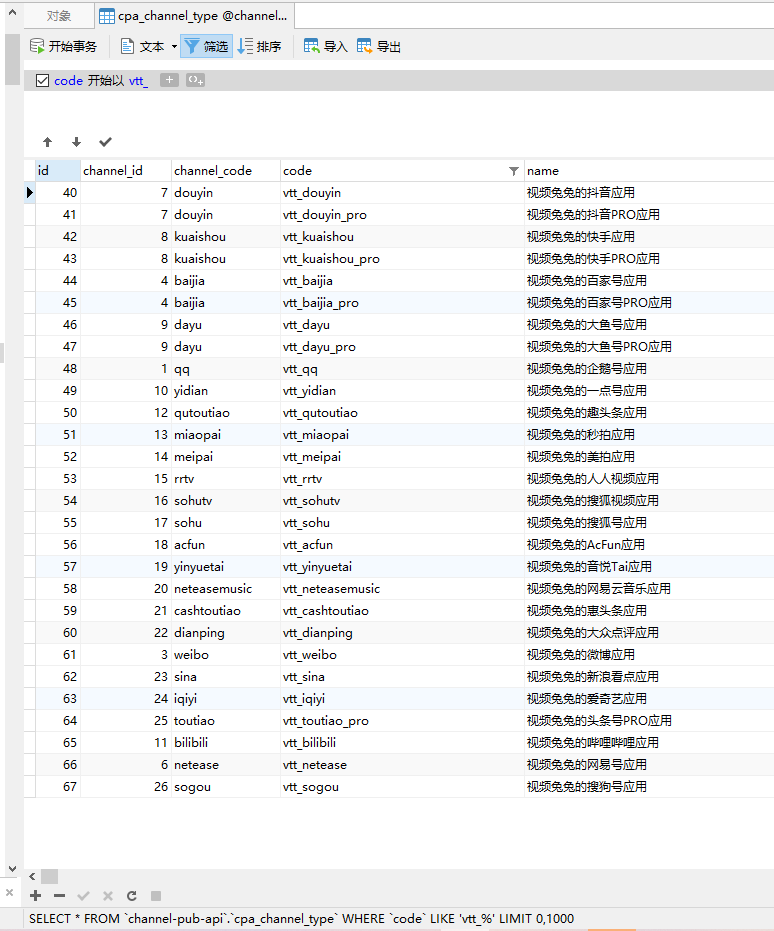
Figure 1
SELECT * FROM `channel-pub-api`.`cpa_channel_type` WHERE `code` LIKE 'vtt_%'
2. LIKE: The first operand should be a field name or dB expression, and the second operand can make a string or an array, representing the value of the first operand that needs to be fuzzy. For example,[‘like’, ‘name’, ‘tester’]will generate name like%tester%. If the range value is an array, multiple LIKE statements concatenated in conjunction with AND will be generated. For example,[‘like’, ‘name’, [‘test’, ‘sample’]] will generate name like%test%and name like%sample%. You can also provide a third optional operand to specify how to escape the special characters in the value. This operand is an array mapping from special characters that need to be escaped to escaped copies. If this operand is not provided, the default escape map will be used. If you need to disable the escape function, you only need to set the parameter to false or pass in an empty array. It should be noted that when the escape map is used (or when the third operand is not provided), the value of the second operand will be added before and after the value of the second operand will be added. The code is as follows
ChannelType::find()
    ->select(ChannelType::tableName() . '.code')
    ->where(['like', 'code', 'vtt_%', false])
    ->asArray()
    ->column();
3. The final generated SQL statement, in line with expectations, as shown in Figure 2
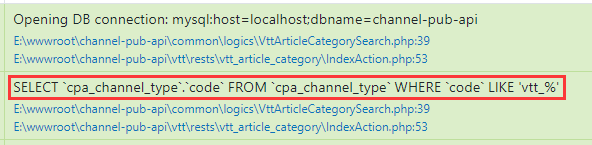
Figure 2
SELECT `cpa_channel_type`.`code` FROM `cpa_channel_type` WHERE `code` LIKE 'vtt_%'
![在渠道发布中,报错:SQLSTATE[01000]: Warning: 1265 Data truncated for column 'pub_log_code' at row 1。](https://www.shuijingwanwq.com/wp-content/uploads/2021/08/1-8-520x245.png)