Deployment of Cakephp 2.x version, warning: splfileinfo::openfile(/app/tmp/cache/persistent/myapp_cake_core_file_map): failed to Open Stream: Permission denied in /lib/cake/cache/engine/fileengine.php on line 356
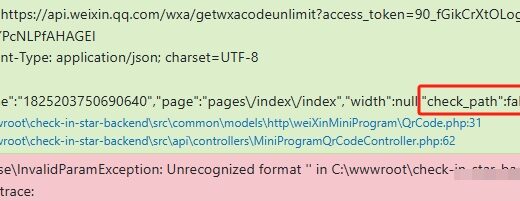
1. Deployment of CakePHP 2.x version, warning: splfileinfo::openfile(/mcloud/creditshop_back/creditshopback/app/tmp/cache/persistent/myapp_cake_core_file_map): Failed to open stream: Permission denied in /mcloud/creditshop_back/creditshopback/lib/cake/cache/engine/fileengine.php on line 356. as shown in Figure 1

Figure 1
2. Enter the directory: /mcloud/creditshop_back/creditshopback/app/tmp/cache/persistent, and view the user and user groups that belong to: root. as shown in Figure 2
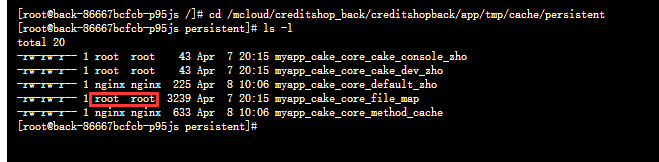
Figure 2
[root@back-86667bcfcb-p95js /]# cd /mcloud/creditshop_back/creditshopback/app/tmp/cache/persistent
[root@back-86667bcfcb-p95js persistent]# ls -l
total 20
-rw-rw-r-- 1 root  root    43 Apr  7 20:15 myapp_cake_core_cake_console_zho
-rw-rw-r-- 1 root  root    43 Apr  7 20:15 myapp_cake_core_cake_dev_zho
-rw-rw-r-- 1 nginx nginx  225 Apr  8 10:06 myapp_cake_core_default_zho
-rw-rw-r-- 1 root  root  3239 Apr  7 20:15 myapp_cake_core_file_map
-rw-rw-r-- 1 nginx nginx  633 Apr  8 10:06 myapp_cake_core_method_cache
[root@back-86667bcfcb-p95js persistent]#
3. Reference URL:https://book.cakephp.org/2/zh/installation.html. Set access rights. The app/tmp directory and its subdirectories must be able to be written by both the web server and the command line user.
HTTPDUSER=`ps aux | grep -E '[a]pache|[h]ttpd|[_]www|[w]ww-data|[n]ginx' | grep -v root | head -1 | cut -d\  -f1`
setfacl -R -m u:${HTTPDUSER}:rwx app/tmp
setfacl -R -d -m u:${HTTPDUSER}:rwx app/tmp
4. Edit the Dockerfile. Make sure that the app/tmp directory and all its subdirectories can be written by the web server user in the CakePHP installation.
chown -R 775 /mcloud/creditshop_back/creditshopback/app/tmp/ && \
    cd /mcloud/creditshop_back/creditshopback &&\
    HTTPDUSER=`ps aux | grep -E '[a]pache|[h]ttpd|[_]www|[w]ww-data|[n]ginx' | grep -v root | head -1 | cut -d\  -f1` &&\
    setfacl -R -m u:${HTTPDUSER}:rwx app/tmp &&\
    setfacl -R -d -m u:${HTTPDUSER}:rwx app/tmp &&\
5. After the upgrade, the nginx user writes successfully, and the access is normal.
![执行时报错:SQLSTATE[42S02]: Base table or view not found: 1146 Table 'object_store.themes' doesn't exist (SQL: delete from `themes` where `id` = 156) 。](https://www.shuijingwanwq.com/wp-content/uploads/2022/07/1-1-520x133.png)