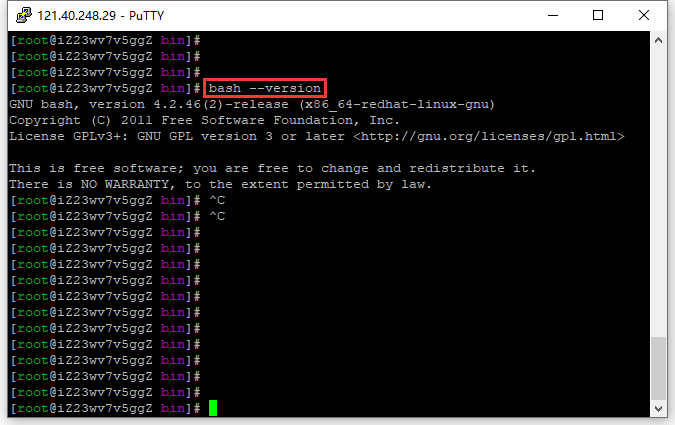
2. Check the bash version: 4.2.46. as shown in Figure 2
Figure 2
[root@iZ23wv7v5ggZ bin]# bash --version
GNU bash, version 4.2.46(2)-release (x86_64-redhat-linux-gnu)
Copyright (C) 2011 Free Software Foundation, Inc.
License GPLv3+: GNU GPL version 3 or later <http://gnu.org/licenses/gpl.html>

This is free software; you are free to change and redistribute it.
There is NO WARRANTY, to the extent permitted by law.
[root@iZ23wv7v5ggZ bin]# ^C
[root@iZ23wv7v5ggZ bin]#
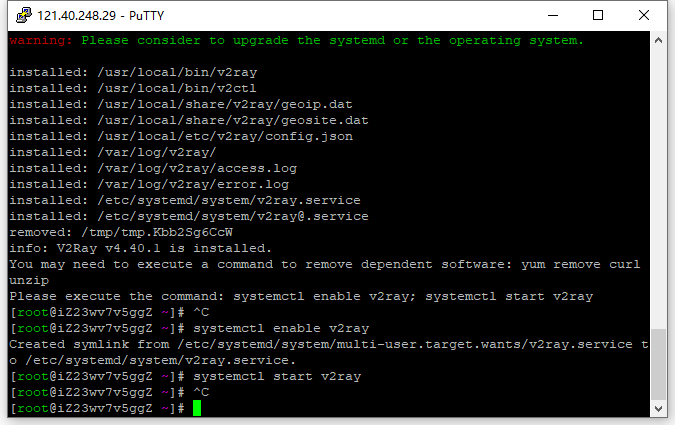
3. Install and update V2ray, refer to the website: https://github.com/v2fly/fhs-install-v2ray/blob/master/readme.zh-hans-cn.md . as shown in Figure 3
Figure 3
[root@iZ23wv7v5ggZ ~]# bash <(curl -L https://raw.githubusercontent.com/v2fly/fhs-install-v2ray/master/install-release.sh)
  % Total    % Received % Xferd  Average Speed   Time    Time     Time  Current
                                 Dload  Upload   Total   Spent    Left  Speed
100 21613  100 21613    0     0  21964      0 --:--:-- --:--:-- --:--:-- 21964
info: Installing V2Ray v4.40.1 for x86_64
Downloading V2Ray archive: https://github.com/v2fly/v2ray-core/releases/download/v4.40.1/v2ray-linux-64.zip
  % Total    % Received % Xferd  Average Speed   Time    Time     Time  Current
                                 Dload  Upload   Total   Spent    Left  Speed
100   626  100   626    0     0    734      0 --:--:-- --:--:-- --:--:--   733
100 12.3M  100 12.3M    0     0  2996k      0  0:00:04  0:00:04 --:--:-- 4167k
Downloading verification file for V2Ray archive: https://github.com/v2fly/v2ray-core/releases/download/v4.40.1/v2ray-linux-64.zip.dgst
info: Extract the V2Ray package to /tmp/tmp.Kbb2Sg6CcW and prepare it for installation.
rm: cannot remove ‘/etc/systemd/system/v2ray.service.d/10-donot_touch_multi_conf.conf’: No such file or directory
rm: cannot remove ‘/etc/systemd/system/v2ray@.service.d/10-donot_touch_multi_conf.conf’: No such file or directory
info: Systemd service files have been installed successfully!
warning: The following are the actual parameters for the v2ray service startup.
warning: Please make sure the configuration file path is correctly set.
~~~~~~~~~~~~~~~~
[Unit]
Description=V2Ray Service
Documentation=https://www.v2fly.org/
After=network.target nss-lookup.target

[Service]
User=nobody
CapabilityBoundingSet=CAP_NET_ADMIN CAP_NET_BIND_SERVICE
AmbientCapabilities=CAP_NET_ADMIN CAP_NET_BIND_SERVICE
NoNewPrivileges=true
ExecStart=/usr/local/bin/v2ray -config /usr/local/etc/v2ray/config.json
Restart=on-failure
RestartPreventExitStatus=23

[Install]
WantedBy=multi-user.target
# In case you have a good reason to do so, duplicate this file in the same directory and make your customizes there.
# Or all changes you made will be lost!  # Refer: https://www.freedesktop.org/software/systemd/man/systemd.unit.html
[Service]
ExecStart=
ExecStart=/usr/local/bin/v2ray -config /usr/local/etc/v2ray/config.json
~~~~~~~~~~~~~~~~
warning: The systemd version on the current operating system is too low.
warning: Please consider to upgrade the systemd or the operating system.

installed: /usr/local/bin/v2ray
installed: /usr/local/bin/v2ctl
installed: /usr/local/share/v2ray/geoip.dat
installed: /usr/local/share/v2ray/geosite.dat
installed: /usr/local/etc/v2ray/config.json
installed: /var/log/v2ray/
installed: /var/log/v2ray/access.log
installed: /var/log/v2ray/error.log
installed: /etc/systemd/system/v2ray.service
installed: /etc/systemd/system/v2ray@.service
removed: /tmp/tmp.Kbb2Sg6CcW
info: V2Ray v4.40.1 is installed.
You may need to execute a command to remove dependent software: yum remove curl unzip
Please execute the command: systemctl enable v2ray; systemctl start v2ray
[root@iZ23wv7v5ggZ ~]# systemctl enable v2ray
Created symlink from /etc/systemd/system/multi-user.target.wants/v2ray.service to /etc/systemd/system/v2ray.service.
[root@iZ23wv7v5ggZ ~]# systemctl start v2ray
[root@iZ23wv7v5ggZ ~]#
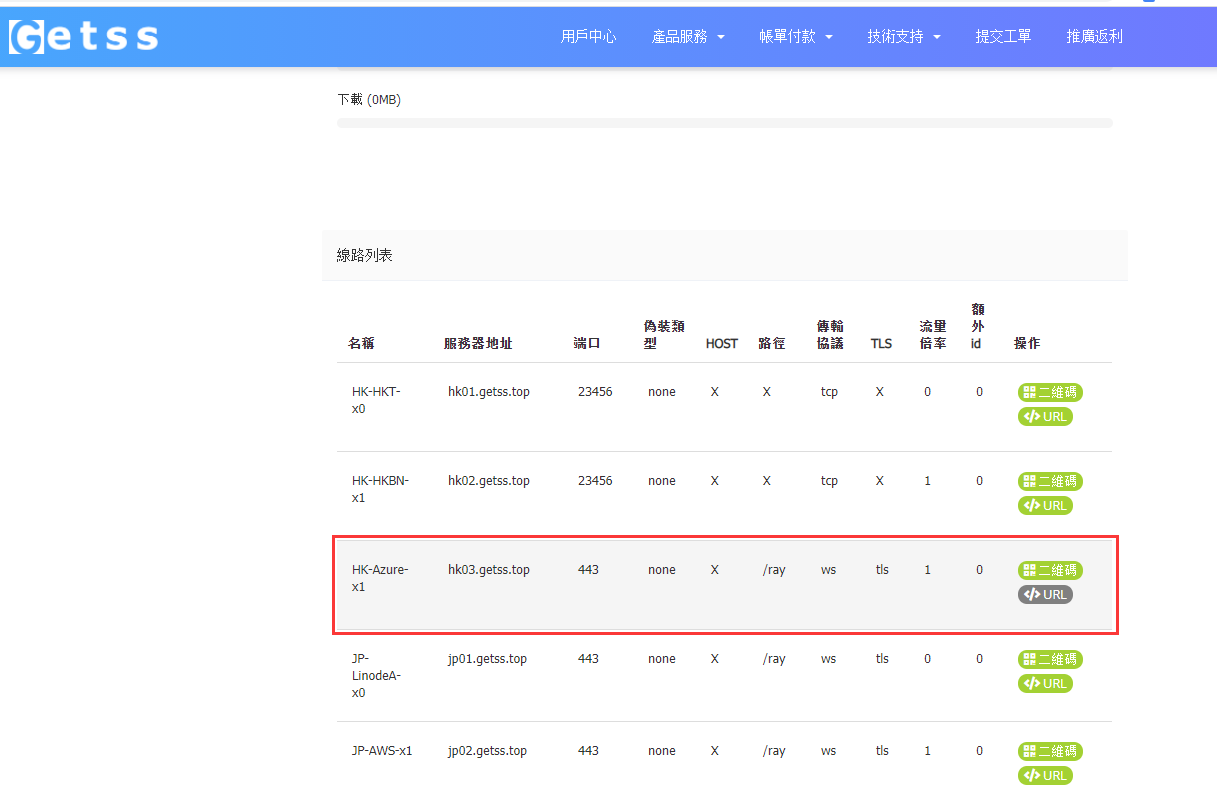
4. I purchased a commercial version of the V2ray server getss, select the Azure server in Hong Kong, and copy the URL. Its value is no longer available, I made changes. as shown in Figure 4
Figure 4
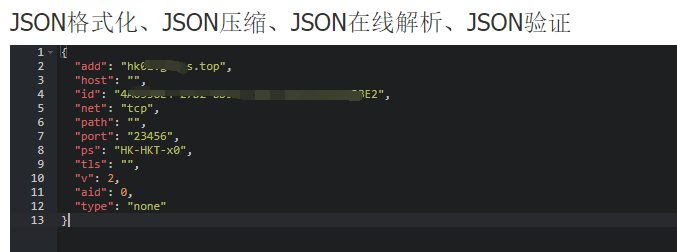
5. After decoding the value after vmess:// base64. JSON format, its value is as follows. Subsequently used to configure the V2RAY client on the Alibaba Cloud server. Its value is no longer available, I made changes. as shown in Figure 5
Figure 5
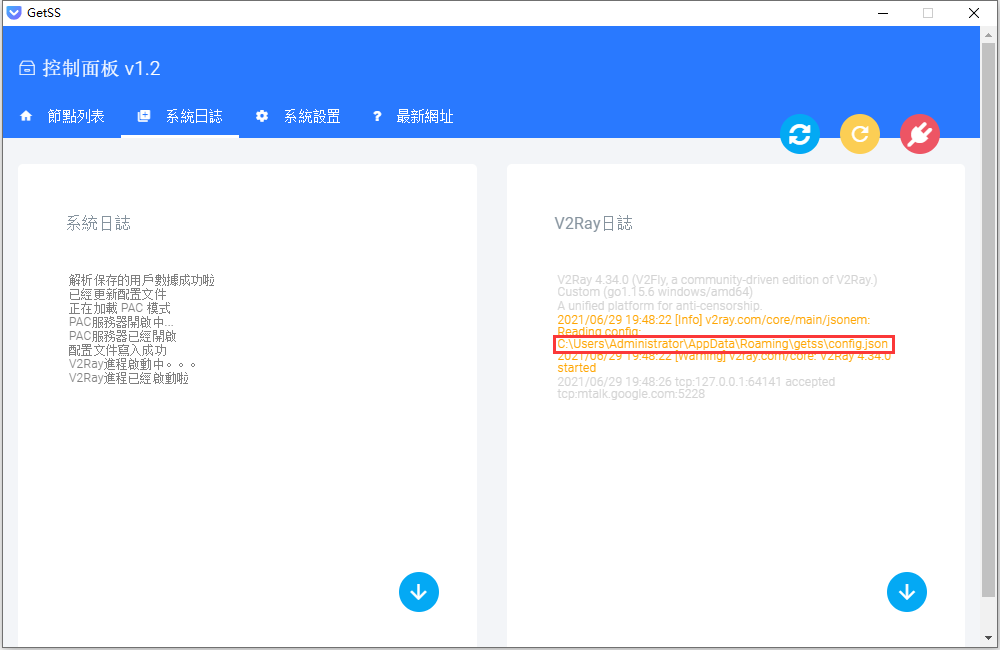
7. V2ray does not use the C/S (ie, client/server) structure of conventional proxy software, it can be used as a server or a client. Configure the client, refer to the file: C:\Users\Administrator\AppData\Roaming\Getss\Config.json. GETSS is a Windows client. Edit /usr/local/etc/v2ray/config.json. as shown in Figure 6
Figure 6
8. Use the configuration check function (test option) provided by v2ray, because you can check the problems outside the json syntax error, such as sudden hand shaking and writing vmsss as vmss, and it is checked out at once. If it is a configuration file, this is the case.
[root@iZ23wv7v5ggZ ~]# /usr/local/bin/v2ray -test -config /usr/local/etc/v2ray/config.json
V2Ray 4.40.1 (V2Fly, a community-driven edition of V2Ray.) Custom (go1.16.5 linux/amd64)
A unified platform for anti-censorship.
Configuration OK.
[root@iZ23wv7v5ggZ ~]#
9. The authentication of the vMess protocol is based on time, and it must be ensured that the system time difference between the server and the client is within 90 seconds. Check the system time of Alibaba Cloud server.
[root@iZ23wv7v5ggZ ~]# date
Thu Jun 24 16:50:13 CST 2021
[root@iZ23wv7v5ggZ ~]#
10. Actually the flow direction of the packet: {browser} <–(socks)–> {v2ray client inbound <–> v2ray client outbound} <–(vmess)–> {target website}.
11. View the ports linked to the proxy port 1081. Displays the Sockets in all connections.
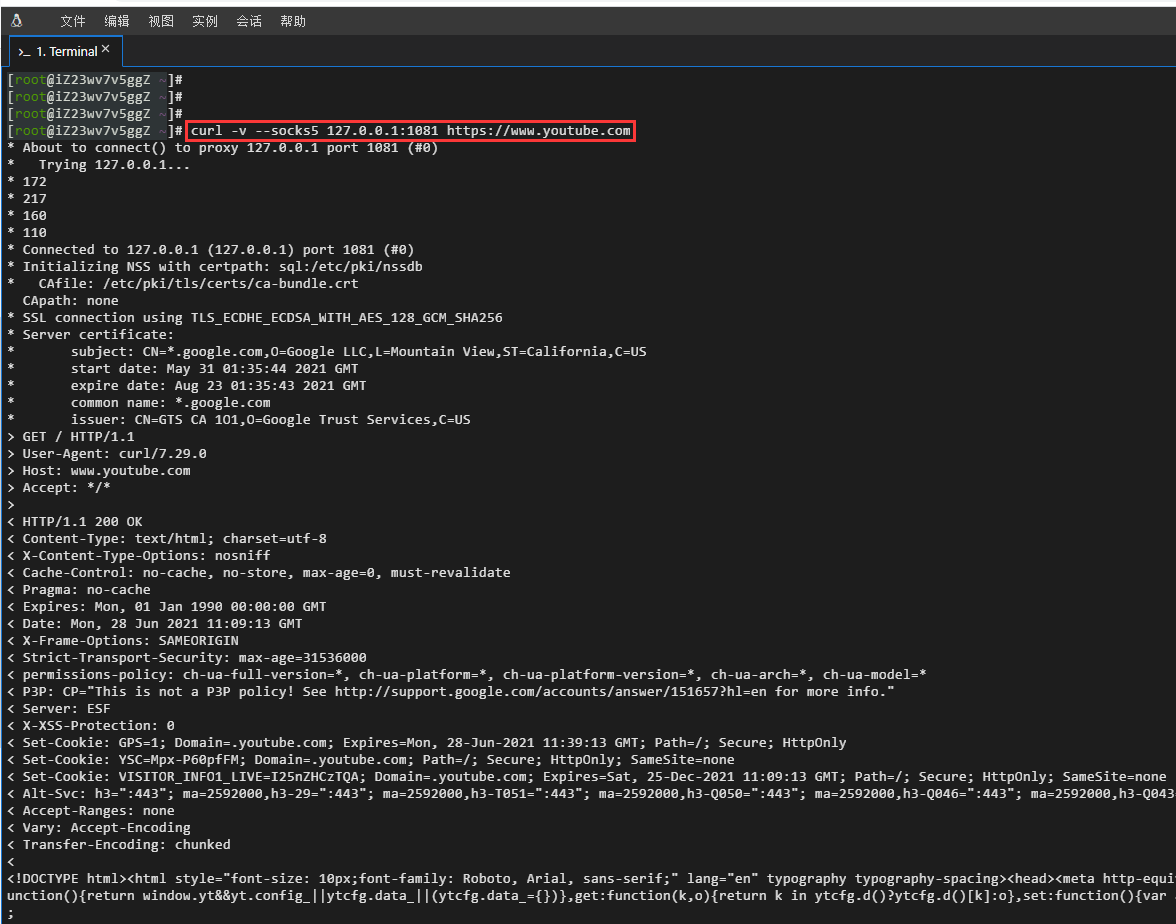
12. Test the Alibaba Cloud server-based SOCKS request http://httpbin.org/ip, https://www.google.com, https://www.youtube.com. The connection was successful. as shown in Figure 7
Figure 7
[root@iZ23wv7v5ggZ v2ray]# curl --socks5 127.0.0.1:1081 http://httpbin.org/ip
{
  "origin": "14.192.49.13"
}
[root@iZ23wv7v5ggZ v2ray]# curl --socks5 127.0.0.1:1081 http://www.google.com
curl: (52) Empty reply from server
[root@iZ23wv7v5ggZ v2ray]# curl --socks5 127.0.0.1:1081 https://www.google.com
curl: (51) Unable to communicate securely with peer: requested domain name does not match the server's certificate.
[root@iZ23wv7v5ggZ v2ray]# curl -v --socks5 127.0.0.1:1081 https://sitekit.withgoogle.com
* About to connect() to proxy 127.0.0.1 port 1081 (#0)
*   Trying 127.0.0.1...
* 216
* 58
* 200
* 49
* Connected to 127.0.0.1 (127.0.0.1) port 1081 (#0)
* Initializing NSS with certpath: sql:/etc/pki/nssdb
*   CAfile: /etc/pki/tls/certs/ca-bundle.crt
  CApath: none
* SSL connection using TLS_ECDHE_ECDSA_WITH_AES_128_GCM_SHA256
* Server certificate:
*       subject: CN=*.appspot.com,O=Google LLC,L=Mountain View,ST=California,C=US
*       start date: May 31 01:07:40 2021 GMT
*       expire date: Aug 23 01:07:39 2021 GMT
*       common name: *.appspot.com
*       issuer: CN=GTS CA 1O1,O=Google Trust Services,C=US
> GET / HTTP/1.1
> User-Agent: curl/7.29.0
> Host: sitekit.withgoogle.com
> Accept: */*
>
< HTTP/1.1 200 OK
< Content-Type: text/html; charset=utf-8
< Vary: Accept-Encoding
< X-Cloud-Trace-Context: f0ad2afe1e1be1a7fd9d592b1b2e4c62
< Date: Fri, 25 Jun 2021 09:35:19 GMT
< Server: Google Frontend
< Content-Length: 89089
< Alt-Svc: h3=":443"; ma=2592000,h3-29=":443"; ma=2592000,h3-T051=":443"; ma=2592000,h3-Q050=":443"; ma=2592000,h3-Q046=":443"; ma=2592000,h3-Q043=":443"; ma=2592000,quic=":443"; ma=2592000; v="46,43"
<
<!DOCTYPE html>
[root@iZ23wv7v5ggZ ~]# curl -v --socks5 127.0.0.1:1081 https://www.youtube.com
* About to connect() to proxy 127.0.0.1 port 1081 (#0)
*   Trying 127.0.0.1...
* 172
* 217
* 160
* 110
* Connected to 127.0.0.1 (127.0.0.1) port 1081 (#0)
* Initializing NSS with certpath: sql:/etc/pki/nssdb
*   CAfile: /etc/pki/tls/certs/ca-bundle.crt
  CApath: none
* SSL connection using TLS_ECDHE_ECDSA_WITH_AES_128_GCM_SHA256
* Server certificate:
*       subject: CN=*.google.com,O=Google LLC,L=Mountain View,ST=California,C=US
*       start date: May 31 01:35:44 2021 GMT
*       expire date: Aug 23 01:35:43 2021 GMT
*       common name: *.google.com
*       issuer: CN=GTS CA 1O1,O=Google Trust Services,C=US
> GET / HTTP/1.1
> User-Agent: curl/7.29.0
> Host: www.youtube.com
> Accept: */*
>
< HTTP/1.1 200 OK
< Content-Type: text/html; charset=utf-8
< X-Content-Type-Options: nosniff
< Cache-Control: no-cache, no-store, max-age=0, must-revalidate
< Pragma: no-cache
< Expires: Mon, 01 Jan 1990 00:00:00 GMT
< Date: Mon, 28 Jun 2021 11:09:13 GMT
< X-Frame-Options: SAMEORIGIN
< Strict-Transport-Security: max-age=31536000
< permissions-policy: ch-ua-full-version=*, ch-ua-platform=*, ch-ua-platform-version=*, ch-ua-arch=*, ch-ua-model=*
< P3P: CP="This is not a P3P policy! See http://support.google.com/accounts/answer/151657?hl=en for more info."
< Server: ESF
< X-XSS-Protection: 0
< Set-Cookie: GPS=1; Domain=.youtube.com; Expires=Mon, 28-Jun-2021 11:39:13 GMT; Path=/; Secure; HttpOnly
< Set-Cookie: YSC=Mpx-P60pfFM; Domain=.youtube.com; Path=/; Secure; HttpOnly; SameSite=none
< Set-Cookie: VISITOR_INFO1_LIVE=I25nZHCzTQA; Domain=.youtube.com; Expires=Sat, 25-Dec-2021 11:09:13 GMT; Path=/; Secure; HttpOnly; SameSite=none
< Alt-Svc: h3=":443"; ma=2592000,h3-29=":443"; ma=2592000,h3-T051=":443"; ma=2592000,h3-Q050=":443"; ma=2592000,h3-Q046=":443"; ma=2592000,h3-Q043=":443"; ma=2592000,quic=":443"; ma=2592000; v="46,43"
< Accept-Ranges: none
< Vary: Accept-Encoding
< Transfer-Encoding: chunked
<
<!DOCTYPE html><html style="font-size: 10px;font-family: Roboto, Arial, sans-serif;" lang="en" typography typography-spacing><head><meta http-equiv="X-UA-Compatible" content="IE=edge"/><script nonce="m6im/2YfcUAbOVHb8ZzpHQ">var ytcfg={d:function(){return window.yt&&yt.config_||ytcfg.data_||(ytcfg.data_={})},get:function(k,o){return k in ytcfg.d()?ytcfg.d()[k]:o},set:function(){var a=arguments;if(a.length>1)ytcfg.d()[a[0]]=a[1];else for(var k in a[0])ytcfg.d()[k]=a[0][k]}};
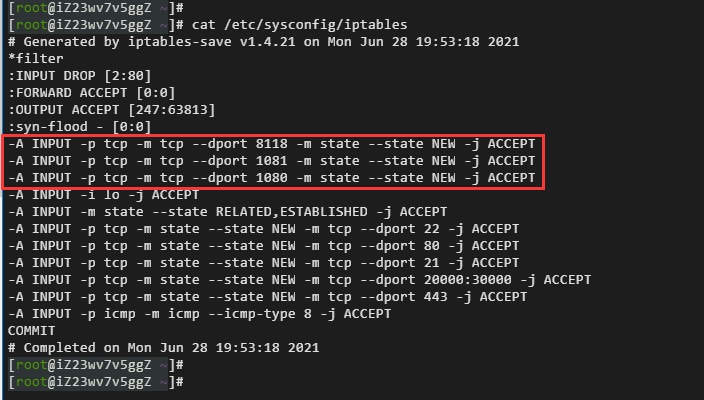
13. The ports opened by Alibaba Cloud servers 1081 and 8118 need to run commands to open. Open the firewall iptables. as shown in Figure 8
8
[root@iZ23wv7v5ggZ ~]# cat /etc/sysconfig/iptables
# Generated by iptables-save v1.4.21 on Mon Jun 28 19:53:18 2021
*filter
:INPUT DROP [2:80]
:FORWARD ACCEPT [0:0]
:OUTPUT ACCEPT [247:63813]
:syn-flood - [0:0]
-A INPUT -p tcp -m tcp --dport 8118 -m state --state NEW -j ACCEPT
-A INPUT -p tcp -m tcp --dport 1081 -m state --state NEW -j ACCEPT
-A INPUT -p tcp -m tcp --dport 1080 -m state --state NEW -j ACCEPT
-A INPUT -i lo -j ACCEPT
-A INPUT -m state --state RELATED,ESTABLISHED -j ACCEPT
-A INPUT -p tcp -m state --state NEW -m tcp --dport 22 -j ACCEPT
-A INPUT -p tcp -m state --state NEW -m tcp --dport 80 -j ACCEPT
-A INPUT -p tcp -m state --state NEW -m tcp --dport 21 -j ACCEPT
-A INPUT -p tcp -m state --state NEW -m tcp --dport 20000:30000 -j ACCEPT
-A INPUT -p tcp -m state --state NEW -m tcp --dport 443 -j ACCEPT
-A INPUT -p icmp -m icmp --icmp-type 8 -j ACCEPT
COMMIT
# Completed on Mon Jun 28 19:53:18 2021
[root@iZ23wv7v5ggZ v2ray]# iptables -I INPUT -p tcp --dport 1081 -m state --state NEW -j ACCEPT
[root@iZ23wv7v5ggZ v2ray]# service iptables save
iptables: Saving firewall rules to /etc/sysconfig/iptables:[  OK  ]
[root@iZ23wv7v5ggZ v2ray]# cat /etc/sysconfig/iptables
# Generated by iptables-save v1.4.21 on Fri Jun 25 17:19:08 2021
*filter
:INPUT DROP [2:80]
:FORWARD ACCEPT [0:0]
:OUTPUT ACCEPT [580:261280]
:syn-flood - [0:0]
-A INPUT -p tcp -m tcp --dport 1081 -m state --state NEW -j ACCEPT
-A INPUT -p tcp -m tcp --dport 1080 -m state --state NEW -j ACCEPT
-A INPUT -i lo -j ACCEPT
-A INPUT -m state --state RELATED,ESTABLISHED -j ACCEPT
-A INPUT -p tcp -m state --state NEW -m tcp --dport 22 -j ACCEPT
-A INPUT -p tcp -m state --state NEW -m tcp --dport 80 -j ACCEPT
-A INPUT -p tcp -m state --state NEW -m tcp --dport 21 -j ACCEPT
-A INPUT -p tcp -m state --state NEW -m tcp --dport 20000:30000 -j ACCEPT
-A INPUT -p tcp -m state --state NEW -m tcp --dport 443 -j ACCEPT
-A INPUT -p icmp -m icmp --icmp-type 8 -j ACCEPT
COMMIT
# Completed on Fri Jun 25 17:19:08 2021
[root@iZ23wv7v5ggZ v2ray]#
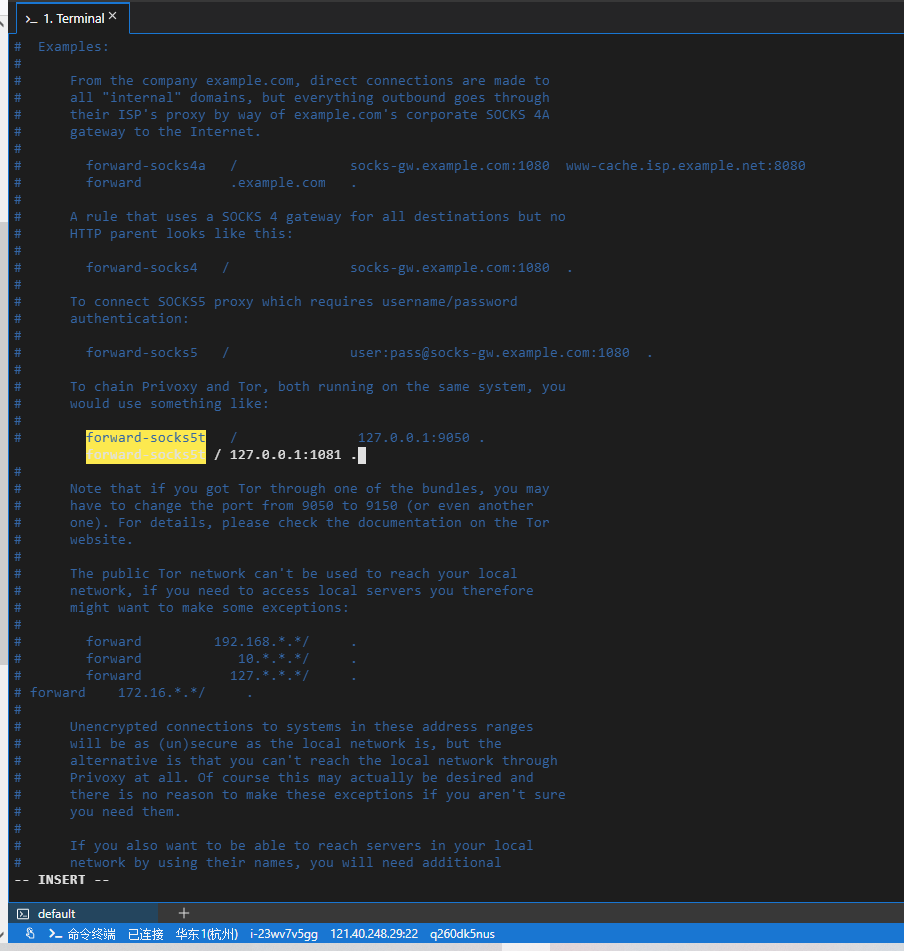
14. Install and configure Privoxy, and modify the configuration file /etc/privoxy/config. as shown in Figure 9
Figure 9
/usr/local/bin/v2ray -test -config /usr/local/etc/v2ray/config.json
[root@iZ23wv7v5ggZ ~]# yum -y install privoxy
Loaded plugins: fastestmirror
Determining fastest mirrors
base                                                     | 3.6 kB     00:00
epel                                                     | 4.7 kB     00:00
extras                                                   | 2.9 kB     00:00
updates                                                  | 2.9 kB     00:00
(1/7): base/7/x86_64/group_gz                              | 153 kB   00:00
(2/7): epel/x86_64/group_gz                                |  96 kB   00:00
(3/7): epel/x86_64/updateinfo                              | 1.0 MB   00:00
(4/7): extras/7/x86_64/primary_db                          | 242 kB   00:00
(5/7): base/7/x86_64/primary_db                            | 6.1 MB   00:00
(6/7): epel/x86_64/primary_db                              | 6.9 MB   00:00
(7/7): updates/7/x86_64/primary_db                         | 8.8 MB   00:00
Resolving Dependencies
--> Running transaction check
---> Package privoxy.x86_64 0:3.0.32-1.el7 will be installed
--> Finished Dependency Resolution

Dependencies Resolved

================================================================================
 Package           Arch             Version                Repository      Size
================================================================================
Installing:
 privoxy           x86_64           3.0.32-1.el7           epel           998 k

Transaction Summary
================================================================================
Install  1 Package

Total download size: 998 k
Installed size: 3.1 M
Downloading packages:
privoxy-3.0.32-1.el7.x86_64.rpm                            | 998 kB   00:00
Running transaction check
Running transaction test
Transaction test succeeded
Running transaction
  Installing : privoxy-3.0.32-1.el7.x86_64                                  1/1
  Verifying  : privoxy-3.0.32-1.el7.x86_64                                  1/1

Installed:
  privoxy.x86_64 0:3.0.32-1.el7

Complete!

[root@iZ23wv7v5ggZ ~]# systemctl enable privoxy
Created symlink from /etc/systemd/system/multi-user.target.wants/privoxy.service to /usr/lib/systemd/system/privoxy.service.
[root@iZ23wv7v5ggZ ~]# systemctl start privoxy
[root@iZ23wv7v5ggZ ~]# systemctl status privoxy
● privoxy.service - Privoxy Web Proxy With Advanced Filtering Capabilities
   Loaded: loaded (/usr/lib/systemd/system/privoxy.service; enabled; vendor preset: disabled)
   Active: active (running) since Thu 2021-06-24 11:08:07 CST; 5s ago
  Process: 6845 ExecStart=/usr/sbin/privoxy --pidfile /run/privoxy.pid --user privoxy /etc/privoxy/config (code=exited, status=0/SUCCESS)
 Main PID: 6846 (privoxy)
   CGroup: /system.slice/privoxy.service
           └─6846 /usr/sbin/privoxy --pidfile /run/privoxy.pid --user privoxy...

Jun 24 11:08:06 iZ23wv7v5ggZ systemd[1]: Starting Privoxy Web Proxy With Adv....
Jun 24 11:08:07 iZ23wv7v5ggZ systemd[1]: Started Privoxy Web Proxy With Adva....
Hint: Some lines were ellipsized, use -l to show in full.
[root@iZ23wv7v5ggZ ~]# yum install w3m -y
Loaded plugins: fastestmirror
Loading mirror speeds from cached hostfile
Resolving Dependencies
--> Running transaction check
---> Package w3m.x86_64 0:0.5.3-50.git20210102.el7 will be installed
--> Processing Dependency: libcrypto.so.1.1(OPENSSL_1_1_0)(64bit) for package: w3m-0.5.3-50.git20210102.el7.x86_64
--> Processing Dependency: libssl.so.1.1(OPENSSL_1_1_0)(64bit) for package: w3m-0.5.3-50.git20210102.el7.x86_64
--> Processing Dependency: perl(NKF) for package: w3m-0.5.3-50.git20210102.el7.x86_64
--> Processing Dependency: libcrypto.so.1.1()(64bit) for package: w3m-0.5.3-50.git20210102.el7.x86_64
--> Processing Dependency: libgc.so.1()(64bit) for package: w3m-0.5.3-50.git20210102.el7.x86_64
--> Processing Dependency: libssl.so.1.1()(64bit) for package: w3m-0.5.3-50.git20210102.el7.x86_64
--> Running transaction check
---> Package gc.x86_64 0:7.2d-7.el7 will be installed
---> Package openssl11-libs.x86_64 1:1.1.1g-3.el7 will be installed
---> Package perl-NKF.x86_64 1:2.1.3-5.el7 will be installed
--> Finished Dependency Resolution

Dependencies Resolved

================================================================================
 Package             Arch        Version                        Repository
                                                                           Size
================================================================================
Installing:
 w3m                 x86_64      0.5.3-50.git20210102.el7       epel      980 k
Installing for dependencies:
 gc                  x86_64      7.2d-7.el7                     base      158 k
 openssl11-libs      x86_64      1:1.1.1g-3.el7                 epel      1.5 M
 perl-NKF            x86_64      1:2.1.3-5.el7                  epel      131 k

Transaction Summary
================================================================================
Install  1 Package (+3 Dependent packages)

Total download size: 2.7 M
Installed size: 6.5 M
Downloading packages:
(1/4): gc-7.2d-7.el7.x86_64.rpm                            | 158 kB   00:00
(2/4): perl-NKF-2.1.3-5.el7.x86_64.rpm                     | 131 kB   00:00
(3/4): openssl11-libs-1.1.1g-3.el7.x86_64.rpm              | 1.5 MB   00:00
(4/4): w3m-0.5.3-50.git20210102.el7.x86_64.rpm             | 980 kB   00:00
--------------------------------------------------------------------------------
Total                                              5.0 MB/s | 2.7 MB  00:00
Running transaction check
Running transaction test
Transaction test succeeded
Running transaction
  Installing : 1:openssl11-libs-1.1.1g-3.el7.x86_64                         1/4
  Installing : gc-7.2d-7.el7.x86_64                                         2/4
  Installing : 1:perl-NKF-2.1.3-5.el7.x86_64                                3/4
  Installing : w3m-0.5.3-50.git20210102.el7.x86_64                          4/4
  Verifying  : 1:perl-NKF-2.1.3-5.el7.x86_64                                1/4
  Verifying  : gc-7.2d-7.el7.x86_64                                         2/4
  Verifying  : w3m-0.5.3-50.git20210102.el7.x86_64                          3/4
  Verifying  : 1:openssl11-libs-1.1.1g-3.el7.x86_64                         4/4

Installed:
  w3m.x86_64 0:0.5.3-50.git20210102.el7

Dependency Installed:
  gc.x86_64 0:7.2d-7.el7              openssl11-libs.x86_64 1:1.1.1g-3.el7
  perl-NKF.x86_64 1:2.1.3-5.el7

Complete!
[root@iZ23wv7v5ggZ ~]# vi /etc/privoxy/config
[root@iZ23wv7v5ggZ ~]#
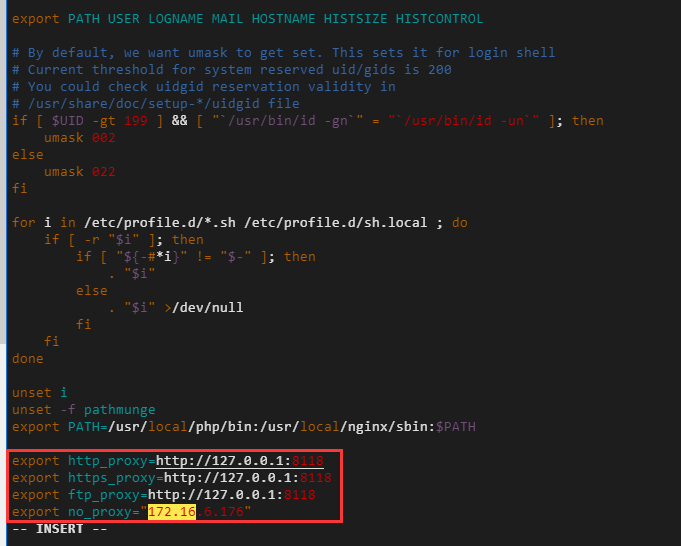
15. Set the http/https proxy, and modify the configuration file /etc/profile. 172.16.6.176 is the IP of the server intranet, indicating that there is no proxy. As shown in Figure 10
Figure 10
[root@iZ23wv7v5ggZ ~]# vi /etc/profile
[root@iZ23wv7v5ggZ ~]# systemctl stop privoxy
[root@iZ23wv7v5ggZ ~]# systemctl start privoxy
[root@iZ23wv7v5ggZ ~]# systemctl status privoxy
● privoxy.service - Privoxy Web Proxy With Advanced Filtering Capabilities
   Loaded: loaded (/usr/lib/systemd/system/privoxy.service; enabled; vendor preset: disabled)
   Active: active (running) since Fri 2021-06-25 19:17:34 CST; 10s ago
  Process: 10823 ExecStart=/usr/sbin/privoxy --pidfile /run/privoxy.pid --user privoxy /etc/privoxy/config (code=exited, status=0/SUCCESS)
 Main PID: 10824 (privoxy)
   CGroup: /system.slice/privoxy.service
           └─10824 /usr/sbin/privoxy --pidfile /run/privoxy.pid --user privoxy /etc/privoxy/config

Jun 25 19:17:33 iZ23wv7v5ggZ systemd[1]: Starting Privoxy Web Proxy With Advanced Filtering Capabilities...
Jun 25 19:17:34 iZ23wv7v5ggZ systemd[1]: Started Privoxy Web Proxy With Advanced Filtering Capabilities.
[root@iZ23wv7v5ggZ ~]#
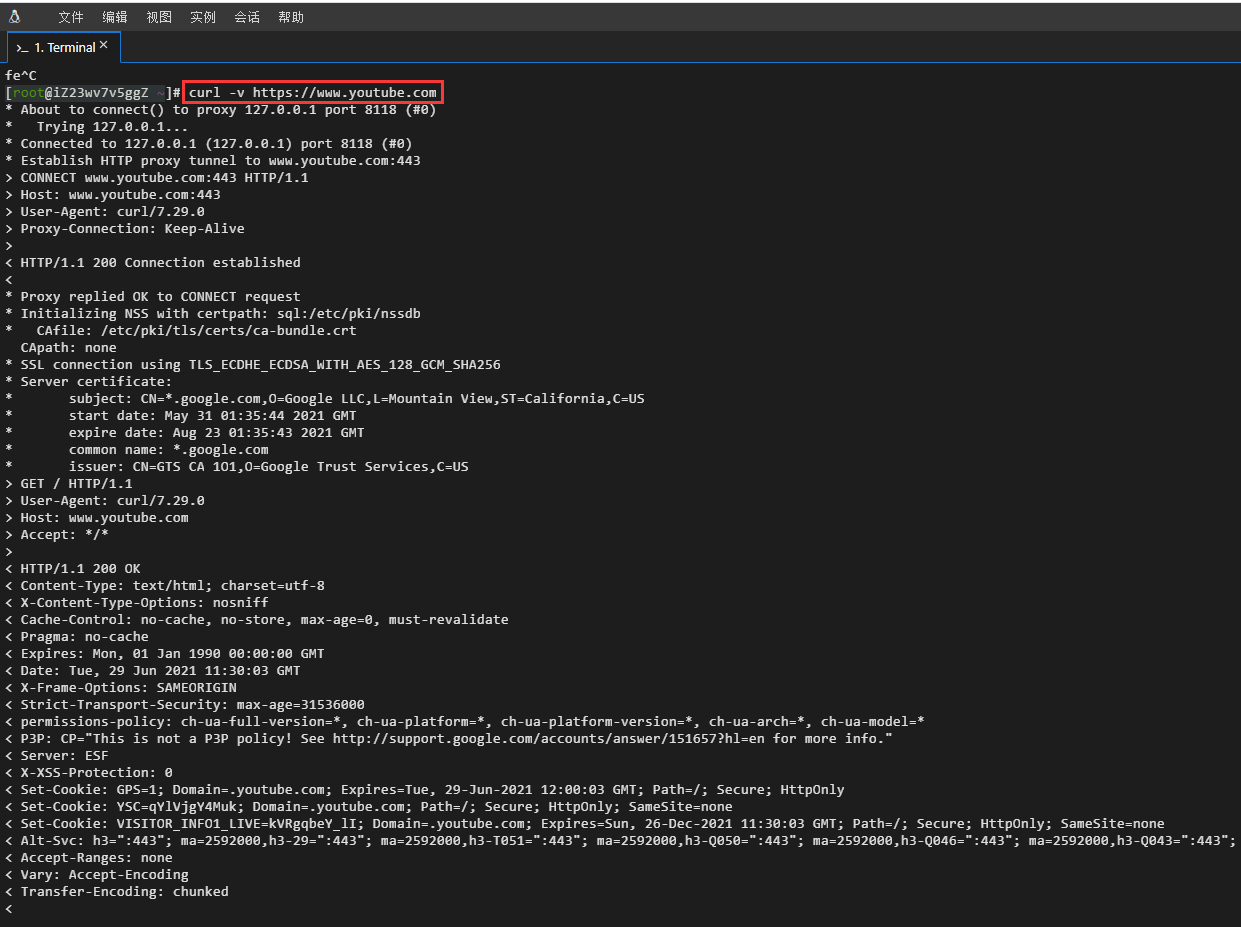
16. Test the Alibaba Cloud server based on CURL HTTP requests http://httpbin.org/ip, https://www.google.com, https://www.youtube.com. The connection was successful. as shown in Figure 11
Figure 11
[root@iZ23wv7v5ggZ ~]# curl -v http://httpbin.org/ip
* About to connect() to proxy 127.0.0.1 port 8118 (#0)
* Trying 127.0.0.1...
* Connected to 127.0.0.1 (127.0.0.1) port 8118 (#0)
> GET http://httpbin.org/ip HTTP/1.1
> User-Agent: curl/7.29.0
> Host: httpbin.org
> Accept: */*
> Proxy-Connection: Keep-Alive
>
< HTTP/1.1 200 OK
< Date: Tue, 29 Jun 2021 11:28:55 GMT
< Content-Type: application/json
< Content-Length: 31
< Connection: keep-alive
< Server: gunicorn/19.9.0
< Access-Control-Allow-Origin: *
< Access-Control-Allow-Credentials: true
< Proxy-Connection: keep-alive
<
{
"origin": "14.192.49.13"
}
* Connection #0 to host 127.0.0.1 left intact
[root@iZ23wv7v5ggZ ~]# curl -v http://www.google.com
* About to connect() to proxy 127.0.0.1 port 8118 (#0)
* Trying 127.0.0.1...
* Connected to 127.0.0.1 (127.0.0.1) port 8118 (#0)
> GET http://www.google.com/ HTTP/1.1
> User-Agent: curl/7.29.0
> Host: www.google.com
> Accept: */*
> Proxy-Connection: Keep-Alive
>
< HTTP/1.1 302 Found
< Location: http://www.google.com.hk/url?sa=p&hl=zh-CN&pref=hkredirect&pval=yes&q=http://www.google.com.hk/&ust=1624966178742441&usg=AOvVaw2QC6Lusz__XY4CV4128vDo
< Cache-Control: private
< Content-Type: text/html; charset=UTF-8
< P3P: CP="This is not a P3P policy! See g.co/p3phelp for more info."
< Date: Tue, 29 Jun 2021 11:29:08 GMT
< Server: gws
< Content-Length: 370
< X-XSS-Protection: 0
< X-Frame-Options: SAMEORIGIN
< Set-Cookie: 1P_JAR=2021-06-29-11; expires=Thu, 29-Jul-2021 11:29:08 GMT; path=/; domain=.google.com; Secure
< Set-Cookie: NID=218=mAQ-WwaoohthEWglgFX6uc1oS1THml90khjAACvGj_9OGJ73I3SvN6kwGB4ahRX3uZh5Sw0__Q-y5ahjTAvJtItGntahKmj_d4ESUipCEyIjCRsskk88MU_sF6xOPwhvpqQdY3Zs5ZdscNbvbvB5Z0n0iVnRtGayv2Is44Z8phc; expires=Wed, 29-Dec-2021 11:29:08 GMT; path=/; domain=.google.com; HttpOnly
< Proxy-Connection: keep-alive
<
<HTML><HEAD><meta http-equiv="content-type" content="text/html;charset=utf-8">
<TITLE>302 Moved</TITLE></HEAD><BODY>
<H1>302 Moved</H1>
The document has moved
<A HREF="http://www.google.com.hk/url?sa=p&hl=zh-CN&pref=hkredirect&pval=yes&q=http://www.google.com.hk/&ust=1624966178742441&usg=AOvVaw2QC6Lusz__XY4CV4128vDo">here</A>.
</BODY></HTML>
* Connection #0 to host 127.0.0.1 left intact
[root@iZ23wv7v5ggZ ~]# curl -v https://www.google.com
* About to connect() to proxy 127.0.0.1 port 8118 (#0)
* Trying 127.0.0.1...
* Connected to 127.0.0.1 (127.0.0.1) port 8118 (#0)
* Establish HTTP proxy tunnel to www.google.com:443
> CONNECT www.google.com:443 HTTP/1.1
> Host: www.google.com:443
> User-Agent: curl/7.29.0
> Proxy-Connection: Keep-Alive
>
< HTTP/1.1 200 Connection established
<
* Proxy replied OK to CONNECT request
* Initializing NSS with certpath: sql:/etc/pki/nssdb
* CAfile: /etc/pki/tls/certs/ca-bundle.crt
CApath: none
* SSL connection using TLS_ECDHE_ECDSA_WITH_AES_128_GCM_SHA256
* Server certificate:
* subject: CN=www.google.com,O=Google LLC,L=Mountain View,ST=California,C=US
* start date: May 31 03:52:12 2021 GMT
* expire date: Aug 23 03:52:11 2021 GMT
* common name: www.google.com
* issuer: CN=GTS CA 1O1,O=Google Trust Services,C=US
> GET / HTTP/1.1
> User-Agent: curl/7.29.0
> Host: www.google.com
> Accept: */*
>
< HTTP/1.1 302 Found
< Location: https://www.google.com.hk/url?sa=p&hl=zh-CN&pref=hkredirect&pval=yes&q=https://www.google.com.hk/&ust=1624966197905473&usg=AOvVaw3rpxJ3M42WvO-874oCUUAA
< Cache-Control: private
< Content-Type: text/html; charset=UTF-8
< P3P: CP="This is not a P3P policy! See g.co/p3phelp for more info."
< Date: Tue, 29 Jun 2021 11:29:27 GMT
< Server: gws
< Content-Length: 372
< X-XSS-Protection: 0
< X-Frame-Options: SAMEORIGIN
< Set-Cookie: 1P_JAR=2021-06-29-11; expires=Thu, 29-Jul-2021 11:29:27 GMT; path=/; domain=.google.com; Secure
< Set-Cookie: NID=218=Oer550Xi5XY2PWWVqYODOuO0eo3bDFJv7wRpooU1FMnNvfWZSI9azb4-oPY_CIbBjn1Wyt4ycJYne9IHTdySDugiDbXhZeEnWSt66bpphBWLPcNyQyEqIS1ltdCHGJw_C8XV3LSlF2NSUbtI825BQGha3baM6qJVvQI2x2Pj-XU; expires=Wed, 29-Dec-2021 11:29:27 GMT; path=/; domain=.google.com; HttpOnly
< Alt-Svc: h3=":443"; ma=2592000,h3-29=":443"; ma=2592000,h3-T051=":443"; ma=2592000,h3-Q050=":443"; ma=2592000,h3-Q046=":443"; ma=2592000,h3-Q043=":443"; ma=2592000,quic=":443"; ma=2592000; v="46,43"
<
<HTML><HEAD><meta http-equiv="content-type" content="text/html;charset=utf-8">
<TITLE>302 Moved</TITLE></HEAD><BODY>
<H1>302 Moved</H1>
The document has moved
<A HREF="https://www.google.com.hk/url?sa=p&hl=zh-CN&pref=hkredirect&pval=yes&q=https://www.google.com.hk/&ust=1624966197905473&usg=AOvVaw3rpxJ3M42WvO-874oCUUAA">here</A>.
</BODY></HTML>
* Connection #0 to host 127.0.0.1 left intact
[root@iZ23wv7v5ggZ ~]# curl -v https://sitekit.withgoogle.com
* About to connect() to proxy 127.0.0.1 port 8118 (#0)
* Trying 127.0.0.1...
* Connected to 127.0.0.1 (127.0.0.1) port 8118 (#0)
* Establish HTTP proxy tunnel to sitekit.withgoogle.com:443
> CONNECT sitekit.withgoogle.com:443 HTTP/1.1
> Host: sitekit.withgoogle.com:443
> User-Agent: curl/7.29.0
> Proxy-Connection: Keep-Alive
>
< HTTP/1.1 200 Connection established
<
* Proxy replied OK to CONNECT request
* Initializing NSS with certpath: sql:/etc/pki/nssdb
* CAfile: /etc/pki/tls/certs/ca-bundle.crt
CApath: none
* SSL connection using TLS_ECDHE_ECDSA_WITH_AES_128_GCM_SHA256
* Server certificate:
* subject: CN=*.appspot.com,O=Google LLC,L=Mountain View,ST=California,C=US
* start date: Jun 07 01:07:29 2021 GMT
* expire date: Aug 30 01:07:28 2021 GMT
* common name: *.appspot.com
* issuer: CN=GTS CA 1O1,O=Google Trust Services,C=US
> GET / HTTP/1.1
> User-Agent: curl/7.29.0
> Host: sitekit.withgoogle.com
> Accept: */*
>
< HTTP/1.1 200 OK
< Content-Type: text/html; charset=utf-8
< Vary: Accept-Encoding
< X-Cloud-Trace-Context: 803be8061a081faa119115967f932ca2
< Date: Tue, 29 Jun 2021 11:29:47 GMT
< Server: Google Frontend
< Content-Length: 89089
< Alt-Svc: h3=":443"; ma=2592000,h3-29=":443"; ma=2592000,h3-T051=":443"; ma=2592000,h3-Q050=":443"; ma=2592000,h3-Q046=":443"; ma=2592000,h3-Q043=":443"; ma=2592000,quic=":443"; ma=2592000; v="46,43"
<
<!DOCTYPE html>
<html lang="en-US" class="no-js glue-flexbox glue-app-ready" amp="" i-amphtml-layout="" i-amphtml-no-boilerplate="" transformed="self;v=1">^C
[root@iZ23wv7v5ggZ ~]# curl -v https://www.youtube.com
* About to connect() to proxy 127.0.0.1 port 8118 (#0)
* Trying 127.0.0.1...
* Connected to 127.0.0.1 (127.0.0.1) port 8118 (#0)
* Establish HTTP proxy tunnel to www.youtube.com:443
> CONNECT www.youtube.com:443 HTTP/1.1
> Host: www.youtube.com:443
> User-Agent: curl/7.29.0
> Proxy-Connection: Keep-Alive
>
< HTTP/1.1 200 Connection established
<
* Proxy replied OK to CONNECT request
* Initializing NSS with certpath: sql:/etc/pki/nssdb
* CAfile: /etc/pki/tls/certs/ca-bundle.crt
CApath: none
* SSL connection using TLS_ECDHE_ECDSA_WITH_AES_128_GCM_SHA256
* Server certificate:
* subject: CN=*.google.com,O=Google LLC,L=Mountain View,ST=California,C=US
* start date: May 31 01:35:44 2021 GMT
* expire date: Aug 23 01:35:43 2021 GMT
* common name: *.google.com
* issuer: CN=GTS CA 1O1,O=Google Trust Services,C=US
> GET / HTTP/1.1
> User-Agent: curl/7.29.0
> Host: www.youtube.com
> Accept: */*
>
< HTTP/1.1 200 OK
< Content-Type: text/html; charset=utf-8
< X-Content-Type-Options: nosniff
< Cache-Control: no-cache, no-store, max-age=0, must-revalidate
< Pragma: no-cache
< Expires: Mon, 01 Jan 1990 00:00:00 GMT
< Date: Tue, 29 Jun 2021 11:30:03 GMT
< X-Frame-Options: SAMEORIGIN
< Strict-Transport-Security: max-age=31536000
< permissions-policy: ch-ua-full-version=*, ch-ua-platform=*, ch-ua-platform-version=*, ch-ua-arch=*, ch-ua-model=*
< P3P: CP="This is not a P3P policy! See http://support.google.com/accounts/answer/151657?hl=en for more info."
< Server: ESF
< X-XSS-Protection: 0
< Set-Cookie: GPS=1; Domain=.youtube.com; Expires=Tue, 29-Jun-2021 12:00:03 GMT; Path=/; Secure; HttpOnly
< Set-Cookie: YSC=qYlVjgY4Muk; Domain=.youtube.com; Path=/; Secure; HttpOnly; SameSite=none
< Set-Cookie: VISITOR_INFO1_LIVE=kVRgqbeY_lI; Domain=.youtube.com; Expires=Sun, 26-Dec-2021 11:30:03 GMT; Path=/; Secure; HttpOnly; SameSite=none
< Alt-Svc: h3=":443"; ma=2592000,h3-29=":443"; ma=2592000,h3-T051=":443"; ma=2592000,h3-Q050=":443"; ma=2592000,h3-Q046=":443"; ma=2592000,h3-Q043=":443"; ma=2592000,quic=":443"; ma=2592000; v="46,43"
< Accept-Ranges: none
< Vary: Accept-Encoding
< Transfer-Encoding: chunked
<
<!DOCTYPE html>^C
[root@iZ23wv7v5ggZ ~]#
Leave a Reply