In the Ubuntu system in WSL2, execute the command: sudo apt install php7.4-cli, report error: e: failed to fetchhttp://security.ubuntu.com/ubuntu/pool/main/p/php7.4/php7.4-common_7.4.3-4ubuntu2.5_amd64.deb404 Not Found[IP: 91.189.88.152 80]
1. In the Ubuntu system in WSL2, execute the command: sudo apt install php7.4-cli, report an error: e: failed to fetchhttp://security.ubuntu.com/ubuntu/pool/main/p/php7.4/php7.4-common_7.4.3-4ubuntu2.5_amd64.deb404 Not Found[IP: 91.189.88.152 80]. as shown in Figure 1
![在 WSL2 中的 Ubuntu 系统中,执行命令:sudo apt install php7.4-cli,报错:E: Failed to fetch http://security.ubuntu.com/ubuntu/pool/main/p/php7.4/php7.4-common_7.4.3-4ubuntu2.5_amd64.deb 404 Not Found [IP: 91.189.88.152 80]。](https://www.shuijingwanwq.com/wp-content/uploads/2021/12/1-7.png)
Figure 1
wangqiang@DESKTOP-QLPK8QM:/mnt/e/wwwroot/weibo$ php artisan make:controller StaticPagesController

Command 'php' not found, but can be installed with:

sudo apt install php7.4-cli
wangqiang@DESKTOP-QLPK8QM:/mnt/e/wwwroot/weibo$ sudo apt install php7.4-cli
Reading package lists... Done
Building dependency tree
Reading state information... Done
The following additional packages will be installed:
  php-common php7.4-common php7.4-json php7.4-opcache php7.4-readline
Suggested packages:
  php-pear
The following NEW packages will be installed:
  php-common php7.4-cli php7.4-common php7.4-json php7.4-opcache php7.4-readline
0 upgraded, 6 newly installed, 0 to remove and 0 not upgraded.
Need to get 2643 kB of archives.
After this operation, 13.2 MB of additional disk space will be used.
Do you want to continue? [Y/n] Y
Get:1 http://archive.ubuntu.com/ubuntu focal/main amd64 php-common all 2:75 [11.9 kB]
Ign:2 http://archive.ubuntu.com/ubuntu focal-updates/main amd64 php7.4-common amd64 7.4.3-4ubuntu2.5
Ign:3 http://archive.ubuntu.com/ubuntu focal-updates/main amd64 php7.4-json amd64 7.4.3-4ubuntu2.5
Ign:4 http://archive.ubuntu.com/ubuntu focal-updates/main amd64 php7.4-opcache amd64 7.4.3-4ubuntu2.5
Ign:5 http://archive.ubuntu.com/ubuntu focal-updates/main amd64 php7.4-readline amd64 7.4.3-4ubuntu2.5
Ign:6 http://archive.ubuntu.com/ubuntu focal-updates/main amd64 php7.4-cli amd64 7.4.3-4ubuntu2.5
Err:2 http://security.ubuntu.com/ubuntu focal-updates/main amd64 php7.4-common amd64 7.4.3-4ubuntu2.5
  404  Not Found [IP: 91.189.88.152 80]
Err:3 http://security.ubuntu.com/ubuntu focal-updates/main amd64 php7.4-json amd64 7.4.3-4ubuntu2.5
  404  Not Found [IP: 91.189.88.152 80]
Err:4 http://security.ubuntu.com/ubuntu focal-updates/main amd64 php7.4-opcache amd64 7.4.3-4ubuntu2.5
  404  Not Found [IP: 91.189.88.152 80]
Err:5 http://security.ubuntu.com/ubuntu focal-updates/main amd64 php7.4-readline amd64 7.4.3-4ubuntu2.5
  404  Not Found [IP: 91.189.88.152 80]
Err:6 http://security.ubuntu.com/ubuntu focal-updates/main amd64 php7.4-cli amd64 7.4.3-4ubuntu2.5
  404  Not Found [IP: 91.189.88.152 80]
Fetched 11.9 kB in 5s (2475 B/s)
E: Failed to fetch http://security.ubuntu.com/ubuntu/pool/main/p/php7.4/php7.4-common_7.4.3-4ubuntu2.5_amd64.deb  404  Not Found [IP: 91.189.88.152 80]
E: Failed to fetch http://security.ubuntu.com/ubuntu/pool/main/p/php7.4/php7.4-json_7.4.3-4ubuntu2.5_amd64.deb  404  Not Found [IP: 91.189.88.152 80]
E: Failed to fetch http://security.ubuntu.com/ubuntu/pool/main/p/php7.4/php7.4-opcache_7.4.3-4ubuntu2.5_amd64.deb  404  Not Found [IP: 91.189.88.152 80]
E: Failed to fetch http://security.ubuntu.com/ubuntu/pool/main/p/php7.4/php7.4-readline_7.4.3-4ubuntu2.5_amd64.deb  404  Not Found [IP: 91.189.88.152 80]
E: Failed to fetch http://security.ubuntu.com/ubuntu/pool/main/p/php7.4/php7.4-cli_7.4.3-4ubuntu2.5_amd64.deb  404  Not Found [IP: 91.189.88.152 80]
E: Unable to fetch some archives, maybe run apt-get update or try with --fix-missing?
wangqiang@DESKTOP-QLPK8QM:/mnt/e/wwwroot/weibo$
2. Based on the prompt information, run apt-get update. as shown in Figure 2
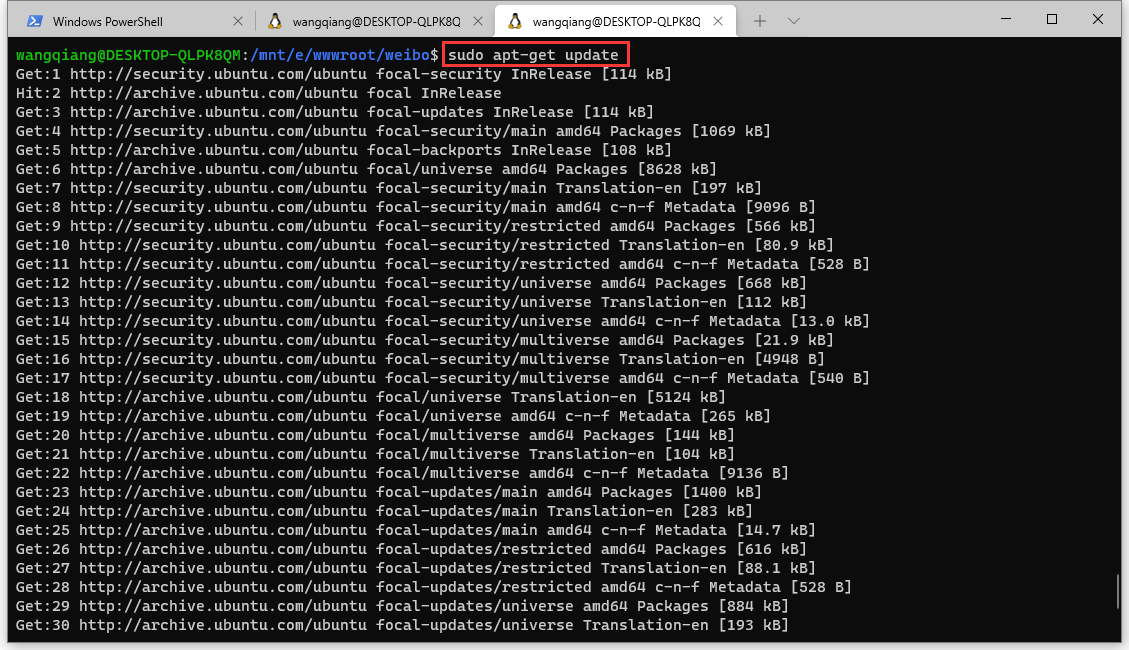
Figure 2
wangqiang@DESKTOP-QLPK8QM:/mnt/e/wwwroot/weibo$ sudo apt-get update
Get:1 http://security.ubuntu.com/ubuntu focal-security InRelease [114 kB]
Hit:2 http://archive.ubuntu.com/ubuntu focal InRelease
Get:3 http://archive.ubuntu.com/ubuntu focal-updates InRelease [114 kB]
Get:4 http://security.ubuntu.com/ubuntu focal-security/main amd64 Packages [1069 kB]
Get:5 http://archive.ubuntu.com/ubuntu focal-backports InRelease [108 kB]
Get:6 http://archive.ubuntu.com/ubuntu focal/universe amd64 Packages [8628 kB]
Get:7 http://security.ubuntu.com/ubuntu focal-security/main Translation-en [197 kB]
Get:8 http://security.ubuntu.com/ubuntu focal-security/main amd64 c-n-f Metadata [9096 B]
Get:9 http://security.ubuntu.com/ubuntu focal-security/restricted amd64 Packages [566 kB]
Get:10 http://security.ubuntu.com/ubuntu focal-security/restricted Translation-en [80.9 kB]
Get:11 http://security.ubuntu.com/ubuntu focal-security/restricted amd64 c-n-f Metadata [528 B]
Get:12 http://security.ubuntu.com/ubuntu focal-security/universe amd64 Packages [668 kB]
Get:13 http://security.ubuntu.com/ubuntu focal-security/universe Translation-en [112 kB]
Get:14 http://security.ubuntu.com/ubuntu focal-security/universe amd64 c-n-f Metadata [13.0 kB]
Get:15 http://security.ubuntu.com/ubuntu focal-security/multiverse amd64 Packages [21.9 kB]
Get:16 http://security.ubuntu.com/ubuntu focal-security/multiverse Translation-en [4948 B]
Get:17 http://security.ubuntu.com/ubuntu focal-security/multiverse amd64 c-n-f Metadata [540 B]
Get:18 http://archive.ubuntu.com/ubuntu focal/universe Translation-en [5124 kB]
Get:19 http://archive.ubuntu.com/ubuntu focal/universe amd64 c-n-f Metadata [265 kB]
Get:20 http://archive.ubuntu.com/ubuntu focal/multiverse amd64 Packages [144 kB]
Get:21 http://archive.ubuntu.com/ubuntu focal/multiverse Translation-en [104 kB]
Get:22 http://archive.ubuntu.com/ubuntu focal/multiverse amd64 c-n-f Metadata [9136 B]
Get:23 http://archive.ubuntu.com/ubuntu focal-updates/main amd64 Packages [1400 kB]
Get:24 http://archive.ubuntu.com/ubuntu focal-updates/main Translation-en [283 kB]
Get:25 http://archive.ubuntu.com/ubuntu focal-updates/main amd64 c-n-f Metadata [14.7 kB]
Get:26 http://archive.ubuntu.com/ubuntu focal-updates/restricted amd64 Packages [616 kB]
Get:27 http://archive.ubuntu.com/ubuntu focal-updates/restricted Translation-en [88.1 kB]
Get:28 http://archive.ubuntu.com/ubuntu focal-updates/restricted amd64 c-n-f Metadata [528 B]
Get:29 http://archive.ubuntu.com/ubuntu focal-updates/universe amd64 Packages [884 kB]
Get:30 http://archive.ubuntu.com/ubuntu focal-updates/universe Translation-en [193 kB]
Get:31 http://archive.ubuntu.com/ubuntu focal-updates/universe amd64 c-n-f Metadata [19.9 kB]
Get:32 http://archive.ubuntu.com/ubuntu focal-updates/multiverse amd64 Packages [24.8 kB]
Get:33 http://archive.ubuntu.com/ubuntu focal-updates/multiverse Translation-en [6928 B]
Get:34 http://archive.ubuntu.com/ubuntu focal-updates/multiverse amd64 c-n-f Metadata [616 B]
Get:35 http://archive.ubuntu.com/ubuntu focal-backports/main amd64 Packages [42.0 kB]
Get:36 http://archive.ubuntu.com/ubuntu focal-backports/main Translation-en [10.0 kB]
Get:37 http://archive.ubuntu.com/ubuntu focal-backports/main amd64 c-n-f Metadata [864 B]
Get:38 http://archive.ubuntu.com/ubuntu focal-backports/restricted amd64 c-n-f Metadata [116 B]
Get:39 http://archive.ubuntu.com/ubuntu focal-backports/universe amd64 Packages [18.9 kB]
Get:40 http://archive.ubuntu.com/ubuntu focal-backports/universe Translation-en [7492 B]
Get:41 http://archive.ubuntu.com/ubuntu focal-backports/universe amd64 c-n-f Metadata [636 B]
Get:42 http://archive.ubuntu.com/ubuntu focal-backports/multiverse amd64 c-n-f Metadata [116 B]
Fetched 21.0 MB in 31s (675 kB/s)
Reading package lists... Done
wangqiang@DESKTOP-QLPK8QM:/mnt/e/wwwroot/weibo$
3. Execute the command again: sudo apt install php7.4-cli, no error is reported. as shown in Figure 3
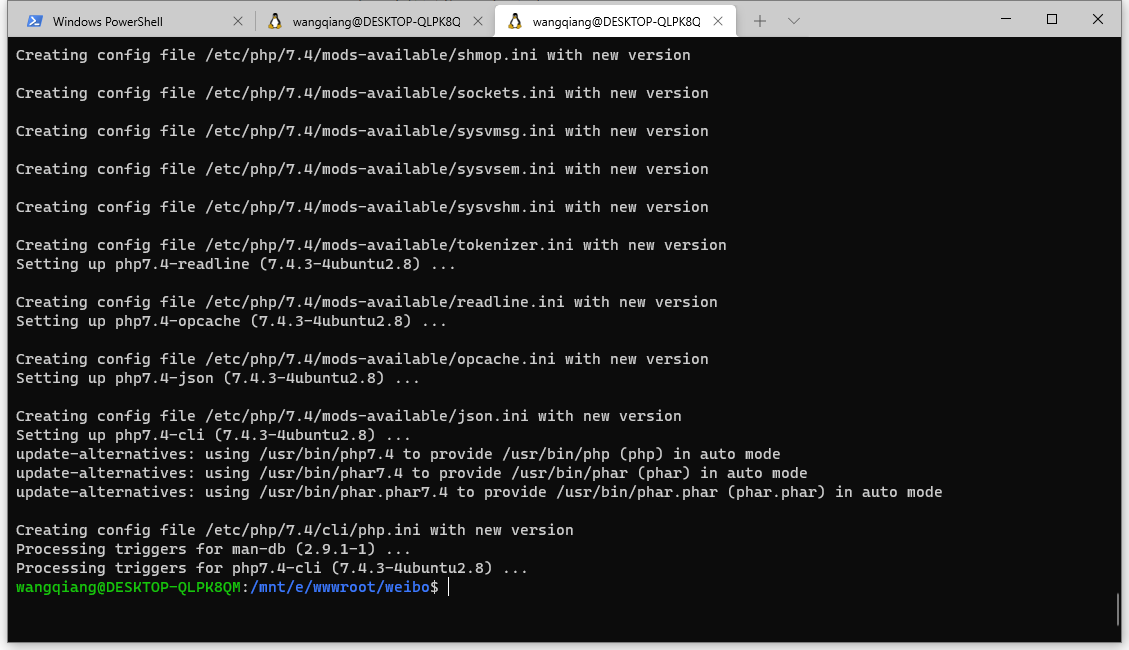
Figure 3
Creating config file /etc/php/7.4/mods-available/shmop.ini with new version

Creating config file /etc/php/7.4/mods-available/sockets.ini with new version

Creating config file /etc/php/7.4/mods-available/sysvmsg.ini with new version

Creating config file /etc/php/7.4/mods-available/sysvsem.ini with new version

Creating config file /etc/php/7.4/mods-available/sysvshm.ini with new version

Creating config file /etc/php/7.4/mods-available/tokenizer.ini with new version
Setting up php7.4-readline (7.4.3-4ubuntu2.8) ...

Creating config file /etc/php/7.4/mods-available/readline.ini with new version
Setting up php7.4-opcache (7.4.3-4ubuntu2.8) ...

Creating config file /etc/php/7.4/mods-available/opcache.ini with new version
Setting up php7.4-json (7.4.3-4ubuntu2.8) ...

Creating config file /etc/php/7.4/mods-available/json.ini with new version
Setting up php7.4-cli (7.4.3-4ubuntu2.8) ...
update-alternatives: using /usr/bin/php7.4 to provide /usr/bin/php (php) in auto mode
update-alternatives: using /usr/bin/phar7.4 to provide /usr/bin/phar (phar) in auto mode
update-alternatives: using /usr/bin/phar.phar7.4 to provide /usr/bin/phar.phar (phar.phar) in auto mode

Creating config file /etc/php/7.4/cli/php.ini with new version
Processing triggers for man-db (2.9.1-1) ...
Processing triggers for php7.4-cli (7.4.3-4ubuntu2.8) ...
4. Execute the command: php artisan make:controller staticpagescontroller. Error: Your composer dependencies require a php version “>= 8.0.2”. You are running 7.4.3. as shown in Figure 4
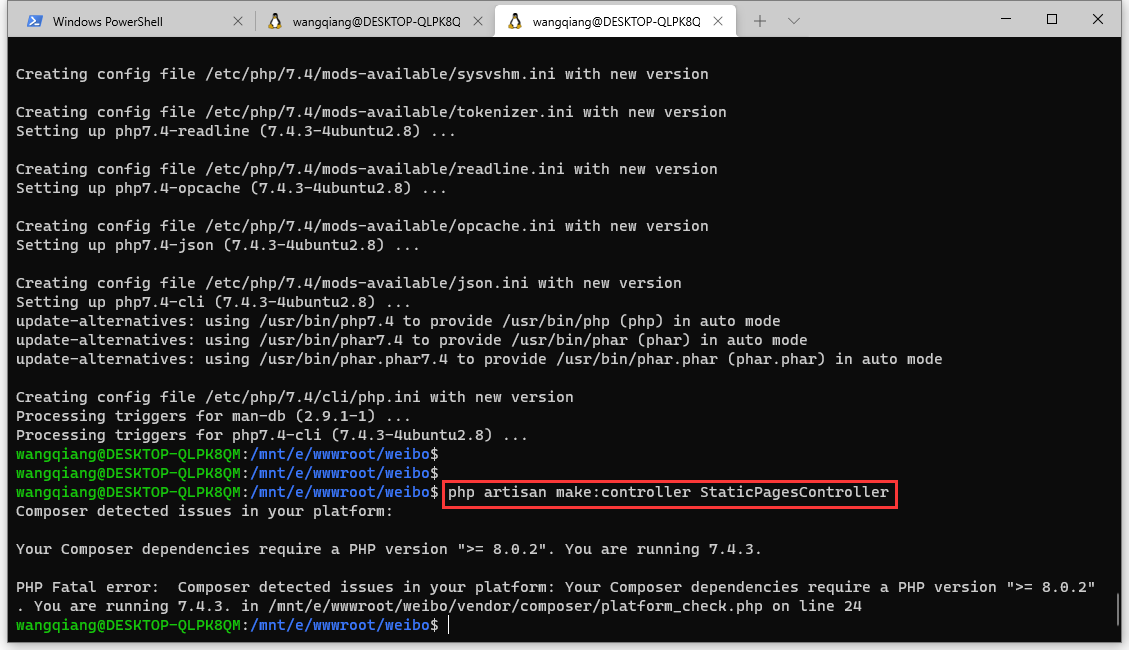
Figure 4
wangqiang@DESKTOP-QLPK8QM:/mnt/e/wwwroot/weibo$ php artisan make:controller StaticPagesController
Composer detected issues in your platform:

Your Composer dependencies require a PHP version ">= 8.0.2". You are running 7.4.3.

PHP Fatal error:  Composer detected issues in your platform: Your Composer dependencies require a PHP version ">= 8.0.2". You are running 7.4.3. in /mnt/e/wwwroot/weibo/vendor/composer/platform_check.php on line 24
wangqiang@DESKTOP-QLPK8QM:/mnt/e/wwwroot/weibo$
5. Because the Docker container is implemented based on Laravel Sail. Adjust execution command: Sail Artisan make:Controller staticpagesController.
Generate the controller successfully. as shown in Figure 5
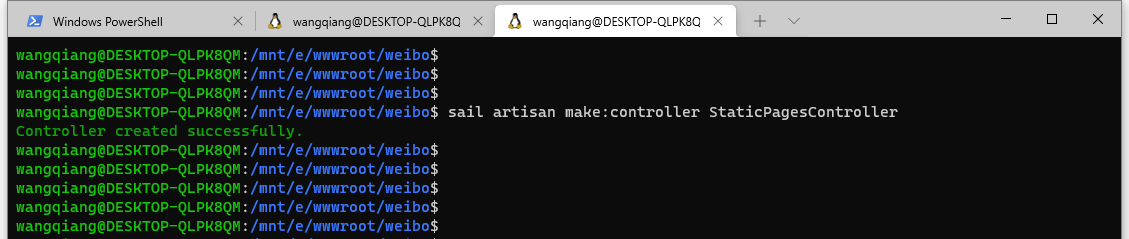
Figure 5
wangqiang@DESKTOP-QLPK8QM:/mnt/e/wwwroot/weibo$ sail artisan make:controller StaticPagesController
Controller created successfully.
wangqiang@DESKTOP-QLPK8QM:/mnt/e/wwwroot/weibo$
![执行 composer require 时,报错:[Composer\Downloader\TransportException] curl error 6 while downloading https://api/v4/projects/%2Fnova: Could not resolve host: api](https://www.shuijingwanwq.com/wp-content/uploads/2022/01/1-18-520x245.png)