1. Search in GitHub: Laravel Module, select the first result: NWidArt / Laravel-Modules. It supports module management in Laravel.
2. Reference URL: https://nicolaswidart.com/blog/writing-modular-applications-with-laravel-modules . Why use this package, write modular applications using laravel-modules. When it comes to writing more complex and larger applications, it is found that Laravel’s default structure is cumbersome and not ideal.
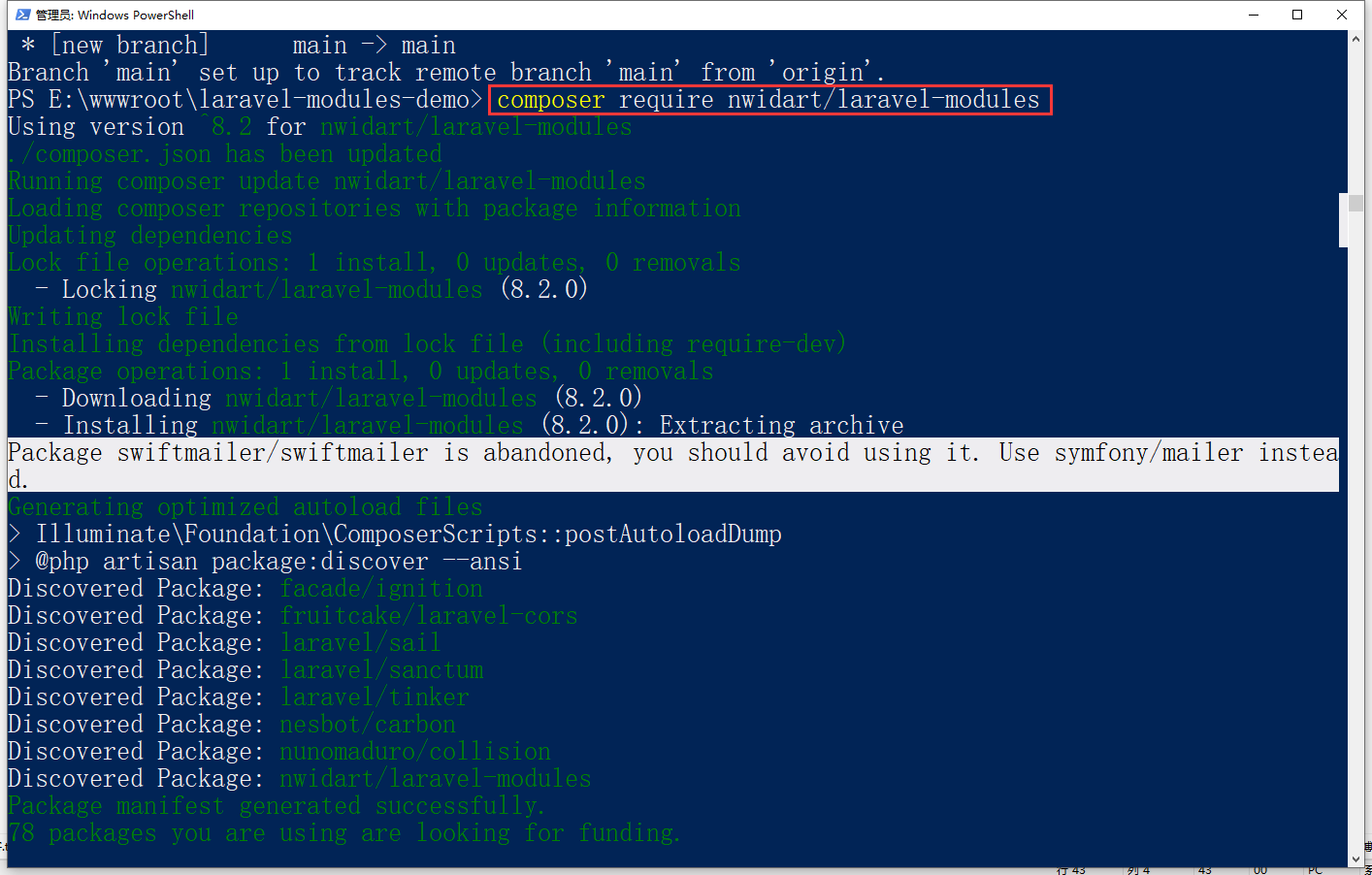
3. To install via Composer, run the following command. as shown in Figure 1
Figure 1
PS E:\wwwroot\laravel-modules-demo> composer require nwidart/laravel-modules
Using version ^8.2 for nwidart/laravel-modules
./composer.json has been updated
Running composer update nwidart/laravel-modules
Loading composer repositories with package information
Updating dependencies
Lock file operations: 1 install, 0 updates, 0 removals
  - Locking nwidart/laravel-modules (8.2.0)
Writing lock file
Installing dependencies from lock file (including require-dev)
Package operations: 1 install, 0 updates, 0 removals
  - Downloading nwidart/laravel-modules (8.2.0)
  - Installing nwidart/laravel-modules (8.2.0): Extracting archive
Package swiftmailer/swiftmailer is abandoned, you should avoid using it. Use symfony/mailer instead.
Generating optimized autoload files
> Illuminate\Foundation\ComposerScripts::postAutoloadDump
> @php artisan package:discover --ansi
Discovered Package: facade/ignition
Discovered Package: fruitcake/laravel-cors
Discovered Package: laravel/sail
Discovered Package: laravel/sanctum
Discovered Package: laravel/tinker
Discovered Package: nesbot/carbon
Discovered Package: nunomaduro/collision
Discovered Package: nwidart/laravel-modules
Package manifest generated successfully.
78 packages you are using are looking for funding.
Use the `composer fund` command to find out more!
> @php artisan vendor:publish --tag=laravel-assets --ansi --force
No publishable resources for tag [laravel-assets].
Publishing complete.
4. Run the following command to publish the configuration file of the package
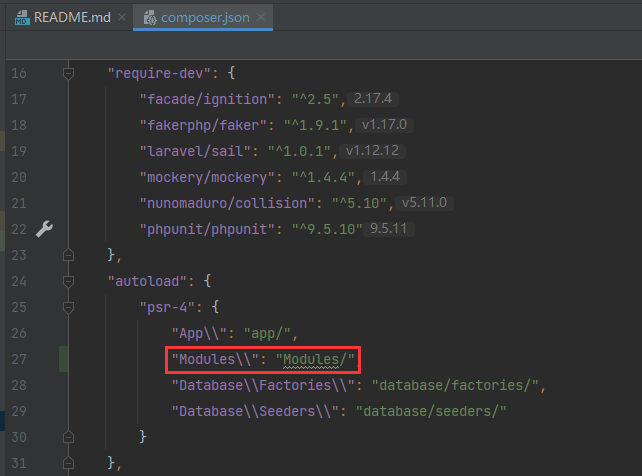
5. By default, the module class will not load automatically. You can automatically load modules using PSR-4. Edit composer.json and run: composer dump-autoload. as shown in Figure 2
Figure 2
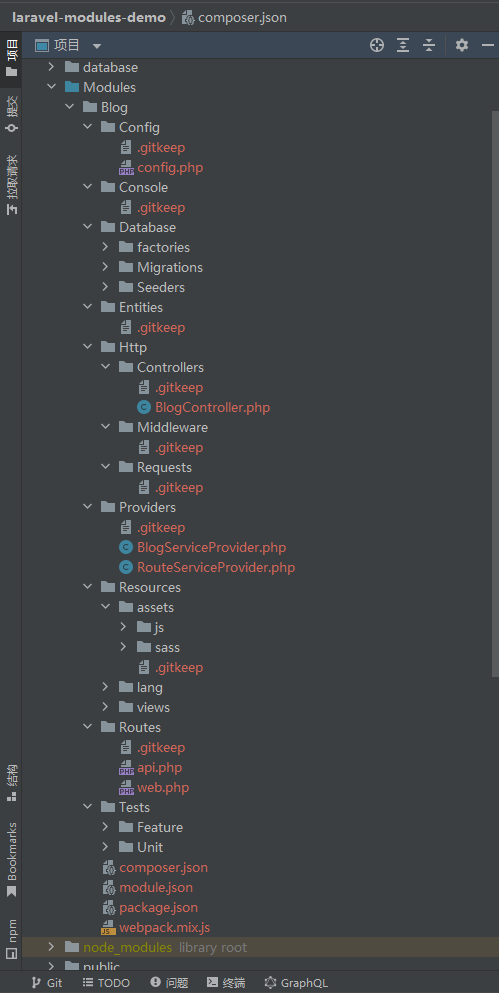
6. Reference document: https://nwidart.com/laravel-modules/v6/introduction , quickly open an example, use php artisan module:make blog Generate your first module. The following structure will be generated. Since the version of the document is for V6, and the latest version of the program is now V8, the directory structure is different. as shown in Figure 3
Figure 3
PS E:\wwwroot\laravel-modules-demo> php artisan module:make Blog
Created : E:\wwwroot\laravel-modules-demo\Modules/Blog/module.json
Created : E:\wwwroot\laravel-modules-demo\Modules/Blog/Routes/web.php
Created : E:\wwwroot\laravel-modules-demo\Modules/Blog/Routes/api.php
Created : E:\wwwroot\laravel-modules-demo\Modules/Blog/Resources/views/index.blade.php
Created : E:\wwwroot\laravel-modules-demo\Modules/Blog/Resources/views/layouts/master.blade.php
Created : E:\wwwroot\laravel-modules-demo\Modules/Blog/Config/config.php
Created : E:\wwwroot\laravel-modules-demo\Modules/Blog/composer.json
Created : E:\wwwroot\laravel-modules-demo\Modules/Blog/Resources/assets/js/app.js
Created : E:\wwwroot\laravel-modules-demo\Modules/Blog/Resources/assets/sass/app.scss
Created : E:\wwwroot\laravel-modules-demo\Modules/Blog/webpack.mix.js
Created : E:\wwwroot\laravel-modules-demo\Modules/Blog/package.json
Created : E:/wwwroot/laravel-modules-demo/Modules/Blog/Database/Seeders/BlogDatabaseSeeder.php
Created : E:/wwwroot/laravel-modules-demo/Modules/Blog/Providers/BlogServiceProvider.php
Created : E:/wwwroot/laravel-modules-demo/Modules/Blog/Providers/RouteServiceProvider.php
Created : E:/wwwroot/laravel-modules-demo/Modules/Blog/Http/Controllers/BlogController.php
Module [Blog] created successfully.
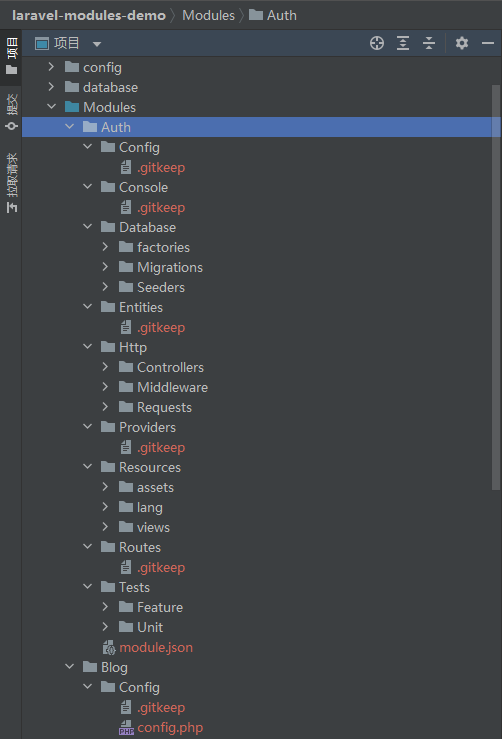
7. By default, when you create a new module, the command automatically adds some resources, such as controllers, torrents, service providers, etc. If you don’t want these, you can add the –plain flag to generate a normal module. The following structure will be generated. as shown in Figure 4
Figure 4
PS E:\wwwroot\laravel-modules-demo> php artisan module:make Auth -p
Created : E:\wwwroot\laravel-modules-demo\Modules/Auth/module.json
Module [Auth] created successfully.
Leave a Reply