Implement security verification of file pathnames in PHP (you can add files when editing template code)
1. View request parameters: Asset[key]: Assets/2022/02/25.css, ready to add a new file in the template file: Assets/2022/02/25.css. Response failed: Theme files may not be stored in subfolders. as shown in Figure 1
![View request parameters: Asset[key]: Assets/2022/02/25.css, ready to add a new file in the template file: Assets/2022/02/25.css. Response failed: Theme files may not be stored in subfolders.](https://www.shuijingwanwq.com/wp-content/uploads/2022/03/1-19.png)
2. View request parameters: Asset[key]: Assets/25.css, ready to add a new file in the template file: assets/25.css. Respond successfully. as shown in Figure 2
![View request parameters: Asset[key]: Assets/25.css, ready to add a new file in the template file: assets/25.css. Respond successfully.](https://www.shuijingwanwq.com/wp-content/uploads/2022/03/2-19.png)
3. View request parameters: Asset[key]: Assets/02\25.css, ready to add a new file in the template file: assets/02\25.css. Response failed: ‘assets/02\\25.css’ contains illegal characters. as shown in Figure 3
![View request parameters: Asset[key]: Assets/02\25.css, ready to add a new file in the template file: assets/02\25.css. Response failed: "assets/02\\25.css" contains illegal characters.](https://www.shuijingwanwq.com/wp-content/uploads/2022/03/3-17.png)
4. View request parameters: Asset[key]: templates/customers/order.order.order1.liquid, ready to add a new file in the template file: templates/customers/order.order1.liquid. Respond successfully. Directory: Templates/customers have already been generated. as shown in Figure 4
![View request parameters: Asset[key]: templates/customers/order.order.order1.liquid, ready to add a new file in the template file: templates/customers/order.order1.liquid. Respond successfully. Directory: Templates/customers have already been generated.](https://www.shuijingwanwq.com/wp-content/uploads/2022/03/4-10.png)
5. The final verification rules are as follows:
(1) Path parameters must start with the directory that has been generated. The directory contains:[‘layouts/’, ‘auth/’, ‘pages/’, ‘components/’, ‘assets/’, ‘js/’, ‘sass/’, ‘assets/iconfont/’, ‘js/common/’, ‘js/view/’, ‘js/view/account/’, ‘js/view/cart/’, ‘js/view/collections/’, ‘js/view/product/’, ‘js/view/productlist/’, ‘js/view/search/’]
(2) When Asset[key]After removing the beginning of the directory, you only need to verify the pure file name, and it is not allowed to include / and \
(3) Verify the Asset[key]The file extension, whose file suffix must belong to a predefined array, contains:[‘.php’, ‘.json’, ‘.css’, ‘.scss’, ‘.js’, ‘.vue’]
6. The main difficulty lies in the realization of the verification rule of Article 2, refer to:https://stackoverflow.com/questions/31089394/check-if-string-is-valid-filename. POSIX ‘Fully Portable File Name’ lists these: a-z a-z 0-9 ._ – . Create a new file: FilePathValidator.php, no spaces are allowed.
<?php
function validate($filename) {
    if (preg_match('/^[\w\-.]+$/', $filename)) {
        return $filename . ' 验证成功';
    } else {
        return $filename . ' 验证失败';
    }
}

$filenames = ['assets/2022/02/25.css', 'assets/02\25.css', '/25.css', '25.css/', '2_- 5.css', '2_-5.css', '中国.css', 'testjpg.', '.testjpg', 'test.jpg'];
foreach ($filenames as $filename) {
    echo validate($filename) . PHP_EOL;
}
?>
7. Check the running results and verify the successful 3 file names, which need to be excluded: testjpg., .testjpg, and the third verification rule can just queue up: testjpg., .testjpg. The beginning of the directory and the end of the file extension, you can use the validation method in dirname() and laravel: ends_with:foo,bar,… The fields for verification must end with one of the given values. as shown in Figure 5
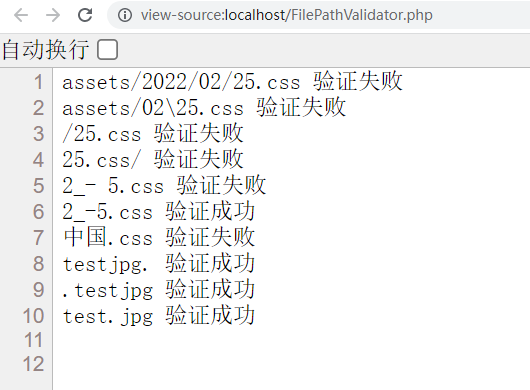
Figure 5
assets/2022/02/25.css 验证失败
assets/02\25.css 验证失败
/25.css 验证失败
25.css/ 验证失败
2_- 5.css 验证失败
2_-5.css 验证成功
中国.css 验证失败
testjpg. 验证成功
.testjpg 验证成功
test.jpg 验证成功
    /**
     * Return the validation rules.
     *
     * @return array<string, array<mixed>>
     */
    public function rules(): array
    {
        $extensions = implode(",", ThemeAsset::BLADE_EXTENSIONS);
        return [
            'key' => [
                // 当获取文件路径中的目录部分后,其必须属于目录列表之一
                function ($attribute, $value, $fail) {
                    if (!in_array(dirname($value) . '/', ThemeAsset::BLADE_DIRS)) {
                        $fail('The directory portion of ' . $attribute . ' can only contain the following: ' . implode(", ", ThemeAsset::BLADE_DIRS));
                    }
                },
                // 当获取文件路径中的文件名部分后,便仅需要验证纯粹的文件名,只允许包含:A-Z、a-z、0-9、.、_、-
                function ($attribute, $value, $fail) {
                    if (!preg_match('/^[\w\-.]+$/', basename($value))) {
                        $fail('The file name portion of ' . $attribute . ' can only contain the following: A-Z, a-z, 0-9, ., _, -');
                    }
                },
                // 验证的字段必须以给定的值之一结尾
                'ends_with:' . $extensions,
            ],
        ];
    }
8. This will filter out valid file names that do not belong to ISO-1252, such as Japanese, Chinese, Western Europe, Cyrillic, Middle East… characters. Also, it doesn’t filter out file names with valid characters but invalid in the operating system, such as COM1, LPT1, AUX…. These two defects are temporarily acceptable. Subsequently, filenames with valid characters but invalid in the operating system may not be filtered out. as shown in Figure 6
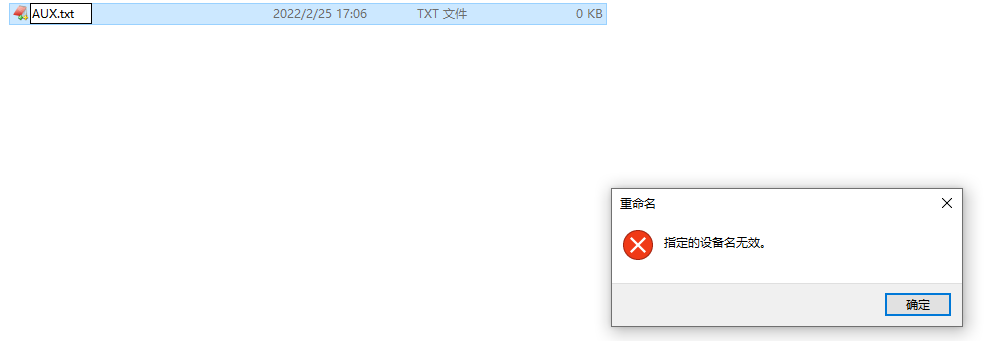
Figure 6