
![在 Lighthouse 5 中,报错:Illuminate\Contracts\Container\BindingResolutionException : Target [Interface] is not instantiable while building [Resolver].](https://media.shuijingwanwq.com/2022/06/1-17.png)
1. In Lighthouse 5, an error is reported: illuminate\contracts\container\bindingResolutionException : target[Interface]Is not instantiable while building[Resolver]… as shown in Figure 1
![在 Lighthouse 5 中,报错:Illuminate\Contracts\Container\BindingResolutionException : Target [Interface] is not instantiable while building [Resolver].](https://www.shuijingwanwq.com/wp-content/uploads/2022/06/1-17.png)
PS E:\wwwroot\object> php artisan lighthouse:ide-helper
Wrote schema directive definitions to E:\wwwroot\object/schema-directives.graphql.

   Illuminate\Contracts\Container\BindingResolutionException  : Target [Modules\ThemeStoreGraphQl\ThemeSetting\Schema\TemplateSchemaLoaderInterface] is not instantiable while building [Modules\ThemeStoreGraphQl\Resolver\OnlineStoreTheme\TemplateSettingsDataResolver].

  at E:\wwwroot\object\vendor\laravel\framework\src\Illuminate\Container\Container.php:978
    974|         } else {
    975|             $message = "Target [$concrete] is not instantiable.";
    976|         }
    977|
  > 978|         throw new BindingResolutionException($message);
    979|     }
    980|
    981|     /**
    982|      * Throw an exception for an unresolvable primitive.

  Exception trace:

  1   Illuminate\Container\Container::notInstantiable("Modules\ThemeStoreGraphQl\ThemeSetting\Schema\TemplateSchemaLoaderInterface")
      E:\wwwroot\object\vendor\laravel\framework\src\Illuminate\Container\Container.php:812

  2   Illuminate\Container\Container::build("Modules\ThemeStoreGraphQl\ThemeSetting\Schema\TemplateSchemaLoaderInterface")
      E:\wwwroot\object\vendor\laravel\framework\src\Illuminate\Container\Container.php:681

  Please use the argument -v to see more details.
2. Edit ThemeStoreGraphQL/Resources/GraphQL/Theme_Setting.GraphQL , comment out: TemplateSettingsData(BaseName: String!):[ThemeSection]@field(resolver: “modules\\themestoreGraphQL\\resolver\\onlinestoreetheme\\TemplateSettingsDataResolver”). Then no errors will be reported.
    # "获取主题页面的配置"
    # templateSettingsData(basename: String!): [ThemeSection] @field(resolver: "Modules\\ThemeStoreGraphQl\\Resolver\\OnlineStoreTheme\\TemplateSettingsDataResolver")
3. After uncommenting, check ThemeStoreGraphQL/Resolver/OnlineStoreEtheme/TemplateSettingsDateResolver.php . TemplateSchemaLoaderInterface is passed as a parameter to the constructor.
    private TemplateSchemaLoaderInterface $templateSchemaLoader;

    public function __construct(TemplateSchemaLoaderInterface $templateSchemaLoader)
    {
        $this->templateSchemaLoader = $templateSchemaLoader;
    }
4. Check the service provider class of this module, and it is determined that there are corresponding instances registered. But does not execute register() . Because no graphql is output.
    public function register()
    {
        echo 'graphql';
        exit;

        $this->app->singleton(TemplateSchemaLoaderInterface::class, function($app) {
            if ($this->app['config']['theme_store.view_storage'] == 'database') {
                return new DbTemplateSchemaLoader($app->make(ViewStorageInterface::class), $app->make(TemplateBuilder::class));
            } else {
                return new FileTemplateSchemaLoader($app->make('igaster.themes'), $app->make(TemplateBuilder::class));
            }
        });

        $this->app->singleton(TemplateSettingsDataResolver::class, function($app){
            return new TemplateSettingsDataResolver($app->make(TemplateSchemaLoaderInterface::class));
        });

    }
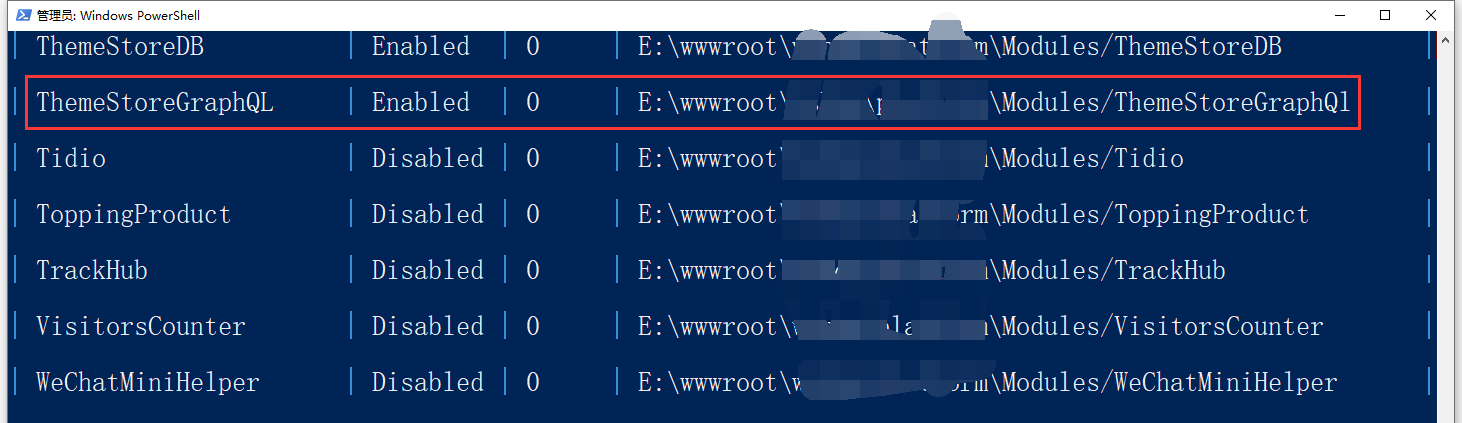
5. Check the module list, its name is ThemeStoreGraphQL, and the path is E:\wwwroot\object\modules/themestoreGraphQL. as shown in Figure 2
6. Check /modules/themestoreGraphQL/Composer.json, the path ThemeStoreGraphQL does not match the actual directory name ThemeStoreGraphQL. Adjusted to match the actual directory name. as shown in Figure 3

{

    "extra": {
        "laravel": {
            "providers": [
                "Modules\\ThemeStoreGraphQL\\Providers\\GraphQlResolverServiceProvider"
            ],
            "aliases": {

            }
        }
    },
    "autoload": {
        "psr-4": {
            "Modules\\ThemeStoreGraphQL\\": ""
        }
    }

}
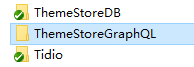
7. Rename the directory name: ThemeStoreGraphQL, and then batch replace ThemeStoreGraphQL to theMeStoreGraphQL. Failed to rename in phpstorm, prompt: java.io.IOException: cannot beE:\WWWroot\Object\Modules\ThemeStoreGraphQLRenamed ThemeStoreGraphQL. as shown in Figure 4

8. Rename in the operating system directory. as shown in Figure 5
9. After batch replacement, execute composer install. Error still reported: Illuminate\Contracts\Container\BindingResolutionException : target[Modules\ThemeStoreGraphQL\ThemeSetting\Schema\TemplateSchemaLoaderInterface]Is not instantiable while building[Modules\ThemeStoreGraphQL\Resolver\OnlineStoreTheme\TemplateSettingsDataResolver].
10. View /bootstrap/cache/services.php, GraphQlResolverServiceProvider in the array keyProvidersexist in the array keyeagerdoes not exist in.
<?php return array (
  'providers' =>
  array (
    90 => 'Modules\\ThemeStoreDB\\Providers\\ThemeStoreDBServiceProvider',
    91 => 'Modules\\ThemeLocalization\\Providers\\ThemeLocalizationServiceProvider',
    92 => 'Modules\\ThemeAsset\\Providers\\ThemeAssetServiceProvider',
    93 => 'Modules\\ThemeSetting\\Providers\\ThemeSettingServiceProvider',
    94 => 'Modules\\Theme\\Providers\\ThemeServiceProvider',
    95 => 'Modules\\ThemeStoreGraphQL\\Providers\\GraphQlResolverServiceProvider',
  ),
  'eager' =>
  array (
    74 => 'Modules\\ThemeStoreDB\\Providers\\ThemeStoreDBServiceProvider',
    75 => 'Modules\\ThemeLocalization\\Providers\\ThemeLocalizationServiceProvider',
    76 => 'Modules\\ThemeAsset\\Providers\\ThemeAssetServiceProvider',
    77 => 'Modules\\ThemeSetting\\Providers\\ThemeSettingServiceProvider',
    78 => 'Modules\\Theme\\Providers\\ThemeServiceProvider',
  ),
);
11. Edit /Modules/ThemeStoreGraphQL/Providers/GraphQlResolverServiceProvider.php, delete the Implements DeferrableProvider After, look at /bootstrap/cache/services.php’s GraphQlResolverServiceProvider in the array keyseagerexists, and the program runs no longer reported errors.
use Illuminate\Contracts\Support\DeferrableProvider;

class GraphQlResolverServiceProvider extends ServiceProvider implements DeferrableProvider
12. To delay loading the provider, you need to implement a Provides method of \illuminate\contracts\support\deferRableProvider interface. This Provides method returns the service container binding registered by the provider
use Illuminate\Contracts\Support\DeferrableProvider;

class GraphQlResolverServiceProvider extends ServiceProvider implements DeferrableProvider
{
    /**
     * 获取由提供者提供的服务。
     *
     * @return array
     */
    public function provides()
    {
        return [TemplateSchemaLoaderInterface::class, TemplateSettingsDataResolver::class, SettingPersisterInterface::class];
    }
}
13. View the GraphQlResolverServiceProvider of /bootstrap/cache/services.php in the array keyeagerdoes not exist, and no errors are reported at runtime. as shown in Figure 6

PS E:\wwwroot\object> php artisan lighthouse:ide-helper
Wrote schema directive definitions to E:\wwwroot\object/schema-directives.graphql.
Wrote definitions for programmatically registered types to E:\wwwroot\object/programmatic-types.graphql.
Wrote PHP definitions to E:\wwwroot\object/_lighthouse_ide_helper.php.

It is recommended to add them to your .gitignore file.
PHP / Laravel / Yii2 Legacy Project Maintenance & Long-Term Technical Support
If your PHP / Laravel / Yii2 project is already in production but needs bug fixing, API troubleshooting, performance optimization, developer handover support, or long-term maintenance, feel free to contact me for remote technical support.
Ideal For:
✅ PHP legacy systems without active maintenance
✅ Laravel / Yii2 project bug fixes
✅ Admin panel feature iterations
✅ RESTful API troubleshooting
✅ MySQL / Redis / Nginx performance issues
✅ Long-term remote part-time maintenance
We can start with a small task:
✅ Production error troubleshooting
✅ API issue analysis
✅ Slow query and performance bottleneck diagnosis
✅ Initial code structure review
✅ Deployment environment and log inspection
If you would like to discuss your project, please contact me and mention: PHP Maintenance Consultation.
Contact Me:
Telegram: @shuijingwan
WeChat: 13980074657
Email: shuijingwanwq@gmail.com
Leave a Reply