

1. After installing Hyper-V on Windows 10, run the program in the virtual machine, and there are often serious hard disk I/O errors. It is suspected that it is caused by the lack of space in the C disk. A total of 100 GB of space is available, and only 10 GB is left. as shown in Figure 1

2. Open the Hyper-V Manager, operate – Hyper-V settings, and find that some settings use the C drive by default. as shown in Figure 2
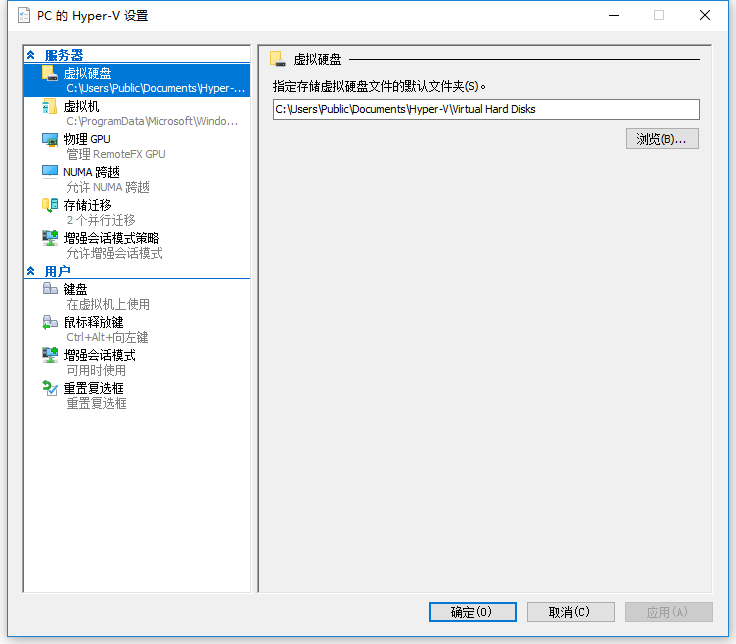
3. After deciding to delete all virtual machines, reset the drive letter to F drive. as shown in Figure 3
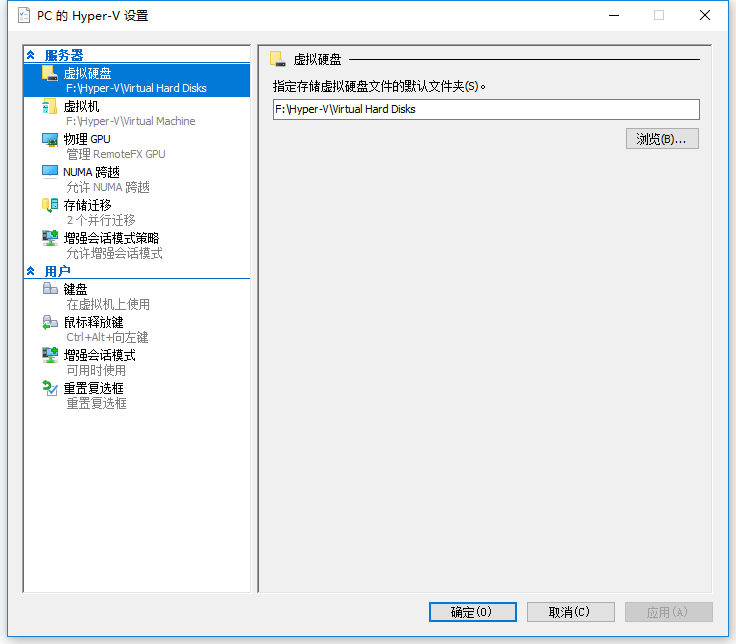
4. Based on step 2, find the corresponding directory and delete the corresponding file. C:\Users\Public\Documents\Hyper-V and C:\ProgramData\Microsoft\Windows\hyper-v (this directory has failed to delete). The remaining 20 GB is available in the C disc space. as shown in Figure 4

5. But after the above operation, after opening Hyper-V Quick Create, report that the virtual machine management service (VMMS) is not run on this computer. Suspected to be related to the deletion of C:\ProgramData\Microsoft\Windows\Hyper-V. Therefore, deletion is not recommended for this directory.
Need long-term technical maintenance or remote troubleshooting?
I am a PHP / Go backend engineer with 15+ years of experience, focused on existing system maintenance, bug fixing, performance optimization, server troubleshooting, WordPress maintenance, and small feature iterations.
If your project is facing any of the following issues, we can start with a small troubleshooting task first:
- ✅ PHP / Laravel / Yii2 legacy systems without active maintenance
- ✅ Go / Gin backend APIs that need troubleshooting or optimization
- ✅ Slow, broken, or unstable WordPress websites
- ✅ Nginx / MySQL / Redis / Linux server issues
- ✅ CDN / Cloudflare / DNS / HTTPS configuration problems
- ✅ Long-term remote technical support or part-time maintenance
More details: About Me & Collaboration
WeChat: 13980074657
Email: shuijingwanwq@gmail.com
Telegram: @shuijingwan
GitHub: https://github.com/shuijingwan
Leave a Reply