PS E:wwwrootlaravel6-modules-demo> php artisan module:make Blog
Created : E:wwwrootlaravel6-modules-demoModules/Blog/module.json
Created : E:wwwrootlaravel6-modules-demoModules/Blog/Routes/web.php
Created : E:wwwrootlaravel6-modules-demoModules/Blog/Routes/api.php
Created : E:wwwrootlaravel6-modules-demoModules/Blog/Resources/views/index.blade.php
Created : E:wwwrootlaravel6-modules-demoModules/Blog/Resources/views/layouts/master.blade.php
Created : E:wwwrootlaravel6-modules-demoModules/Blog/Config/config.php
Created : E:wwwrootlaravel6-modules-demoModules/Blog/composer.json
Created : E:wwwrootlaravel6-modules-demoModules/Blog/Resources/assets/js/app.js
Created : E:wwwrootlaravel6-modules-demoModules/Blog/Resources/assets/sass/app.scss
Created : E:wwwrootlaravel6-modules-demoModules/Blog/webpack.mix.js
Created : E:wwwrootlaravel6-modules-demoModules/Blog/package.json
Created : E:/wwwroot/laravel6-modules-demo/Modules/Blog/Database/Seeders/BlogDatabaseSeeder.php
Created : E:/wwwroot/laravel6-modules-demo/Modules/Blog/Providers/BlogServiceProvider.php
Created : E:/wwwroot/laravel6-modules-demo/Modules/Blog/Providers/RouteServiceProvider.php
Created : E:/wwwroot/laravel6-modules-demo/Modules/Blog/Http/Controllers/BlogController.php
Module [Blog] created successfully.
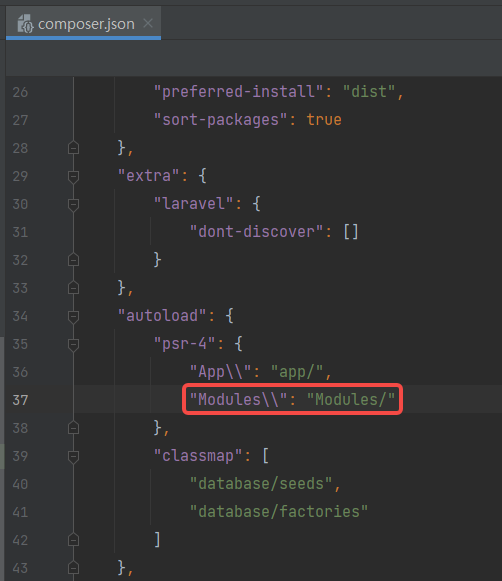
2. By default, the module class will not load automatically. You can load your modules automatically using PSR-4. Edit composer.json. as shown in Figure 1
Figure 1
4. Generate a given console command for the specified module.
PS E:wwwrootlaravel6-modules-demo> php artisan module:make-command CreatePostCommand Blog
Created : E:/wwwroot/laravel6-modules-demo/Modules/Blog/Console/CreatePostCommand.php
5. Edit CreatePostCommand.php, mainly modify the $name attribute and the handle method
<?php

namespace ModulesBlogConsole;

use IlluminateConsoleCommand;
use SymfonyComponentConsoleInputInputOption;
use SymfonyComponentConsoleInputInputArgument;

class CreatePostCommand extends Command
{
    /**
     * The console command name.
     *
     * @var string
     */
    protected $name = 'blog:create-post';

    /**
     * The console command description.
     *
     * @var string
     */
    protected $description = 'Command description.';

    /**
     * Create a new command instance.
     *
     * @return void
     */
    public function __construct()
    {
        parent::__construct();
    }

    /**
     * Execute the console command.
     *
     * @return mixed
     */
    public function handle()
    {
        file_put_contents(storage_path() . '/logs/Modules-Blog-Console-CreatePostCommand-handle-' . microtime(true) . '-' . mt_rand()  . '.txt', print_r([], true), FILE_APPEND | LOCK_EX);
    }

    /**
     * Get the console command arguments.
     *
     * @return array
     */
    protected function getArguments()
    {
        return [
            ['example', InputArgument::REQUIRED, 'An example argument.'],
        ];
    }

    /**
     * Get the console command options.
     *
     * @return array
     */
    protected function getOptions()
    {
        return [
            ['example', null, InputOption::VALUE_OPTIONAL, 'An example option.', null],
        ];
    }
}
6. Register the command to register the command using the Laravel method called Commands available in the service provider class.
    /**
     * Register the service provider.
     *
     * @return void
     */
    public function register()
    {
        $this->app->register(RouteServiceProvider::class);
        $this->commands([
            ModulesBlogConsoleCreatePostCommand::class,
        ]);
    }
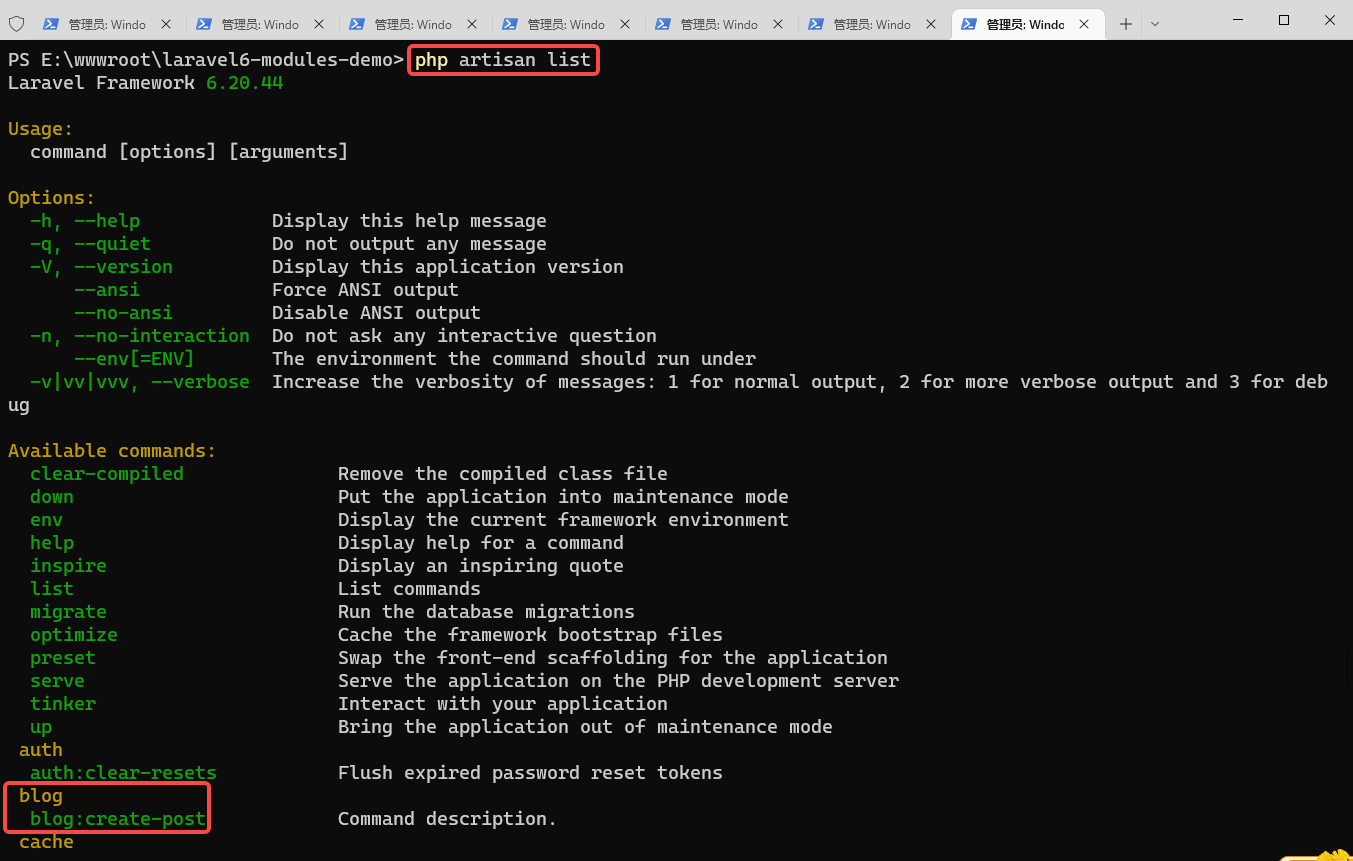
7. To view the list of all available Artisan commands, you can use the list command: confirm that blog:create-post exists. as shown in Figure 3
Figure 3
8. Execute: php artisan blog:create-post When an error is reported: not enough arguments (missing: “example”).
PS E:wwwrootlaravel6-modules-demo> php artisan blog:create-post


  Not enough arguments (missing: "example").
9. Edit CreatePostCommand.php and delete the method getArguments
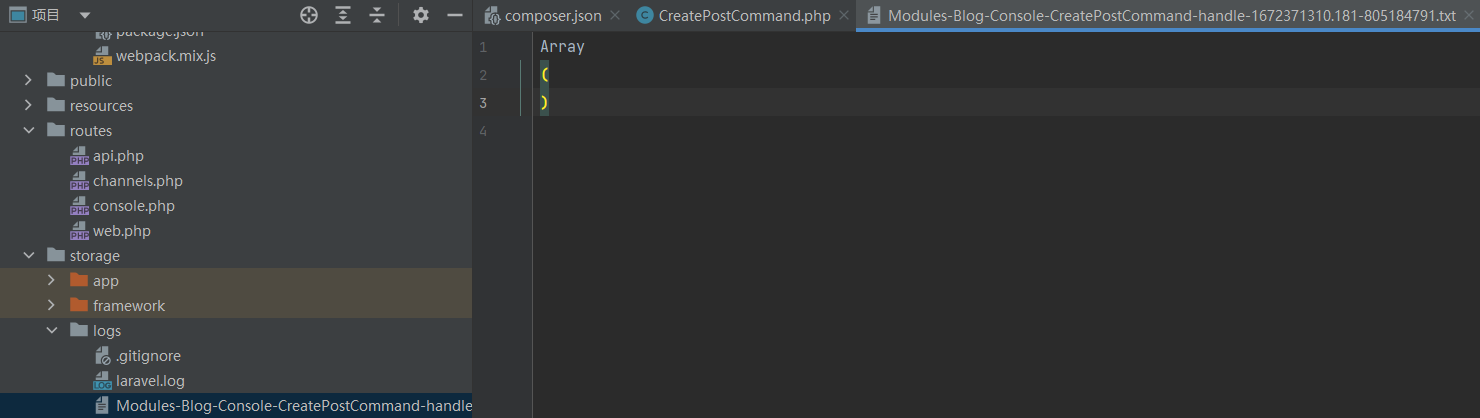
10. Execute again: php artisan blog:create-post, no more errors. To view the execution result, there is an output log file: modules-blog-console-createpostcommand-handle-1672371310.181-805184791.txt . as shown in Figure 4
Figure 4
11. Execution: php artisan schedule:run, response: no scheduled command is ready to run.
PS E:wwwrootlaravel6-modules-demo> php artisan schedule:run
No scheduled commands are ready to run.
12. Refer to task scheduling – ARTISAN command scheduling, define new scheduling tasks in the Schedule method of the AppConsoleKernel class
13. Execute the schedule:run command, the execution is successful, and the corresponding log file is successfully generated. as shown in Figure 5
Figure 5
14. However, since command blog:create-post is written in the module, the schedule for scheduling this command should also be written in the corresponding module to be a more suitable implementation.
15. Reference: https://stackoverflow.com/questions/30456737/how-to-schedule-artisan-commands-in-a-package , both options are feasible. Restore the implementation of step 12.

Leave a Reply