

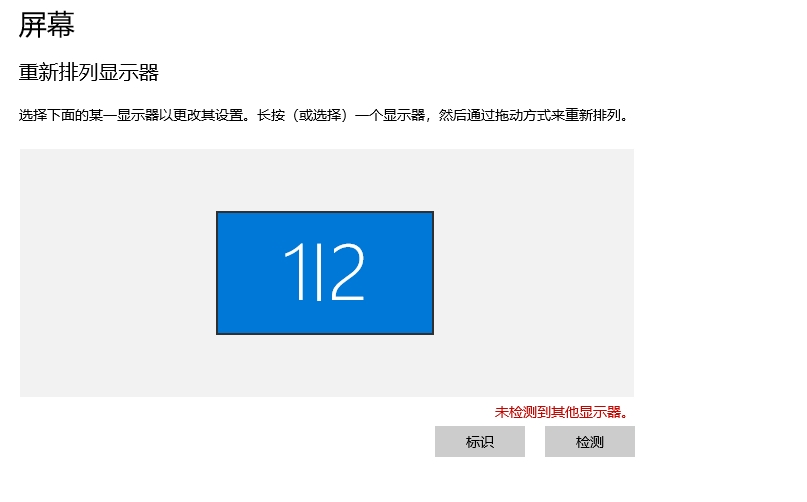
1. The HDMI to VGA converter has been connected. But now the ThinkPad T570 still doesn’t detect other monitors. as shown in Figure 1
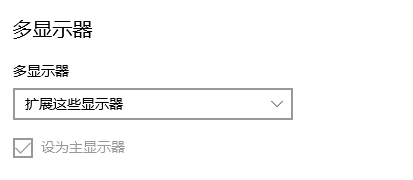
2. Finally found that you need to choose to expand these monitors in the multi-monitor, instead of copying these monitors by default. as shown in Figure 2
3. However, now Rearrange the display has 1 2 two monitors. However, only the VGA display is displayed: the detection signal line. as shown in Figure 3
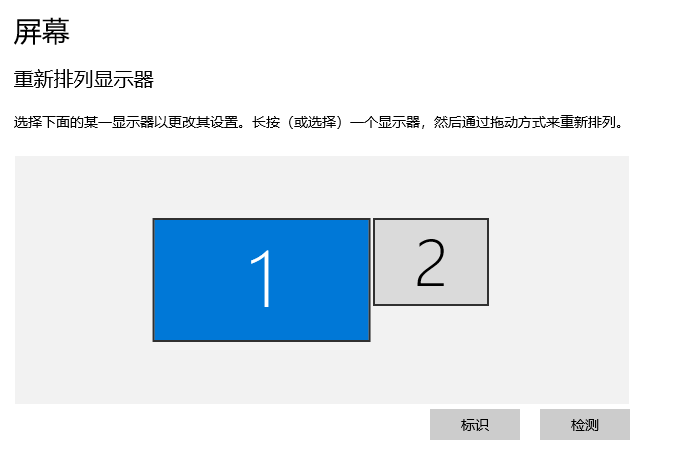
4. In the display settings, click Box 2 (your VGA screen), and find down: Multiple monitors → Extend these monitors. Then the most important: make sure that the display 2 is selected, and change the resolution to: 1024×768 (recommended). still invalid.
5. Finally found the reason, the cable of the VGA monitor is not inserted. The final effect is in line with expectations. as shown in Figure 4
6. It is generally a habit to put the 2 monitor on the left side of the 1 display (laptop). But now clicking on the lower right corner of the 1 display, it feels like I have clicked on the Win icon displayed in 2. Right-click the desktop → Display settings. Find two squares for rearranged displays (1 = notebook, 2 = VGA). Press and hold block 2, drag it to the left side of block 1, and the upper and lower edges are fully aligned (the system will make a light line prompt to align). Click Apply Save. Test: The mouse slides out from the lower right corner of the screen 1, and should only slide at the bottom of the screen 1/right, and will not jump directly to the screen 2.
Need long-term technical maintenance or remote troubleshooting?
I am a PHP / Go backend engineer with 15+ years of experience, focused on existing system maintenance, bug fixing, performance optimization, server troubleshooting, WordPress maintenance, and small feature iterations.
If your project is facing any of the following issues, we can start with a small troubleshooting task first:
- ✅ PHP / Laravel / Yii2 legacy systems without active maintenance
- ✅ Go / Gin backend APIs that need troubleshooting or optimization
- ✅ Slow, broken, or unstable WordPress websites
- ✅ Nginx / MySQL / Redis / Linux server issues
- ✅ CDN / Cloudflare / DNS / HTTPS configuration problems
- ✅ Long-term remote technical support or part-time maintenance
More details: About Me & Collaboration
WeChat: 13980074657
Email: shuijingwanwq@gmail.com
Telegram: @shuijingwan
GitHub: https://github.com/shuijingwan
Leave a Reply