

When displaying code snippets containing emoji in WordPress, it is often encountered that Emoji is converted into
🎉Or<img>label problem. This article records a complete investigation and solution process.
problem
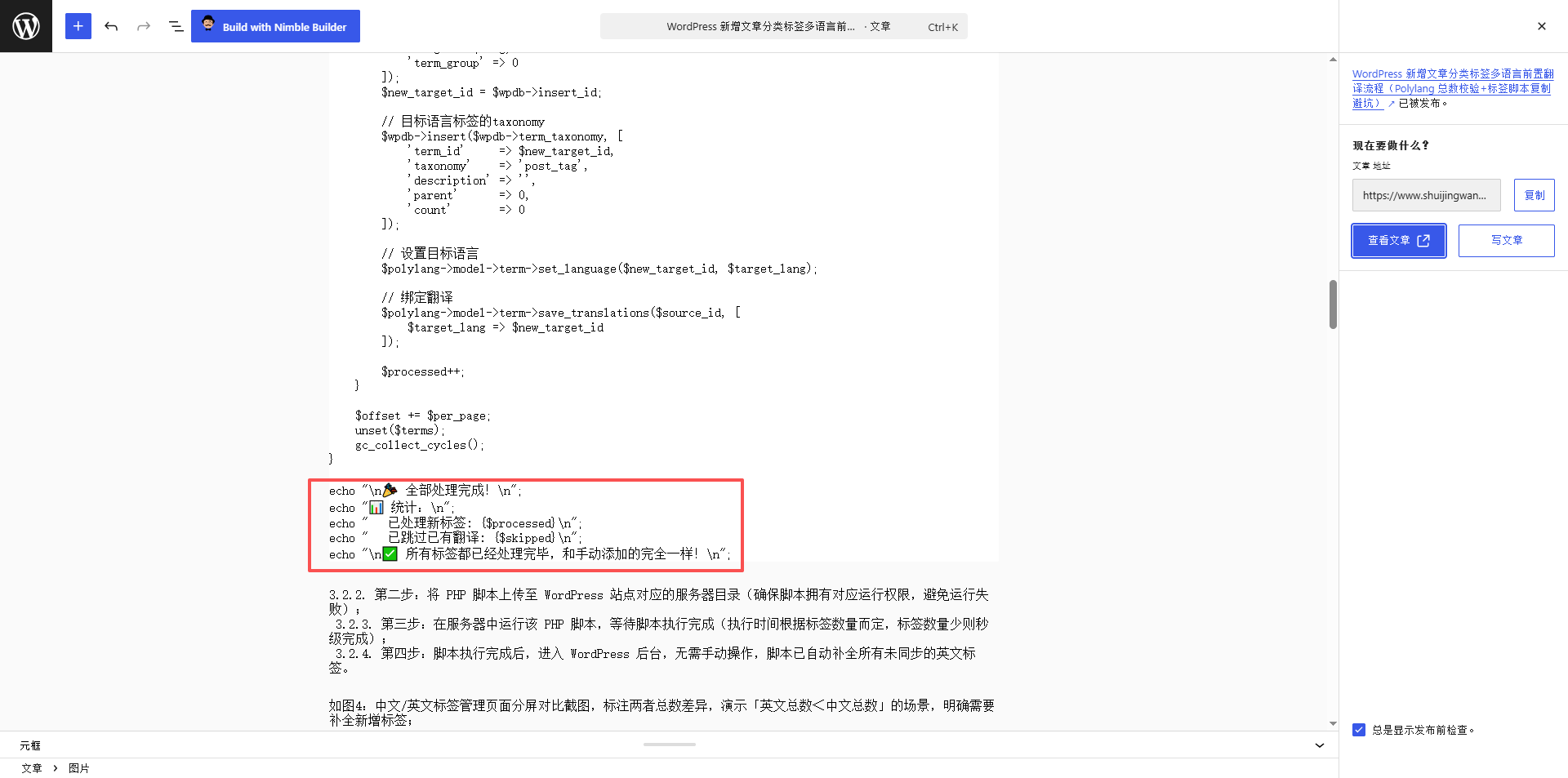
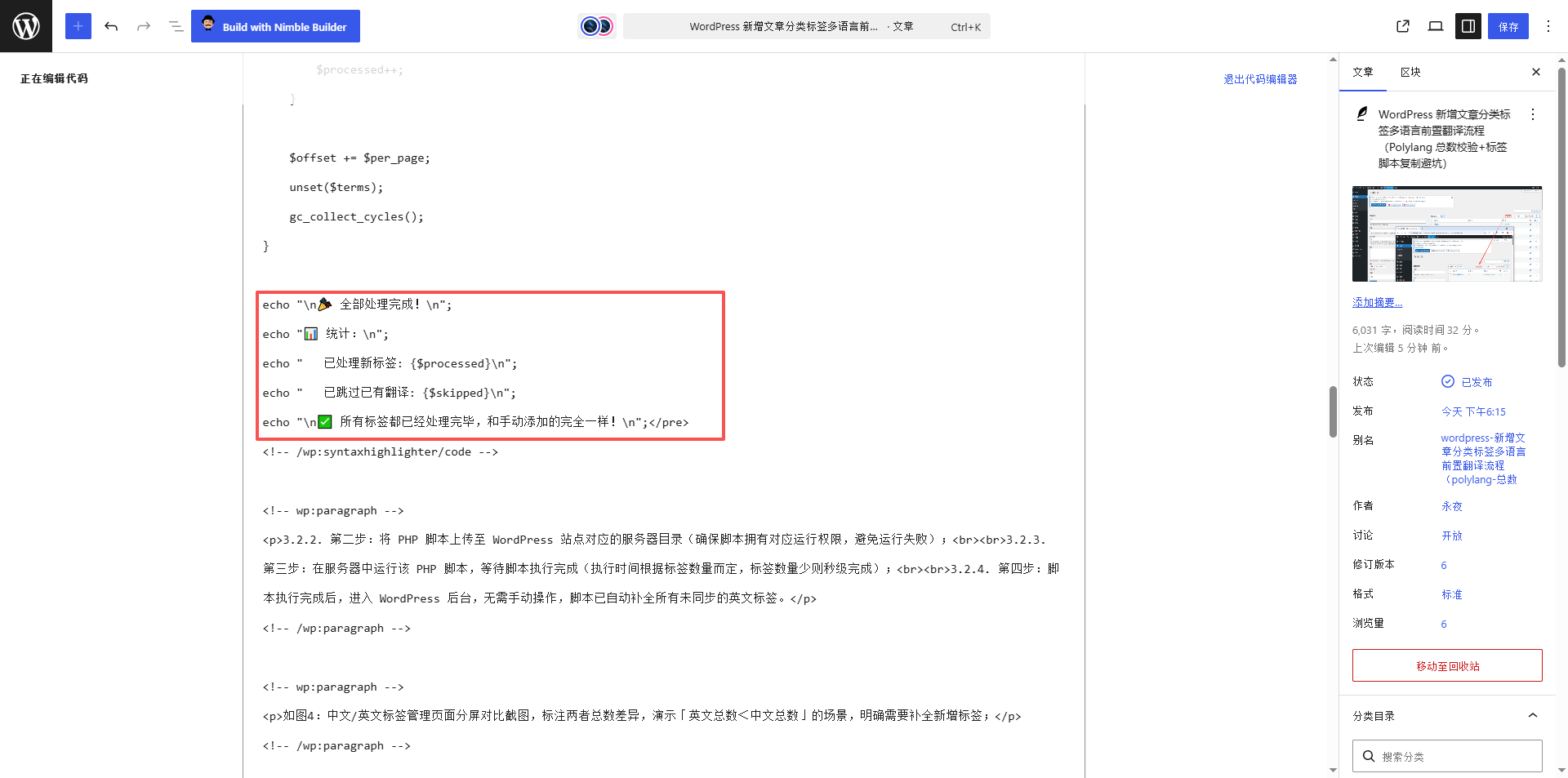
In the code block of the WordPress Gutenburg editor, write the following PHP code, as shown in Figure 1:

echo "\n🎉 全部处理完成!\n";
echo "📊 统计:\n";
echo "   已处理新标签: {$processed}\n";
echo "   已跳过已有翻译: {$skipped}\n";
echo "\n✅ 所有标签都已经处理完毕,和手动添加的完全一样!\n";
After saving the article, the front end displays:
echo "\n🎉 全部处理完成!\n";
echo "📊 统计:\n";
...
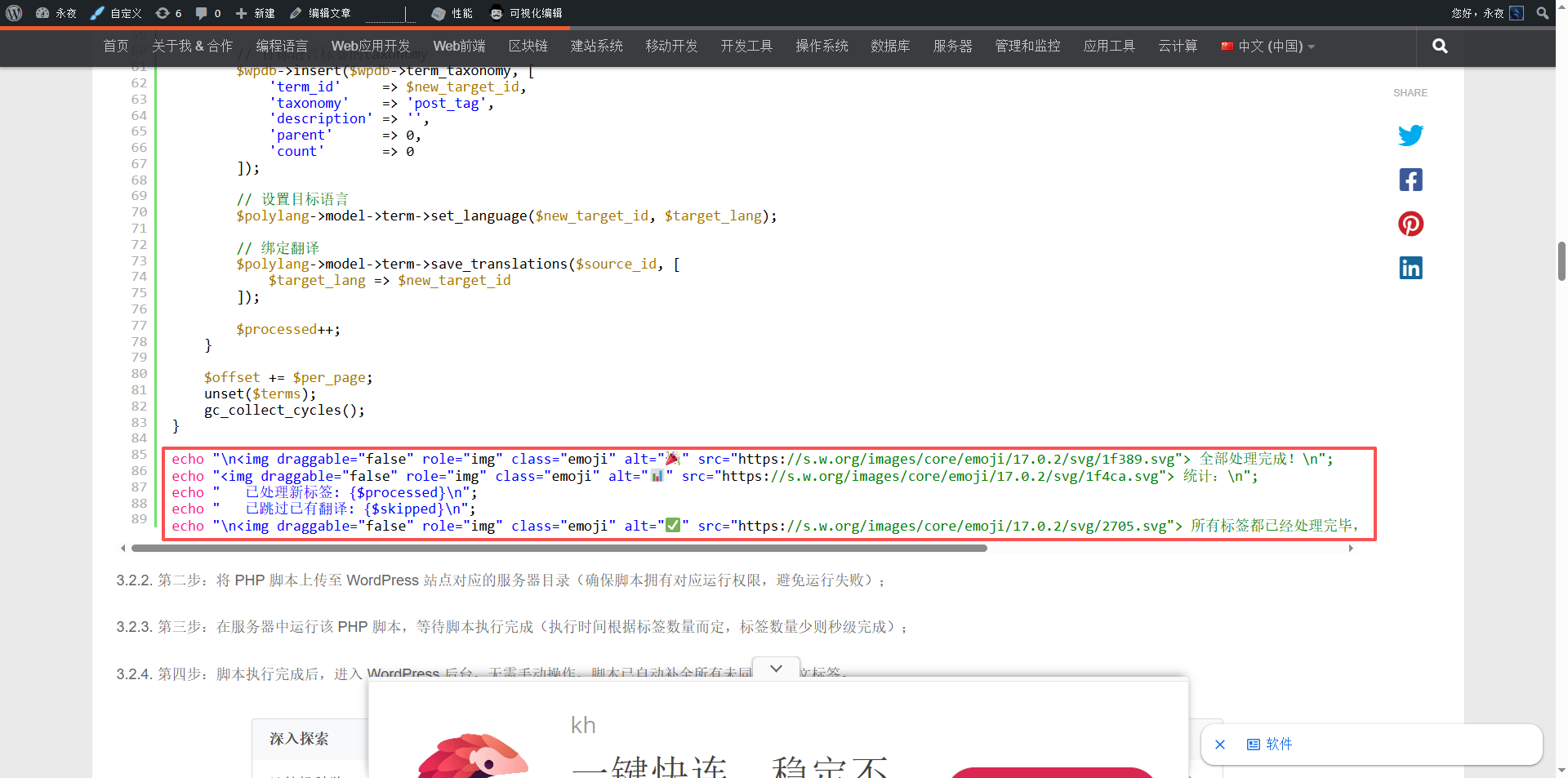
Or worse, emoji becomes a long <img> Tag:
echo "\n<img draggable="false" ... src=".../1f389.svg"> 全部处理完成!\n";
As shown in Figure 2: Emoji is displayed normally in the editor
As shown in Figure 3: Emoji becomes an HTML entity in the front-end code block
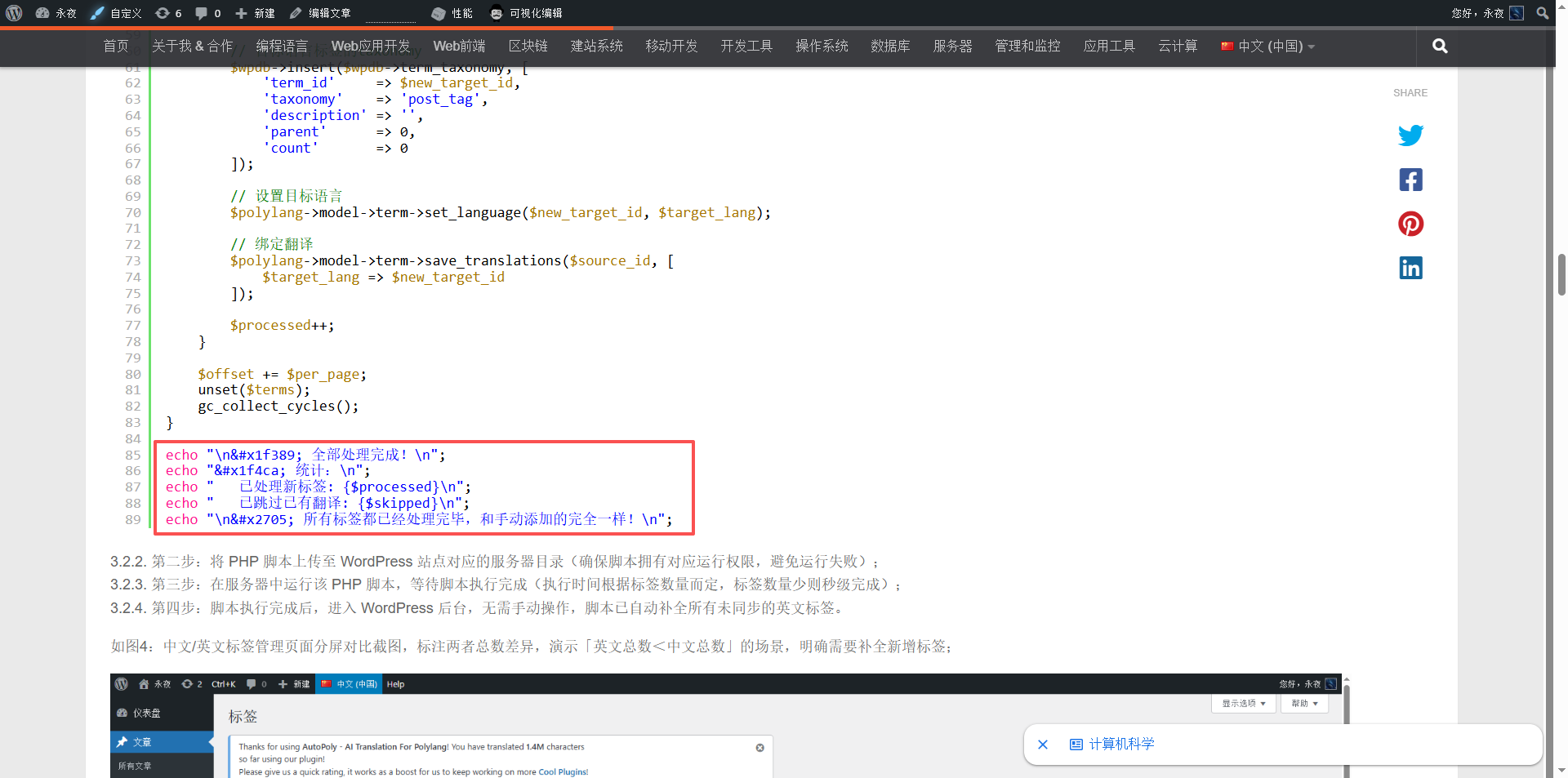
Figure 8: Emoji becomes an IMG tag in the front-end code block
Cause analysis
This problem is caused by the superposition of two independent mechanisms:
- Database character set does not support emoji
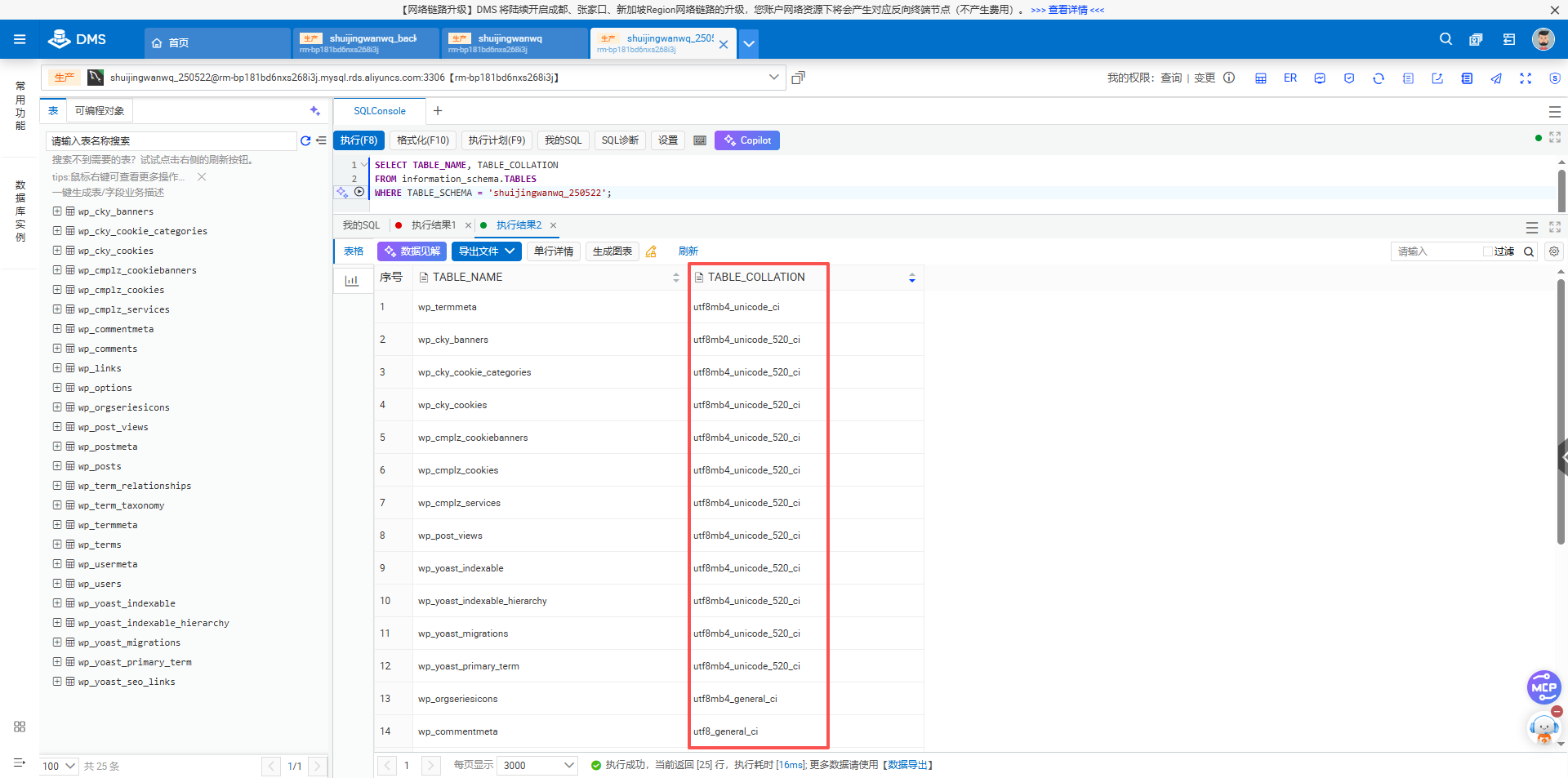
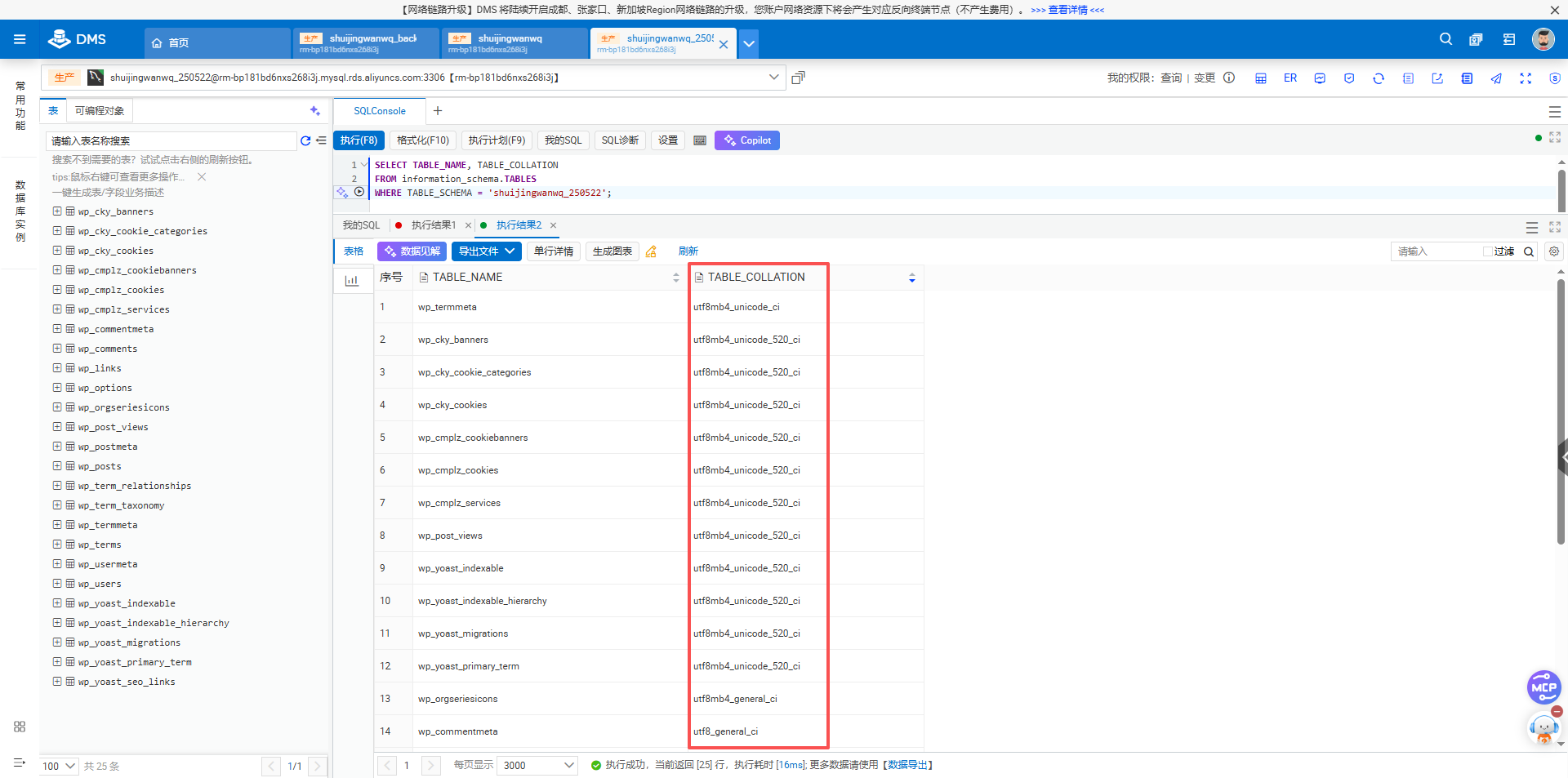
Old version of mysqlutf8The character set only supports 3-byte characters, while Emoji occupies 4 bytes. When the table or field isutf8When, WordPress automatically converts emoji into HTML entities (such as🎉→🎉), to avoid database errors. Figure 4: Query found core table character set is utf8_general_ci - Emoji image replacement for front-end output
Even if the database is supportedutf8mb4, WordPress still replaces emoji characters with SVG pictures loaded from CDN by default (viaWP_STATICIZE_EMOJIfilter), causing the code block to appear<img>label.
for use SyntaxHighlighter Evolved For users of the code highlighting plugin, these two conversions will completely destroy the original display of the code.
Solution
Step 1: Check and upgrade the database character set
Make sure your WordPress database is used utf8mb4 character set.
- Query the character set of the current table via phpMyAdmin or SQL:
   SELECT TABLE_NAME, TABLE_COLLATION
   FROM information_schema.TABLES
   WHERE TABLE_SCHEMA = '你的数据库名';
Figure 4: Example of query results (some tables are utf8_general_ci)
- If
wp_posts,wp_options,wp_termsEquivalent core table displayutf8_general_ci, you need to convert:
-- SELECT TABLE_NAME, TABLE_COLLATION FROM information_schema.TABLES WHERE TABLE_SCHEMA = '你的数据库名'; 的查询结果如下:
INSERT INTO `TABLES` (`TABLE_NAME`,`TABLE_COLLATION`) VALUES ('wp_cky_banners','utf8mb4_unicode_520_ci');
INSERT INTO `TABLES` (`TABLE_NAME`,`TABLE_COLLATION`) VALUES ('wp_cky_cookie_categories','utf8mb4_unicode_520_ci');
INSERT INTO `TABLES` (`TABLE_NAME`,`TABLE_COLLATION`) VALUES ('wp_cky_cookies','utf8mb4_unicode_520_ci');
INSERT INTO `TABLES` (`TABLE_NAME`,`TABLE_COLLATION`) VALUES ('wp_cmplz_cookiebanners','utf8mb4_unicode_520_ci');
INSERT INTO `TABLES` (`TABLE_NAME`,`TABLE_COLLATION`) VALUES ('wp_cmplz_cookies','utf8mb4_unicode_520_ci');
INSERT INTO `TABLES` (`TABLE_NAME`,`TABLE_COLLATION`) VALUES ('wp_cmplz_services','utf8mb4_unicode_520_ci');
INSERT INTO `TABLES` (`TABLE_NAME`,`TABLE_COLLATION`) VALUES ('wp_commentmeta','utf8_general_ci');
INSERT INTO `TABLES` (`TABLE_NAME`,`TABLE_COLLATION`) VALUES ('wp_comments','utf8_general_ci');
INSERT INTO `TABLES` (`TABLE_NAME`,`TABLE_COLLATION`) VALUES ('wp_links','utf8_general_ci');
INSERT INTO `TABLES` (`TABLE_NAME`,`TABLE_COLLATION`) VALUES ('wp_options','utf8_general_ci');
INSERT INTO `TABLES` (`TABLE_NAME`,`TABLE_COLLATION`) VALUES ('wp_orgseriesicons','utf8mb4_general_ci');
INSERT INTO `TABLES` (`TABLE_NAME`,`TABLE_COLLATION`) VALUES ('wp_post_views','utf8mb4_unicode_520_ci');
INSERT INTO `TABLES` (`TABLE_NAME`,`TABLE_COLLATION`) VALUES ('wp_postmeta','utf8_general_ci');
INSERT INTO `TABLES` (`TABLE_NAME`,`TABLE_COLLATION`) VALUES ('wp_posts','utf8_general_ci');
INSERT INTO `TABLES` (`TABLE_NAME`,`TABLE_COLLATION`) VALUES ('wp_term_relationships','utf8_general_ci');
INSERT INTO `TABLES` (`TABLE_NAME`,`TABLE_COLLATION`) VALUES ('wp_term_taxonomy','utf8_general_ci');
INSERT INTO `TABLES` (`TABLE_NAME`,`TABLE_COLLATION`) VALUES ('wp_termmeta','utf8mb4_unicode_ci');
INSERT INTO `TABLES` (`TABLE_NAME`,`TABLE_COLLATION`) VALUES ('wp_terms','utf8_general_ci');
INSERT INTO `TABLES` (`TABLE_NAME`,`TABLE_COLLATION`) VALUES ('wp_usermeta','utf8_general_ci');
INSERT INTO `TABLES` (`TABLE_NAME`,`TABLE_COLLATION`) VALUES ('wp_users','utf8_general_ci');
INSERT INTO `TABLES` (`TABLE_NAME`,`TABLE_COLLATION`) VALUES ('wp_yoast_indexable','utf8mb4_unicode_520_ci');
INSERT INTO `TABLES` (`TABLE_NAME`,`TABLE_COLLATION`) VALUES ('wp_yoast_indexable_hierarchy','utf8mb4_unicode_520_ci');
INSERT INTO `TABLES` (`TABLE_NAME`,`TABLE_COLLATION`) VALUES ('wp_yoast_migrations','utf8mb4_unicode_520_ci');
INSERT INTO `TABLES` (`TABLE_NAME`,`TABLE_COLLATION`) VALUES ('wp_yoast_primary_term','utf8mb4_unicode_520_ci');
INSERT INTO `TABLES` (`TABLE_NAME`,`TABLE_COLLATION`) VALUES ('wp_yoast_seo_links','utf8_general_ci');


-- 需要转换的 SQL 如下:

-- 文章相关表
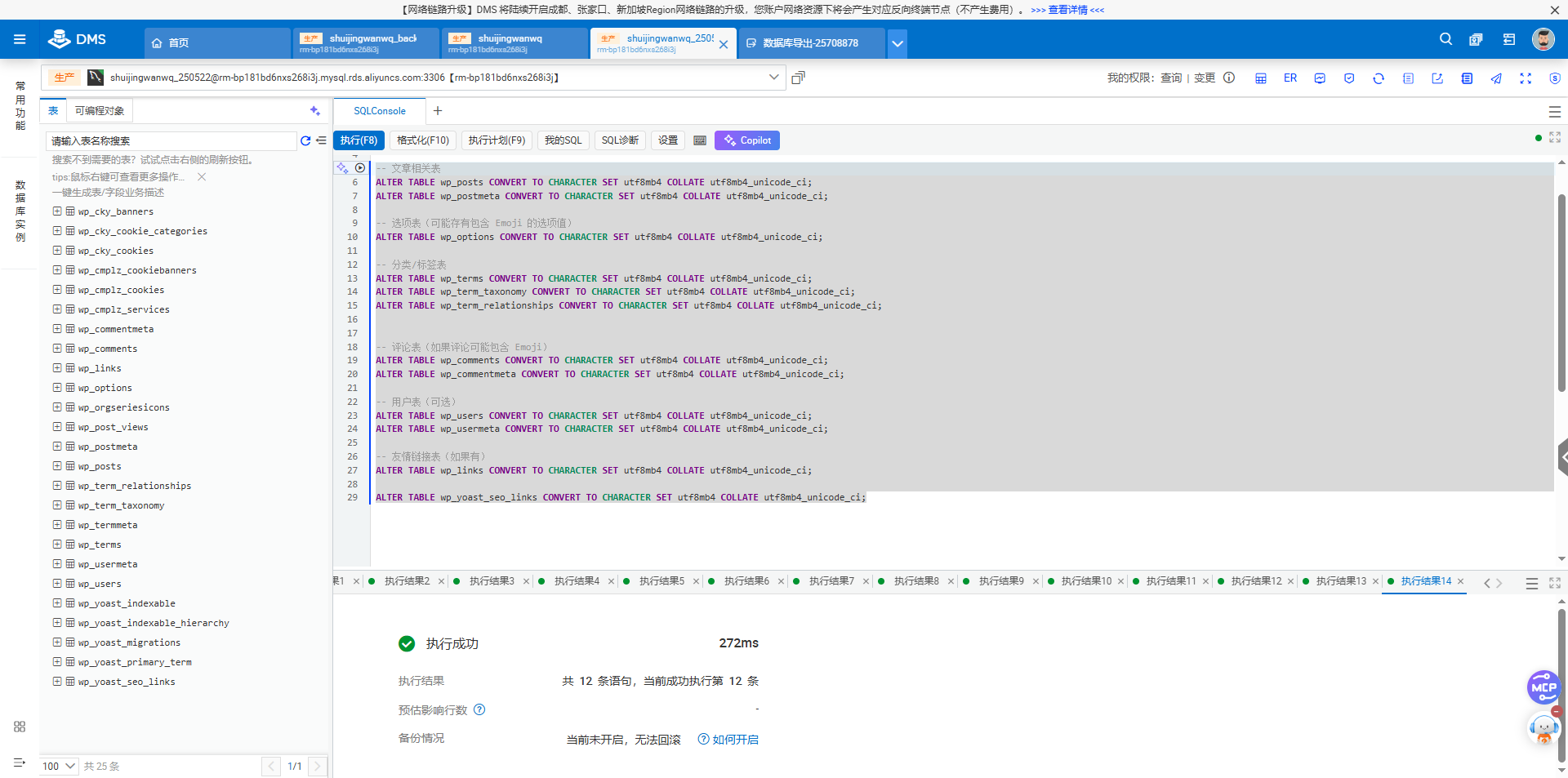
ALTER TABLE wp_posts CONVERT TO CHARACTER SET utf8mb4 COLLATE utf8mb4_unicode_ci;
ALTER TABLE wp_postmeta CONVERT TO CHARACTER SET utf8mb4 COLLATE utf8mb4_unicode_ci;

-- 选项表(可能存有包含 Emoji 的选项值)
ALTER TABLE wp_options CONVERT TO CHARACTER SET utf8mb4 COLLATE utf8mb4_unicode_ci;

-- 分类/标签表
ALTER TABLE wp_terms CONVERT TO CHARACTER SET utf8mb4 COLLATE utf8mb4_unicode_ci;
ALTER TABLE wp_term_taxonomy CONVERT TO CHARACTER SET utf8mb4 COLLATE utf8mb4_unicode_ci;
ALTER TABLE wp_term_relationships CONVERT TO CHARACTER SET utf8mb4 COLLATE utf8mb4_unicode_ci;


-- 评论表(如果评论可能包含 Emoji)
ALTER TABLE wp_comments CONVERT TO CHARACTER SET utf8mb4 COLLATE utf8mb4_unicode_ci;
ALTER TABLE wp_commentmeta CONVERT TO CHARACTER SET utf8mb4 COLLATE utf8mb4_unicode_ci;

-- 用户表(可选)
ALTER TABLE wp_users CONVERT TO CHARACTER SET utf8mb4 COLLATE utf8mb4_unicode_ci;
ALTER TABLE wp_usermeta CONVERT TO CHARACTER SET utf8mb4 COLLATE utf8mb4_unicode_ci;

-- 友情链接表(如果有)
ALTER TABLE wp_links CONVERT TO CHARACTER SET utf8mb4 COLLATE utf8mb4_unicode_ci;

ALTER TABLE wp_yoast_seo_links CONVERT TO CHARACTER SET utf8mb4 COLLATE utf8mb4_unicode_ci;
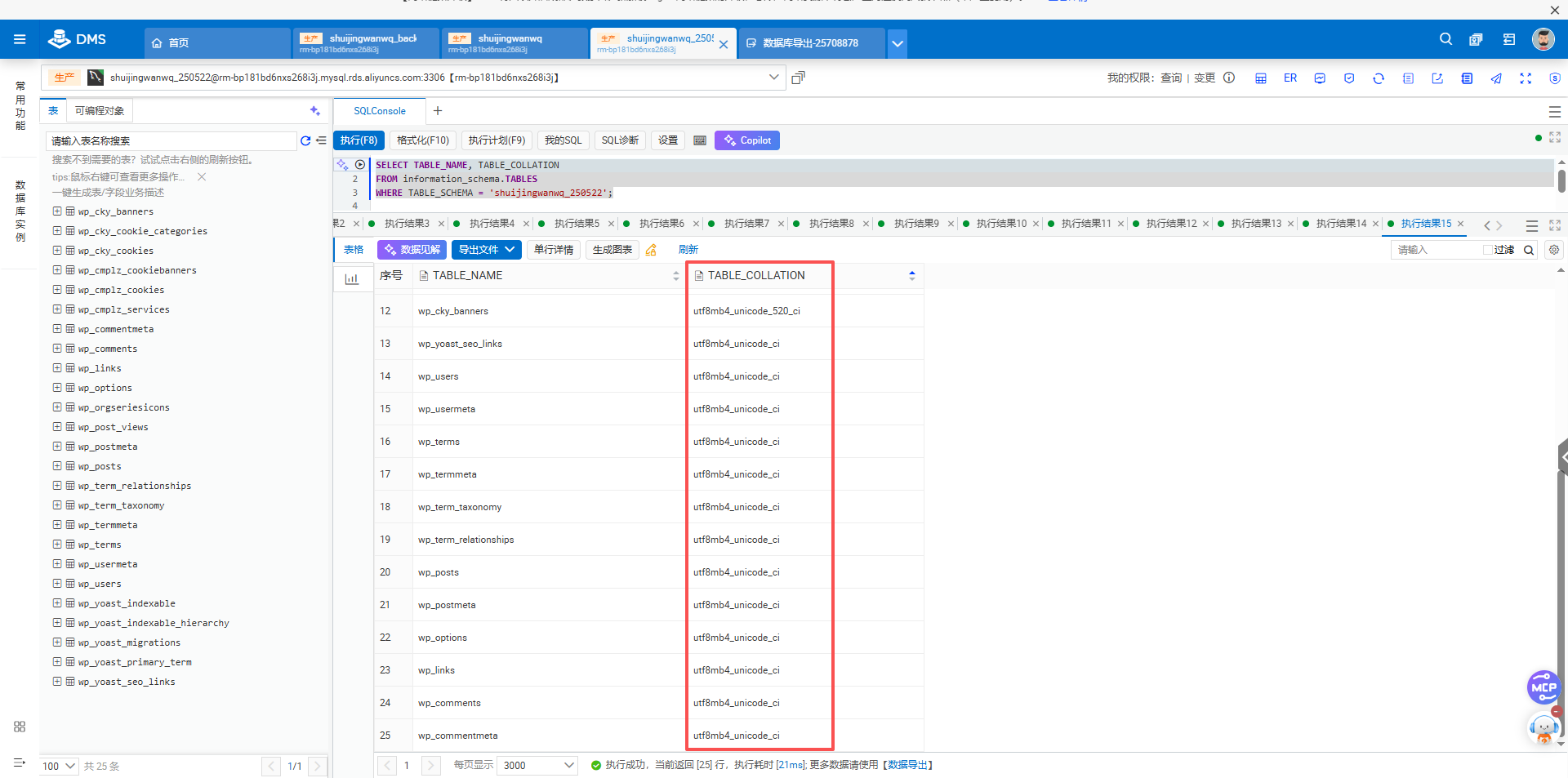
Figure 5: Perform an ALTER TABLE conversion
- In
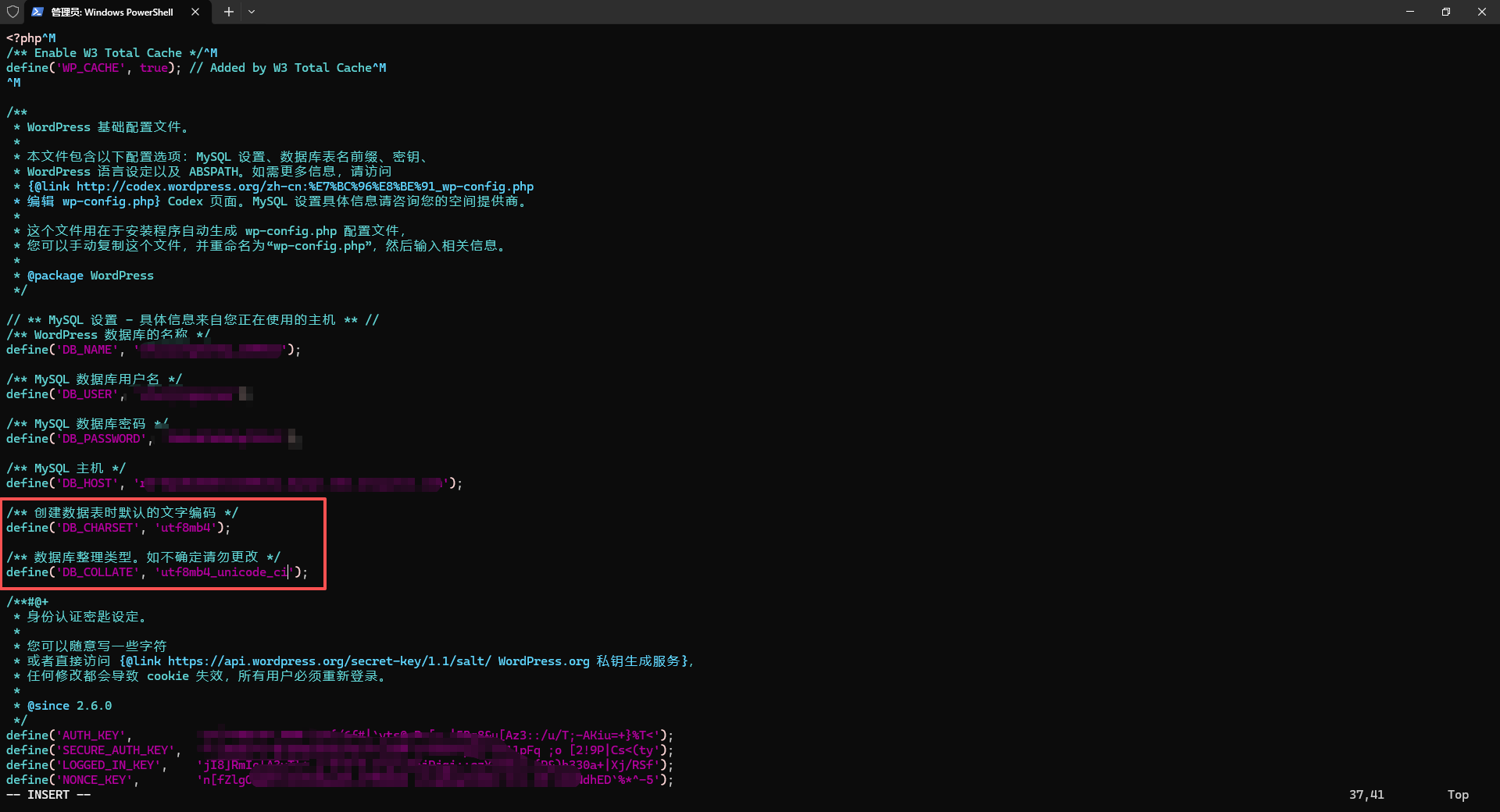
wp-config.phpThe specified character set is mandatory, as shown in Figure 7:
   define('DB_CHARSET', 'utf8mb4');
   define('DB_COLLATE', 'utf8mb4_unicode_ci');
⚠️ Note: Be sure to back up the database before operation!
Step 2: Disable front-end emoji image replacement
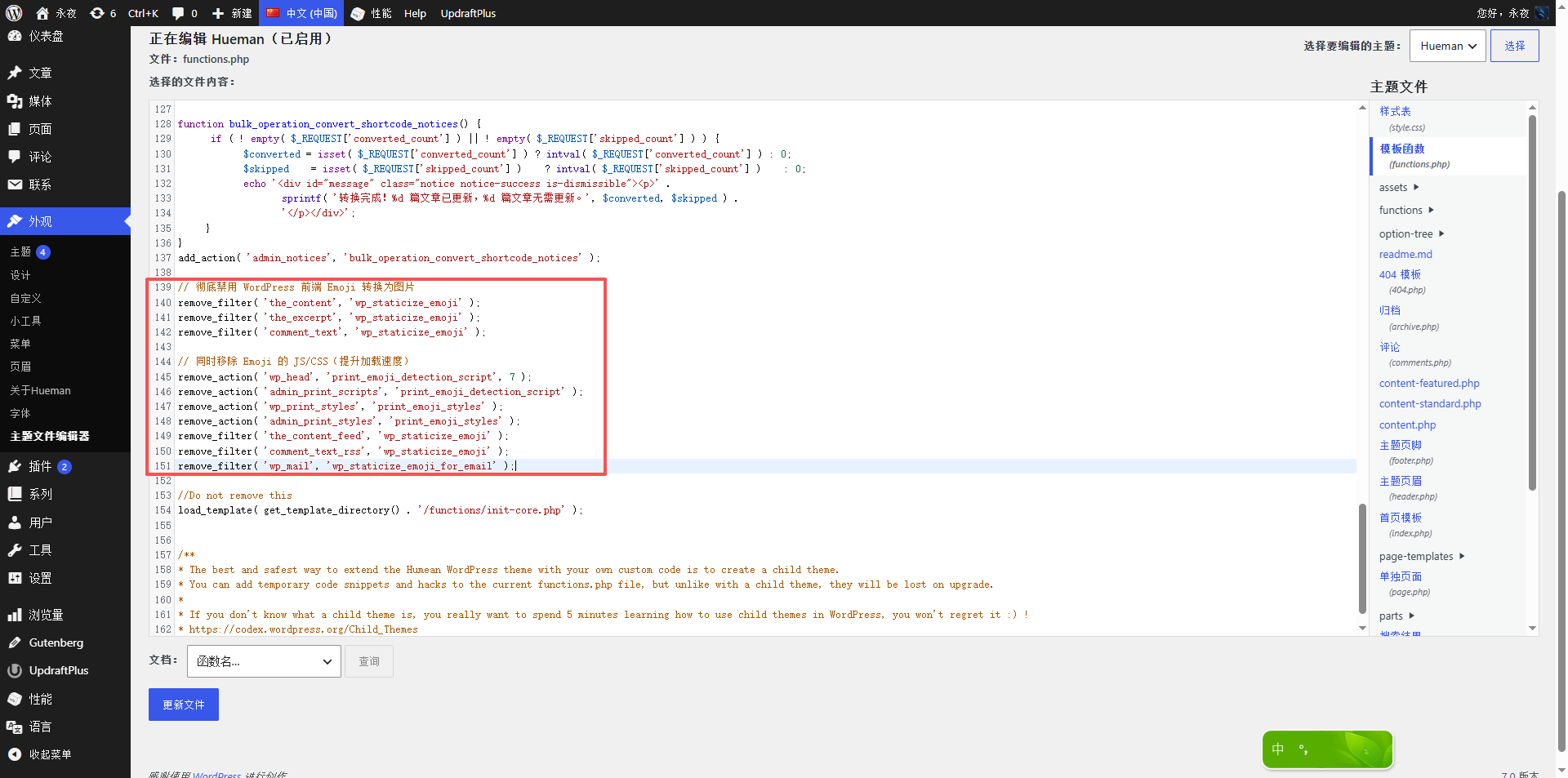
in the theme functions.php Add the following code in:
// 彻底禁用 WordPress 前端 Emoji 转换为图片
remove_filter( 'the_content', 'wp_staticize_emoji' );
remove_filter( 'the_excerpt', 'wp_staticize_emoji' );
remove_filter( 'comment_text', 'wp_staticize_emoji' );

// 同时移除 Emoji 的 JS/CSS(提升加载速度)
remove_action( 'wp_head', 'print_emoji_detection_script', 7 );
remove_action( 'admin_print_scripts', 'print_emoji_detection_script' );
remove_action( 'wp_print_styles', 'print_emoji_styles' );
remove_action( 'admin_print_styles', 'print_emoji_styles' );
remove_filter( 'the_content_feed', 'wp_staticize_emoji' );
remove_filter( 'comment_text_rss', 'wp_staticize_emoji' );
remove_filter( 'wp_mail', 'wp_staticize_emoji_for_email' );
As shown in Figure 10: Add a disable code in functions.php
Step 3: Clean up the exceptions in existing articles
- New article: After the above two steps of configuration, you can directly use emoji to save it to display normally.
- Old article: If it has been converted to an HTML entity or
<img>tabs, which need to be manually re-edited, putting entities (such as🎉) replace back to the original emoji character (🎉) and update the article.
Figure 9: Replace the entity with Emoji in the Gutenberg editor
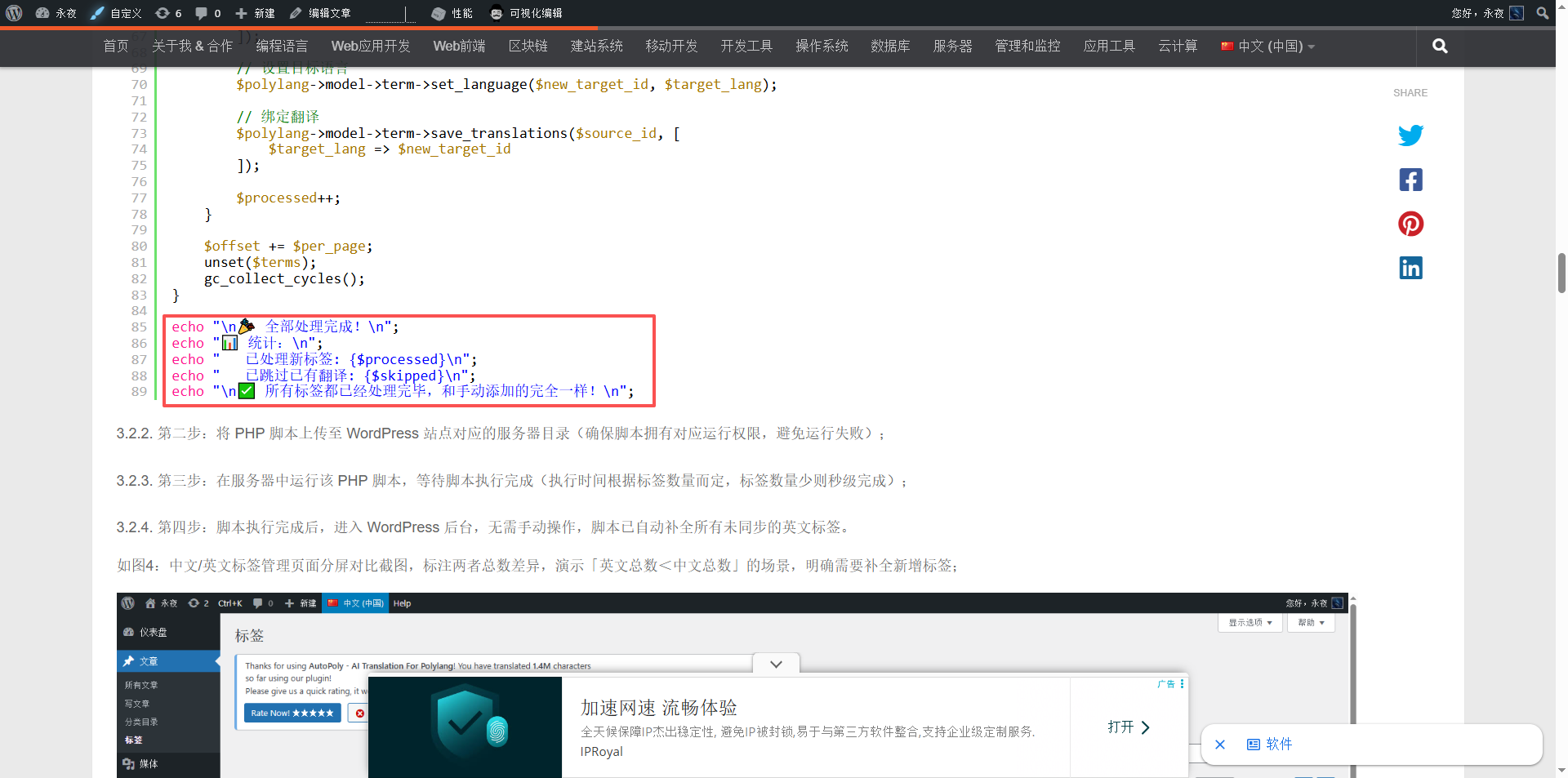
As shown in Figure 11: The final front-end display effect (emoji is displayed as it is)
Summary
| Phenomenon | Reason | Solution |
|---|---|---|
After saving the emoji becomes &#x...; | Database character set is not utf8mb4 | Upgrade table to utf8mb4 |
front-end display <img> Label | WP_STATICIZE_EMOJI Filter | Remove this filter in functions.php |
Through the above three steps, your WordPress site can perfectly display the code snippet containing emoji in the code block, no longer disturbed by any conversion. If using SyntaxHighlighter Evolved Or other code highlighting plug-ins, the same applies to this scheme.
This article is based on the real problem troubleshooting records, and all operations have been verified in the WordPress 7.x + php 8.x environment.
Need long-term technical maintenance or remote troubleshooting?
I am a PHP / Go backend engineer with 15+ years of experience, focused on existing system maintenance, bug fixing, performance optimization, server troubleshooting, WordPress maintenance, and small feature iterations.
If your project is facing any of the following issues, we can start with a small troubleshooting task first:
- ✅ PHP / Laravel / Yii2 legacy systems without active maintenance
- ✅ Go / Gin backend APIs that need troubleshooting or optimization
- ✅ Slow, broken, or unstable WordPress websites
- ✅ Nginx / MySQL / Redis / Linux server issues
- ✅ CDN / Cloudflare / DNS / HTTPS configuration problems
- ✅ Long-term remote technical support or part-time maintenance
More details: About Me & Collaboration
WeChat: 13980074657
Email: shuijingwanwq@gmail.com
Telegram: @shuijingwan
GitHub: https://github.com/shuijingwan
Leave a Reply