Solve the problems encountered in the process of configuring awstats under CentOS 6.2 64 bit!
According to two URLs:
http://www.centospub.com/make/awstats.html
http://www.centos.bz/2012/02/analyze-nginx-log-with-awstats/
To configure, the version is the selected awstats-7.2.tar.gz, the latest version. You need to go over the wall to download.
It is configured on Alibaba Cloud CentOS 6.2 64-bit.
After the configuration is complete, open the URLhttp://*.*.*.*/awstats/awstats.pl?config=www.***.com,

Prompt 403, no permission to access.
Searching on the Internet said that the permission of /usr/local/awstats/ was set to 755 or even 777, I set it, and found that it still cannot be opened. Later I found a post that will
<directory “/usr/local/awstats/wwwroot”>
Options includes execcgi followsymlinks
AllowOverride None
order allow, deny
Allow from all
require all granted (mainly added this line)
</directory>
Finally, the 403 error is not prompted, but when I open the URL, it shows that the source code is displayed, so I have to continue the analysis:
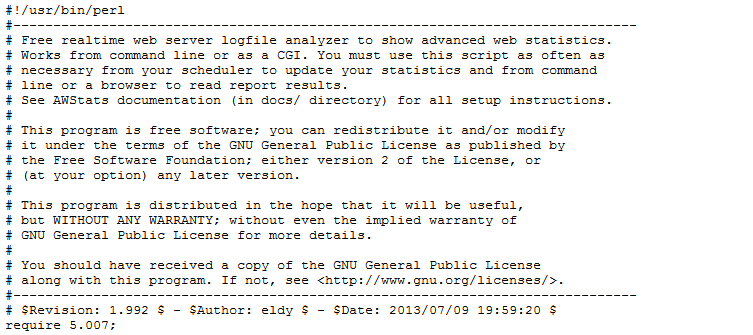
awstats.pl displays the source code, not the statistical table.
There is a line in httpd.conf:
#loadmodule cgid_module modules/mod_cgid.so, I modified it to
LoadModule CGID_Module modules/mod_cgid.so, but the problem of apache cannot be started, and finally checked in the modules directory , the reason is that there is no such mod_cgid.so file, but I found that there is another file mod_cgi.so, so I tried it and inserted a line:
loadmodule cgi_module modules/mod_cgi.so, it can be opened, but the display is blank, the prompt is not updated, alas, there are some small depressing ones.
Continue to analyze, and finally I clear all the contents of logs/access_log and other log files, because after executing
When /root/awstats.sh, it prompts that there is a problem with the access_log format, and there seems to be a prompt for permissions,
After clearing for a period of time, when there is content in the log file such as aaess_log, rerun this command, and finallyhttp://*.*.*.*/awstats/awstats.pl?config=www.***.com有内容了的。唉,基本配置完毕了,还需要配置一下通过用户名及密码访问的,这样感觉更安全一些的。
Configuration in httpd.conf
#
# directives to allow use of awstats as a CGI
#
alias /awstatcclasses “/usr/local/awstats/wwwroot/classes/”
alias /awstatscss “/usr/local/awstats/wwwroot/css/”
alias /awstatsicons “/usr/local/awstats/wwwroot/icon/”
scriptAlias /awstats/ “/usr/local/awstats/wwwroot/cgi-bin/”
#
# this is to permit url access to scripts/files in awstats directory.
#
<directory “/usr/local/awstats/wwwroot”>
Options includes execcgi followsymlinks
AllowOverride None
order allow, deny
Allow from all
AuthType Basic
AuthName “Awstats Access”
AuthUserFile /usr/local/awstats/htpasswd
require valid-user
</directory>
/usr/local/apache/bin/htpasswd -c /usr/local/awstats/htpasswd Username (set the username to access awstats for you), and then enter the password twice, and it’s ok now. It took a day and a half to finally configure the configuration, hehe!