The detailed process of upgrading PHP-5.3.5 to PHP-5.4.42 under Windows8.1 64 bit!
1. Since it is ready to use the Yii 2.0 framework, which requires PHP 5.4 or later, it is decided to upgrade the PHP version;
2. The current environment is: Windows 8.1 64, Apache 2.2.25 (http://www.apache.org/)、MySQL-5.5.28、PHP-5.3.5、phpMyAdmin-4.2.9.1;

Screenshot of the environment before the upgrade
3. Prepare to upgrade to: Windows 8.1 64, Apache 2.4.12 (http://www.apachelounge.com/)、MySQL-5.5.28、PHP-5.4.42、phpMyAdmin-4.2.9.1,主要是将PHP升级为5.4.42,Apache从VC6编辑的转换为VC9编译的,且升级为2.4.12;
4. Open the URL:http://windows.php.net/download/#php-5.4-ts-VC9-x86, download php-5.4.42-win32-vc9-x86.zip;
5. Read the prompt document on the left:
which version do I choose?
iis
If you are using php as fastcgi with iis you should use the non-thread safe (nts) versions of php.
apache
Please use the Apache builds provided by Apache Lounge. They provide VC9, VC11 and VC14 builds of Apache for x86 and x64. We use their binaries to build the apache sapis.
If you are using php as module with apache builds from apache.org (not recommended) you need to use the older VC6 versions of php compiled with the legacy visual studio 6 compiler. Do not use VC9+ versions of php with the Apache.org Binaries.
With apache you have to use the thread safe (ts) versions of php.
VC9, VC11 & VC14
More relationships of PHP are built with VC9, VC11 or VC14 (Visual Studio 2008, 2012 or 2015 compiler Respectively) and include improvements in performance and stability.
– The VC9 builds require you to have the Visual C++ Redistributable for Visual Studio 2008 SP1 x86 or x64 installed
– The VC11 builds require to have the Visual C++ Redistributable for Visual Studio 2012 x86 or x64 Installed
– The VC14 builds require to have the Visual C++ Redistributable for Visual Studio 2015 x86 or x64 Installed
Its general meaning translates to:
Which version should I choose?
iis
If you are using PHP as FastCGI to use IIS, you should use PHP with a non-thread-safe (NTS) version.
apache
Please use Apache provided by Apache Lounge. They provide Apache established by VC9, VC11 and VC14, which can be used for x86 and x64. We use our own binary code to build Apache’s sapis.
If you are using php to build from apache.org (not recommended) with apache modules, you need to use php older versions of VC6 compiled with the traditional Visual Studio 6 compiler. Do not use VC9+ versions of php with apache.org binary.
Note: Apache1 and Apache2 for Windows are compiled using VC6, so if you want to use the official APACH under Windows E+PHP must use the VC6 version to be compatible with the official Apache, but cannot use the VC9 version to compile PHP, because there is incompatibility between them. Now php Versions above 5.4 do not provide VC6, there are two solutions, 1: compile a VC6 version of 5.4 (because it is too old, php official has given up , not recommended), 2: Let Apache compile a VC9 version, which is essentially to make Apache compatible with PHP and Apache Lounge provides versions above VC9;
6. If you just upgrade to php to 5.4.42, you can find that it can also be used. The screenshot is as follows:

For the time being, only the PHP version is upgraded, and Apache is still the official software;
According to the official hint of php, although there is no problem running the php program, there is still a compatibility problem in theory, so I decided to upgrade apache to VC9 version;
7. Uninstall Apache 2.2.25 (http://www.apache.org/)The screenshot is as follows:

Uninstall Apache 2.2.25 (http://www.apache.org/)
8. Install Apache 2.4.12 (http://www.apachelounge.com/),具体下载地址为:http://www.apachelounge.com/download/additional/:
Copy D:\software\httpd-2.4.12-win32-vc9\apache24 to c:\apache24
9. Start apache in the DOS window:

Start Apache in the DOS window
10. The process of solving the AH00112 error is as follows:

11. Solve the success of AH00112 error;

Solve the AH00112 error success
12. Solve the AH00558 error:

Solve the AH00558 error
13. Solution (OS 10048), the reason is that the same command is run multiple times, and the apache has been enabled, so it is recommended to close the corresponding process before debugging errors;

(OS 10048) processing

End the apache process
14. Install Apache as a service:

Install Apache as a service
15. Report an error, the permissions are insufficient, it should be run as administrator, and run cmd.exe (command prompt (admin) (A)) as an administrator:

Command Prompt (Admin) (A), install Apache as a service
16,Double clickapachemonitor.exeor put it inYoursin the startup folder.

Put Apache in the notification area
17. Screenshots of phpinfo running
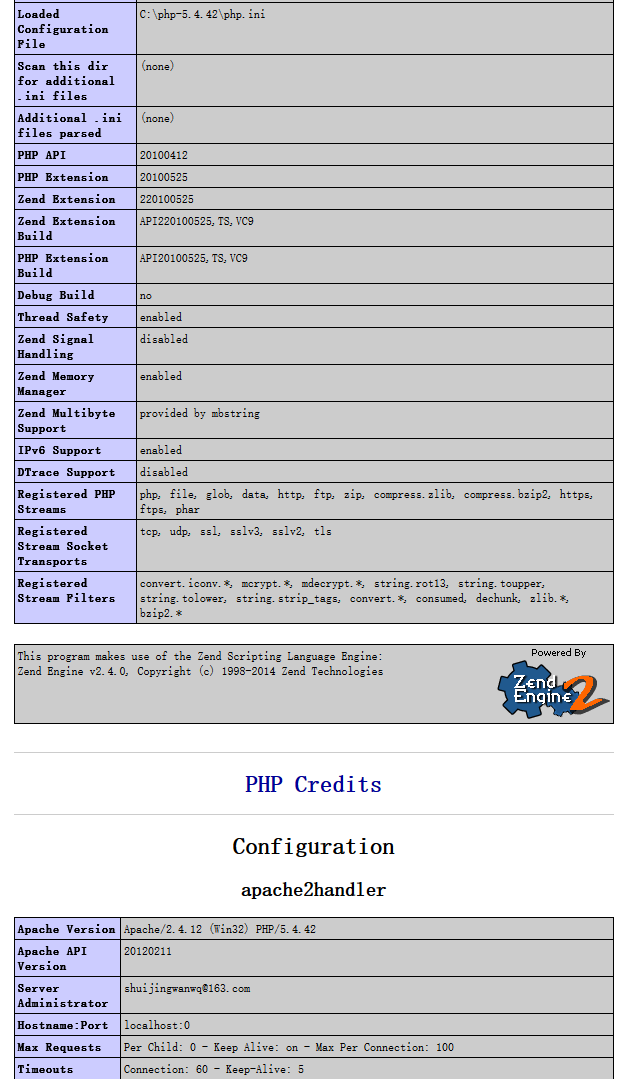
Screenshot of phpinfo running
![在 Laravel 6 中报错:Target [Interface] is not instantiable while building [Resolver]](https://www.shuijingwanwq.com/wp-content/uploads/2022/04/1-7-520x245.png)