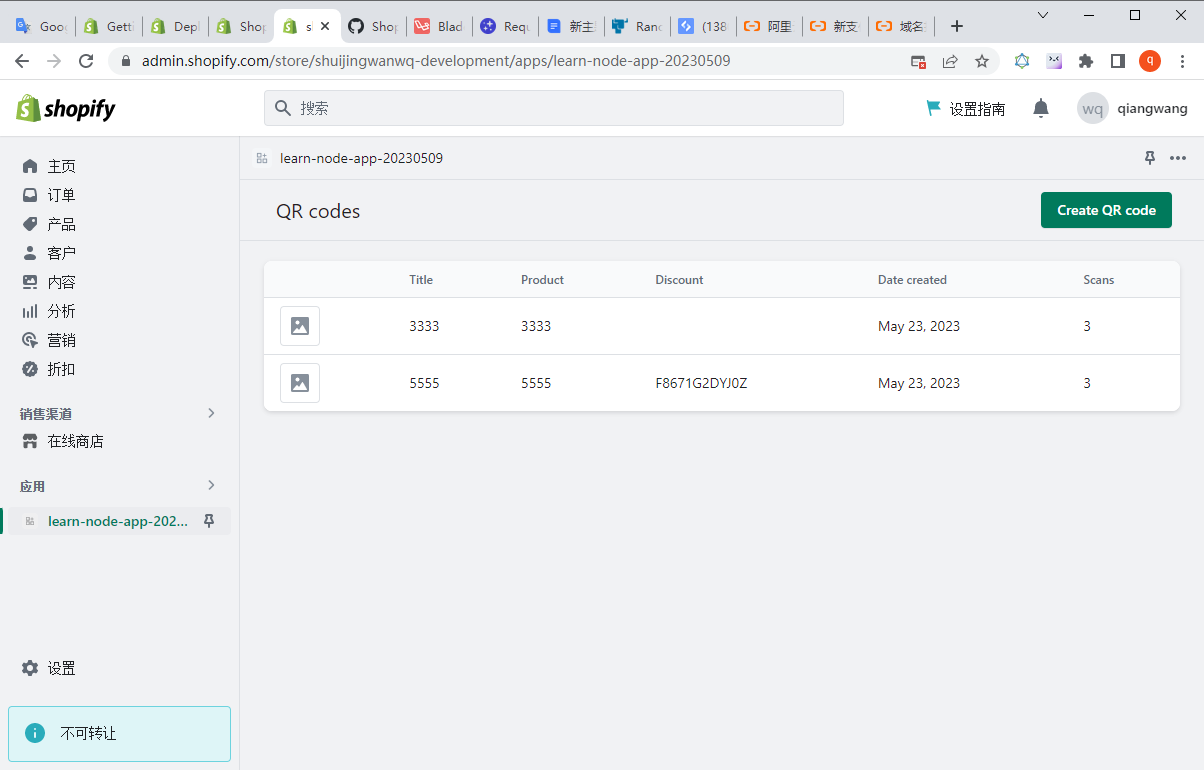
1. There is a Shopify PHP application, which can already be previewed in the development environment. as shown in Figure 1
Figure 1
2. Now it is ready to be deployed to the production environment. Shopify recommends creating a separate application if you need to deploy the application to the production environment. This application shares the code base with the development and test environments, but has its own records and configurations in the Shopify Partner Center. To avoid the application of production environments that affect the production environment during development and testing. Use Shopify Partners
Create the app from scratch: learn-php-app-0605-prod. as shown in Figure 2
Figure 2
3. Retrieve environment variables so that they can be set in later steps. Note the ScoPes, Shopify_API_KEY, and Shopify_API_Secret values. You need to set these values as environment variables that host the application.
wangqiang@DESKTOP-QLPK8QM:/mnt/e/wwwroot/shopify-app/learn-php-app-ubuntu-2004-0605$ npm run shopify app env show

> learn-php-app-ubuntu-2004-0605@1.0.0 shopify
> shopify app env show

?  Which existing app is this for?
✔  learn-php-app-0605-prod


    SHOPIFY_API_KEY=c7f826670575f7ae069f7e56350465ef
    SHOPIFY_API_SECRET=4de64aa8281e97055cf7698bbe56039e
    SCOPES=write_products
[root@iZ23wv7v5ggZ ~]# php -v
PHP 8.1.19 (cli) (built: Jun  7 2023 11:34:24) (NTS)
Copyright (c) The PHP Group
Zend Engine v4.1.19, Copyright (c) Zend Technologies
    with Zend OPcache v8.1.19, Copyright (c), by Zend Technologies
[root@iZ23wv7v5ggZ ~]#
7. When adding a virtual host, setting the SSL certificate failed: lets Encrypt verify error! DNS problem, you need to set the resolution of the domain name first.
[root@iZ23wv7v5ggZ www.shuijingwanwq.com]# ~/oneinstack/vhost.sh

#######################################################################
#       OneinStack for CentOS/RedHat 7+ Debian 9+ and Ubuntu 16+      #
#       For more information please visit https://oneinstack.com      #
#######################################################################

What Are You Doing?
        1. Use HTTP Only
        2. Use your own SSL Certificate and Key
        3. Use Let's Encrypt to Create SSL Certificate and Key
        q. Exit
Please input the correct option: 3

Please input domain(example: www.example.com): learn-php-app-0605-prod.shuijingwanwq.com
domain=learn-php-app-0605-prod.shuijingwanwq.com

Please input the directory for the domain:learn-php-app-0605-prod.shuijingwanwq.com :
(Default directory: /data/wwwroot/learn-php-app-0605-prod.shuijingwanwq.com):
Virtual Host Directory=/data/wwwroot/learn-php-app-0605-prod.shuijingwanwq.com

Create Virtul Host directory......
set permissions of Virtual Host directory......

Do you want to add more domain name? [y/n]: n

Do you want to redirect all HTTP requests to HTTPS? [y/n]: y

Please select domain cert key length.
Enter one of 2048, 3072, 4096, 8192 will issue a RSA cert.
Enter one of ec-256, ec-384, ec-521 will issue a ECC cert.

Please enter your cert key length (default 2048):

Let's Encrypt Verify error! DNS problem: NXDOMAIN looking up A for learn-php-app-0605-prod.shuijingwanwq.com
[Wed Jun  7 04:44:59 PM CST 2023] Using CA: https://acme.zerossl.com/v2/DV90
[Wed Jun  7 04:44:59 PM CST 2023] Creating domain key
[Wed Jun  7 04:44:59 PM CST 2023] The domain key is here: /root/.acme.sh/learn-php-app-0605-prod.shuijingwanwq.com/learn-php-app-0605-prod.shuijingwanwq.com.key
[Wed Jun  7 04:44:59 PM CST 2023] Single domain='learn-php-app-0605-prod.shuijingwanwq.com'
[Wed Jun  7 04:44:59 PM CST 2023] Getting domain auth token for each domain
[Wed Jun  7 04:45:05 PM CST 2023] Getting webroot for domain='learn-php-app-0605-prod.shuijingwanwq.com'
[Wed Jun  7 04:45:05 PM CST 2023] Verifying: learn-php-app-0605-prod.shuijingwanwq.com
[Wed Jun  7 04:45:07 PM CST 2023] Processing, The CA is processing your order, please just wait. (1/30)
[Wed Jun  7 04:45:11 PM CST 2023] learn-php-app-0605-prod.shuijingwanwq.com:Verify error:"error":{
[Wed Jun  7 04:45:11 PM CST 2023] Please add '--debug' or '--log' to check more details.
[Wed Jun  7 04:45:11 PM CST 2023] See: https://github.com/acmesh-official/acme.sh/wiki/How-to-debug-acme.sh
Error: Create Let's Encrypt SSL Certificate failed!
[root@iZ23wv7v5ggZ www.shuijingwanwq.com]#
8. Add records in Alibaba Cloud Parsing DNS. as shown in Figure 3
Figure 3
9. Add the virtual host again
[root@iZ23wv7v5ggZ www.shuijingwanwq.com]# ~/oneinstack/vhost.sh

#######################################################################
#       OneinStack for CentOS/RedHat 7+ Debian 9+ and Ubuntu 16+      #
#       For more information please visit https://oneinstack.com      #
#######################################################################

What Are You Doing?
        1. Use HTTP Only
        2. Use your own SSL Certificate and Key
        3. Use Let's Encrypt to Create SSL Certificate and Key
        q. Exit
Please input the correct option: 3

Please input domain(example: www.example.com): learn-php-app-0605-prod.shuijingwanwq.com
domain=learn-php-app-0605-prod.shuijingwanwq.com

Please input the directory for the domain:learn-php-app-0605-prod.shuijingwanwq.com :
(Default directory: /data/wwwroot/learn-php-app-0605-prod.shuijingwanwq.com):
Virtual Host Directory=/data/wwwroot/learn-php-app-0605-prod.shuijingwanwq.com

Create Virtul Host directory......
set permissions of Virtual Host directory......

Do you want to add more domain name? [y/n]: n

Do you want to redirect all HTTP requests to HTTPS? [y/n]: y

Please select domain cert key length.
Enter one of 2048, 3072, 4096, 8192 will issue a RSA cert.
Enter one of ec-256, ec-384, ec-521 will issue a ECC cert.

Please enter your cert key length (default 2048):
[Wed Jun  7 04:51:49 PM CST 2023] Using CA: https://acme.zerossl.com/v2/DV90
[Wed Jun  7 04:51:49 PM CST 2023] Single domain='learn-php-app-0605-prod.shuijingwanwq.com'
[Wed Jun  7 04:51:49 PM CST 2023] Getting domain auth token for each domain
[Wed Jun  7 04:51:54 PM CST 2023] Getting webroot for domain='learn-php-app-0605-prod.shuijingwanwq.com'
[Wed Jun  7 04:51:54 PM CST 2023] Verifying: learn-php-app-0605-prod.shuijingwanwq.com
[Wed Jun  7 04:51:55 PM CST 2023] Processing, The CA is processing your order, please just wait. (1/30)
[Wed Jun  7 04:52:01 PM CST 2023] Success
[Wed Jun  7 04:52:01 PM CST 2023] Verify finished, start to sign.
[Wed Jun  7 04:52:01 PM CST 2023] Lets finalize the order.
[Wed Jun  7 04:52:01 PM CST 2023] Le_OrderFinalize='https://acme.zerossl.com/v2/DV90/order/CLf6pxWJkdxtQylgNxS_Jg/finalize'
[Wed Jun  7 04:52:02 PM CST 2023] Order status is processing, lets sleep and retry.
[Wed Jun  7 04:52:02 PM CST 2023] Retry after: 15
[Wed Jun  7 04:52:18 PM CST 2023] Polling order status: https://acme.zerossl.com/v2/DV90/order/CLf6pxWJkdxtQylgNxS_Jg
[Wed Jun  7 04:52:20 PM CST 2023] Downloading cert.
[Wed Jun  7 04:52:20 PM CST 2023] Le_LinkCert='https://acme.zerossl.com/v2/DV90/cert/B2uRnJRfyVAP2B9aqQ2_Lw'
[Wed Jun  7 04:52:22 PM CST 2023] Cert success.
-----BEGIN CERTIFICATE-----
*******************
-----END CERTIFICATE-----
[Wed Jun  7 04:52:22 PM CST 2023] Your cert is in: /root/.acme.sh/learn-php-app-0605-prod.shuijingwanwq.com/learn-php-app-0605-prod.shuijingwanwq.com.cer
[Wed Jun  7 04:52:22 PM CST 2023] Your cert key is in: /root/.acme.sh/learn-php-app-0605-prod.shuijingwanwq.com/learn-php-app-0605-prod.shuijingwanwq.com.key
[Wed Jun  7 04:52:22 PM CST 2023] The intermediate CA cert is in: /root/.acme.sh/learn-php-app-0605-prod.shuijingwanwq.com/ca.cer
[Wed Jun  7 04:52:22 PM CST 2023] And the full chain certs is there: /root/.acme.sh/learn-php-app-0605-prod.shuijingwanwq.com/fullchain.cer

Do you want to add hotlink protection? [y/n]: y

Allow Rewrite rule? [y/n]: y

Please input the rewrite of programme :
wordpress,opencart,magento2,drupal,joomla,codeigniter,laravel
thinkphp,pathinfo,discuz,typecho,ecshop,nextcloud,zblog,whmcs rewrite was exist.
(Default rewrite: other): laravel
You choose rewrite=laravel

Allow Nginx/Tengine/OpenResty access_log? [y/n]: y
You access log file=/data/wwwlogs/learn-php-app-0605-prod.shuijingwanwq.com_nginx.log

nginx: the configuration file /usr/local/nginx/conf/nginx.conf syntax is ok
nginx: configuration file /usr/local/nginx/conf/nginx.conf test is successful
Reload Nginx......

#######################################################################
#       OneinStack for CentOS/RedHat 7+ Debian 9+ and Ubuntu 16+      #
#       For more information please visit https://oneinstack.com      #
#######################################################################
Your domain:                  learn-php-app-0605-prod.shuijingwanwq.com
Virtualhost conf:             /usr/local/nginx/conf/vhost/learn-php-app-0605-prod.shuijingwanwq.com.conf
Directory of:                 /data/wwwroot/learn-php-app-0605-prod.shuijingwanwq.com
Rewrite rule:                 /usr/local/nginx/conf/rewrite/laravel.conf
Let's Encrypt SSL Certificate:/usr/local/nginx/conf/ssl/learn-php-app-0605-prod.shuijingwanwq.com.crt
SSL Private Key:              /usr/local/nginx/conf/ssl/learn-php-app-0605-prod.shuijingwanwq.com.key
[root@iZ23wv7v5ggZ www.shuijingwanwq.com]#
10. Add an FTP account
[root@iZ23wv7v5ggZ www.shuijingwanwq.com]# ~/oneinstack/pureftpd_vhost.sh

#######################################################################
#       OneinStack for CentOS/RedHat 7+ Debian 9+ and Ubuntu 16+      #
#                 FTP virtual user account management                 #
#       For more information please visit https://oneinstack.com      #
#######################################################################

What Are You Doing?
        1. UserAdd
        2. UserMod
        3. UserPasswd
        4. UserDel
        5. ListAllUser
        6. ShowUser
        q. Exit
Please input the correct option: 1

Please input a username: learn-php-app-0605-prod.shuijingwanwq.com

Please input the password: XZzqpC4k3Clf6Oup26e

Please input the directory(Default directory: /data/wwwroot): /data/wwwroot/learn-php-app-0605-prod.shuijingwanwq.com
Password:
Enter it again:
#####################################

[learn-php-app-0605-prod.shuijingwanwq.com] create successful!

You user name is : learn-php-app-0605-prod.shuijingwanwq.com
You Password is : ************
You directory is : /data/wwwroot/learn-php-app-0605-prod.shuijingwanwq.com
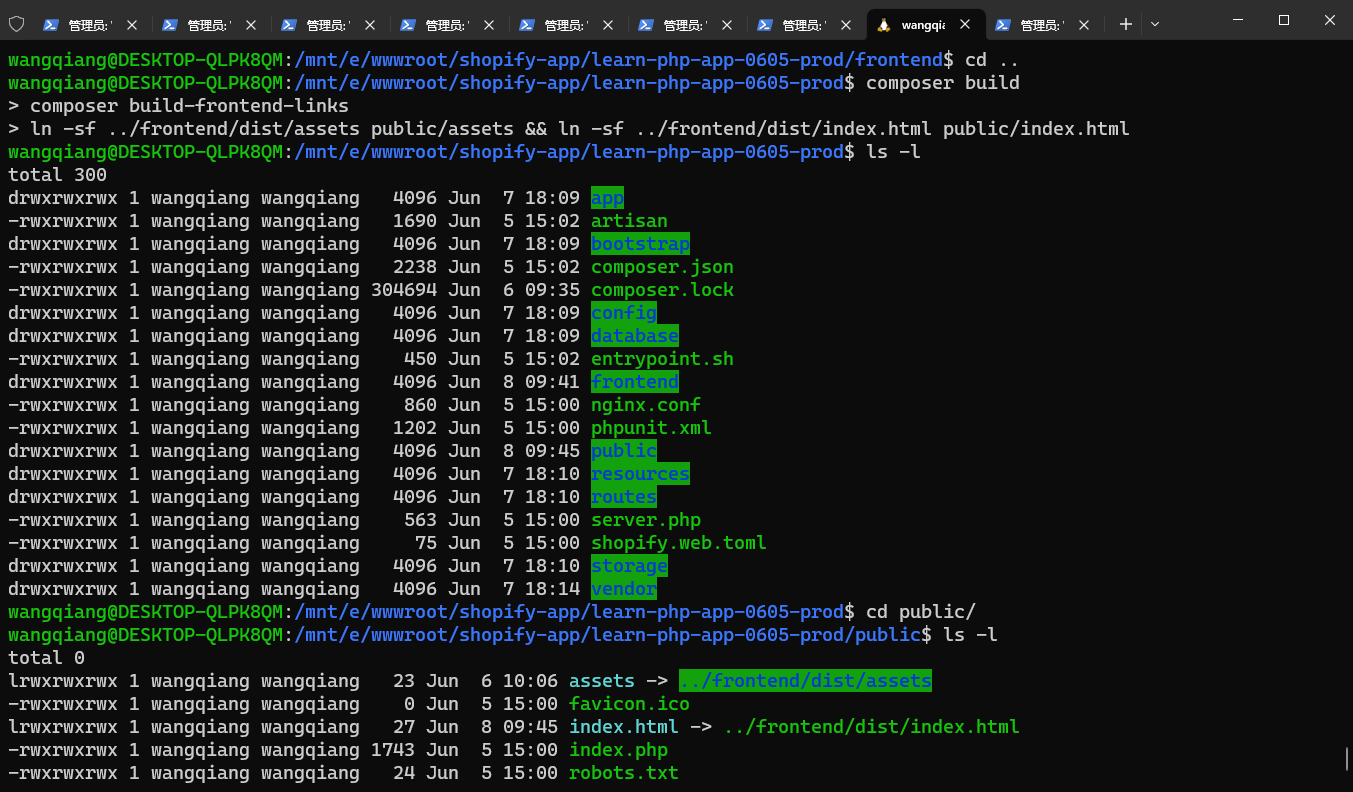
11. At this time, it is necessary to build applications in the production environment in the local environment to avoid building in the production environment, because the prerequisites required for construction in the production environment are temporarily not supported, such as npm, composer, etc. Shopify_api_key needs to use the variable value retrieved in step 3. Copy the application directory learn-php-app-ubuntu-2004-0605/web is learn-php-app-0605-prod. The directory learn-php-app-0605-prod only needs to be built and uploaded to the production environment. Therefore, the dependency files of the development environment are not required.
wangqiang@DESKTOP-QLPK8QM:/mnt/e/wwwroot/shopify-app$ cd learn-php-app-0605-prod/
wangqiang@DESKTOP-QLPK8QM:/mnt/e/wwwroot/shopify-app/learn-php-app-0605-prod$ ls -l
total 300
drwxrwxrwx 1 wangqiang wangqiang   4096 Jun  7 17:38 app
-rwxrwxrwx 1 wangqiang wangqiang   1690 Jun  5 15:02 artisan
drwxrwxrwx 1 wangqiang wangqiang   4096 Jun  7 17:38 bootstrap
-rwxrwxrwx 1 wangqiang wangqiang   2238 Jun  5 15:02 composer.json
-rwxrwxrwx 1 wangqiang wangqiang 304694 Jun  6 09:35 composer.lock
drwxrwxrwx 1 wangqiang wangqiang   4096 Jun  7 17:38 config
drwxrwxrwx 1 wangqiang wangqiang   4096 Jun  7 17:38 database
-rwxrwxrwx 1 wangqiang wangqiang    450 Jun  5 15:02 entrypoint.sh
drwxrwxrwx 1 wangqiang wangqiang   4096 Jun  7 17:39 frontend
-rwxrwxrwx 1 wangqiang wangqiang    860 Jun  5 15:00 nginx.conf
-rwxrwxrwx 1 wangqiang wangqiang   1202 Jun  5 15:00 phpunit.xml
drwxrwxrwx 1 wangqiang wangqiang   4096 Jun  7 17:39 public
drwxrwxrwx 1 wangqiang wangqiang   4096 Jun  7 17:39 resources
drwxrwxrwx 1 wangqiang wangqiang   4096 Jun  7 17:39 routes
-rwxrwxrwx 1 wangqiang wangqiang    563 Jun  5 15:00 server.php
-rwxrwxrwx 1 wangqiang wangqiang     75 Jun  5 15:00 shopify.web.toml
drwxrwxrwx 1 wangqiang wangqiang   4096 Jun  7 17:39 storage
drwxrwxrwx 1 wangqiang wangqiang   4096 Jun  7 17:42 vendor
12. Edit .env, set to the configuration value in the production environment
13. To build the front-end and back-end, report an error: /bin/sh: 1: vite: not found, you need to execute: npm install . as shown in Figure 4
Figure 4
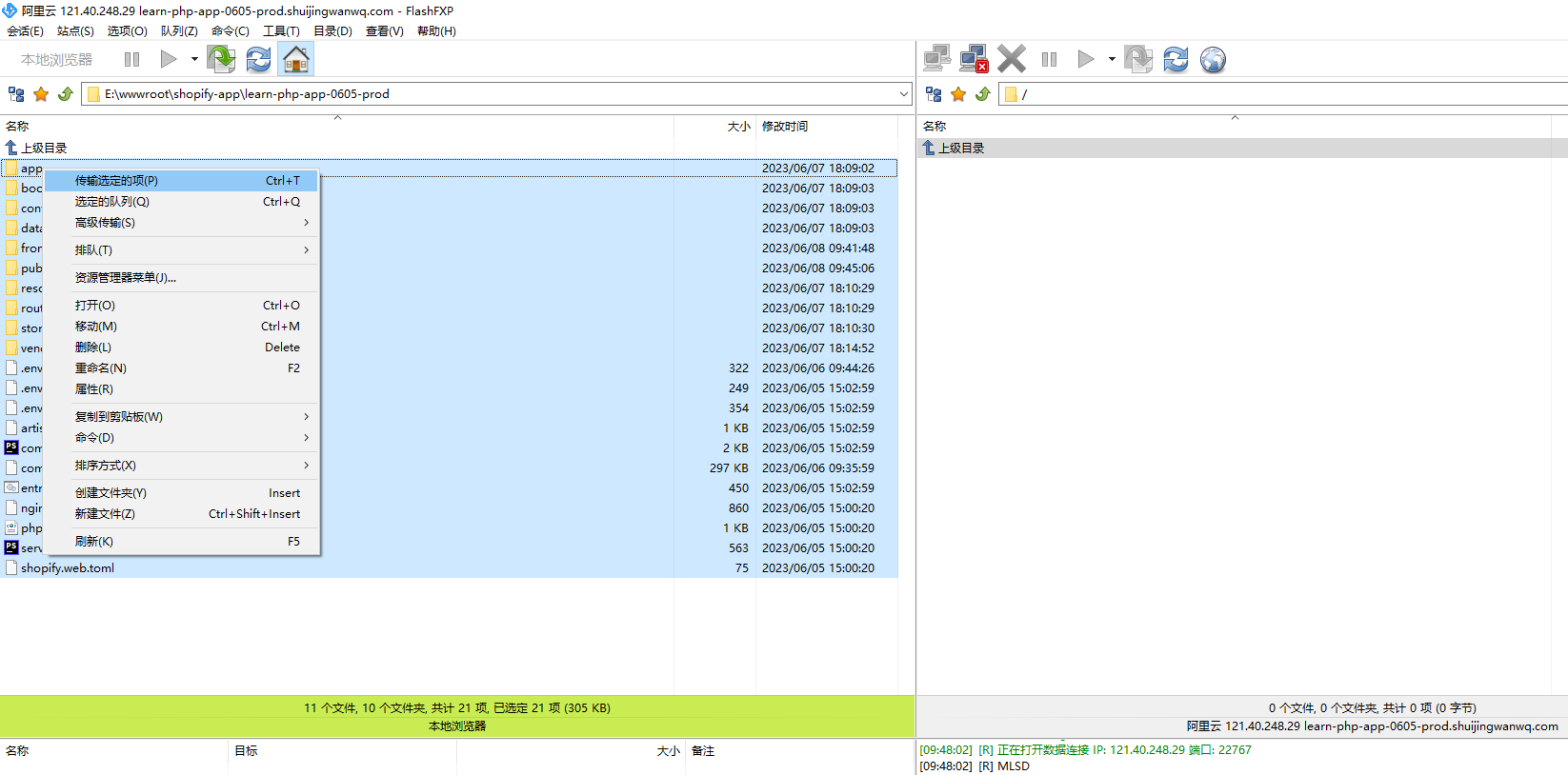
14. Upload all files under the directory learn-php-app-0605-prod based on FTP. The total size is about 150 MB. The upload time is too long, and the most decided to build it in the production environment. Directory: vendor, frontend/node_modules can not be uploaded. as shown in Figure 5
Figure 5
15. Install node.js and composer, node.js needs to restart the instance after installation
[root@iZ23wv7v5ggZ ~]# ~/oneinstack/install.sh --node

#######################################################################
#       OneinStack for CentOS/RedHat 7+ Debian 9+ and Ubuntu 16+      #
#       For more information please visit https://oneinstack.com      #
#######################################################################

Download Nodejs...
--2023-06-08 10:45:47--  https://mirrors.tuna.tsinghua.edu.cn/nodejs-release/v18.14.2/node-v18.14.2-linux-x64.tar.gz
Resolving mirrors.tuna.tsinghua.edu.cn (mirrors.tuna.tsinghua.edu.cn)... 101.6.15.130, 2402:f000:1:400::2
Connecting to mirrors.tuna.tsinghua.edu.cn (mirrors.tuna.tsinghua.edu.cn)|101.6.15.130|:443... connected.
HTTP request sent, awaiting response... 200 OK
Length: 44201520 (42M) [application/octet-stream]
Saving to: ‘node-v18.14.2-linux-x64.tar.gz’

     0K .......... .......... .......... .......... ..........  0%  878K 49s
    50K .......... .......... .......... .......... ..........  0% 1.79M 36s
 43150K .......... .....                                      100% 14.2M=2.7s

2023-06-08 10:45:50 (15.7 MB/s) - ‘node-v18.14.2-linux-x64.tar.gz’ saved [44201520/44201520]

Nodejs installed successfully!
[xprober.php] found
####################Congratulations########################
Total OneinStack Install Time: 0 minutes

[root@iZ23wv7v5ggZ ~]# node -v
-bash: node: command not found

[root@iZ23wv7v5ggZ ~]# ~/oneinstack/addons.sh

#######################################################################
#       OneinStack for CentOS/RedHat 7+ Debian 9+ and Ubuntu 16+      #
#                    Install/Uninstall Extensions                     #
#       For more information please visit https://oneinstack.com      #
#######################################################################

What Are You Doing?
        1. Install/Uninstall PHP Composer
        2. Install/Uninstall fail2ban
        3. Install/Uninstall ngx_lua_waf
        4. Install/Uninstall Python3.6
        q. Exit
Please input the correct option: 1

Please select an action:
        1. install
        2. uninstall
Please input a number:(Default 1 press Enter) 1

PHP Composer installed successfully!

What Are You Doing?
        1. Install/Uninstall PHP Composer
        2. Install/Uninstall fail2ban
        3. Install/Uninstall ngx_lua_waf
        4. Install/Uninstall Python3.6
        q. Exit
Please input the correct option: q
[root@iZ23wv7v5ggZ ~]# composer -V
Composer version 2.5.7 2023-05-24 15:00:39
[root@iZ23wv7v5ggZ ~]# node -v
v18.14.2
16. After the FTP upload is completed, create a database (the connection information is consistent with the .env), generate APP_KEY, perform database migration, and build front-end and back-end
[root@iZ23wv7v5ggZ frontend]# npm install
npm WARN deprecated w3c-hr-time@1.0.2: Use your platform's native performance.now() and performance.timeOrigin.

added 359 packages, and audited 360 packages in 17s

41 packages are looking for funding
  run `npm fund` for details

found 0 vulnerabilities
npm notice
npm notice New minor version of npm available! 9.5.0 -> 9.7.1
npm notice Changelog: https://github.com/npm/cli/releases/tag/v9.7.1
npm notice Run npm install -g npm@9.7.1 to update!
npm notice
[root@iZ23wv7v5ggZ frontend]# SHOPIFY_API_KEY=c7f826670575f7ae069f7e56350465ef npm run build

> shopify-frontend-template-react@1.0.0 build
> vite build

vite v4.3.9 building for production...
✓ 1966 modules transformed.
dist/assets/empty-state-8039a1e1.svg      0.26 kB │ gzip:   0.20 kB
dist/index.html                           0.48 kB │ gzip:   0.33 kB
dist/assets/home-trophy-d70b3542.png     20.65 kB
dist/assets/index-37530742.css          371.48 kB │ gzip:  45.42 kB
dist/assets/ja-abb1af27.js                0.21 kB │ gzip:   0.15 kB
dist/assets/ko-ef9a93f5.js                0.21 kB │ gzip:   0.15 kB
dist/assets/th-32f01d1c.js                0.21 kB │ gzip:   0.15 kB
dist/assets/zh-4775ba45.js                0.21 kB │ gzip:   0.15 kB
dist/assets/vi-72f55a87.js                0.23 kB │ gzip:   0.17 kB
dist/assets/nb-79727cd5.js                0.24 kB │ gzip:   0.17 kB
dist/assets/tr-d5c962f0.js                0.24 kB │ gzip:   0.17 kB
dist/assets/de-5d4a5256.js                0.28 kB │ gzip:   0.20 kB
dist/assets/fi-e67a7779.js                0.28 kB │ gzip:   0.20 kB
dist/assets/nl-ed6c02b1.js                0.28 kB │ gzip:   0.20 kB
dist/assets/da-9b835bb8.js                0.31 kB │ gzip:   0.22 kB
dist/assets/cs-d855408e.js                0.32 kB │ gzip:   0.23 kB
dist/assets/sv-8ac62b51.js                0.37 kB │ gzip:   0.25 kB
dist/assets/en-d265ad8d.js                0.41 kB │ gzip:   0.26 kB
dist/assets/es-fd2f35f4.js                0.41 kB │ gzip:   0.29 kB
dist/assets/pt-227fd344.js                0.41 kB │ gzip:   0.29 kB
dist/assets/pt-PT-a0c51464.js             0.41 kB │ gzip:   0.29 kB
dist/assets/pl-ab15c7ea.js                0.42 kB │ gzip:   0.29 kB
dist/assets/fr-23e50d95.js                0.43 kB │ gzip:   0.29 kB
dist/assets/it-08f76780.js                0.45 kB │ gzip:   0.30 kB
dist/assets/en-df34a502.js                1.53 kB │ gzip:   0.77 kB
dist/assets/de-2ae5c9fa.js                1.72 kB │ gzip:   0.90 kB
dist/assets/fr-5253333d.js                1.83 kB │ gzip:   0.94 kB
dist/assets/polyfill-force-11887b4b.js    5.21 kB │ gzip:   2.03 kB
dist/assets/zh-CN-cf74d136.js             7.72 kB │ gzip:   3.26 kB
dist/assets/zh-TW-6a74a185.js             7.86 kB │ gzip:   3.36 kB
dist/assets/ko-2cf626e6.js                8.18 kB │ gzip:   3.39 kB
dist/assets/ja-6f78282b.js                8.35 kB │ gzip:   3.58 kB
dist/assets/en-c240dff3.js                9.95 kB │ gzip:   2.95 kB
dist/assets/vi-e4ef4fd6.js                9.97 kB │ gzip:   3.34 kB
dist/assets/th-2a34d5e0.js               10.14 kB │ gzip:   3.77 kB
dist/assets/sv-a901b08f.js               10.22 kB │ gzip:   3.27 kB
dist/assets/da-1564850b.js               10.30 kB │ gzip:   3.26 kB
dist/assets/nb-0a6d8490.js               10.35 kB │ gzip:   3.25 kB
dist/assets/pl-a603e9c2.js               10.39 kB │ gzip:   3.39 kB
dist/assets/cs-3c753a97.js               10.40 kB │ gzip:   3.50 kB
dist/assets/fi-c0a9d95f.js               10.63 kB │ gzip:   3.41 kB
dist/assets/tr-bd45be97.js               10.68 kB │ gzip:   3.39 kB
dist/assets/it-8bb02787.js               10.72 kB │ gzip:   3.32 kB
dist/assets/pt-PT-af188c06.js            10.85 kB │ gzip:   3.34 kB
dist/assets/nl-0772ea77.js               10.89 kB │ gzip:   3.25 kB
dist/assets/pt-BR-8a1d5660.js            10.94 kB │ gzip:   3.36 kB
dist/assets/es-5e0e20e7.js               10.95 kB │ gzip:   3.39 kB
dist/assets/de-a04fe3bd.js               11.11 kB │ gzip:   3.35 kB
dist/assets/fr-1848494a.js               11.31 kB │ gzip:   3.48 kB
dist/assets/index-41437cc7.js            53.59 kB │ gzip:  18.93 kB
dist/assets/polyfill-904c231f.js        133.64 kB │ gzip:  40.74 kB
dist/assets/index-991532e3.js           618.82 kB │ gzip: 164.28 kB

(!) Some chunks are larger than 500 kBs after minification. Consider:
- Using dynamic import() to code-split the application
- Use build.rollupOptions.output.manualChunks to improve chunking: https://rollupjs.org/configuration-options/#output-manualchunks
- Adjust chunk size limit for this warning via build.chunkSizeWarningLimit.
✓ built in 21.56s
[root@iZ23wv7v5ggZ frontend]# cd ..
[root@iZ23wv7v5ggZ learn-php-app-0605-prod.shuijingwanwq.com]# composer install
Installing dependencies from lock file (including require-dev)
Verifying lock file contents can be installed on current platform.
Your lock file does not contain a compatible set of packages. Please run composer update.

  Problem 1
    - league/flysystem is locked to version 1.1.10 and an update of this package was not requested.
    - league/flysystem 1.1.10 requires ext-fileinfo * -> it is missing from your system. Install or enable PHP's fileinfo extension.
  Problem 2
    - league/mime-type-detection is locked to version 1.11.0 and an update of this package was not requested.
    - league/mime-type-detection 1.11.0 requires ext-fileinfo * -> it is missing from your system. Install or enable PHP's fileinfo extension.
  Problem 3
    - league/flysystem 1.1.10 requires ext-fileinfo * -> it is missing from your system. Install or enable PHP's fileinfo extension.
    - laravel/framework v8.83.27 requires league/flysystem ^1.1 -> satisfiable by league/flysystem[1.1.10].
    - laravel/framework is locked to version v8.83.27 and an update of this package was not requested.

To enable extensions, verify that they are enabled in your .ini files:
    - /usr/local/php/etc/php.ini
    - /usr/local/php/etc/php.d/02-opcache.ini
    - /usr/local/php/etc/php.d/03-imagick.ini
    - /usr/local/php/etc/php.d/04-ldap.ini
    - /usr/local/php/etc/php.d/05-redis.ini
    - /usr/local/php/etc/php.d/07-mongodb.ini
You can also run `php --ini` in a terminal to see which files are used by PHP in CLI mode.
Alternatively, you can run Composer with `--ignore-platform-req=ext-fileinfo` to temporarily ignore these required extensions.
17. After installing the PHP extension FileInfo, execute it again. Error: The process class relies on proc_open, which is not available on your php installation.
disable_functions = passthru,exec,system,chroot,chgrp,chown,shell_exec,proc_open,proc_get_status,ini_alter,ini_restore,dl,readlink,symlink,popepassthru,stream_socket_server,fsocket,popen

[root@iZ23wv7v5ggZ php]# service php-fpm restart
Redirecting to /bin/systemctl restart php-fpm.service
[root@iZ23wv7v5ggZ learn-php-app-0605-prod.shuijingwanwq.com]# composer install
Installing dependencies from lock file (including require-dev)
Verifying lock file contents can be installed on current platform.
Nothing to install, update or remove
Package fruitcake/laravel-cors is abandoned, you should avoid using it. No replacement was suggested.
Package swiftmailer/swiftmailer is abandoned, you should avoid using it. Use symfony/mailer instead.
Generating optimized autoload files
> IlluminateFoundationComposerScripts::postAutoloadDump
> @php artisan package:discover --ansi
Discovered Package: facade/ignition
Discovered Package: fideloper/proxy
Discovered Package: fruitcake/laravel-cors
Discovered Package: laravel/sail
Discovered Package: laravel/tinker
Discovered Package: nesbot/carbon
Discovered Package: nunomaduro/collision
Package manifest generated successfully.
81 packages you are using are looking for funding.
Use the `composer fund` command to find out more!
19. Failed to execute database migration, error: sqlstate[42000]: Syntax Error or Access Violation: 1071 specific key was too long; max key length is 767 bytes
[root@iZ23wv7v5ggZ learn-php-app-0605-prod.shuijingwanwq.com]# php artisan migrate
**************************************
*     Application In Production!     *
**************************************

 Do you really wish to run this command? (yes/no) [no]:
 > yes

Migration table created successfully.
Migrating: 2019_08_19_000000_create_failed_jobs_table

   IlluminateDatabaseQueryException

  SQLSTATE[42000]: Syntax error or access violation: 1071 Specified key was too long; max key length is 767 bytes (SQL: alter table `failed_jobs` add unique `failed_jobs_uuid_unique`(`uuid`))

  at vendor/laravel/framework/src/Illuminate/Database/Connection.php:712
    708▕         // If an exception occurs when attempting to run a query, we'll format the error
    709▕         // message to include the bindings with SQL, which will make this exception a
    710▕         // lot more helpful to the developer instead of just the database's errors.
    711▕         catch (Exception $e) {
  ➜ 712▕             throw new QueryException(
    713▕                 $query, $this->prepareBindings($bindings), $e
    714▕             );
    715▕         }
    716▕     }

      +9 vendor frames
  10  database/migrations/2019_08_19_000000_create_failed_jobs_table.php:24
      IlluminateSupportFacadesFacade::__callStatic()

      +22 vendor frames
  33  artisan:37
      IlluminateFoundationConsoleKernel::handle()
20. Reference:Parameter configuration of Alibaba Cloud RDS, enable InnoDB_Large_Prefix . Edit config/database.php, modifyEngine=>null, forEngine=>innodb,. Execute the database migration again and report an error. sqlstate[42S01]: base table or view already EXISTS: 1050 tablefailed_jobsALREADY EXISTS. After deleting all tables in the database, the migration is re-execute. No more errors.
[root@iZ23wv7v5ggZ learn-php-app-0605-prod.shuijingwanwq.com]# php artisan migrate
**************************************
*     Application In Production!     *
**************************************

 Do you really wish to run this command? (yes/no) [no]:
 > yes

Migration table created successfully.
Migrating: 2019_08_19_000000_create_failed_jobs_table
Migrated:  2019_08_19_000000_create_failed_jobs_table (13.03ms)
Migrating: 2021_05_03_050717_create_sessions_table
Migrated:  2021_05_03_050717_create_sessions_table (11.62ms)
Migrating: 2021_05_05_071311_add_scope_expires_access_token_to_sessions
Migrated:  2021_05_05_071311_add_scope_expires_access_token_to_sessions (9.72ms)
Migrating: 2021_05_11_151158_add_online_access_info_to_sessions
Migrated:  2021_05_11_151158_add_online_access_info_to_sessions (9.32ms)
Migrating: 2021_05_17_152611_change_sessions_user_id_type
Migrated:  2021_05_17_152611_change_sessions_user_id_type (48.28ms)
  index index.php index.html;
  root /data/wwwroot/learn-php-app-0605-prod.shuijingwanwq.com/public;
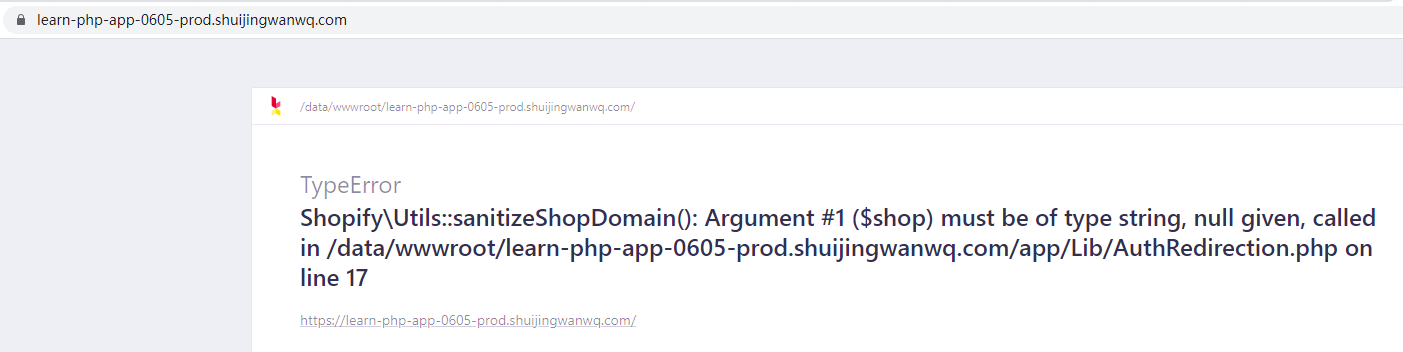
26. Response 500, enable debug, edit .env. Error: TypeError
Shopifyutils::SanitizeShopDomain(): Argument #1 ($shop) must be of type string, null given, called in /data/wwwroot/learn-php-0605-prod.shuijingwanwq.com/app/lib/authredirection.php on line 17 . Ignore it, it’s in line with expectations. as shown in Figure 7
Figure 7
app_env=local
app_debug=true
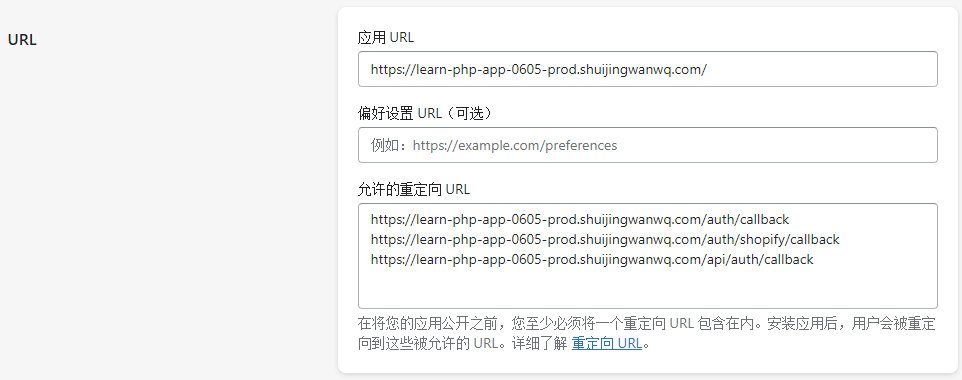
27. Update the URL in the partner dashboard. as shown in Figure 8
8
28. In the partner dashboard, go to the overview page of the application. In the Test Your Apps section, click Select Store and then select a store to test the app. as shown in Figure 9
Figure 9
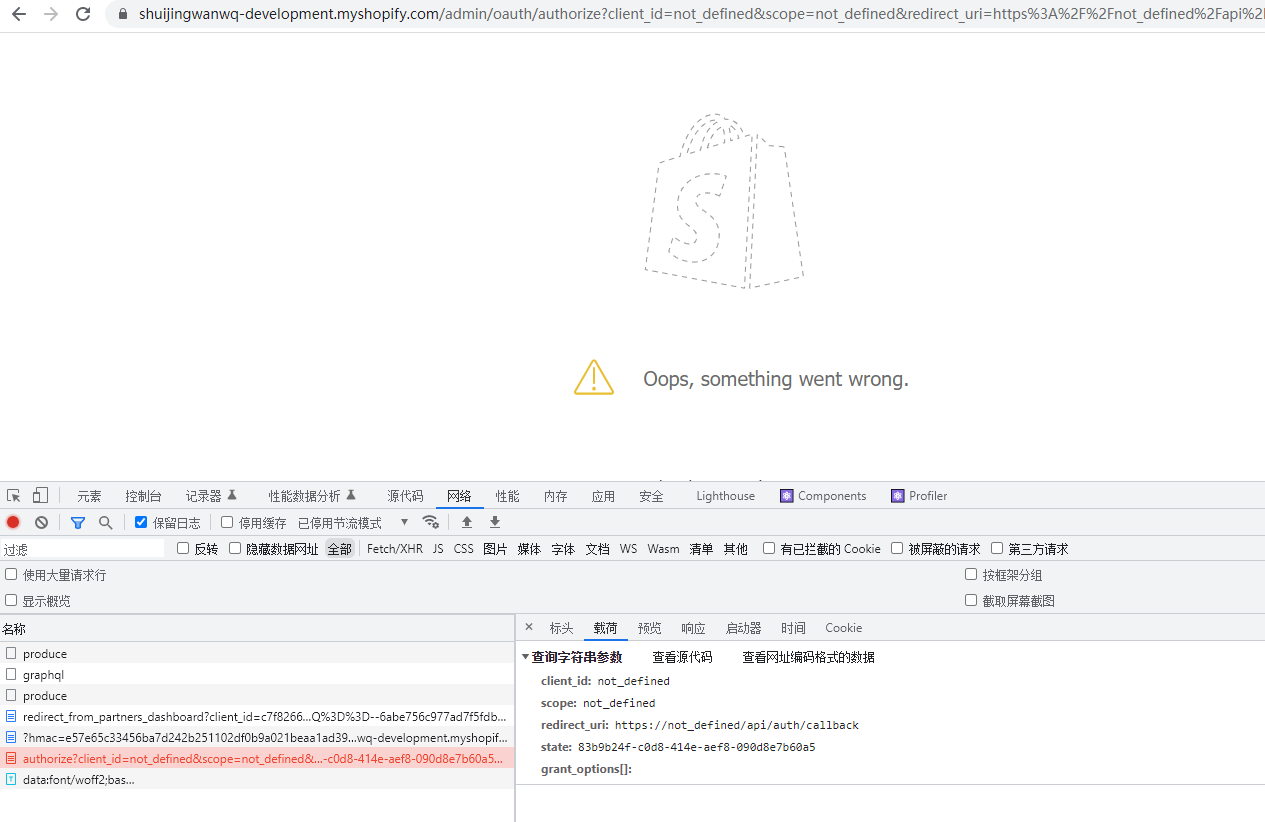
29. When installing the application, an error is reported: ops, something went wrong. . The reason should be that the request parameter is incorrect. As shown in Figure 10
Figure 10
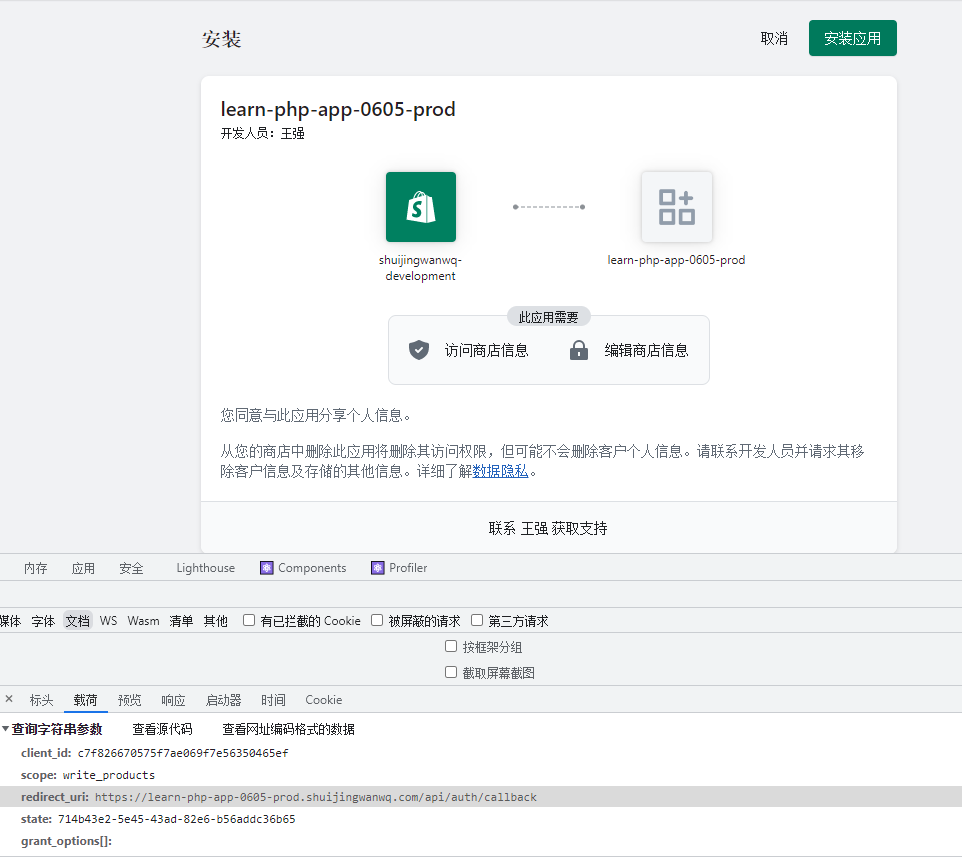
31. No more errors. as shown in Figure 11
Figure 11
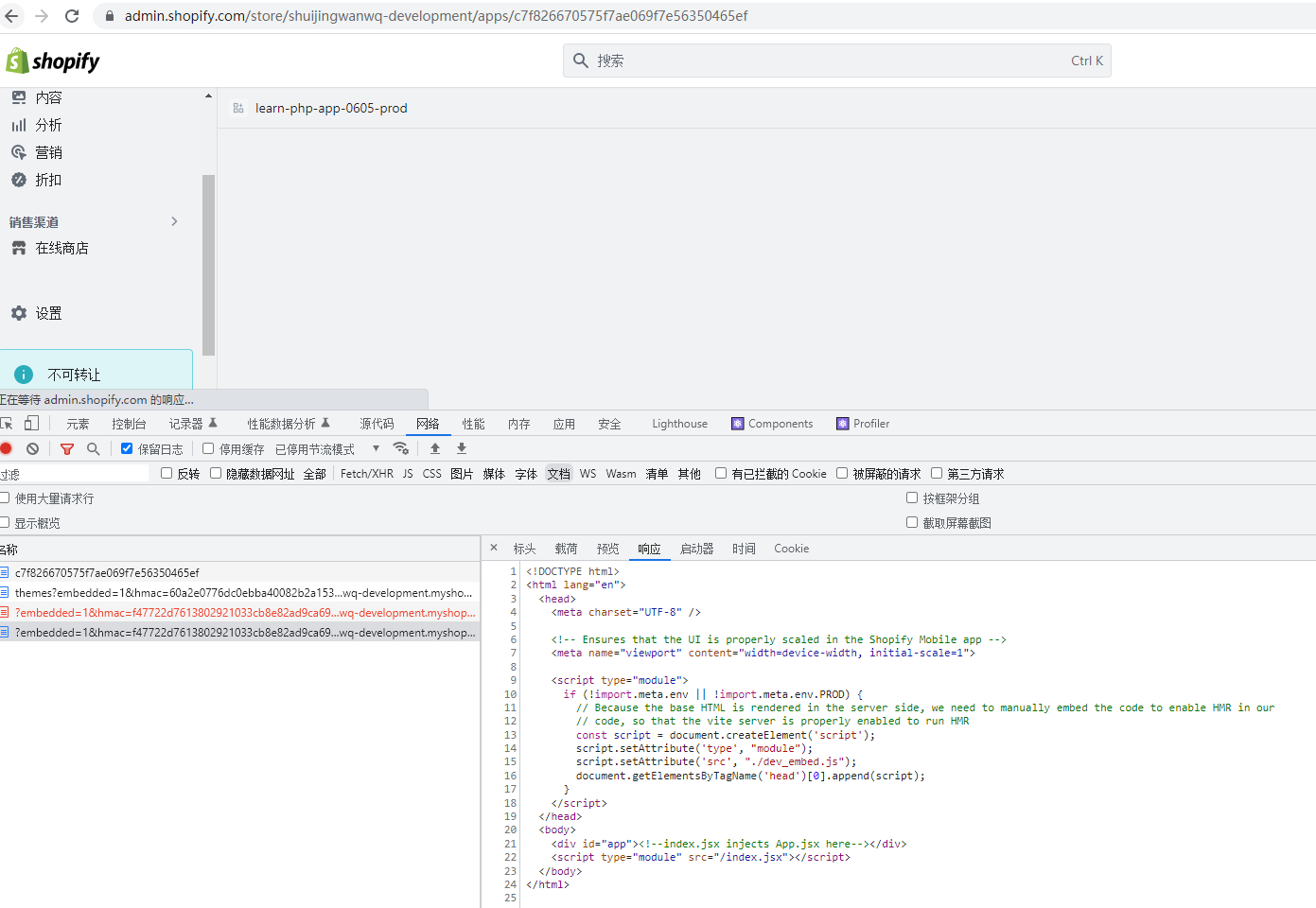
32. After clicking the installation application, enter the store background, but the page preview is blank. as shown in Figure 12
Figure 12
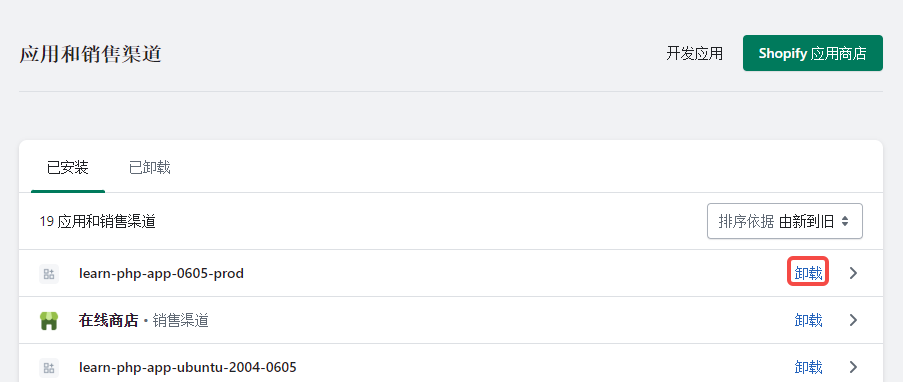
33. After rebuilding the front-end and back-end, uninstall the application. as shown in Figure 13
Figure 13
34. Install again, refresh the page, the page is no longer blank, in line with expectations. Figure 14
Figure 14





Leave a Reply