The migration implementation process of the virtual machine of Oracle VM VirtualBox under Windows 10 to solve the problem of excessive foot space in the C drive
1. The remaining 40.5G space of the C drive space is available

The remaining 40.5G space of the C drive space is available
2. The reason is: C:\Users\Administrator\VirtualBox VMs, occupying space is 43.6GB

The reason is: C:\Users\Administrator\VirtualBox VMs, occupying space is 43.6GB
3. Modify the default virtual computer location of VirtualBox to: D:\VirtualBox VMs
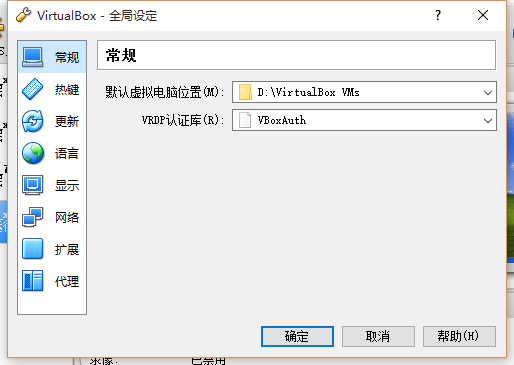
Modify the default virtual computer location of VirtualBox to: D:\VirtualBox VMs
4. Copy the virtual machine windows_xp_ie6 step 1

Copy the virtual machine windows_xp_ie6 step 1
5. Copy the virtual machine Windows_XP_IE6 to Windows_XP_IE6_1, and check the MAC address of all network cards to be reinitialized

Copy the virtual machine Windows_XP_IE6 to Windows_XP_IE6_1, and check the MAC address of all network cards to be reinitialized
6. Choose to copy completely

Choose Full Copy
7. Start Windows_XP_IE6_1 successfully

Start Windows_XP_IE6_1 successfully
8. Delete Windows_XP_IE6, select Delete all files

Delete windows_xp_ie6, select delete all files
9. Other virtual machines are processed in the same process, and the last C drive space is 73.9GB available

Other virtual machines are processed in the same process, and the last C drive space is 73.9GB available