Under WINDWOS 10 and PHP 7.1.12 Based on Yii 2 Starter Kit, the background application is replicated as an interface application to realize the process of RESTful Web service.
1. In Windows PowerSHLL, enter the E:\wwwroot\cmcp-api directory, as shown in Figure 1

Figure 1
2. Create a new application API, copy the backend directory as the API, as shown in Figure 2

Figure 2
3. Edit \.env.dist, add API-related configuration, this is the configuration file submitted to Git version control, as shown in Figure 3
API_HOST_INFO         = http://api.yii2-starter-kit.dev
#API_HOST_INFO         = http://yii2-starter-kit.dev
#API_BASE_URL          = /api/web
API_COOKIE_VALIDATION_KEY =

Figure 3
4. Edit \.env, add the API-related configuration, this is the actual configuration file, as shown in Figure 4
API_HOST_INFO         = http://www.cmcp-api.localhost
#API_HOST_INFO         = http://yii2-starter-kit.dev
#API_BASE_URL          = /api/web
API_COOKIE_VALIDATION_KEY =

Figure 4
5. Edit \common\config\bootstrap.php, and configure the alias of the interface application, as shown in Figure 5
Yii::setAlias('@api', realpath(__DIR__.'/../../api'));
Yii::setAlias('@apiUrl', env('API_HOST_INFO') . env('API_BASE_URL') );

Figure 5
6. Edit \common\config\base.php, and configure the language package file of the interface application, as shown in Figure 6
'api'=>'api.php',

Figure 6
7. Create a Chinese language pack file for the interface application, copy \common\messages\zh\backend.php as \common\messages\zh\api.php (if you need to support other languages, you can create a new language directory), as shown in Figure 7

Figure 7
8. Edit \common\config\base.php to configure the parsing and generation of the URL of the interface application, as shown in Figure 8
        'urlManagerApi' => \yii\helpers\ArrayHelper::merge(
            [
                'hostInfo' => env('API_HOST_INFO'),
                'baseUrl' => env('API_BASE_URL'),
            ],
            require(Yii::getAlias('@api/config/_urlManager.php'))
        ),

8
9. Edit \Console\Controllers\AppController.php, search for this file and there are 6 backends, then copy 3 copies accordingly as an API, as shown in Figure 9
    public $writablePaths = [
        '@common/runtime',
        '@frontend/runtime',
        '@frontend/web/assets',
        '@backend/runtime',
        '@backend/web/assets',
        '@api/runtime',
        '@api/web/assets',
        '@storage/cache',
        '@storage/web/source'
    ];

    public $executablePaths = [
        '@backend/yii',
        '@api/yii',
        '@frontend/yii',
        '@console/yii',
    ];

Figure 9
10. Edit \AutoCompletion.php, add the configuration related to the interface application, as shown in Figure 10
* @property yii\web\UrlManager $urlManagerApi UrlManager for api application.

Figure 10
11. Search for backend\, backend/, => in the directory APIbackend, backend, strictly match the case, replace it with API\, API/, =>API, API, as shown in Figure 11
backend\ 替换为: api\
backend/ 替换为: api/
=> 'backend' 替换为: => 'api'
BACKEND 替换为: => API

Figure 11
12. In the \tests directory, there are corresponding configurations related to the new interface application. This part is suspended for a while, and then the configuration is required when the automated test is required. View \api\web\index-test.php, as shown in Figure 12

Figure 12
13. In Windows Powershll, enter the E:\wwwroot\cmcp-api directory, run the command again: php console/yii app/setup, set writable and executable permissions, as shown in Figure 13

Figure 13
14. Add a virtual host in the nginx configuration file, restart nginx, as shown in Figure 14
## API ##
server {
    listen 80; ## 监听 ipv4 上的 80 端口
    # listen [::]:80 default_server ipv6only=on; ## 监听 ipv6 上的 80 端口

    root E:/wwwroot/cmcp-api/api/web;
    index index.php index.html;

    server_name www.cmcp-api.localhost;

    charset utf-8;

	access_log logs/www.cmcp-api.localhost.access.log;
	error_log logs/www.cmcp-api.localhost.error.log;

    client_max_body_size 128M;

    # There is a VirtualBox bug related to sendfile that can lead to
    # corrupted files, if not turned-off on Vagrant based setup
    # sendfile off;

    location / {
		# 如果找不到真实存在的文件,把请求分发至 index.php
        try_files $uri $uri/ /index.php?$args;
    }

    # location ~* ^.+\.(jpg|jpeg|gif|png|ico|css|pdf|ppt|txt|bmp|rtf|js)$ {
    #     access_log off;
    #     expires max;
    # }

    location ~ \.php$ {
        fastcgi_split_path_info ^(.+\.php)(/.+)$;
        fastcgi_param SCRIPT_FILENAME $document_root$fastcgi_script_name;
        fastcgi_pass php-fpm;
        fastcgi_index index.php;
        include fastcgi_params;
    }

	location ~ /\.(ht|svn|git) {
        deny all;
    }

}

Figure 14
15. Add new configuration in the hosts file, as shown in Figure 15
# 内容管控平台接口
127.0.0.1 cmcp-api.localhost www.cmcp-api.localhost frontend.cmcp-api.localhost backend.cmcp-api.localhost storage.cmcp-api.localhost

Figure 15
16. Openhttp://www.cmcp-api.localhost,If the style file loading response 404 occurs, you can delete all subdirectories under \api\web\assets, as shown in Figure 16

Figure 16
17. The function of preparing to create the page is implemented based on the interface, as shown in Figure 17

Figure 17
18. Adjust the relevant structure of the page model to realize the model layering, refer to the website:https://www.shuijingwanwq.com/2017/08/15/1713/, as shown in Figure 18

18
19. Open the URL:http://frontend.cmcp-api.localhost/gii, as shown in Figure 19

Figure 19
20. Establish the corresponding model based on the database table CA_PAGE, as shown in Figure 20

Figure 20
21. Create a new Logics directory in the common directory, which is used for the directory where the logical layer of the mysql model is located, as shown in Figure 21

Figure 21
22. Copy \common\models\page.php to \common\logics\page.php, as shown in Figure 22
 [
                'class' => SluggableBehavior::className(),
                'attribute' => 'title',
                'ensureUnique' => true,
                'immutable' => true
            ]
        ];
    }

    /**
     * @inheritdoc
     */
    public function rules()
    {
        return [
            [['title', 'body'], 'required'],
            [['body'], 'string'],
            [['status'], 'integer'],
            [['slug'], 'unique'],
            [['slug'], 'string', 'max' => 2048],
            [['title'], 'string', 'max' => 512],
            [['view'], 'string', 'max' => 255]
        ];
    }

    /**
     * @inheritdoc
     */
    public function attributeLabels()
    {
        return [
            'id' => Yii::t('common', 'ID'),
            'slug' => Yii::t('common', 'Slug'),
            'title' => Yii::t('common', 'Title'),
            'body' => Yii::t('common', 'Body'),
            'view' => Yii::t('common', 'Page View'),
            'status' => Yii::t('common', 'Active'),
            'created_at' => Yii::t('common', 'Created At'),
            'updated_at' => Yii::t('common', 'Updated At'),
        ];
    }
}

Figure 22
23. Based on diff, edit \common\logics\page.php, as shown in Figure 23

Figure 23
24. The mysql model file in the common/logics directory is business logic related, inherited to the \common\models\page data layer, as shown in Figure 24
 [
                'class' => SluggableBehavior::className(),
                'attribute' => 'title',
                'ensureUnique' => true,
                'immutable' => true
            ]
        ];
    }

    /**
     * @inheritdoc
     */
    public function rules()
    {
        return [
            [['title', 'body'], 'required'],
            [['body'], 'string'],
            [['status'], 'integer'],
            [['slug'], 'unique'],
            [['slug'], 'string', 'max' => 2048],
            [['title'], 'string', 'max' => 512],
            [['view'], 'string', 'max' => 255],
        ];
    }

}

Figure 24
25. Click the Start button under the Model Generator to generate the model page. The namespace is Common\Models. At this time, you need to support internationalization, overwrite \Common\Models\page.php, as shown in Figure 25

Figure 25
26. Edit \common\config\base.php, when the source language and the target language are the same, whether to force the message translation, the default is false, and set it to true, as shown in Figure 26
                '*'=> [
                    'class' => 'yii\i18n\PhpMessageSource',
                    'forceTranslation' => true,
                    'basePath'=>'@common/messages',
                    'fileMap'=>[
                        'common'=>'common.php',
                        'backend'=>'backend.php',
                        'api'=>'api.php',
                        'frontend'=>'frontend.php',
                    ],
                    'on missingTranslation' => ['\backend\modules\i18n\Module', 'missingTranslation']
                ],

Figure 26
27. Create a new \common\messages\en\model\page.php, which supports the message translation when the target language is English and the United States, as shown in Figure 27
return [
    'ID' => 'ID',
    'Slug' => 'Slug',
    'Title' => 'Title',
    'Body' => 'Body',
    'View' => 'Page View',
    'Status' => 'Active',
    'Created At' => 'Created At',
    'Updated At' => 'Updated At',
];

Figure 27
28. Create a new \common\messages\zh\model\page.php, support the message translation of the target language in simplified Chinese, as shown in Figure 28
return [
    'ID' => 'ID',
    'Slug' => '别名',
    'Title' => '标题',
    'Body' => '内容',
    'View' => '页面浏览',
    'Status' => '活动',
    'Created At' => '创建时间',
    'Updated At' => '更新时间',
];

Figure 28
29. Create a new \api\models\page.php, the mysql model file in the api/models directory is business logic related (only related to the API), inherit to \common\logics\page The logic layer, as shown in Figure 29

Figure 29
30. Copy \api\models\page.php to \frontend\models\page.php, \backend\models\page.php, and adjust to their respective namespaces, as shown in Figure 30

Figure 30
31. Search for use common\models\page; in the API application, and replace it with: use api\models\page;, the same processing in the foreground and background applications, as shown in Figure 31

Figure 31
32. When the local is set to Simplified Chinese, openhttp://backend.cmcp-api.localhost/page/create, the translation function is available, as shown in Figure 32

Figure 32
33. Edit personal information and set the local to English-speaking United States, as shown in Figure 33

Figure 33
34. When the local setting is English to the United States, turn it on againhttp://backend.cmcp-api.localhost/page/create, the translation function is available, as shown in Figure 34

Figure 34
35. Start to implement RESTful web service, refer to the URL:https://www.shuijingwanwq.com/2016/11/28/1457/, as shown in Figure 35

Figure 35
36. Open the URL:http://backend.cmcp-api.localhost/article/create, create an article, as shown in Figure 36

Figure 36
37. In Postman, gethttp://frontend.cmcp-api.localhost/api/v1/articles, this is the built-in RESTful web service, the response result, as shown in Figure 37
{
    "items": [
        {
            "id": 1,
            "slug": "biao-ti20180104-0",
            "category_id": 1,
            "title": "标题20180104-0",
            "body": "

内容

",
            "published_at": 1515031309,
            "_links": {
                "self": {
                    "href": "http://frontend.cmcp-api.localhost/api/v1/articles/1"
                }
            }
        }
    ],
    "_links": {
        "self": {
            "href": "http://frontend.cmcp-api.localhost/api/v1/articles?page=1"
        }
    },
    "_meta": {
        "totalCount": 1,
        "pageCount": 1,
        "currentPage": 1,
        "perPage": 20
    }
}

Figure 37
38. RESTful web service, it is recommended to implement based on a separate interface application, rather than based on an API module in the foreground application, which can more conveniently maintain your web application, as shown in Figure 38

Figure 38
39. Create a new directory: \api\rests, this directory will be used as the operation method category of RESTful web services, as shown in Figure 39

Figure 39
40. Edit the controller class \API\Controllers\PageController.php, the controller class is extended from[[yii\rest\ActiveController]]. by specifying[[yii\rest\ActiveController::modelClass|modelClass]] As API\Models\page, the controller can know which model to use to obtain and process data. as shown in Figure 40
namespace api\controllers;

use yii\rest\ActiveController;

class PageController extends ActiveController
{
    public $modelClass = 'api\models\Page';
}
![编辑控制器类 \api\controllers\PageController.php ,控制器类扩展自 [[yii\rest\ActiveController]]。 通过指定 [[yii\rest\ActiveController::modelClass|modelClass]] 作为 api\models\Page, 控制器就能知道使用哪个模型去获取和处理数据。](https://www.shuijingwanwq.com/wp-content/uploads/2018/01/40.png)
Figure 40
41. Configure the URL rule, modify the configuration of the urlmanager component configured in the application, edit: \api\config\_urlmanager.php, as shown in Figure 41
return [
    'class' => yii\web\UrlManager::class,
    'enablePrettyUrl' => true,
    'showScriptName' => false,
    'rules' => [
        [
            'class' => 'yii\rest\UrlRule',
            'controller' => ['page'],
        ],
    ],
];

Figure 41
42. In Postman, gethttp://www.cmcp-api.localhost/pages, 403 response, as shown in Figure 42
{
    "name": "Forbidden",
    "message": "Login Required",
    "code": 0,
    "status": 403,
    "type": "yii\\web\\ForbiddenHttpException"
}

Figure 42
43. Edit \api\config\web.php, comment the additional behavior of GLOBALAccess, which needs to be adjusted (verified and authorized), as shown in Figure 43
    /*
    'as globalAccess' => [
        'class' => common\behaviors\GlobalAccessBehavior::class,
        'rules' => [
            [
                'controllers' => ['sign-in'],
                'allow' => true,
                'roles' => ['?'],
                'actions' => ['login']
            ],
            [
                'controllers' => ['sign-in'],
                'allow' => true,
                'roles' => ['@'],
                'actions' => ['logout']
            ],
            [
                'controllers' => ['site'],
                'allow' => true,
                'roles' => ['?', '@'],
                'actions' => ['error']
            ],
            [
                'controllers' => ['debug/default'],
                'allow' => true,
                'roles' => ['?'],
            ],
            [
                'controllers' => ['user'],
                'allow' => true,
                'roles' => ['administrator'],
            ],
            [
                'controllers' => ['user'],
                'allow' => false,
            ],
            [
                'allow' => true,
                'roles' => ['manager'],
            ]
        ]
    ]
    */

Figure 43
44. In Postman, gethttp://www.cmcp-api.localhost/pages, 200 responses, as shown in Figure 44
[
    {
        "id": 1,
        "slug": "about",
        "title": "About",
        "body": "Lorem ipsum dolor sit amet, consectetur adipiscing elit.",
        "view": null,
        "status": 1,
        "created_at": 1514860785,
        "updated_at": 1514860785
    }
]

Figure 44
45. After calling the API service, the returned data is in a unified format, and the returned HTTP status code is 20X, which means that the call is successful; the HTTP status code returned to 4xx or 5xx means that the call fails. Adjust the return data format of the 200 response, consistent with the 403 response, at least include: “message”, “code”, create a new language package file: \api\me ssages\zh\app.php (response success), \api\messages\zh\error.php (response failed), as shown in Figure 45
return [
    10000 => 'success',
    10001 => '获取页面列表成功',
];

Figure 45
46. The realization of versioning, refer to the website:https://github.com/yiisoft/yii2/blob/master/docs/guide-zh-CN/rest-versioning.md, edit \API\Controllers\PageController.php, delete ModelClass, as shown in Figure 46

Figure 46
47. Implement each major version of the API in the main version number of a separate module ID, generate module v1 based on GII, and open the URL:http://frontend.cmcp-api.localhost/gii/module, as shown in Figure 47

Figure 47
48. Create a new \API\modules\v1\models\page.php, and inherit to \api\models\page.php, as shown in Figure 48
Note: \api\modules\v1\models\page (only for v1 modules) > \api\models\page (for API applications only) > \common\logics\page.php (available for multiple applications such as api, frontend, etc.) > \common\models\page.php (limited to GII generation only) > \yii\db\ActiveRecord

Figure 48
49. \API\modules\v1\controllers\defaultcontroller.php Renamed to \API\modules\v1\controllers\pagecontroller.php, edit the code, as shown in Figure 49
Note: \api\modules\v1\controllers\pagecontroller.php (only for v1 module) > \api\controllers\pagecontroller.php (only for API Application) > \yii\rest\ActiveController

Figure 49
50. To use the module in the application, you only need to add the module to the configuration of the application body.[[yii\base\Application::modules|modules]] in the list of attributes, the application body configuration of the following code uses the v1 module, edit \api\config\web.php, as shown in Figure 50
    'modules' => [
        'v1' => [
            'class' => api\modules\v1\Module::class,
        ],
        'i18n' => [
            'class' => api\modules\i18n\Module::class,
            'defaultRoute' => 'i18n-message/index'
        ]
    ],
![要在应用中使用模块,只需要将模块加入到应用主体配置的[[yii\base\Application::modules|modules]]属性的列表中, 如下代码的应用主体配置 使用 v1 模块,编辑 \api\config\web.php](https://www.shuijingwanwq.com/wp-content/uploads/2018/01/50.png)
Figure 50
Note: By configuring the ONLY option to explicitly list what behavior support is listed, v1/page only supports:index,update,delete,options
 yii\web\UrlManager::class,
    'enablePrettyUrl' => true,
    'enableStrictParsing' => true,
    'showScriptName' => false,
    'rules' => [
        [
            'class' => 'yii\rest\UrlRule',
            'controller' => ['v1/page'],
            'only' => ['index', 'update', 'delete', 'options'],
        ],
    ],
];

Figure 51
52. In Postman, gethttp://www.cmcp-api.localhost/v1/pages, 200 responses, as shown in Figure 52
[
    {
        "id": 1,
        "slug": "about",
        "title": "About",
        "body": "Lorem ipsum dolor sit amet, consectetur adipiscing elit.",
        "view": null,
        "status": 1,
        "created_at": 1514860785,
        "updated_at": 1514860785
    }
]

Figure 52
53. Test the ONLY option, in Postman, gethttp://www.cmcp-api.localhost/v1/pages/1, 405 response (not allowed method. BecauseviewThe behavior is not supported), the test passed, as shown in Figure 53

Figure 53
54. Configure the URL rules, modify the configuration of the urlmanager component configured in the application to support the v1 module, edit: \api\config\_urlmanager.php, as shown in Figure 54
Note: Unconfigure the ONLY option and support all behaviors later
 yii\web\UrlManager::class,
    'enablePrettyUrl' => true,
    'enableStrictParsing' => true,
    'showScriptName' => false,
    'rules' => [
        [
            'class' => 'yii\rest\UrlRule',
            'controller' => ['v1/page'],
        ],
    ],
];

Figure 54
55. In Postman, gethttp://www.cmcp-api.localhost/v1, 404 response, the format is HMTL, as shown in Figure 55
Not Found (#404)

Figure 55
56. For the solution of 404 response format is HTML, edit \API\config\web.php, and set the default response format to json, as shown in Figure 56
        'response' => [
            'format' => yii\web\Response::FORMAT_JSON,
        ],

Figure 56
57. In Postman, gethttp://www.cmcp-api.localhost/v1, 404 response, the format is JSON, as shown in Figure 57
{
    "name": "Not Found",
    "message": "Page not found.",
    "code": 0,
    "status": 404,
    "type": "yii\\web\\NotFoundHttpException"
}

Figure 57
58. The realization of data serialization, including paging information in the response body to simplify the development of the client, edit \API\Controllers\PageController.php, as shown in Figure 58
 'yii\rest\Serializer',
        'collectionEnvelope' => 'items',
    ];
}

Figure 58
59. In Postman, gethttp://www.cmcp-api.localhost/v1/pages, 200 responses, including paging information in the response body, as shown in Figure 59
{
    "items": [
        {
            "id": 1,
            "slug": "about",
            "title": "About",
            "body": "Lorem ipsum dolor sit amet, consectetur adipiscing elit.",
            "view": null,
            "status": 1,
            "created_at": 1514860785,
            "updated_at": 1514860785
        }
    ],
    "_links": {
        "self": {
            "href": "http://www.cmcp-api.localhost/v1/pages?page=1"
        }
    },
    "_meta": {
        "totalCount": 1,
        "pageCount": 1,
        "currentPage": 1,
        "perPage": 20
    }
}

Figure 59
60. RESTful APIs are usually stateless, so configure the user application component, edit \api\config\web.php, as shown in Figure 60
Note: Configure User Application Components:
install[[yii\web\User::enableSession|enableSession]] property is false.
install[[yii\web\User::loginUrl|loginUrl]] The attribute is null to display an HTTP 403 error instead of jumping to the login interface.
        'user' => [
            'class' => yii\web\User::class,
            'identityClass' => common\models\User::class,
            'enableSession' => false,
            'loginUrl' => null,
            'enableAutoLogin' => false,
            'as afterLogin' => common\behaviors\LoginTimestampBehavior::class
        ],

Figure 60
61. Copy the directory under \vendor\yiisoft\yii2\rest action.php, indexaction.php, viewaction.php, createaction.php, updateAction.php, deleteAction.php, serializer.php to the directory \api\rests\page, as shown in Figure 61

Figure 61
62. If it is a directory where multiple words are combined, it is recommended to use lowercase + underscore for the directory, refer to the URL:https://github.com/hfcorriez/fig-standards/blob/master/accepted/zh_CN/PSR-0.md, edit \api\controllers\pagecontroller.php, as shown in Figure 62
 'api\rests\page\Serializer',
        'collectionEnvelope' => 'items',
    ];

    /**
     * @inheritdoc
     */
    public function actions()
    {
        return [
            'index' => [
                'class' => 'api\rests\page\IndexAction',
                'modelClass' => $this->modelClass,
                'checkAccess' => [$this, 'checkAccess'],
            ],
            'view' => [
                'class' => 'api\rests\page\ViewAction',
                'modelClass' => $this->modelClass,
                'checkAccess' => [$this, 'checkAccess'],
            ],
            'create' => [
                'class' => 'api\rests\page\CreateAction',
                'modelClass' => $this->modelClass,
                'checkAccess' => [$this, 'checkAccess'],
                'scenario' => $this->createScenario,
            ],
            'update' => [
                'class' => 'api\rests\page\UpdateAction',
                'modelClass' => $this->modelClass,
                'checkAccess' => [$this, 'checkAccess'],
                'scenario' => $this->updateScenario,
            ],
            'delete' => [
                'class' => 'api\rests\page\DeleteAction',
                'modelClass' => $this->modelClass,
                'checkAccess' => [$this, 'checkAccess'],
            ],
            'options' => [
                'class' => 'yii\rest\OptionsAction',
            ],
        ];
    }
}
Note: If only less behavior is supported, you can choose the following scheme, such as
    public function actions()
    {
        $actions = parent::actions();

        $actions['view']['class'] = 'api\rests\page\ViewAction';

        return $actions;
    }

Figure 62
63. Edit \api\rests\page\indexaction.php, adjust the namespace, inheritance relationship, query conditions, etc., as shown in Figure 63
 * @since 1.0
 */
class IndexAction extends \yii\rest\IndexAction
{
    const STATUS_INACTIVE = 0; //状态:不活跃
    const STATUS_ACTIVE = 1; //状态:活跃

    /**
     * Prepares the data provider that should return the requested collection of the models.
     * @return ActiveDataProvider
     */
    protected function prepareDataProvider()
    {
        $requestParams = Yii::$app->getRequest()->getBodyParams();
        if (empty($requestParams)) {
            $requestParams = Yii::$app->getRequest()->getQueryParams();
        }

        $filter = null;
        if ($this->dataFilter !== null) {
            $this->dataFilter = Yii::createObject($this->dataFilter);
            if ($this->dataFilter->load($requestParams)) {
                $filter = $this->dataFilter->build();
                if ($filter === false) {
                    return $this->dataFilter;
                }
            }
        }

        if ($this->prepareDataProvider !== null) {
            return call_user_func($this->prepareDataProvider, $this, $filter);
        }

        /* @var $modelClass \yii\db\BaseActiveRecord */
        $modelClass = $this->modelClass;

        $query = $modelClass::find()->where(['status' => self::STATUS_ACTIVE]);
        if (!empty($filter)) {
            $query->andWhere($filter);
        }

        return Yii::createObject([
            'class' => ActiveDataProvider::className(),
            'query' => $query,
            'pagination' => [
                'params' => $requestParams,
            ],
            'sort' => [
                'params' => $requestParams,
            ],
        ]);
    }
}

Figure 63
64. Edit \api\rests\page\serializer.php, adjust the namespace, inheritance relationship, and response structure (response success: “code”: 10000, “message”, “data”; response failed: “code”: other numbers not equal to 10000, “message”), etc., as shown in Figure 64
 * @since 1.0
 */
class Serializer extends \yii\rest\Serializer
{
    /**
     * Serializes a data provider.
     * @param DataProviderInterface $dataProvider
     * @return array the array representation of the data provider.
     */
    protected function serializeDataProvider($dataProvider)
    {
        if ($this->preserveKeys) {
            $models = $dataProvider->getModels();
        } else {
            $models = array_values($dataProvider->getModels());
        }
        $models = $this->serializeModels($models);

        if (($pagination = $dataProvider->getPagination()) !== false) {
            $this->addPaginationHeaders($pagination);
        }

        if ($this->request->getIsHead()) {
            return null;
        } elseif ($this->collectionEnvelope === null) {
            return $models;
        }

        $result = [
            $this->collectionEnvelope => $models,
        ];

        if (empty($result['items'])) {
            return ['code' => 20001, 'message' => Yii::t('error', '20001')];
        }

        if ($pagination !== false) {
            return ['code' => 10000, 'message' => Yii::t('app', '10001'), 'data' => array_merge($result, $this->serializePagination($pagination))];
        }

        return ['code' => 10000, 'message' => Yii::t('app', '10001'), 'data' => $result];
    }
}

Figure 64
65. Edit \API\Config\Base.php, and configure the I18N application components of the interface application, as shown in Figure 65
        'i18n' => [
            'translations' => [
                'model/*'=> [
                    'class' => 'yii\i18n\PhpMessageSource',
                    'forceTranslation' => true,
                    'basePath'=>'@common/messages',
                    'fileMap'=>[
                    ],
                ],
                'app'=> [
                    'class' => 'yii\i18n\PhpMessageSource',
                    'forceTranslation' => true,
                    'basePath'=>'@api/messages',
                    'fileMap'=>[
                    ],
                ],
                '*'=> [
                    'class' => 'yii\i18n\PhpMessageSource',
                    'forceTranslation' => true,
                    'basePath'=>'@api/messages',
                    'fileMap'=>[
                    ],
                ],
            ],
        ],

Figure 65
66. Create a new language pack file: \api\messages\zh\error.php (simplified Chinese, response failed), as shown in Figure 66
return [
    20000 => 'error',
    20001 => '页面列表为空',
];

Figure 66
67. Create a new language pack file: \api\messages\en\app.php (English in the United States, the response is successful), as shown in Figure 67
return [
    10000 => 'success',
    10001 => 'Get page list is successful',
];

Figure 67
68. Create a new language pack file: \api\messages\en\error.php (English in the United States, the response failed), as shown in Figure 68
return [
    20000 => 'error',
    20001 => 'Page list is empty',
];

Figure 68
69. Open the URL:http://backend.cmcp-api.localhost/page/update?id=1, edit the article, the active checkbox is unchecked, as shown in Figure 69

Figure 69
70. In Postman, gethttp://www.cmcp-api.localhost/v1/pages, 200 responses, the list of pages whose status is active is empty, as shown in Figure 70
Note:
accept application/json; version=0.0
{
    "code": 20001,
    "message": "Page list is empty"
}

Figure 70
71. In Postman, gethttp://www.cmcp-api.localhost/v1/pages, 200 responses, the list of pages whose status is active is empty, as shown in Figure 71
Note:
accept application/json; version=0.0
accept-language en
{
    "code": 20001,
    "message": "页面列表为空"
}

Figure 71
72. Open the URL:http://backend.cmcp-api.localhost/page/update?id=1, edit the article, the active checkbox is checked, as shown in Figure 72

Figure 72
73. In Postman, gethttp://www.cmcp-api.localhost/v1/pages, 200 response, the list of pages whose status is active is not empty, as shown in Figure 73
Note:
accept application/json; version=0.0
accept-language en-us
{
    "code": 10000,
    "message": "Get page list is successful",
    "data": {
        "items": [
            {
                "id": 1,
                "slug": "about",
                "title": "About",
                "body": "

Lorem ipsum dolor sit amet, consectetur adipiscing elit.

",
                "view": "",
                "status": 1,
                "created_at": 1514860785,
                "updated_at": 1515482758
            }
        ],
        "_links": {
            "self": {
                "href": "http://www.cmcp-api.localhost/v1/pages?page=1"
            }
        },
        "_meta": {
            "totalCount": 1,
            "pageCount": 1,
            "currentPage": 1,
            "perPage": 20
        }
    }
}

Figure 73
74. In Postman, gethttp://www.cmcp-api.localhost/v1/pages, 200 responses, the list of pages whose status is active is not empty, as shown in Figure 74
Note:
accept application/json; version=0.0
accept-language en
{
    "code": 10000,
    "message": "获取页面列表成功",
    "data": {
        "items": [
            {
                "id": 1,
                "slug": "about",
                "title": "About",
                "body": "

Lorem ipsum dolor sit amet, consectetur adipiscing elit.

",
                "view": "",
                "status": 1,
                "created_at": 1514860785,
                "updated_at": 1515482758
            }
        ],
        "_links": {
            "self": {
                "href": "http://www.cmcp-api.localhost/v1/pages?page=1"
            }
        },
        "_meta": {
            "totalCount": 1,
            "pageCount": 1,
            "currentPage": 1,
            "perPage": 20
        }
    }
}

Figure 74
75, get /pages/1: Return to the detailed information of page 1, edit \api\rests\page\action.php, adjust the namespace, inheritance relationship, response structure, etc., as shown in Figure 75
 * @since 1.0
 */
class Action extends \yii\rest\Action
{
    /**
     * Returns the data model based on the primary key given.
     * If the data model is not found, a 404 HTTP exception will be raised.
     * @param string $id the ID of the model to be loaded. If the model has a composite primary key,
     * the ID must be a string of the primary key values separated by commas.
     * The order of the primary key values should follow that returned by the `primaryKey()` method
     * of the model.
     * @return ActiveRecordInterface the model found
     * @throws NotFoundHttpException if the model cannot be found
     */
    public function findModel($id)
    {
        if ($this->findModel !== null) {
            return call_user_func($this->findModel, $id, $this);
        }

        /* @var $modelClass ActiveRecordInterface */
        $modelClass = $this->modelClass;
        $keys = $modelClass::primaryKey();
        if (count($keys) > 1) {
            $values = explode(',', $id);
            if (count($keys) === count($values)) {
                $model = $modelClass::findOne(array_combine($keys, $values));
            }
        } elseif ($id !== null) {
            $model = $modelClass::findOne($id);
        }

        if (isset($model)) {
            return $model;
        }

        throw new NotFoundHttpException(Yii::t('error', Yii::t('error', Yii::t('error', '20002'), ['id' => $id])), 20002);
    }
}

Figure 75
76. Edit \api\rests\page\viewaction.php, adjust the namespace, inheritance relationship, response structure, etc., as shown in Figure 76
 * @since 1.0
 */
class ViewAction extends Action
{
    const STATUS_INACTIVE = 0; //状态:不活跃
    const STATUS_ACTIVE = 1; //状态:活跃

    /**
     * Displays a model.
     * @param string $id the primary key of the model.
     * @return \yii\db\ActiveRecordInterface the model being displayed
     */
    public function run($id)
    {
        $model = $this->findModel($id);
        if ($this->checkAccess) {
            call_user_func($this->checkAccess, $this->id, $model);
        }

        /* 判断状态,如果为不活跃,则返回失败 */
        if ($model->status === self::STATUS_INACTIVE) {
            return ['code' => 20003, 'message' => Yii::t('error', Yii::t('error', Yii::t('error', '20003'), ['id' => $id]))];
        }

        return ['code' => 10000, 'message' => Yii::t('app', '10002'), 'data' => $model];
    }
}

Figure 76
77. Edit the language pack file: \api\messages\zh\app.php (Simplified Chinese, response success), \API\Messages\zh\Error.php (Simplified Chinese, Response Failed), \api\messages\en\app.php (English American, response success), \api\messages\en\error.php (English US, response failed), as shown in Figure 77
\API\Messages\zh\app.php
return [
    10000 => 'success',
    10001 => '获取页面列表成功',
    10002 => '获取页面详情成功',
];
\API\Messages\zh\Error.php
return [
    20000 => 'error',
    20001 => '页面列表为空',
    20002 => '页面ID:{id},不存在',
    20003 => '页面ID:{id},的状态不活跃',
];
\API\Messages\en\app.php
return [
    10000 => 'success',
    10001 => 'Get page list is successful',
    10002 => 'Get page details succeeded',
];
\API\Messages\en\Error.php
return [
    20000 => 'error',
    20001 => 'Page list is empty',
    20002 => 'Page ID: {id}, does not exist',
    20003 => 'Page ID: {id}, the status is not active',
];

Figure 77
78. In Postman, gethttp://www.cmcp-api.localhost/v1/pages/1, 200 response, its status is active, as shown in Figure 78
Note:
accept application/json; version=0.0
accept-language en
{
    "code": 10000,
    "message": "获取页面详情成功",
    "data": {
        "id": 2,
        "slug": "contact",
        "title": "Contact",
        "body": "

Contact

",
        "view": "",
        "status": 1,
        "created_at": 1515488912,
        "updated_at": 1515488912
    }
}

Figure 78
79. In Postman, gethttp://www.cmcp-api.localhost/v1/pages/1, 200 response, its status is active, as shown in Figure 79
Note:
accept application/json; version=0.0
accept-language en-us
{
    "code": 10000,
    "message": "Get page details succeeded",
    "data": {
        "id": 2,
        "slug": "contact",
        "title": "Contact",
        "body": "

Contact

",
        "view": "",
        "status": 1,
        "created_at": 1515488912,
        "updated_at": 1515488912
    }
}

Figure 79
80. In Postman, gethttp://www.cmcp-api.localhost/v1/pages/2, 200 response, its status is inactive, as shown in Figure 80
Note:
accept application/json; version=0.0
accept-language en-us
{
    "code": 20003,
    "message": "Page ID: 2, the status is not active"
}

Figure 80
81. In Postman, gethttp://www.cmcp-api.localhost/v1/pages/3, 404 response, the page does not exist, as shown in Figure 81
Note:
accept application/json; version=0.0
accept-language en
{
    "name": "Not Found",
    "message": "页面ID:3,不存在",
    "code": 20002,
    "status": 404,
    "type": "yii\\web\\NotFoundHttpException"
}

Figure 81
82. Realize[[yii\web\Linkable]] interface to support Hateoas, return the relevant links to this resource object, edit the resource class \api\models\page.php, as shown in Figure 82
 Url::to(['page/view', 'id' => $this->id], true),
            'index' => Url::to(['page/index'], true),
            'view' => Url::to(['page/view', 'id' => $this->id], true),
            'create' => Url::to(['page/index'], true),
            'update' => Url::to(['page/view', 'id' => $this->id], true),
            'delete' => Url::to(['page/view', 'id' => $this->id], true),
            'options' => Url::to(['page/index'], true),

        ];
    }
}
![实现[[yii\web\Linkable]] 接口来支持HATEOAS,返回与本资源对象的相关链接,编辑资源类 \api\models\Page.php](https://www.shuijingwanwq.com/wp-content/uploads/2018/01/82.png)
Figure 82
Note:
accept application/json; version=0.0
accept-language en
Accept-encoding gzip, deflate, br
{
    "code": 10000,
    "message": "获取页面详情成功",
    "data": {
        "id": 1,
        "slug": "about",
        "title": "About",
        "body": "

Lorem ipsum dolor sit amet, consectetur adipiscing elit.

",
        "view": "",
        "status": 1,
        "created_at": 1514860785,
        "updated_at": 1515548927,
        "_links": {
            "self": {
                "href": "http://www.cmcp-api.localhost/v1/pages/1"
            },
            "index": {
                "href": "http://www.cmcp-api.localhost/v1/pages"
            },
            "view": {
                "href": "http://www.cmcp-api.localhost/v1/pages/1"
            },
            "create": {
                "href": "http://www.cmcp-api.localhost/v1/pages"
            },
            "update": {
                "href": "http://www.cmcp-api.localhost/v1/pages/1"
            },
            "delete": {
                "href": "http://www.cmcp-api.localhost/v1/pages/1"
            },
            "options": {
                "href": "http://www.cmcp-api.localhost/v1/pages"
            }
        }
    }
}

Figure 83
84, post /pages: create a new page, edit \api\rests\page\createaction.php, as shown in Figure 84
 * @since 1.0
 */
class CreateAction extends Action
{
    /**
     * @var string the scenario to be assigned to the new model before it is validated and saved.
     */
    public $scenario = Model::SCENARIO_DEFAULT;
    /**
     * @var string the name of the view action. This property is need to create the URL when the model is successfully created.
     */
    public $viewAction = 'view';


    /**
     * Creates a new model.
     * @return \yii\db\ActiveRecordInterface the model newly created
     * @throws ServerErrorHttpException if there is any error when creating the model
     */
    public function run()
    {
        if ($this->checkAccess) {
            call_user_func($this->checkAccess, $this->id);
        }

        /* @var $model \yii\db\ActiveRecord */
        $model = new $this->modelClass([
            'scenario' => $this->scenario,
        ]);

        $model->load(Yii::$app->getRequest()->getBodyParams(), '');
        if ($model->save()) {
            $response = Yii::$app->getResponse();
            $response->setStatusCode(201);
            $id = implode(',', array_values($model->getPrimaryKey(true)));
            $response->getHeaders()->set('Location', Url::toRoute([$this->viewAction, 'id' => $id], true));
        } elseif ($model->hasErrors()) {
            $response = Yii::$app->getResponse();
            $response->setStatusCode(422, 'Data Validation Failed.');
            foreach ($model->getFirstErrors() as $message) {
                $firstErrors = $message;
            }
            return ['code' => 20004, 'message' => Yii::t('error', Yii::t('error', Yii::t('error', '20004'), ['firstErrors' => $firstErrors]))];
        } elseif (!$model->hasErrors()) {
            throw new ServerErrorHttpException('Failed to create the object for unknown reason.');
        }

        return ['code' => 10000, 'message' => Yii::t('app', '10003'), 'data' => $model];
    }
}

Figure 84
85. In Postman, posthttp://www.cmcp-api.localhost/v1/pages, 201 response, as shown in Figure 85
Note:
accept application/json; version=0.0
accept-language en
Accept-encoding gzip, deflate, br
content-type application/x-www-form-urlencoded
{
    "code": 10000,
    "message": "创建页面成功",
    "data": {
        "slug": "slug-20180110-4",
        "title": "title-20180110-4",
        "body": "body-20180110-4",
        "view": "view-20180110-4",
        "status": "0",
        "created_at": 1515566824,
        "updated_at": 1515566824,
        "id": 7,
        "_links": {
            "self": {
                "href": "http://www.cmcp-api.localhost/v1/pages/7"
            },
            "index": {
                "href": "http://www.cmcp-api.localhost/v1/pages"
            },
            "view": {
                "href": "http://www.cmcp-api.localhost/v1/pages/7"
            },
            "create": {
                "href": "http://www.cmcp-api.localhost/v1/pages"
            },
            "update": {
                "href": "http://www.cmcp-api.localhost/v1/pages/7"
            },
            "delete": {
                "href": "http://www.cmcp-api.localhost/v1/pages/7"
            },
            "options": {
                "href": "http://www.cmcp-api.localhost/v1/pages"
            }
        }
    }
}

Figure 85
86. In Postman, postmanhttp://www.cmcp-api.localhost/v1/pages, the parameters are left as is, 422 response, as shown in Figure 86
Note:
accept application/json; version=0.0
accept-language en
Accept-encoding gzip, deflate, br
content-type application/x-www-form-urlencoded
{
    "code": 20004,
    "message": "数据验证失败:Slug的值\"slug-20180110-4\"已经被占用了。"
}

Figure 86
87. In Postman, posthttp://www.cmcp-api.localhost/v1/pages, 422 responses (data validation failed (e.g., responding to a POST request). Please check the detailed error message in the response body.), as shown in Figure 87
Note:
accept application/json; version=0.0
accept-language en
Accept-encoding gzip, deflate, br
content-type application/x-www-form-urlencoded
Body
Missing title parameter
{
    "code": 20004,
    "message": "数据验证失败:Title不能为空。"
}

Figure 87
88. In Postman, posthttp://www.cmcp-api.localhost/v1/pages, 422 responses, as shown in Figure 88
Note:
accept application/json; version=0.0
accept-language en-us
Accept-encoding gzip, deflate, br
content-type application/x-www-form-urlencoded
Body
Missing title parameter
{
    "code": 20004,
    "message": "Data validation failed: Title cannot be blank."
}

88
89, put /pages/4: update a page, edit \api\rests\page\updateaction.php, as shown in Figure 89
 * @since 1.0
 */
class UpdateAction extends Action
{
    /**
     * @var string the scenario to be assigned to the model before it is validated and updated.
     */
    public $scenario = Model::SCENARIO_DEFAULT;


    /**
     * Updates an existing model.
     * @param string $id the primary key of the model.
     * @return \yii\db\ActiveRecordInterface the model being updated
     * @throws ServerErrorHttpException if there is any error when updating the model
     */
    public function run($id)
    {
        /* @var $model ActiveRecord */
        $model = $this->findModel($id);

        if ($this->checkAccess) {
            call_user_func($this->checkAccess, $this->id, $model);
        }

        $model->scenario = $this->scenario;
        $model->load(Yii::$app->getRequest()->getBodyParams(), '');
        if ($model->save() === false) {
            if ($model->hasErrors()) {
                $response = Yii::$app->getResponse();
                $response->setStatusCode(422, 'Data Validation Failed.');
                foreach ($model->getFirstErrors() as $message) {
                    $firstErrors = $message;
                }
                return ['code' => 20004, 'message' => Yii::t('error', Yii::t('error', Yii::t('error', '20004'), ['firstErrors' => $firstErrors]))];
            } elseif (!$model->hasErrors()) {
                throw new ServerErrorHttpException('Failed to update the object for unknown reason.');
            }
        }

        return ['code' => 10000, 'message' => Yii::t('app', '10004'), 'data' => $model];
    }
}

Figure 89
90. In Postman, PUThttp://www.cmcp-api.localhost/v1/pages/4, 200 responses, as shown in Figure 90
{
    "code": 10000,
    "message": "更新页面成功",
    "data": {
        "id": 4,
        "slug": "slug-20180110-44",
        "title": "title-20180110-44",
        "body": "body-20180110-44",
        "view": "view-20180110-44",
        "status": "1",
        "created_at": 1515554512,
        "updated_at": 1515569633,
        "_links": {
            "self": {
                "href": "http://www.cmcp-api.localhost/v1/pages/4"
            },
            "index": {
                "href": "http://www.cmcp-api.localhost/v1/pages"
            },
            "view": {
                "href": "http://www.cmcp-api.localhost/v1/pages/4"
            },
            "create": {
                "href": "http://www.cmcp-api.localhost/v1/pages"
            },
            "update": {
                "href": "http://www.cmcp-api.localhost/v1/pages/4"
            },
            "delete": {
                "href": "http://www.cmcp-api.localhost/v1/pages/4"
            },
            "options": {
                "href": "http://www.cmcp-api.localhost/v1/pages"
            }
        }
    }
}
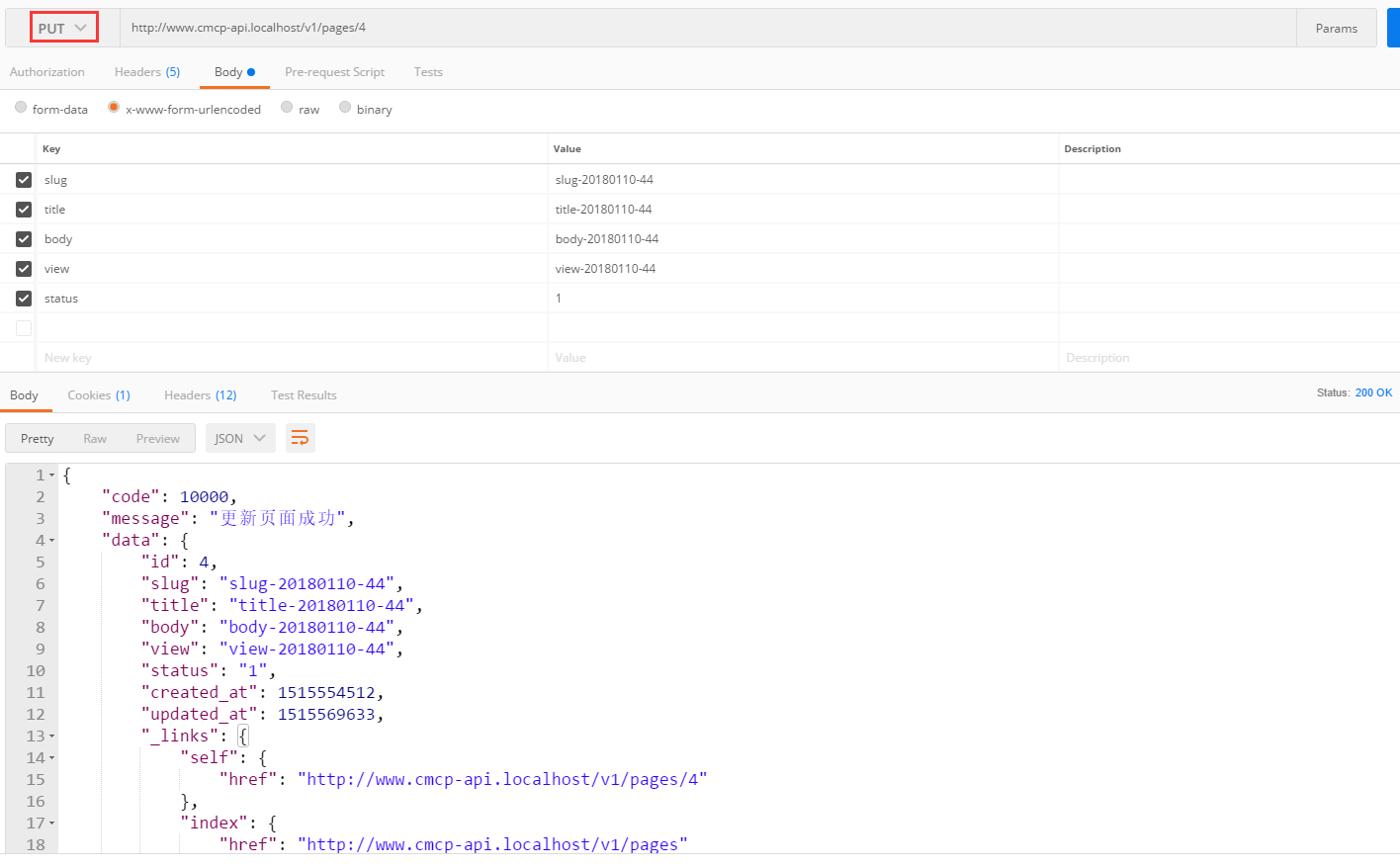
Figure 90
91. In Postman, PUThttp://www.cmcp-api.localhost/v1/pages/4, 422 responses, as shown in Figure 91
Note:
accept application/json; version=0.0
accept-language en-us
Accept-encoding gzip, deflate, br
content-type application/x-www-form-urlencoded
Body
The value of slug has been occupied by another page
{
    "code": 20004,
    "message": "Data validation failed: Slug \"slug-20180110-5\" has already been taken."
}

Figure 91
92, delete /pages/4: delete page 4, edit \api\rests\page\deleteAction.php, as shown in Figure 92
 * @since 1.0
 */
class DeleteAction extends Action
{
    /**
     * Deletes a model.
     * @param mixed $id id of the model to be deleted.
     * @throws ServerErrorHttpException on failure.
     */
    public function run($id)
    {
        $model = $this->findModel($id);

        if ($this->checkAccess) {
            call_user_func($this->checkAccess, $this->id, $model);
        }

        if ($model->delete() === false) {
            throw new ServerErrorHttpException('Failed to delete the object for unknown reason.');
        }

        return ['code' => 10000, 'message' => Yii::t('app', '10005')];
    }
}

Figure 92
93. In Postman, deletehttp://www.cmcp-api.localhost/v1/pages/7, 200 responses, as shown in Figure 93
Note:
accept application/json; version=0.0
accept-language en
Accept-encoding gzip, deflate, br
{
    "code": 10000,
    "message": "删除页面成功"
}

Figure 93
94. Show the last content of the language pack file, as shown in Figure 94
\API\Messages\zh\app.php
return [
    10000 => 'success',
    10001 => '获取页面列表成功',
    10002 => '获取页面详情成功',
    10003 => '创建页面成功',
    10004 => '更新页面成功',
    10005 => '删除页面成功',
];
\API\Messages\zh\Error.php
return [
    20000 => 'error',
    20001 => '页面列表为空',
    20002 => '页面ID:{id},不存在',
    20003 => '页面ID:{id},的状态不活跃',
    20004 => '数据验证失败:{firstErrors}',
];
\API\Messages\en\app.php
return [
    10000 => 'success',
    10001 => 'Get page list is successful',
    10002 => 'Get page details succeeded',
    10003 => 'Create a page success',
    10004 => 'Update page success',
    10005 => 'Delete page success',
];
\API\Messages\en\Error.php
return [
    20000 => 'error',
    20001 => 'Page list is empty',
    20002 => 'Page ID: {id}, does not exist',
    20003 => 'Page ID: {id}, the status is not active',
    20004 => 'Data validation failed: {firstErrors}',
];

Figure 94
95. Options /Pages: Display verbs about the end /pages support, in Postman, optionshttp://www.cmcp-api.localhost/v1/pages, 200 responses, as shown in Figure 95

Figure 95
96. Options /Pages/1: Display verbs about end /pages/1 support, in Postman, optionshttp://www.cmcp-api.localhost/v1/pages/1, 200 responses, as shown in Figure 96

Figure 96
97. Summary: The current supported behaviors: index, view, create, update, delete, options, in addition to options, basically after inheriting, the specific requirements are overwritten to achieve specific needs.
![nginx: [emerg] unknown directive "ssl" in C:\nginx-1.26.3/conf/nginx.conf:44](https://www.shuijingwanwq.com/wp-content/uploads/2025/03/1-520x73.jpg)