In Windows 10, right-click on the system -> New -> No new text document

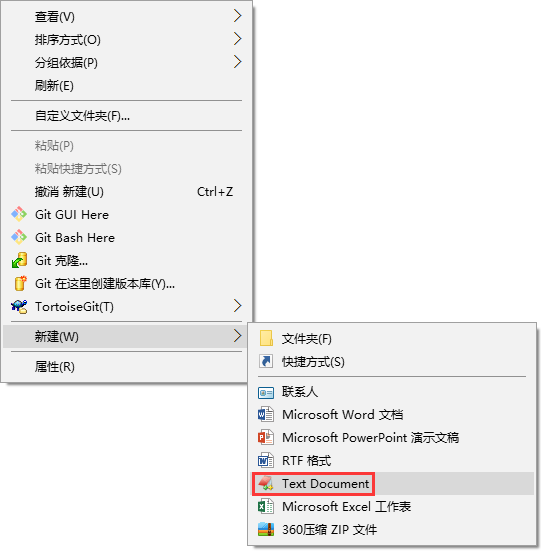
菜单中已经有新建文本文档(Text Document)了
1. In Windows 10, right-click the system -> New -> There is no new text document, and it was used by the family for a while, and it was lost, as shown in Figure 1
在 Windows 10 中,系统右键 -> 新建 -> 没有新建文本文档
Figure 1
2. Reference website: https://answers.microsoft.com/zh-hans/windows/forum/windows_7-desktop/%e 7%B3%BB%E7%BB%9F%E5%8F%B3%E9%94%AE%E6%96 %B0/8BA81D6B-24BF-4655-AFC1-3D0651013087 3. Click Start, enter notepad in “Start Search”, and open notepad2, as shown in Figure 2
点击开始,在“开始搜索”中输入 notepad,打开 Notepad2
Figure 2
4. Copy and paste the following content into the opened notepad file, and save this file as a file in REG format, as shown in Figure 3
将以下内容复制粘贴到打开的记事本文件中,将此文件另存为reg格式的文件
Figure 3


Windows Registry Editor Version 5.00


[HKEY_CLASSES_ROOT\.txt]

@="txtfile"

"Content Type"="text/plain"


[HKEY_CLASSES_ROOT\.txt\ShellNew]

"NullFile"=""


[HKEY_CLASSES_ROOT\txtfile]

@="Text Document"


[HKEY_CLASSES_ROOT\txtfile\shell]


[HKEY_CLASSES_ROOT\txtfile\shell\open]


[HKEY_CLASSES_ROOT\txtfile\shell\open\command]

@=hex(2):25,00,53,00,79,00,73,00,74,00,65,00,6d,00,52,00,6f,00,6f,00,74,00,25,\

 00,5c,00,73,00,79,00,73,00,74,00,65,00,6d,00,33,00,32,00,5c,00,4e,00,4f,00,\

 54,00,45,00,50,00,41,00,44,00,2e,00,45,00,58,00,45,00,20,00,25,00,31,00,00,\

 00


5. Double-click this file to prompt whether to import the registry information, please click “Yes”, as shown in Figure 4
双击此文件,提示是否导入注册表信息时,请点击“是”
Figure 4
6. The registry editor prompts that the prompt is successful, as shown in Figure 5
注册表编辑器提示成功
Figure 5
7. There is already a new text document in the menu, as shown in Figure 6
菜单中已经有新建文本文档(Text Document)了
Figure 6

Comments

Leave a Reply

Your email address will not be published. Required fields are marked *

This site uses Akismet to reduce spam. Learn how your comment data is processed.