The solution to the html escape character in SyntaxHighlighter 3.x of WordPress 4.9.8 is rooted in the Gutenberg editor
1. HTML escape characters appear in SyntaxHighlighter 3.x of WordPress 4.9.8, and newline tags are automatically added, etc., as shown in Figure 1

Figure 1
2. The expected format should not appear HTML escape characters, as shown in Figure 2

Figure 2
3. For a long time, there were no HTML escape characters. I am not sure whether it was caused by the upgrade or what. The HTML escaped characters also appeared in the previous articles, as shown in Figure 3
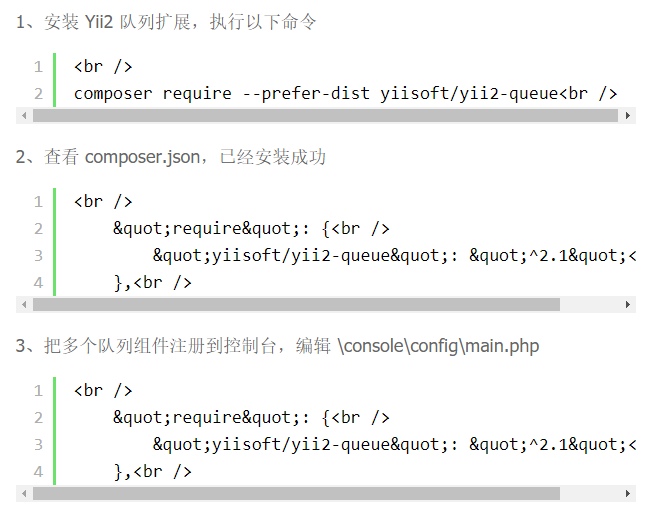
Figure 3
4. Check the data stored in the mysql database in the article in Figure 1, and find that there is no HTML escape character, as shown in Figure 4

Figure 4
5. Check the data stored in the MySQL database in the article in Figure 2 and find that there are HTML escape characters, as shown in Figure 5

Figure 5
6. The article in Figure 2 was published based on the Gutenberg editor. It is seriously suspected that it was caused by the problem of installing the Gutenberg editor, and decided to disable the Gutenberg editor, as shown in Figure 6

Figure 6
7. After disabling the Gutenberg editor, the articles in Figure 1, Figure 2, and Figure 3 have all been displayed normally, and there are no HTML escape characters. Analyze the reasons: use Gutenberg The article published by the editor, the content was esized in HTML before storing to the database, and then reversed when the content was displayed, but it did not take into account the compatibility of the articles published by the classic editor, where the article in Figure 2 is displayed normally, even if it was based on The Gutenberg editor was released, as shown in Figure 7

Figure 7